
DOOGEE Blade GT Pro
Uživatelská příručka k odolnému smartphonu DOOGEE Blade GT Pro 5G
Model: Blade GT Pro
1. Úvod
Welcome to the user manual for your DOOGEE Blade GT Pro 5G Rugged Smartphone. This guide provides essential information to help you set up, operate, maintain, and troubleshoot your device. Please read this manual thoroughly to ensure optimal performance and longevity of your smartphone.

Obrázek 1.1: Přední a zadní strana view of the DOOGEE Blade GT Pro 5G Rugged Smartphone.
2. Obsah balení
Ověřte, zda jsou v balení produktu přítomny všechny položky:
- 1 x DOOGEE Blade GT Pro Rugged Smartphone
- 1 x USB kabel typu C
- 1 x 18W nabíječka
- 1 x ochranná fólie s potiskem (předem nanesená)
- 1 x Protiexplozivní fólie
- 1 x telefonní pouzdro
- 1 x Balící krabice
- 1 x Uživatelská příručka a záruční list

Image 2.1: Illustration of the DOOGEE Blade GT Pro package contents.
3. Zařízení skončiloview
Familiarize yourself with the physical components and features of your DOOGEE Blade GT Pro smartphone.
3.1 Physical Dimensions and Durability
The Blade GT Pro features a slim 10.5 mm body and weighs approximately 260 grams, designed for a comfortable grip. It is built with aerospace-grade metal for enhanced durability.

Image 3.1: Device thickness and weight for ergonomic handling.
3.2 LED Light Effect
The device includes a customizable LED light bar on the back that provides visual alerts for calls, messages, and music synchronization. It supports various effects triggered by scenarios such as charging, gaming mode, or party mode. Brightness and lighting styles (constant-on, strobe) are adjustable.

Image 3.2: Customizable RGB lighting effects.
4. Nastavení
4.1 Instalace SIM karty a karty MicroSD
- Vyhledejte držák SIM karty na boku zařízení.
- Vložte nástroj pro vysunutí SIM karty do malého otvoru vedle zásobníku a pevně zatlačte, dokud zásobník nevyskočí.
- Vložte kartu (karty) Nano-SIM a/nebo kartu MicroSD do určených slotů v držáku. Ujistěte se, že zlaté kontakty směřují dolů.
- Opatrně vložte zásobník zpět do telefonu, dokud nebude v jedné rovině s tělem zařízení.

Image 4.1: Dual-card slot for SIM and MicroSD.
4.2 Počáteční zapnutí
- Press and hold the Power button (located on the side of the device) until the DOOGEE logo appears on the screen.
- Postupujte podle pokynů na obrazovce a dokončete počáteční nastavení, včetně výběru jazyka, připojení k Wi-Fi a nastavení účtu Google.
5. Návod k obsluze
5.1 Zobrazení a navigace
The Blade GT Pro features a 6.72-inch FHD+ IPS display with a 120Hz refresh rate for smooth visuals. Navigation is primarily via touchscreen gestures and on-screen buttons.

Image 5.1: High refresh rate display for smooth visuals.
5.2 Použití kamery
The device is equipped with a 108MP main camera, an 8MP wide-angle lens, a 2MP macro camera, and a 32MP selfie camera. Various modes are available for different photographic needs.
- Hlavní fotoaparát: Pro fotografie ve vysokém rozlišení.
- Širokoúhlý objektiv: Capture broader scenes.
- Makro kamera: Pro detailní záběry zblízka.
- Selfie kamera: Pro autoportréty a videohovory.
- Speciální režimy: HDR, Night Mode, 360° Panorama, and Underwater Mode.

Image 5.2: Camera features and example výstřely.
5.3 Bezpečnostní funkce
The Blade GT Pro offers multiple security options:
- Odemknutí otiskem prstu z boku: Zaregistrujte si otisk prstu pro rychlý a bezpečný přístup.
- ID obličeje: Použijte rozpoznávání obličeje k odemknutí zařízení.
- PIN/Vzor/Heslo: Standardní možnosti zabezpečení systému Android.
5.4 Funkce NFC
NFC (Near Field Communication) allows for contactless transactions and quick pairing with compatible devices. Enable NFC in your phone's settings to use features like Google Pay.
6. Údržba
6.1 Čištění vašeho zařízení
K čištění smartphonu používejte měkký hadřík, který nepouští vlákna. Vyhněte se abrazivním materiálům nebo agresivním chemikáliím, které by mohly poškodit displej nebo...asing. For stubborn dirt, slightly dampa hadřík s vodou.
6.2 Odolnost proti vodě, prachu a pádu
The DOOGEE Blade GT Pro is certified with IP68/IP69K and MIL-STD-810H standards, indicating strong resistance to water, dust, and drops. While designed for rugged use, proper care is still recommended:
- Před vystavením zařízení vodě nebo prachu se ujistěte, že jsou všechny kryty portů bezpečně uzavřeny.
- Avoid intentional submersion in water beyond specified depths or durations.
- Rinse the phone with clean water if exposed to saltwater or other corrosive liquids, then dry thoroughly.
- I když je odolný proti pádu, extrémní nárazy mohou stále způsobit poškození.
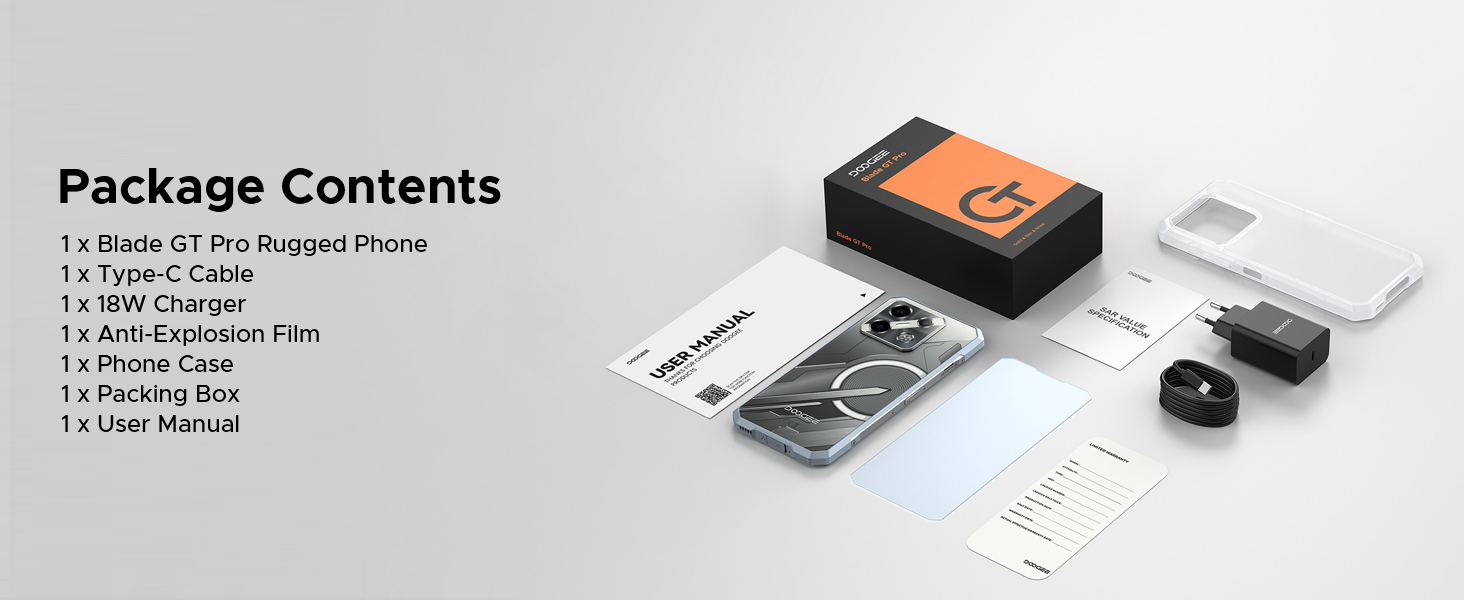
Image 6.1: Durability features for outdoor use.
6.3 Aktualizace softwaru
Regularly check for and install software updates to ensure your device has the latest features, security patches, and performance improvements. You can usually find this option in the 'Settings' menu under 'System' or 'About Phone'.
7. Řešení problémů
Tato část se zabývá běžnými problémy, se kterými se můžete setkat u svého DOOGEE Blade GT Pro.
| Problém | Možné řešení |
|---|---|
| Zařízení se nezapne | Ujistěte se, že je baterie nabitá. Připojte nabíječku a před opětovným zapnutím počkejte několik minut. Pokud zařízení nereaguje, proveďte vynucený restart podržením tlačítka napájení po dobu 10–15 sekund. |
| Špatné připojení k síti | Check if the SIM card is correctly inserted. Verify that you are within network coverage. Restart the device. Ensure your carrier supports the device's frequency bands (Note: Does not support Verizon and AT&T networks). |
| Baterie se rychle vybíjí | Reduce screen brightness. Close unused applications running in the background. Disable Wi-Fi, Bluetooth, or GPS when not in use. Check for power-intensive apps in battery settings. |
| Aplikace padá nebo zamrzávají | Clear the cache of the problematic app. Update the app to its latest version. If the issue persists, uninstall and reinstall the app. Ensure the phone's operating system is up to date. |
| Skener otisků prstů nefunguje | Ensure your finger is clean and dry. Re-register your fingerprint. Check for any physical obstruction or damage to the sensor. |
8. Specifikace
Key technical specifications for the DOOGEE Blade GT Pro 5G Rugged Smartphone:
| Funkce | Detail |
|---|---|
| Model | Blade GT Pro |
| Operační systém | Android 14 |
| Procesor | MediaTek Dimensity 7250, 6nm Octa-core |
| BERAN | 32GB (12GB physical + 20GB extended) LPDDR5 |
| Interní úložiště | 256 GB (rozšiřitelné až na 2 TB pomocí MicroSD karty) |
| Zobrazit | 6.72-inch FHD+ IPS, 1080x2408 resolution, 120Hz Refresh Rate, 380 nits brightness |
| Zadní kamera | 108MP Main, 8MP Wide-Angle, 2MP Macro |
| Přední kamera | 32 MP |
| Baterie | 5800mAh, 18W Fast Charging, OTG Support |
| Konektivita | 5G, Wi-Fi 6, Bluetooth, NFC, USB Type-C |
| Trvanlivost | IP68/IP69K, MIL-STD-810H (Waterproof, Dustproof, Drop-resistant) |
| Zabezpečení | Odemykání otiskem prstu z boku, Face ID |
| Rozměry | tloušťka 10.5 mm |
| Hmotnost | 260 gramů |
9. Záruka a podpora
9.1 Informace o záruce
Your DOOGEE Blade GT Pro smartphone comes with a limited manufacturer's warranty. Please refer to the 'User Manual and Warranty Card' included in your package for specific terms, conditions, and duration of the warranty. Keep your proof of purchase for warranty claims.
9.2 Zákaznická podpora
For further assistance, technical support, or service inquiries, please contact DOOGEE customer service through their official webwebu nebo kontaktních informací uvedených v záruční dokumentaci.
Ask a question about this manual
Ask about setup, troubleshooting, compatibility, parts, safety, or missing instructions. Manuals+ will review the question and use this page’s manual context to help answer it.