
Electronic Spices W88-B
Electroni Spices W88-B 20A Solar Charger Controller User Manual
Model: W88-B
1. Úvod
The Electronic Spices W88-B 20A Solar Charger Controller is designed to efficiently manage the charging and discharging of 12V/24V solar power systems. This controller optimizes battery performance and extends battery life by preventing overcharging, over-discharging, and short circuits. It features dual USB ports for charging mobile devices and other USB-powered gadgets directly from the solar system. Utilizing intelligent PWM charging technology, it enhances energy conversion efficiency, making it suitable for off-grid solar setups, RVs, boats, and small solar installations. The user-friendly LCD display provides real-time data for effective monitoring and management. Constructed with durable and heat-resistant materials, the W88-B controller offers reliable long-term performance in various environmental conditions.
2. Klíčové vlastnosti
- Model: W88-B
- Jmenovitý objemtage: 12V/24V automatic identification
- Jmenovitý proud: 20A
- Max. PV svtage: 50V
- Max. vstupní výkon FV panelů: 130W (for 12V system) / 260W (for 24V system)
- Typ displeje: LCD/LED display for real-time monitoring
- Technologie nabíjení: PWM battery charging
- USB porty: Dva USB porty pro nabíjení zařízení
- Ochranné vlastnosti: Overcharging, over-discharging, short circuit, over-current, over-voltage, overheating, and lightning protection.
- Kompatibilita baterie: Suitable for lead-acid battery, lithium iron battery, lithium battery.
- Materiál: Odolná konstrukce z plastu a kovu.
3. Konec produktuview a Rozměry
The W88-B solar charge controller features a compact design with clearly labeled terminals and an intuitive LCD display. Below are images illustrating the product's appearance and its key dimensions.

Obrázek 3.1: Přední strana view of the Electroni Spices W88-B Solar Charger Controller, showing the LCD display, control buttons, USB ports, and terminal connections.

Figure 3.2: Dimensions of the W88-B Solar Charger Controller, indicating a length of 131 mm and a width of 69 mm.
4. Bezpečnostní informace a ochranné prvky
Always observe safety precautions when working with electrical systems. Ensure all connections are secure and correct before applying power. The W88-B controller incorporates multiple protection features to ensure safe operation of your solar system:
- Nadproudová ochrana: Zabraňuje poškození způsobenému nadměrným průtokem proudu.
- Ochrana proti přebití: Stops charging when the battery is full to prevent overcharging.
- Ochrana proti zkratu: V případě zkratu se automaticky odpojí.
- Přes Voltage ochrana: Protects against damage from excessively high voltage.
- Ochrana proti přehřátí: Vypne se, pokud vnitřní teplota překročí bezpečné limity.
- Ochrana před bleskem: Nabízí ochranu před údery blesku.

Figure 4.1: Visual representation of the various protection features integrated into the W88-B Solar Charger Controller.
5. Nastavení a instalace
Proper installation is crucial for the optimal performance and longevity of your solar charge controller. Follow these steps carefully:
- Nejprve připojte baterii: Connect the battery to the charge controller. Ensure correct polarity (+ to + and - to -). The controller will detect the battery voltage (12 V nebo 24 V) automaticky.
- Připojení solárních panelů: Connect the solar panels to the charge controller. Again, observe correct polarity.
- Connect DC Load (Optional): Connect your DC load (e.g., DC lights) to the load terminals of the controller.
- Connect Inverter (Optional): If using an inverter for AC loads, connect it to the battery terminals (not directly to the controller's load terminals).
Důležité: Always connect the battery to the controller first, then the solar panels, and finally the load. Disconnect in the reverse order: load, then solar panels, then battery.
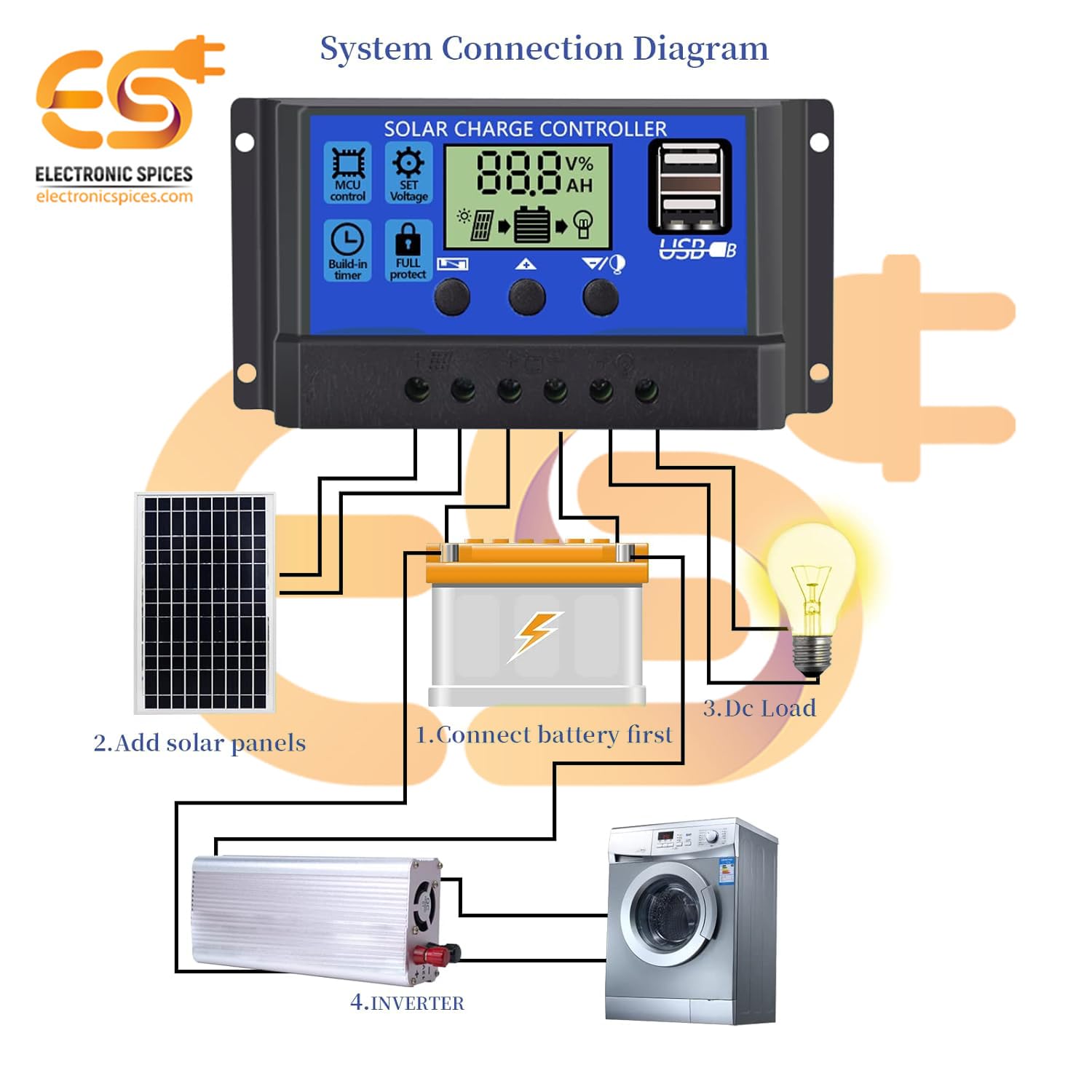
Figure 5.1: System connection diagram illustrating the proper sequence for connecting the battery, solar panels, DC load, and inverter to the solar charge controller.

Figure 5.2: A quick visual guide for connecting the solar panels, battery, and DC load to the W88-B controller.
6. Návod k obsluze
The W88-B controller features an LCD display that provides real-time information about your solar system's status.

Figure 6.1: Explanation of the digital display on the W88-B controller, showing indicators for solar panel charge, battery status, and load output.
6.1. Režimy zobrazení
The LCD cycles through various display modes automatically. You can also manually cycle through them using the control buttons. Common displays include:
- Baterie Voltage: Zobrazuje aktuální objemtage připojené baterie.
- Solar Panel Charge Status: Indicates if the solar panels are actively charging the battery.
- Load Output Status: Shows if the load output is active or inactive.
6.2. Ovládací tlačítka
The controller has three buttons for navigation and setting adjustments:
- Tlačítko nabídky: Používá se pro vstup a výstup z režimů nastavení.
- Tlačítko nahoru: Used to increase values or navigate upwards in menus.
- Tlačítko dolů: Used to decrease values or navigate downwards in menus.
Refer to the specific icons on the controller for functions like MCU control, set voltage, build-in timer, and full protect indicators.
7. Údržba
To ensure the long-term reliability and performance of your W88-B solar charge controller, follow these maintenance guidelines:
- Pravidelný úklid: Udržujte ovladač čistý a bez prachu a nečistot. K čištění používejte měkký, suchý hadřík.
- Zkontrolujte připojení: Pravidelně kontrolujte všechna zapojení, abyste se ujistili, že jsou pevná a bez koroze. Volná spojení mohou vést ke ztrátě napájení nebo přehřátí.
- Větrání: Ensure the controller is installed in a well-ventilated area to prevent overheating. Do not block the ventilation holes.
- Podmínky prostředí: While designed for durability, avoid exposing the controller to extreme moisture or direct sunlight for prolonged periods if not rated for such exposure.
- Stav baterie: Monitor your battery's health regularly. A failing battery can impact the controller's performance.
8. Řešení problémů
If you encounter issues with your W88-B solar charge controller, refer to the following common problems and their solutions:
| Problém | Možná příčina | Řešení |
|---|---|---|
| Žádný displej ani napájení | Baterie není připojena nebo je nízkátage; reversed polarity; loose connection. | Zkontrolujte připojení baterie a objtage. Zajistěte správnou polaritu. Utáhněte všechny svorky. |
| Baterie se nenabíjí | Solar panels not connected; insufficient sunlight; faulty solar panel; controller fault. | Check solar panel connections. Ensure panels are receiving adequate sunlight. Test solar panel output. |
| Zatížení nefunguje | Load disconnected; battery voltage too low (low voltage disconnect); overload protection activated. | Check load connections. Charge battery. Reduce load or check for short circuit in load. |
| Přehřátí ovladače | Poor ventilation; excessive load; short circuit. | Ensure adequate airflow around the controller. Reduce load. Check for short circuits in the system. |
Pokud problém přetrvává i po vyzkoušení těchto řešení, kontaktujte zákaznickou podporu.
9. Specifikace
| Parametr | Hodnota |
|---|---|
| Model | W88-B |
| Jmenovitý objemtage | 12V/24V (automatické) |
| Jmenovitý proud | 20A |
| Max. PV svtage | 50V |
| Max. vstupní výkon FV systému (12 V) | 130W |
| Max. vstupní výkon FV systému (24 V) | 260W |
| Typ zobrazení | LCD/LED |
| Typ nabíjecího portu | USB (Dual) |
| Hmotnost položky | 150 gramů |
| Rozměry (DxŠ) | Rozměr 13.1 cm x 6.9 cm |
| Materiál | Plast, kov |
| Barva | Modrý |
| Země původu | Indie |
10. Záruka a podpora
This product is manufactured by Electronic Spices. For any technical assistance, troubleshooting beyond this manual, or warranty inquiries, please contact Electronic Spices customer support. Please have your product model number (W88-B) and purchase details ready when contacting support.
Výrobce: Elektronické koření
Kontaktní údaje: Refer to the contact details provided with your purchase or visit the official Electronic Spices webweb s nejaktuálnějšími informacemi o podpoře.
Ask a question about this manual
Ask about setup, troubleshooting, compatibility, parts, safety, or missing instructions. Manuals+ will review the question and use this page’s manual context to help answer it.