
1. Úvod
Thank you for choosing the SANNCE 16-Channel 8MP NVR Wireless Security Camera System. This system is designed to provide comprehensive surveillance for your home, office, or supermarket, offering high-resolution video, advanced detection capabilities, and convenient remote access. This manual provides essential information for the proper installation, operation, and maintenance of your security system.
2. Bezpečnostní informace
- Ujistěte se, že všechna napájecí připojení jsou bezpečná a správně dimenzovaná pro dané zařízení.
- Do not expose the NVR or cameras to extreme temperatures, humidity, or corrosive environments beyond their specified operating conditions.
- Neumisťujte NVR na přímé sluneční světlo nebo do blízkosti zdrojů tepla.
- Keep the system away from water and other liquids.
- Only use the power adapters provided with the system.
- Do not attempt to disassemble or modify the devices. Refer all servicing to qualified personnel.
- Install cameras in locations where they are protected from physical damage.
3. Obsah balení
Ověřte, zda jsou v balení obsaženy všechny níže uvedené položky:
- 1 x NVR (Network Video Recorder)
- 4 x Wireless IP Cameras
- 1 x myš USB
- 5 x Power Adapters (1 for NVR, 4 for Cameras)
- 4 x Antennas (for cameras)
- 1 x Cat5e Ethernet Cable (3.3ft/1m)
- 4 x Surveillance Signs
- 1 x Průvodce rychlým startem
- 5 x Mounting Screws Bags

Image: All components included in the SANNCE NVR security camera system package, including the NVR, four cameras, power adapters, mouse, cables, and mounting hardware.
4. Konec systémuview
4.1 Funkce síťového videorekordéru
- 16-Channel support for multiple cameras.
- Supports up to 8MP resolution for recording and playback.
- Advanced H.264+ video encoding for efficient storage.
- Dual-band WiFi (2.4/5.8 GHz) for stable wireless connection.
- Local storage via HDD (up to 8TB, not included) and optional cloud storage.
- Compatible with Alexa for smart voice control.
4.2 Funkce fotoaparátu
- 8MP high-definition video capture.
- IP66 weatherproof rating for outdoor use (-20℃ to 60℃ operating temperature).
- Infrared (IR) night vision up to 95 feet and full-color night vision up to 33 feet.
- Intelligent human motion detection.
- Obousměrná audio komunikace.

Image: An 8MP SANNCE security camera system providing surveillance for a house, highlighting 10 meters of full-color night vision capability.

Image: A SANNCE camera with IP66 weatherproofing, shown operating effectively in rainy conditions and capable of withstanding temperatures from -20°C to 60°C.
5. Průvodce nastavením
5.1 Fyzická instalace
- Umístění NVR: Place the NVR in a central location, ideally near your internet router, to ensure optimal wireless signal strength for all cameras. Ensure adequate ventilation.
- Umístění kamery: Mount cameras in desired surveillance areas. Consider the wireless range (up to 1000 feet in open environments) and potential obstructions. Ensure cameras have a clear line of sight to the NVR for best performance. Use the provided mounting screws.
- Instalace antény: Screw the antennas onto the designated ports on each camera.
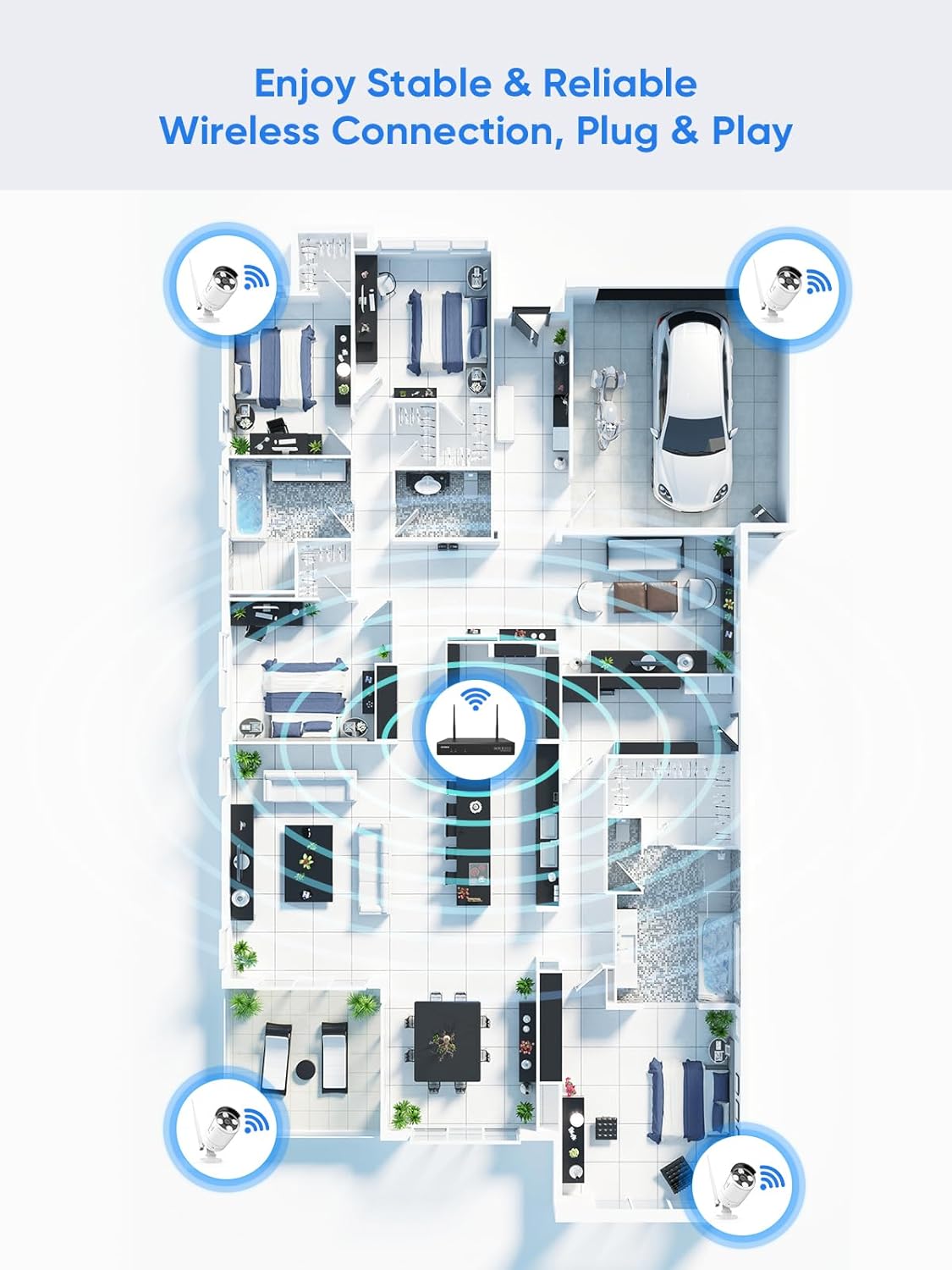
Image: A floor plan illustrating the recommended placement of wireless cameras and the NVR to achieve stable and reliable wireless connectivity throughout a property.
5.2 Zapnutí
- Connect the NVR to a power outlet using its dedicated power adapter.
- Connect each camera to a power outlet using its dedicated power adapter.
- Connect the NVR to a monitor via HDMI or VGA cable (not included) and connect the USB mouse to the NVR.
5.3 Počáteční konfigurace
- Follow the on-screen prompts to complete the initial setup wizard, including language selection, time zone, and password creation.
- The cameras should automatically pair with the NVR. If not, refer to the Quick Start Guide for manual pairing instructions.
- Connect the NVR to your router using the provided Ethernet cable for internet access, enabling remote viewa oznámení.
6. Návod k obsluze
6.1 Přístup do systému
- Místní přístup: Use the connected monitor and USB mouse to navigate the NVR interface directly.
- Remote Access (App): Download the SANNCE mobile application from your device's app store. Register an account and add your NVR by scanning the QR code or entering the device ID.
- Remote Access (PC/Web): Install the SANNCE client software on your computer or access the NVR via a web prohlížeč pomocí jeho IP adresy.

Image: The SANNCE security system interface displayed on a smartphone, tablet, laptop, and desktop monitor, demonstrating remote viewing capabilities and integration with Alexa.
6.2 Živě View a Nahrávání
From the NVR interface or mobile app, you can view live feeds from all connected cameras. The system supports various recording modes:
- Nepřetržité nahrávání: Záznamy 24/7.
- Záznam detekce pohybu: Nahrává pouze při detekci pohybu.
- Human Detection Recording: Records specifically when human shapes are detected, reducing false alarms.
- Plánované nahrávání: Records during specified time intervals.
- Alarm Activated Recording: Zaznamenává, kdy je spuštěna alarmová událost.

Image: An illustration of SANNCE's intelligent human detection feature, showing how it customizes video recording and enables 24/7 monitoring based on human presence, alongside icons for continuous, human, motion, and timer video recording.
6.3 Playback and Notifications
- Přehrávání: Přístup zaznamenán footage through the NVR or app. Use the timeline to select specific dates and times for review.
- Obousměrný rozhovor: Utilize the camera's built-in microphone and speaker to communicate with individuals near the camera via the mobile app.
- Oznámení: Enable app notifications and email alerts to receive instant warnings when motion or human detection events occur.

Image: A delivery person at a door, with a smartphone displaying a SANNCE app notification for human shape detection, indicating a parcel delivery.
7. Údržba
- Čištění: Pravidelně čistěte objektivy fotoaparátu měkkým hadříkemamp hadříkem, abyste zajistili ostrý a kvalitní obraz. Nepoužívejte agresivní chemikálie.
- Aktualizace firmwaru: Check the SANNCE official website or app periodically for firmware updates to ensure optimal performance and security. Follow the provided instructions carefully for updates.
- Správa úložiště: Monitor the NVR's hard drive status. The system typically overwrites the oldest footage when the drive is full. Consider backing up important recordings regularly.
8. Řešení problémů
- Žádný video výstup: Check NVR power, monitor connection, and input source. Ensure cameras are powered on and paired.
- Slabý bezdrátový signál: Relocate NVR or cameras to reduce obstructions. Ensure antennas are securely attached. Consider using a WiFi extender if necessary.
- Nelze přistupovat vzdáleně: Verify NVR is connected to the internet. Check app settings and ensure port forwarding (if required by your network setup) is correctly configured on your router.
- Upozornění na falešný pohyb: Adjust motion detection sensitivity and detection zones in the NVR settings to minimize unwanted triggers from trees, shadows, or small animals.
- Problémy s nočním viděním: Ensure the camera lens is clean. Check for obstructions blocking the IR illuminators.
9. Specifikace
| Funkce | Specifikace |
|---|---|
| Číslo modelu | N98WHG0-94FC |
| Značka | SANNCE |
| Kanály NVR | 16 kanály |
| Rozlišení videa | Až 8MP (4K) |
| Kódování videa | H.264 + |
| Konektivita | Wireless (Dual-band 2.4/5.8 GHz WiFi) |
| Bezdrátové Dosah | Až 1000 stop (otevřené prostředí) |
| Hodnocení odolnosti kamery proti povětrnostním vlivům | IP66 |
| Provozní teplota fotoaparátu | -20 ℃ až 60 ℃ |
| Noční vidění | IR up to 95 ft, Full-color up to 33 ft |
| Podpora úložiště | Up to 8TB HDD (not included), Cloud Storage |
| Zdroj napájení | Electric Cable (via included adapters) |
| Rozměry NVR | 30.48 x 30.48 x 20.32 cm |
| NVR Weight | 3.22 kg |
10. Záruka a podpora
For warranty information, technical support, or service inquiries, please refer to the warranty card included in your product packaging or visit the official SANNCE website. You may also find additional resources, FAQs, and contact information on their support pages.