
1. Úvod
This manual provides essential information for setting up, operating, maintaining, and troubleshooting your CyberpowerPC Gamer Supreme Gaming PC, model SLCAI15000A2. Please read this manual thoroughly before using your new computer to ensure proper functionality and longevity.
2. Bezpečnostní informace
Observe the following safety guidelines to prevent damage to your system and ensure personal safety:
- Napájení: Use only the power cord provided with your system. Ensure the power outlet is properly grounded.
- Větrání: Do not block ventilation openings. Ensure adequate airflow around the computer to prevent overheating.
- Tekutina a vlhkost: Keep the computer away from liquids and excessive moisture. Do not operate the computer with wet hands.
- Umístění: Place the computer on a stable, flat surface. Avoid placing it near heat sources or in direct sunlight.
- Servis: Do not attempt to service the computer yourself. Refer all servicing to qualified service personnel.
3. Obsah balení
Ověřte, zda jsou v balení přítomny všechny položky:
- CyberpowerPC Gamer Supreme Gaming PC (SLCAI15000A2)
- Napájecí kabel
- Herní klávesnice
- Herní myš
- Documentation (Quick Start Guide, Driver Discs if applicable)
4. Nastavení
4.1. Fyzické nastavení
- Rozbalte počítač: Opatrně vyjměte počítač a veškeré příslušenství z obalu.
- Připojení periferií:
- Připojte monitor(y) k portům grafické karty (HDMI nebo DisplayPort) umístěným na zadní straně počítače.
- Připojte klávesnici a myš k libovolným dostupným portům USB.
- Connect speakers or headphones to the audio jacks if desired.
- For wired internet, connect an Ethernet cable to the LAN port. For wireless, ensure antennas are attached if provided.
- Připojte napájení: Plug the power cord into the power supply unit (PSU) at the rear of the PC, then plug the other end into a grounded electrical outlet.
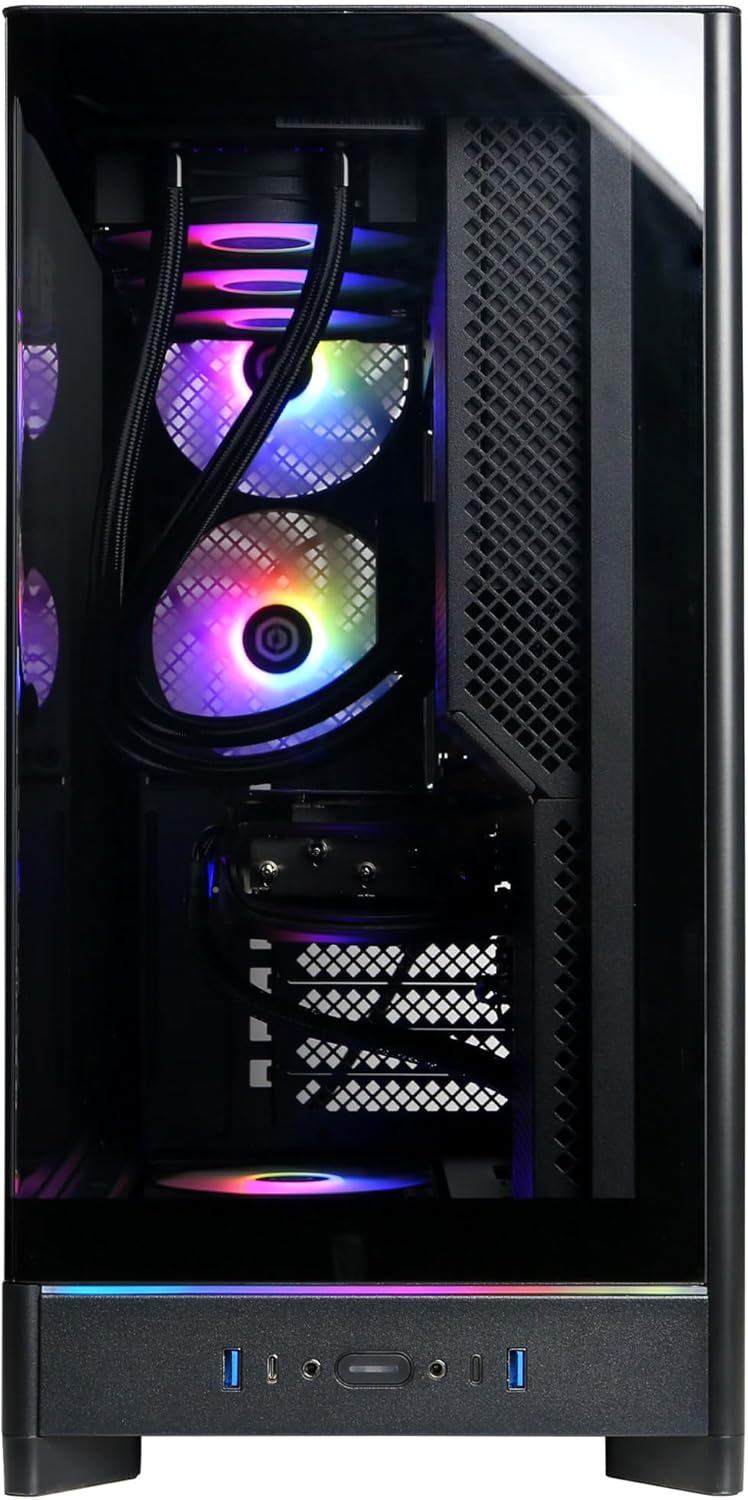
Image: Front panel connections including USB ports and power button.

Obrázek: Podrobný view of the front input/output ports for easy access.
4.2. Počáteční zapnutí
- Stiskněte tlačítko napájení, které se nachází na přední straně počítače.
- The system will boot up, and you should see the operating system loading on your monitor.
4.3. Nastavení operačního systému
Your CyberpowerPC comes with Windows 11 Home pre-installed. Follow the on-screen instructions to complete the initial setup, which includes:
- Výběr regionu a rozložení klávesnice.
- Připojení k síti (kabelové nebo bezdrátové).
- Přihlášení pomocí účtu Microsoft nebo vytvoření místního účtu.
- Nastavení soukromí.
5. Ovládání počítače
5.1. Obecné použití
Once the operating system setup is complete, your PC is ready for use. You can install applications, browse the internet, and engage in gaming. Familiarize yourself with the Windows 11 interface for optimal experience.

Image: Internal components of the PC, showcasing the liquid cooling and RGB lighting.

Image: A different angle of the PC's interior, showing the high-performance graphics card and memory.
5.2. Konektivita
Your PC offers a variety of connectivity options:
- USB porty: Includes 2 x USB-C 3.1, 4 x USB-A 3.1, and 2 x USB-A 2.0 for connecting various devices.
- Video výstupy: 1 x HDMI and 3 x DisplayPort for multiple monitor setups.
- Síť: 1 x LAN port for wired internet and WiFi 6 for high-speed wireless connectivity.
- Bluetooth: Bluetooth 5.3 pro připojení bezdrátových periferií.
- Zvuk: 7.1 Channel Audio for immersive sound experiences.
6. Údržba
Regular maintenance helps ensure the longevity and performance of your PC:
- Čištění: Periodically clean the exterior of the case with a soft, dry cloth. Use compressed air to clear dust from ventilation grilles and internal components (ensure the PC is powered off and unplugged).
- Aktualizace softwaru: Keep your operating system, drivers (especially graphics drivers), and applications updated to the latest versions for security and performance improvements.
- Záloha dat: Pravidelně zálohujte důležitá data na externí disk nebo cloudové úložiště.

Obrázek: Nahoře view of the PC chassis, illustrating the ventilation design.

Obrázek: Boční view of the PC, showing the solid panel and potential rear airflow.
7. Řešení problémů
Pokud narazíte na problémy s počítačem, zvažte následující základní kroky pro řešení problémů:
- Bez napájení: Ensure the power cord is securely connected to both the PC and the wall outlet. Check if the power supply switch at the back of the PC is in the 'ON' position.
- Bez displeje: Verify that your monitor is powered on and correctly connected to the graphics card ports (not the motherboard video outputs). Try a different video cable or monitor if available.
- Zamrznutí/pády systému: Restart the PC. Ensure all drivers are updated. Check for overheating by monitoring temperatures with software.
- Periferie nefunguje: Zkuste připojit periferní zařízení k jinému portu USB. Ujistěte se, že jsou nainstalovány ovladače pro periferní zařízení.
- Pomalý výkon: Close unnecessary applications. Check for malware or viruses. Ensure sufficient free space on your primary drive.
For more complex issues, refer to the CyberpowerPC support webwebu nebo kontaktujte technickou podporu.
8. Specifikace
| Komponent | Specifikace |
|---|---|
| Číslo modelu | SLCAI15000A2 |
| Operační systém | Windows 11 Home |
| CPU | AMD Ryzen 9 9950X 4.3GHz (16 Cores) |
| Čipová sada | AMD B850 |
| Grafická karta | NVIDIA GeForce RTX 5090 32GB |
| BERAN | 64 GB DDR5 |
| Skladování | 4TB PCIe 4.0 NVMe SSD |
| Konektivita | WiFi 6, Bluetooth 5.3, 1x LAN |
| USB porty | 2x USB-C 3.1, 4x USB-A 3.1, 2x USB-A 2.0 |
| Video výstup | 1x HDMI, 3x DisplayPort |
| Zvuk | 7.1kanálový zvuk |
| Chlazení | Liquid Cool CPU |
| Rozměry | 17.6 x 9.2 x 20 palce |
9. Záruka a podpora
Your CyberpowerPC Gamer Supreme Gaming PC is covered by a 1 rok záruka na díly a práciNavíc obdržíte Free Lifetime Technical Support.
For warranty claims, technical assistance, or further inquiries, please visit the official CyberpowerPC support webnebo se obraťte na jejich oddělení zákaznických služeb. Při hledání podpory mějte po ruce doklad o koupi a sériové číslo produktu.
Online podpora: www.cyberpowerpc.com/support