
boAt Aavante Bar Quake
boAt Aavante Bar Quake 2.1 Channel Soundbar User Manual
1. Úvod
This manual provides essential information for the safe and effective use of your boAt Aavante Bar Quake 2.1 Channel Soundbar with Wired Subwoofer. Please read this manual thoroughly before operating the device and retain it for future reference. The boAt Aavante Bar Quake is designed to enhance your audio experience with its 200W RMS output and versatile connectivity options.
Mezi klíčové vlastnosti patří:
- 200W RMS boAt Signature Sound: Poskytuje silný a čistý zvuk.
- 2.1 Channel Soundbar with Wired Subwoofer: Provides immersive sound with enhanced bass.
- Multichannel Connectivity: Supports Bluetooth v5.3, AUX, USB, Optical, and HDMI-ARC.
- Režimy EQ: Offers tailored audio profiles for Movies, Music, News, and 3D content.
- Bass & Treble Controls: Umožňuje individuální úpravy zvuku.
2. Důležité bezpečnostní informace
Pro zajištění bezpečného provozu a prevenci poškození dodržujte prosím následující bezpečnostní opatření:
- Nevystavujte zařízení dešti, vlhkosti ani extrémním teplotám.
- Neotevírejte casing. Veškerý servis svěřte kvalifikovanému personálu.
- Zajistěte dostatečné větrání kolem soundbaru a subwooferu.
- Používejte pouze napájecí adaptér dodaný s jednotkou.
- Udržujte zařízení mimo dosah zdrojů tepla a přímého slunečního záření.
- Nepokládejte na soundbar ani subwoofer těžké předměty.
- Odpojte zástrčku ze zásuvky během bouřek nebo pokud jej delší dobu nepoužíváte.
3. Obsah balení
Ověřte, zda jsou v balení přítomny všechny položky:
- boAt Aavante Bar Quake Soundbar
- Kabelový subwoofer
- Remote Control (with 2 x 12V Alkaline batteries included)
- Uživatelská příručka (tento dokument)
- Záruční list
- Napájecí adaptér
4. Konec produktuview
Familiarize yourself with the components of your boAt Aavante Bar Quake sound system.
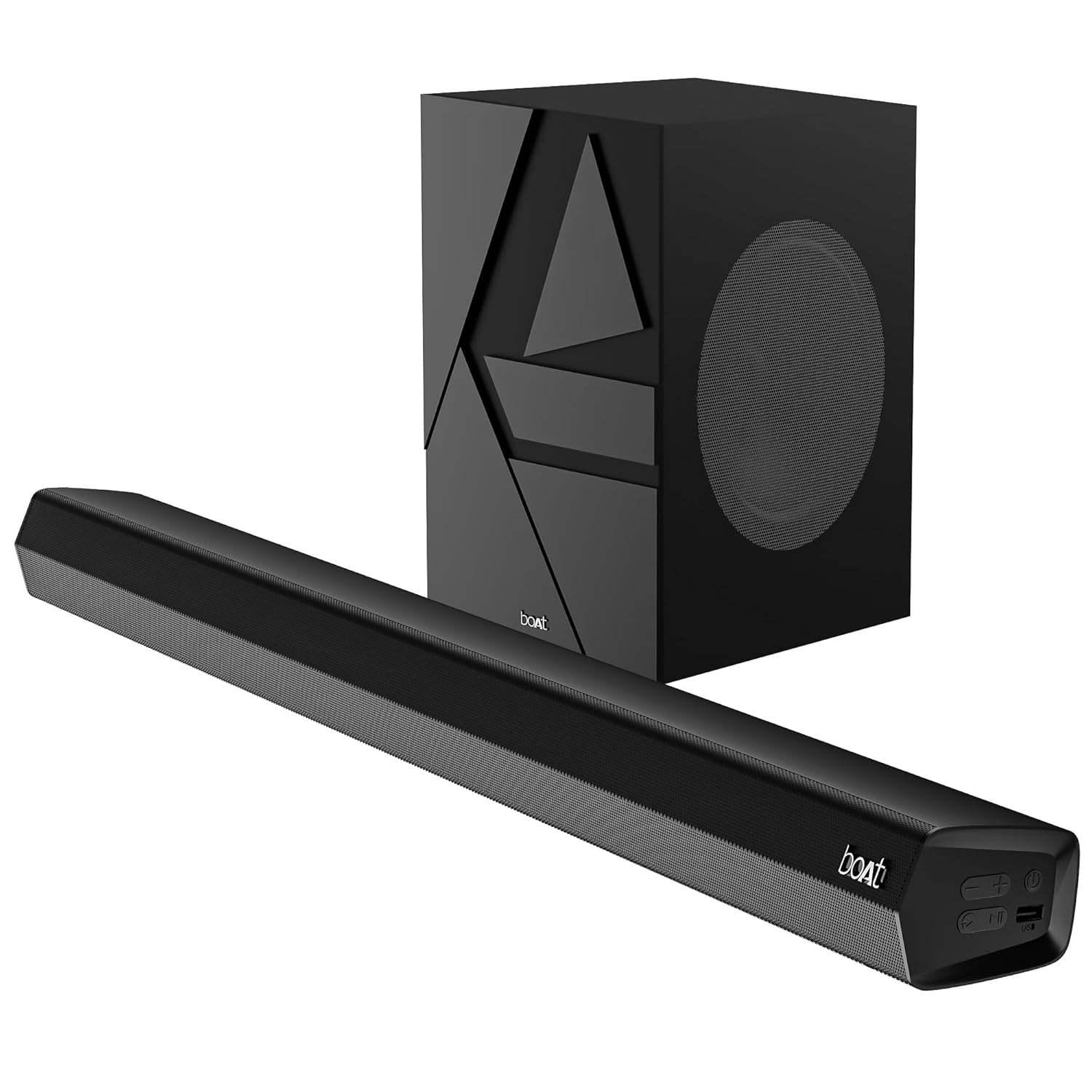
Image 1: The boAt Aavante Bar Quake soundbar and its accompanying wired subwoofer, showcasinjejich design a relativní velikosti.
Funkce soundbaru 4.1

Obrázek 2: Detailní záběr view of the boAt Aavante Bar Quake soundbar, highlighting its sleek design and the '200W RMS boAt Signature Sound' feature.
The soundbar houses the main speakers and control interface. It delivers 200W RMS boAt Signature Sound for a powerful audio experience.
4.2 kabelový subwoofer

Image 3: An illustration showing the boAt Aavante Bar Quake soundbar and its wired subwoofer integrated into a home entertainment setup, emphasizing the 2.1 channel configuration.
The wired subwoofer provides deep, rich bass, complementing the soundbar for a full-range audio output.
4.3 Porty připojení

Obrázek 4: Podrobný view of the rear panel of the boAt Aavante Bar Quake soundbar, clearly showing the various input ports including USB, HDMI (ARC), AUX, and Optical, along with Bluetooth connectivity.
The soundbar features multiple input options for connecting various devices:
- USB port: Pro přehrávání zvuku z USB disků.
- HDMI (ARC) Port: For high-quality audio connection to compatible TVs.
- Bluetooth: Pro bezdrátové streamování zvuku z mobilních zařízení.
- Vstup AUX: Pro připojení zařízení pomocí 3.5mm audio kabelu.
- Optický vstup: For digital audio connection from TVs or other sources.
4.4 Dálkové ovládání

Image 5: The master remote control for the boAt Aavante Bar Quake, illustrating buttons for power, mute, input selection, volume, playback, EQ modes (Music, Movies, News, 3D), and dedicated bass and treble controls.
The included remote control allows full command over the soundbar's functions, including power, volume, input selection, EQ modes, and bass/treble adjustments.
5. Nastavení
5.1 Umístění
- Soundbar: Place the soundbar on a stable, flat surface directly in front of your television, or mount it on the wall below your TV. Ensure there are no obstructions in front of the soundbar.
- subwoofer: Position the subwoofer on the floor, preferably in a corner or near a wall, to enhance bass response. Ensure it is within reach of the soundbar for the wired connection.
5.2 Připojení subwooferu
Connect the wired subwoofer to the dedicated subwoofer output port on the soundbar using the integrated cable.
5.3 Připojení napájení
- Připojte napájecí adaptér k portu DC IN na soundbaru.
- Zapojte druhý konec napájecího adaptéru do elektrické zásuvky.
- Ensure the subwoofer is also connected to a power source if it has a separate power cable (for this model, it's wired to the soundbar).
5.4 Audio připojení
Pro připojení zdroje zvuku vyberte jednu z následujících metod:
- HDMI ARC (doporučeno): Connect an HDMI cable from the HDMI ARC port on your TV to the HDMI ARC port on the soundbar. This allows audio to be sent from the TV to the soundbar and often enables TV remote control of the soundbar volume.
- Optický: Connect an optical cable from your TV's optical output to the OPTICAL IN port on the soundbar.
- AUX: Connect a 3.5mm audio cable from your device's audio output to the AUX IN port on the soundbar.
- USB: Insert a USB drive into the USB port on the soundbar to play audio files přímo.
- Bluetooth: Pokyny k párování Bluetooth naleznete v části 6.2.
6. Návod k obsluze
6.1 Zapnutí/vypnutí
Stiskněte tlačítko Moc tlačítko na soundbaru nebo dálkovém ovladači pro zapnutí nebo vypnutí jednotky.
6.2 Párování Bluetooth
- Turn on the soundbar and select Bluetooth mode using the Vstup button on the remote or soundbar. The LED indicator will flash.
- Povolte na svém mobilním zařízení Bluetooth a vyhledejte dostupná zařízení.
- Select "boAt Aavante Bar Quake" from the list.
- Po spárování přestane LED indikátor blikat a zůstane svítit nepřetržitě.
6.3 Výběr vstupního zdroje
Stiskněte tlačítko Vstup button on the remote control or soundbar repeatedly to cycle through the available input sources: Bluetooth, AUX, Optical, HDMI ARC, and USB.
6.4 Ovládání hlasitosti
Použijte Hlasitost + a Hlasitost - buttons on the remote control or soundbar to adjust the volume level.
6.5 režimy EQ
The soundbar offers four preset equalizer modes to optimize audio for different content types. Press the corresponding button on the remote control to select:
- filmy: Vylepšuje dialogy a filmové efekty.
- Hudba: Poskytuje vyvážený profesionální zvukfile pro přehrávání hudby.
- Zprávy: Optimizes vocal clarity for news and spoken content.
- 3D: Vytváří širší a pohlcující zvuktage.
6.6 Bass & Treble Controls
Použijte BASS+ / BASS- a TREB+ / TREB- buttons on the remote control to fine-tune the bass and treble levels according to your preference.
7. Údržba
7.1 Čištění
- Otřete povrch soundbaru a subwooferu měkkým, suchým hadříkem.
- Do not use liquid cleaners, aerosols, or abrasive chemicals, as these may damage the finish.
- Před čištěním se ujistěte, že je zařízení odpojeno.
7.2 Skladování
Pokud budete přístroj skladovat delší dobu, odpojte jej ze zásuvky a uložte jej na chladném a suchém místě, mimo dosah přímého slunečního záření a extrémních teplot.
8. Řešení problémů
| Problém | Možná příčina | Řešení |
|---|---|---|
| Žádná síla | Napájecí kabel není připojen; Zásuvka není aktivní | Ujistěte se, že je napájecí kabel bezpečně připojen; zkuste jinou zásuvku. |
| Žádný zvuk | Incorrect input source; Volume too low; Mute activated; Incorrect cable connection | Vyberte správný vstupní zdroj; Zvyšte hlasitost; Deaktivujte ztlumení; Zkontrolujte připojení audio kabelu |
| Párování Bluetooth se nezdařilo | Soundbar není v režimu párování; Zařízení je příliš daleko; Rušení | Ensure soundbar is in Bluetooth pairing mode; Move device closer; Avoid interference from other devices |
| Dálkové ovládání nefunguje | Vybité baterie; Překážka mezi dálkovým ovladačem a soundbarem | Replace remote control batteries; Remove any obstructions |
9. Specifikace
| Název modelu | Aavante Bar Quake |
| Typ reproduktoru | Soundbar |
| Konfigurace kanálů prostorového zvuku | 2.1 |
| Maximální výstupní výkon reproduktoru | 200 W RMS |
| Technologie připojení | Bluetooth v5.3, AUX, USB, Optical, HDMI-ARC |
| Frekvenční odezva | 40 Hz |
| Režim zvukového výstupu | Stereo, Movies, Music, News, 3D |
| Kontrolní metoda | Vzdálený |
| Typ montáže | Table & Wall |
| Rozměry produktu | 90.3H x 6.5Š x 8.6V centimetrů |
| Hmotnost položky | 6.5 kg |
| Zahrnuté komponenty | User Manual, Warranty Card, Soundbar, Wired Subwoofer, Remote Control |
| Zdroj napájení | Kabelové elektrické |
| Jsou vyžadovány baterie | Yes (2 x 12V Alkaline for remote, included) |
| Výrobce | Imagine Marketing Limited |
10. Záruka a podpora
10.1 Informace o záruce
The boAt Aavante Bar Quake comes with a 1letá omezená záruka from the date of purchase. This warranty covers manufacturing defects. Please retain your purchase receipt and warranty card for any warranty claims.
10.2 Zákaznická podpora
For technical assistance, troubleshooting, or warranty claims, please contact boAt customer support. Refer to the contact information provided on your warranty card or visit the official boAt webweb s nejnovějšími informacemi o podpoře.
Ask a question about this manual
Ask about setup, troubleshooting, compatibility, parts, safety, or missing instructions. Manuals+ will review the question and use this page’s manual context to help answer it.