
1. Úvod
The Fanvil V60W is an advanced desktop IP phone designed for modern communication needs. It combines elegant design with robust functionality, featuring a 2.4-inch color display for an intuitive user interface. This device supports up to 4 SIP lines and includes 6 programmable keys for optimal customization. High-definition audio quality and 6-way audio conferencing capabilities make this phone ideal for professional communications. Versatile connectivity is provided through integrated dual-band 2.4G/5G WiFi (WiFi 6) and Bluetooth 5, eliminating the need for additional cables. Two 10/100 ports with PoE support ensure easy integration into your existing network. Its modern black design seamlessly fits into any office environment, while the ergonomic handset with a coiled cord ensures comfort during extended conversations.
2. Obsah balení
Please verify that all items are present and in good condition upon opening the package. If any items are missing or damaged, please contact your vendor.
- Fanvil V60W IP Phone Unit
- Sluchátko
- Kabel sluchátka
- Ethernetový kabel
- Napájecí adaptér (pokud nepoužíváte PoE)
- Průvodce rychlou instalací
3. Konec produktuview
Familiarize yourself with the components of your Fanvil V60W IP Phone.
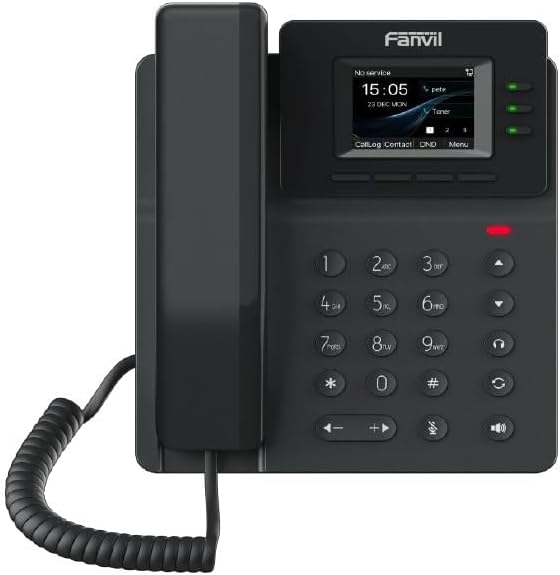
Figure 3.1: Fanvil V60W IP Phone Front View
This image displays the front of the Fanvil V60W IP Phone. It features a black handset on the left, connected by a coiled cord. The main unit on the right includes a color display showing "No service", "15:05", "23 DEC MON", and menu options like "CallLog", "Contact", "DND", and "Menu". Above the display, the "Fanvil" logo is visible. To the right of the display are three green indicator lights. Below the display is a standard numeric keypad (0-9, *, #) along with navigation keys (up, down, left, right), volume controls, and dedicated function keys for headset, speakerphone, mute, and redial/transfer. A red indicator light is visible above the keypad.
Klíčové komponenty:
- Displej: 2.4-inch color display (320 x 240 resolution) for user interface and information.
- Programovatelné klávesy: 6 keys for custom functions.
- Numerická klávesnice: Standardní 0-9, *, # pro vytáčení.
- Navigační klávesy: Pro navigaci v menu.
- Funkční klávesy: Dedicated keys for common features like speakerphone, mute, headset.
- Sluchátko: Ergonomic design for comfortable calls.
- LED indikátory: For call status, message waiting, etc.
4. Nastavení a instalace
Follow these steps to set up your Fanvil V60W IP Phone.
4.1 Připojení telefonu
- Připojení sluchátka: Zapojte jeden konec spirálového kabelu sluchátka do sluchátka a druhý konec do portu pro sluchátko na telefonní základně.
- Připojit k síti:
- Ethernet (PoE or Adapter): Connect an Ethernet cable from the LAN port on the phone to your network switch or router. If using Power over Ethernet (PoE), the phone will power on automatically.
- Power Adapter (if no PoE): If PoE is not available, connect the power adapter to the power port on the phone and then to a power outlet.
- Připojení k počítači (volitelné): If you wish to connect a computer through the phone, connect an Ethernet cable from the PC port on the phone to your computer.
4.2 Počáteční konfigurace
Upon first boot, the phone will attempt to obtain network settings via DHCP. You may need to configure SIP accounts manually or via auto-provisioning.
- Přístup k nastavení: Stiskněte tlačítko Menu key on the phone to access system settings.
- Nastavení sítě: Přejděte na Settings > Advanced Settings > Network to configure IP address, subnet mask, gateway, and DNS if not using DHCP.
- SIP Account Registration: Přejděte na Settings > Advanced Settings > Accounts to add or modify SIP accounts. You will need your SIP server address, SIP user ID, and password provided by your VoIP service provider.
- Konfigurace Wi-Fi: Přejděte na Nastavení > Wi-Fi to enable Wi-Fi and connect to an available wireless network.
5. Základní obsluha
5.1 Uskutečnění hovoru
- Zvedněte sluchátko nebo stiskněte Hlasitý telefon klíč.
- Vytoč číslo pomocí klávesnice.
- Stiskněte tlačítko Vytáčení key or wait a few seconds for the call to connect automatically.
5.2 Přijetí hovoru
Když zazvoní telefon:
- Zvedněte sluchátkonebo
- Stiskněte tlačítko Hlasitý telefon klíč, popř
- Stiskněte odpovídající Čára klíč.
5.3 Ukončení hovoru
Ukončení aktivního hovoru:
- Replace the Handsetnebo
- Stiskněte tlačítko Ukončit hovor key (if available on screen or as a function key).
5.4 Nastavení hlasitosti
Během hovoru použijte Zvýšení hlasitosti (+) a Snížit hlasitost (-) keys to adjust the handset, headset, or speakerphone volume.
6. Pokročilé funkce
The Fanvil V60W offers several advanced features to enhance your communication experience.
- Přidržení hovoru: Stiskněte tlačítko Držet key during an active call to place it on hold. Press again to resume.
- Přepojení hovoru:
- Převod naslepo: Během hovoru stiskněte Převod, dial the new number, and press Převod znovu.
- Zúčastněný transfer: Během hovoru stiskněte Převod, dial the new number, wait for the other party to answer, then press Převod znovu dokončit.
- 6cestná audiokonference:
- Make a call to the first party.
- Stiskněte tlačítko Conf key. The first party is put on hold.
- Dial the second party's number and wait for them to answer.
- Stiskněte tlačítko Conf key again to establish the conference.
- Repeat steps 2-4 for additional parties (up to 6 participants total).
- Bluetooth připojení: Pair your Bluetooth headset or mobile device via Nastavení > Bluetooth for hands-free communication or contact synchronization.
- Programovatelné klávesy: Customize the 6 programmable keys via the phone's web rozhraní nebo Settings > DSS Key to assign speed dials, BLF (Busy Lamp Field), or other functions.
7. Údržba
Proper maintenance ensures the longevity and optimal performance of your Fanvil V60W IP Phone.
- Čištění: K čištění povrchu telefonu použijte měkký, suchý hadřík. V případě odolných skvrn použijte lehceamp cloth with mild, non-abrasive cleaner can be used. Avoid excessive moisture and harsh chemicals.
- Odstranění prachu: Pravidelně otírejte displej a klávesnici, abyste zabránili usazování prachu.
- Podmínky prostředí: Keep the phone in a dry environment, away from direct sunlight, extreme temperatures, and sources of moisture.
- Aktualizace firmwaru: Periodically check for firmware updates from Fanvil's official website or through your service provider. Firmware updates can improve performance, add features, and fix bugs.
8. Řešení problémů
This section addresses common issues you might encounter with your Fanvil V60W IP Phone.
| Problém | Možná příčina | Řešení |
|---|---|---|
| Telefon se nezapne. | No power from adapter or PoE. | Check power adapter connection or ensure PoE is active on the Ethernet port. Try a different power outlet or Ethernet port. |
| Není slyšet oznamovací tón / Nelze uskutečňovat hovory. | Network connectivity issue; SIP account not registered. | Verify Ethernet cable connection. Check network settings (IP address, gateway). Ensure SIP account status is "Registered" in the phone's settings. Contact your VoIP service provider. |
| Špatná kvalita zvuku (ozvěna, statický šum). | Přetížení sítě; vadný kabel; rušení z prostředí. | Check network bandwidth. Replace Ethernet cable. Move phone away from other electronic devices. Adjust volume settings. |
| Nestabilní Wi-Fi připojení. | Weak signal; interference; incorrect password. | Move phone closer to Wi-Fi router. Check Wi-Fi password. Ensure router firmware is up to date. |
If the problem persists after attempting these solutions, please contact your technical support or VoIP service provider for further assistance.
9. Specifikace
Detailed technical specifications for the Fanvil V60W IP Phone.
- Zobrazit: 2.4-inch (320x240) color screen
- SIP linky: 4
- Programovatelné klávesy: 6
- Zvuk: HD Audio, 6-way audio conferencing
- Konektivita: Dual-band 2.4G/5G Wi-Fi (Wi-Fi 6), Bluetooth 5
- Ethernetové porty: 2 x 10/100 Mbps (with PoE support)
- Rozměry (D x Š x V): 22 x 25 x 15 cm (přibližně)
- Hmotnost: 600 gramů (přibližně)
- Materiál: Plast
- Barva: Černý
- Zdroj napájení: Power adapter or PoE
- Kompatibilní zařízení: Ehs
10. Záruka a podpora
For warranty information and technical support, please refer to the documentation provided with your purchase or visit the official Fanvil webUschovejte si účtenku jako doklad o koupi pro případ reklamace.
- Výrobce: Fanvil
- Kontakt podpory: Refer to Fanvil's official website for support channels (e.g., support portal, email, phone).
- Aktualizace softwaru: Information regarding software updates is not available in the product data. Please check the manufacturer's webstránky pro nejnovější aktualizace.
- Náhradní díly: Information regarding spare parts availability is not available.