
1. Konec produktuview
The Fanvil V60P is a professional IP phone designed for business communication. It features a color display, programmable keys, and Power over Ethernet (PoE) support for simplified installation and operation. This manual provides essential information for setting up, operating, and maintaining your device.
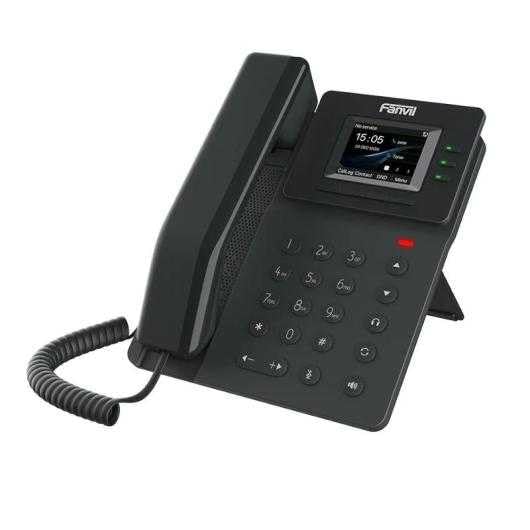
Figure 1: Fanvil V60P Professional IP Phone. This image shows the black IP phone with its handset, color display, and numeric keypad. The display shows "15:05" and menu options.
2. Nastavení a instalace
2.1 Obsah balení
Před instalací ověřte, zda jsou v balení přítomny všechny položky:
- Fanvil V60P IP Phone unit
- Sluchátko a spirálový kabel
- Ethernetový kabel
- Stánek
- Stručný návod k instalaci (pokud je součástí dodávky)
2.2 Fyzické připojení
- Připevněte stojan: Bezpečně připevněte stolní stojan k zadní straně telefonní jednotky.
- Připojení sluchátka: Zapojte jeden konec spirálového kabelu do sluchátka a druhý konec do portu pro sluchátko na základně telefonu.
- Connect to Network and Power (PoE):
- Připojte jeden konec ethernetového kabelu k LAN portu na telefonu.
- Connect the other end of the Ethernet cable to a Power over Ethernet (PoE) enabled switch or injector. The phone will power on automatically.
- Připojení k počítači (volitelné): If you need to connect a computer through the phone, connect an Ethernet cable from your PC to the PC portu na telefonu.
Note: If PoE is not available, a separate power adapter (not included) may be required. Refer to the product specifications for compatible power adapter details.
3. Návod k obsluze
3.1 Základní funkce volání
- Uskutečnění hovoru:
- Pick up the handset or press the Speakerphone button.
- Vytočte požadované číslo pomocí klávesnice.
- Stiskněte tlačítko Vytáčení funkční tlačítko nebo počkejte na časový limit automatického vytáčení.
- Přijetí hovoru:
- Zvedněte sluchátko.
- Alternatively, press the Speakerphone button or the Odpověď kontextové tlačítko.
- Ukončení hovoru: Hang up the handset or press the Speakerphone button.
3.2 Using Programmable DSS Keys
The Fanvil V60P features 6 programmable DSS (Direct Station Select) keys. These keys can be configured for various functions such as speed dial, line keys, busy lamp field (BLF), or other custom features as defined by your system administrator.
- To use a programmed DSS key, simply press the corresponding button.
- Configuration of DSS keys is typically done via the phone's web interface or your IP PBX system.
3.3 Local Phonebook
The phone supports a local phonebook with up to 1000 entries.
- Přístup k telefonnímu seznamu přes Adresář or Kontakty soft key on the display.
- Use the navigation keys to browse entries.
- Select an entry and press the Vytáčení softwarové tlačítko pro zahájení hovoru.
3.4 Audio Conferencing
The V60P supports local 6-party audio conferencing.
- Establish a call with the first participant.
- Stiskněte tlačítko Conf soft key. The first participant will be put on hold.
- Dial the number of the second participant and establish the call.
- Stiskněte tlačítko Conf soft key again to merge all participants into a conference.
- Repeat steps 2-4 to add more participants, up to a total of 6.
4. Údržba
4.1 Čištění zařízení
To maintain the appearance and functionality of your Fanvil V60P IP Phone (made of plastic material), follow these cleaning guidelines:
- Disconnect the phone from its power source (PoE) before cleaning.
- Použijte měkký, mírně damp, lint-free cloth to wipe the surfaces.
- Avoid using harsh chemicals, abrasive cleaners, or solvents, as these can damage the plastic and display.
- Nestříkejte čisticí prostředky přímo na telefon.
4.2 aktualizací firmwaru
Firmware updates may be released periodically to improve performance, add features, or fix bugs. Consult your IT administrator or Fanvil's official website for information on available updates and instructions for installation.
5. Řešení problémů
This section addresses common issues you might encounter with your Fanvil V60P IP Phone.
| Problém | Možná příčina | Řešení |
|---|---|---|
| Telefon se nezapne. | Žádné připojení PoE nebo vadný ethernetový kabel. | Ensure the Ethernet cable is securely connected to the LAN port and a PoE-enabled switch/injector. Verify the PoE source is active. |
| Žádný oznamovací tón. | SIP registration failure or network issue. | Check network connectivity. Verify SIP account settings with your IT administrator. Restart the phone. |
| Nelze uskutečňovat/přijímat hovory. | Network issues, incorrect SIP configuration, or firewall blocking. | Confirm network connection. Check SIP registration status on the phone's display. Contact your IT administrator for network and SIP configuration verification. |
| Špatná kvalita zvuku. | Network congestion or faulty handset/speaker. | Check network bandwidth and latency. Try using a different handset or speaker mode. If the issue persists, contact support. |
6. Specifikace
| Funkce | Detail |
|---|---|
| Model | V60P |
| Systém | Linux |
| Zobrazit | 2.4-inch, 320 x 240 Color Screen |
| DSS klíče | 6 programovatelných kláves |
| SIP linky | 4 |
| Local Phonebook | 1000 záznamů |
| Sluchátko | Kabelové sluchátko |
| Audio konference | 6-party Local Conference |
| Wideband Codecs | G.722, Opus |
| Narrowband Codecs | G.711, G.723.1, G.726, G.729, G.729A, G.729B, G.729AB, iLBC |
| PoE | Ano |
| Síťové porty | 2 ethernetové porty 10/100 Mb/s |
| Podpora BOZP | Ano |
| Podpora IPv6 | Ano |
| Materiál | Plast |
| Rozměry (DxŠxV) | 15 x 200 x 15 cm |
| Hmotnost | 600 gramů |
| ID volajícího | Ano |
| Víceřádkový provoz | Ano |
| Conference Call Functionality | Support Multiple Conferences |
| Standby Duration (if applicable) | 10 hodin |
7. Záruka a podpora
7.1 Záruka na produkt
The Fanvil V60P IP Phone comes with a tříletá záruka na výrobní vadyTato záruka se vztahuje na vady materiálu a zpracování při běžném používání. Uschovejte si prosím doklad o koupi pro případ uplatnění záruky.
7.2 Technická podpora
For technical assistance, troubleshooting beyond this manual, or warranty inquiries, please contact your reseller or Fanvil's official customer support channels. You may need to provide your product model (V60P) and serial number.