
Strong Leap-UNA
Uživatelská příručka k streamovacímu adaptéru STRONG Leap-UNA 2K pro Android TV
Model: Leap-UNA
Značka: Strong
Zavedení
The STRONG Leap-UNA TV Streaming Stick is a compact and powerful device designed to transform your television into a smart TV, providing instant access to a vast array of streaming content. Powered by Android TV 11, it offers seamless 2K resolution streaming with Wi-Fi 5 connectivity. This manual provides detailed instructions for setting up, operating, and maintaining your Leap-UNA streaming stick to ensure an optimal entertainment experience.
Bezpečnostní informace
- Před použitím zařízení si přečtěte všechny pokyny.
- Nevystavujte zařízení dešti, vlhkosti ani extrémním teplotám.
- Zajistěte dostatečné větrání kolem zařízení, aby nedošlo k přehřátí.
- Používejte pouze napájecí adaptér dodaný se zařízením.
- Nepokoušejte se zařízení rozebírat ani opravovat sami. Veškerý servis svěřte kvalifikovanému personálu.
- Udržujte zařízení mimo přímé sluneční světlo a zdroje tepla.
Obsah balení
Zkontrolujte prosím, zda jsou všechny položky přítomny a v dobrém stavu:
- STRONG Leap-UNA 2K Android TV Streaming Stick
- Dálkové ovládání
- Power Adapter (or USB cable for power)
- HDMI Extender (if included)
- Uživatelská příručka (tento dokument)
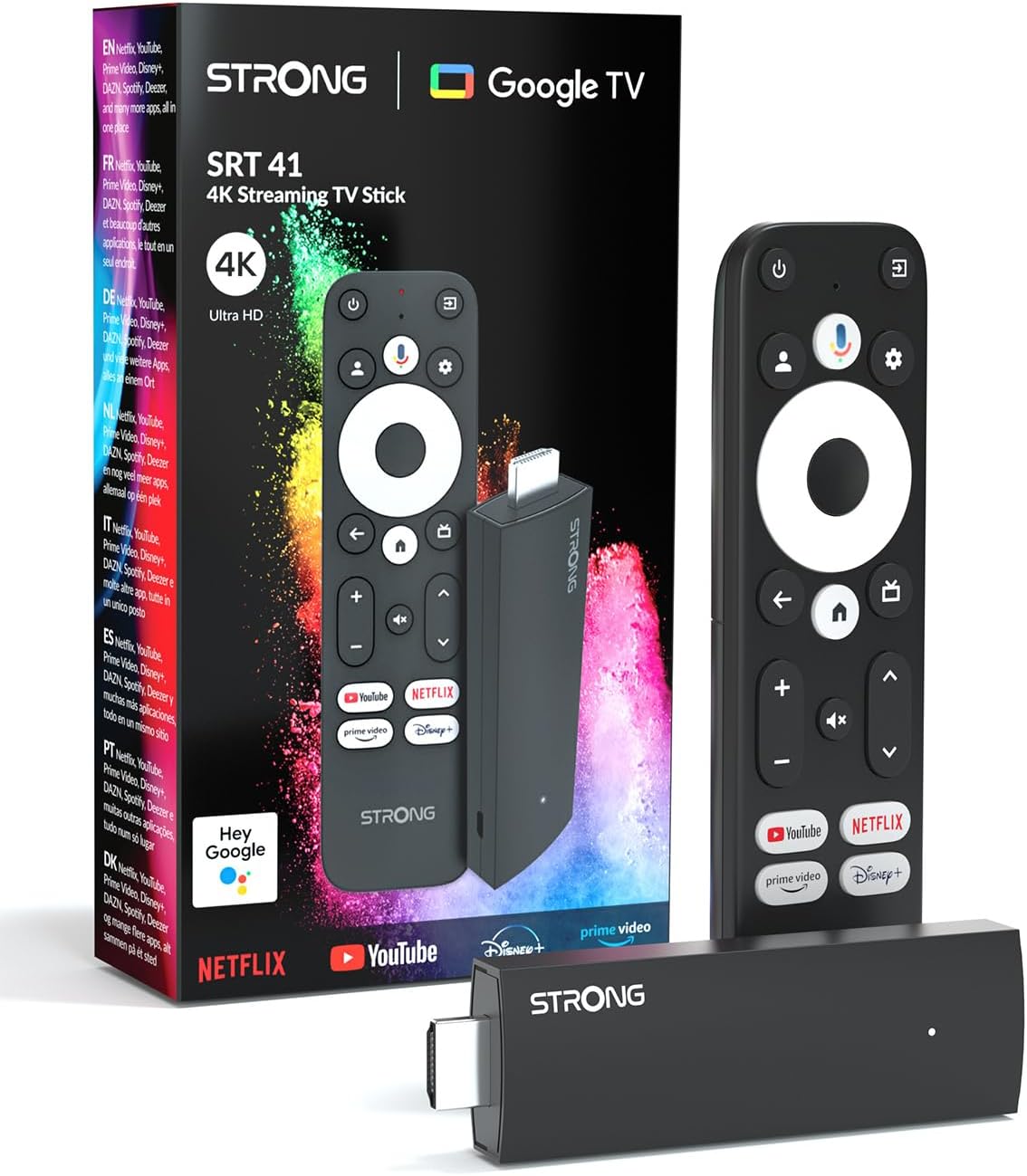
Image: The STRONG Leap-UNA streaming stick, its remote control, and the product packaging. This shows the main components included in the box.
Konec produktuview
The Leap-UNA stick is designed for ease of use and portability. It connects directly to your TV's HDMI port.
Součásti zařízení:
- Streaming Stick: Compact device with an HDMI connector for TV and a Micro USB port for power.
- Dálkové ovládání: Features dedicated buttons for power, navigation, volume, Google Assistant, and quick access to popular streaming services like Netflix and YouTube.

Image: A close-up of the STRONG Leap-UNA streaming stick, highlighting its compact design and connectivity options including HDMI and Micro USB ports.
Nastavení
Follow these steps to set up your STRONG Leap-UNA streaming stick:
- Připojení k televizi: Plug the STRONG Leap-UNA streaming stick directly into an available HDMI port on your television. If space is limited, use an HDMI extender (if provided).
- Zapnutí: Connect the power adapter to the Micro USB port on the streaming stick and then plug the adapter into a power outlet. The device will power on automatically.
- Vyberte vstup HDMI: Use your TV's remote control to select the correct HDMI input source to which the Leap-UNA stick is connected.
- Párování dálkového ovládání: Follow the on-screen instructions to pair your remote control. This usually involves pressing and holding specific buttons on the remote close to the stick.
- Připojení k Wi-Fi: On the screen, select your Wi-Fi network from the list and enter the password. Ensure you have a stable internet connection for optimal streaming.
- Nastavení účtu Google: Sign in with your Google account. This is necessary to access the Google Play Store, Google Assistant, and other Google services. If you don't have one, you can create one.
- Instalace aplikací: After initial setup, you can download and install your favorite streaming applications like Netflix, Amazon Prime Video, YouTube, and Disney+ from the Google Play Store.

Image: Visual representation of the simple setup process: 1. Connect the stick to your TV. 2. Connect to your internet box (Wi-Fi). 3. Start streaming your content.
Návod k obsluze
Použití dálkového ovládání:
The included remote control allows you to navigate the Android TV interface and control your streaming experience.
- Navigační podložka: Pro pohyb v nabídkách a výběr položek použijte kruhovou podložku.
- Tlačítko Zpět: Vrátí se na předchozí obrazovku.
- Tlačítko Domů: Návrat na domovskou obrazovku Android TV.
- Tlačítko Google Assistant: Stisknutím aktivujete hlasové příkazy.
- Tlačítka hlasitosti: Upravte hlasitost televizoru.
- Vyhrazená tlačítka aplikací: Quickly launch Netflix, YouTube, Prime Video, and Disney+ (if available).

Image: The remote control for the STRONG Leap-UNA, highlighting its dedicated app buttons and the wide range of applications available through Google Play.
Hlasové ovládání pomocí Google Assistant:
The integrated Google Assistant allows you to control your device and search for content using your voice. Press the Google Assistant button on your remote and speak your command. Exampzahrnují:
- „Otevřít Netflix“
- „Najít akční filmy“
- „Přehrát [Název filmu]“
- "Jaké je počasí?"

Image: The STRONG Leap-UNA remote control positioned in front of a TV screen, illustrating the use of Google Assistant for voice commands, such as "Avvia Netflix" (Start Netflix).
Vestavěný Chromecast:
With Chromecast built-in, you can cast content directly from your smartphone, tablet, or computer to your TV. Simply open a compatible app on your mobile device and tap the Cast icon ▶ to send the content to your TV.

Image: A TV screen displaying content being cast via Google Cast, with a smartphone in the foreground demonstrating the casting functionality.
Údržba
To ensure the longevity and optimal performance of your STRONG Leap-UNA streaming stick, follow these maintenance guidelines:
- Čištění: K čištění zařízení používejte měkký, suchý hadřík. Nepoužívejte tekuté čisticí prostředky ani aerosoly.
- Větrání: Ensure the device is placed in a well-ventilated area and that its vents are not blocked.
- Aktualizace softwaru: Zařízení může dostávat automatické aktualizace softwaru. Ujistěte se, že je připojeno k internetu, aby mohlo tyto aktualizace dostávat. Zlepší se tak výkon a přidají se nové funkce.
- Skladování: Pokud zařízení delší dobu nepoužíváte, skladujte jej na chladném a suchém místě.
Odstraňování problémů
If you encounter issues with your STRONG Leap-UNA streaming stick, refer to the following common problems and solutions:
| Problém | Možná příčina | Řešení |
|---|---|---|
| Žádné napájení/Zařízení se nezapíná | Power cable not connected properly; Faulty power adapter; Power outlet issue. | Check all power connections. Try a different power outlet. Ensure the power adapter is working. |
| Žádný obraz na televizi | Incorrect HDMI input selected; Loose HDMI connection; TV compatibility issue. | Ensure your TV is on the correct HDMI input. Reconnect the HDMI cable. Try a different HDMI port on your TV. |
| Dálkové ovládání nereaguje | Batteries are low or dead; Remote not paired; Obstruction between remote and stick. | Replace batteries. Re-pair the remote control (refer to Setup section). Ensure no obstructions. |
| Načítání do vyrovnávací paměti nebo špatná kvalita streamování | Weak Wi-Fi signal; Internet speed issues; Network congestion. | Move the stick closer to your Wi-Fi router. Restart your router. Check your internet speed. Reduce other network activity. |
| Aplikace padá nebo zamrzávají | App error; Insufficient memory; Software glitch. | Restart the app. Clear the app's cache (Settings > Apps > [App Name] > Clear cache). Restart the streaming stick. |
Specifikace
| Funkce | Detail |
|---|---|
| Značka | Silný |
| Název modelu | Leap-UNA |
| Operační systém | Android TV 11 |
| Rezoluce | 2K |
| Technologie připojení | Bluetooth, HDMI, IR, Wi-Fi (Wi-Fi 5) |
| Podporované internetové služby | Netflix, Amazon Prime Video, Disney+, YouTube |
| Velikost RAM | 1 GB |
| Rozměry | 9 l x 3 š x 1.5 v centimetrů |
| Kompatibilní zařízení | TV, smartphone, tablet, personal computer, laptop |
| Barva | Černý |
Záruka a podpora
STRONG products are designed for reliability and performance. For warranty information and technical support, please refer to the warranty card included with your product or visit the official STRONG website. You can also contact customer support through the details provided on the packaging or website for assistance with any issues not covered in this manual.
Nejnovější informace a podporu naleznete na adrese: www.strong.tv
Ask a question about this manual
Ask about setup, troubleshooting, compatibility, parts, safety, or missing instructions. Manuals+ will review the question and use this page’s manual context to help answer it.