
AYANEO Pocket S
Uživatelská příručka k herní konzoli AYANEO Pocket S s Androidem
Model: Pocket S
Zavedení
Welcome to the user manual for your AYANEO Pocket S Android Handheld Gaming Device. This manual provides essential information for setting up, operating, maintaining, and troubleshooting your device to ensure optimal performance and longevity. Please read this manual thoroughly before using your device.
Bezpečnostní informace
Abyste předešli poškození zařízení nebo zranění sebe či jiných osob, dodržujte prosím následující bezpečnostní opatření:
- Nevystavujte zařízení extrémním teplotám, přímému slunečnímu záření nebo vysoké vlhkosti.
- Zabraňte pádu zařízení na zem nebo jeho vystavení silným nárazům.
- Používejte pouze schválené nabíječky a příslušenství.
- Nepokoušejte se zařízení rozebírat ani opravovat sami. Obraťte se na kvalifikovaný servisní personál.
- Udržujte zařízení mimo dosah vody a jiných kapalin.
Součásti zařízení
Familiarize yourself with the various parts of your AYANEO Pocket S.
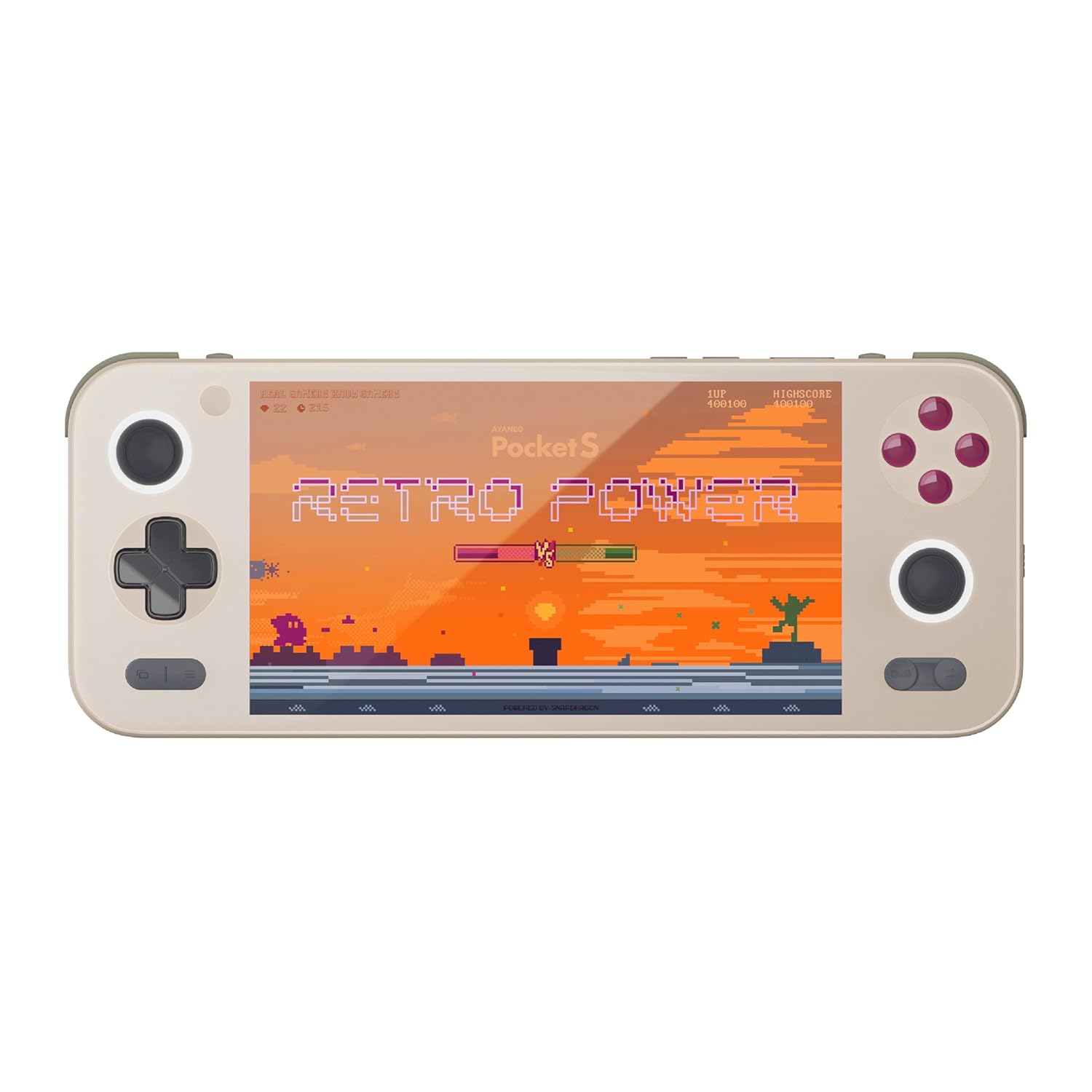
Obrázek 1: Přední strana view of the AYANEO Pocket S, showing the screen, joysticks, D-pad, and action buttons.

Figure 2: Close-up of the Master Controller, highlighting the RGB Hall joysticks, Hall triggers, and crystal-textured keys.

Figure 3: Illustration of the internal VC thermal plate and active cooling system, along with the "Fishbone" biomimetic heat dissipation design on the side.

Figure 4: The AYANEO Pocket S displaying the AYASpace and AYAHOME Launcher interface, showing various game icons.
Klíčové vlastnosti:
- Zobrazit: 6-inch 2K Borderless IPS Screen (490 PPI, 120% sRGB, 85% DCI-P3)
- Procesor: Snapdragon G3x Gen 2 Gaming Platform
- Paměť a úložiště: Up to 16GB RAM, up to 1TB Storage (This model: 12GB RAM, 128GB Storage)
- Chlazení: Large VC Heat Sink, Active Cooling System, "Fishbone" Cooling Vents
- Ovládání: Master Controller with RGB Hall Joysticks, Linear Hall Triggers, X-axis Vibration
- Operační systém: Android 13
Průvodce nastavením
1. Počáteční nabíjení
Before first use, fully charge your AYANEO Pocket S. Connect the provided USB-C cable to the device's charging port and the other end to a compatible power adapter. The charging indicator will illuminate.
2. Zapnutí/vypnutí
- Zapnutí: Press and hold the Power button located on the top edge of the device until the AYANEO logo appears on the screen.
- Vypnutí: Press and hold the Power button until the power options menu appears. Select "Power Off" and confirm.
- Restartovat: V nabídce možností napájení vyberte „Restartovat“.
3. Počáteční konfigurace systému
Upon first power-on, you will be guided through the initial Android setup process. This includes:
- Výběr jazyka.
- Připojování k síti Wi-Fi.
- Signing in with your Google account (optional, but recommended for app downloads).
- Setting up screen lock and other security features.
4. Aktualizace softwaru
It is recommended to check for and install any available system updates after initial setup to ensure you have the latest features and security patches. Navigate to Nastavení > Systém > Aktualizace systému.
Obsluha vašeho zařízení
Navigace a ovládací prvky
The AYANEO Pocket S features both touchscreen input and physical controller input for navigation and gameplay.
- Dotyková obrazovka: Use familiar Android gestures such as tap, swipe, pinch-to-zoom.
- Joysticky: Analog input for movement and camera control in games.
- D-Pad: Digital input for menu navigation and directional controls.
- Akční tlačítka (A/B/X/Y): Primary input for in-game actions.
- Shoulder/Trigger Buttons (L1/L2/R1/R2): Additional input for various game functions.
- Funkční tlačítka: Dedicated buttons for system functions, such as Home, Back, and Menu.
Režimy výkonu
The device offers multiple performance modes to optimize for either maximum performance or extended battery life.
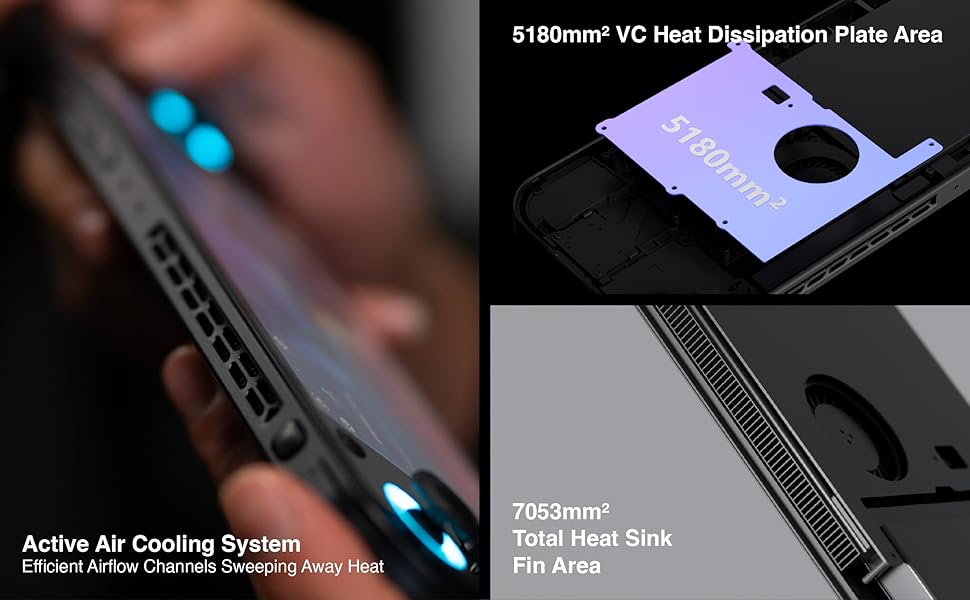
Figure 5: Diagram illustrating the three performance modes: Performance Turbo Mode, Balanced Mode, and Power-Saving Long Battery Life Mode.
- Performance Turbo Mode: Maximizes CPU, GPU, and fan speed for demanding games.
- Vyvážený režim: Provides a good balance between performance and battery life for most games.
- Power-Saving Long Battery Life Mode: Optimizes for extended usage, suitable for less demanding applications or when battery conservation is critical.
You can switch between these modes via the AYASpace application or quick settings menu.
AYASpace and AYAHOME Launcher
The AYASpace application and AYAHOME Launcher provide a customized Android experience for gaming handhelds.
- Správa zvěře: Organize and launch your games.
- Mapování klíčů: Customize button assignments for mobile games that do not natively support physical controllers.
- Nastavení systému: Access performance mode settings, controller calibration, and other device-specific configurations.
Údržba
Čištění zařízení
- K otření obrazovky a těla zařízení použijte měkký hadřík, který nepouští vlákna.
- Na odolné šmouhy lehce otřeteamphadřík vodou nebo čističem obrazovek.
- Nepoužívejte agresivní chemikálie, abrazivní čisticí prostředky ani aerosolové spreje.
- Ensure all ports are free of dust and debris. Use a soft brush or compressed air if necessary, holding the can upright.
Péče o baterie
- Vyhněte se častému úplnému vybíjení baterie.
- Nenechávejte zařízení delší dobu nenabité.
- Store the device in a cool, dry place if not used for a long time, with the battery charged to around 50%.
Údržba softwaru
- Regularly check for and install system updates.
- Keep your applications updated through the Google Play Store or AYASpace.
- Pravidelně mazejte mezipaměť a nepotřebné files pro udržení výkonu systému.
Odstraňování problémů
| Problém | Možná příčina | Řešení |
|---|---|---|
| Zařízení se nezapne. | Slabá baterie; Havárie systému. | Nabíjejte zařízení alespoň 30 minut. Proveďte nucený restart podržením tlačítka napájení po dobu 10–15 sekund. |
| Obrazovka nereaguje. | Softwarová chyba; Poškození obrazovky. | Restartujte zařízení. Pokud problém přetrvává, kontaktujte zákaznickou podporu. |
| Hry se zaostávají nebo fungují špatně. | Incorrect performance mode; Background apps; Overheating. | Switch to Performance Turbo Mode. Close unnecessary background applications. Ensure cooling vents are not blocked. |
| Problémy s připojením k Wi-Fi. | Incorrect password; Router issue; Device Wi-Fi module error. | Verify Wi-Fi password. Restart your router. Toggle Wi-Fi off and on on the device. |
If you encounter issues not listed here or if the suggested solutions do not resolve the problem, please contact AYANEO customer support.
Specifikace
| Funkce | Detail |
|---|---|
| Model | Pocket S |
| Procesor | Snapdragon G3x Gen 2 Gaming Platform |
| Zobrazit | 6-inch 2K Borderless IPS Display (2560*1440 resolution, 490 PPI, 120% sRGB, 85% DCI-P3) |
| BERAN | 12GB (as per current model) |
| Skladování | 128GB (as per current model) |
| Operační systém | Android 13 |
| Chladicí systém | Large VC Heat Sink, Active Cooling System, "Fishbone" Vents |
| Baterie | 1 lithium-iontová baterie (součástí balení) |
| Rozměry | Přibližně 8.42 x 3.35 x 0.55 palce |
| Hmotnost | Přibližně 1.59 libry (0.72 kg) |
Informace o záruce
AYANEO products typically come with a limited manufacturer's warranty. Please refer to the warranty card included in your product packaging or visit the official AYANEO webPodrobné záruční podmínky naleznete na webových stránkách. Uschovejte si doklad o koupi pro případ reklamace.
Note: Protection plans may be available for purchase separately. These plans are offered by third parties and are not part of the standard manufacturer's warranty.
Zákaznická podpora
For technical assistance, troubleshooting, or warranty inquiries, please contact AYANEO customer support through their official channels:
- Oficiální Webmísto: www.ayaneo.com (Check for support section or contact page)
- E-mailová podpora: Obraťte se na úředníka webwebu, kde najdete nejaktuálnější e-mailovou adresu podpory.
- Online komunita/fóra: AYANEO may host online communities where users can find answers and share experiences.
When contacting support, please have your device model (Pocket S) and serial number ready.
Ask a question about this manual
Ask about setup, troubleshooting, compatibility, parts, safety, or missing instructions. Manuals+ will review the question and use this page’s manual context to help answer it.