
Zavedení
Thank you for choosing the MIXX Analog System 5. This Hi-Fi vinyl record player bundle combines a precision turntable with powerful wireless speakers, offering a rich audio experience. This manual provides essential instructions for setting up, operating, and maintaining your system to ensure optimal performance and longevity.
Nastavení
1. Vybalení a komponenty
Carefully unpack all items from the box. Ensure all components are present and undamaged. The bundle includes:
- Record Turntable
- Two Wireless Speakers
- Regional Power Adapter for Speakers (x1)
- Regional Power Adapter for Record Player (x1)
- Twin Male RCA to Twin Male RCA Cable (x1)
- Speaker Connector Cable (x1)
- Dálkové ovládání
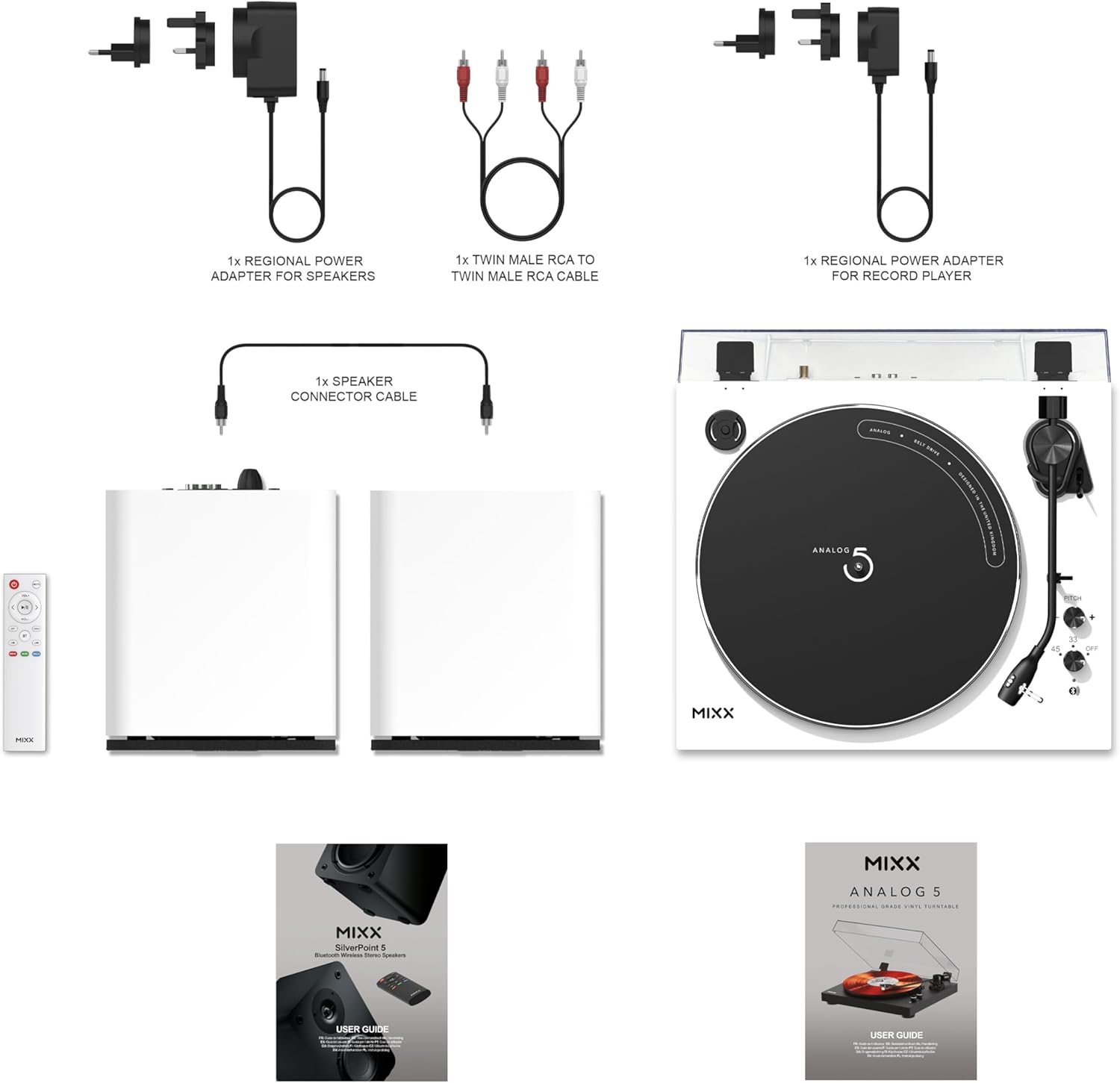
Figure 1: Included Components. This image displays all parts of the Mixx Analog System 5 bundle, including power adapters, cables, speakers, remote, and the turntable itself.
2. Sestava gramofonu
- Place the platter onto the turntable spindle.
- Install the anti-slip mat on top of the platter.
- Ensure the Audio-Technica AT3600L cartridge is securely attached to the tonearm. If not, refer to the cartridge manufacturer's instructions for proper installation.
- Position the dust cover over the turntable.

Figure 2: Audio-Technica AT3600L Cartridge. A detailed view of the pre-installed cartridge, crucial for high-fidelity sound reproduction.
3. Umístění reproduktoru
Place the two wireless speakers on a stable, flat surface, equidistant from your listening position for optimal stereo imaging. Avoid placing them too close to walls or corners, which can affect bass response.

Figure 3: Optimal Speaker Placement. The turntable and speakers arranged on a shelf, demonstrating a typical setup.
4. Connecting Speakers and Power
- Connect the speaker connector cable between the two wireless speakers.
- Connect the regional power adapter for speakers to one of the speakers and then to a power outlet.
- Connect the regional power adapter for the record player to the turntable and then to a power outlet.
Návod k obsluze
1. Zapnutí/vypnutí
Press the power button on the turntable or the remote control to turn the system on or off. Indicators will illuminate when the system is active.
2. Přehrávání vinylové desky
- Umístěte vinylovou desku na talíř gramofonu.
- Select the appropriate speed (33 or 45 RPM) using the speed selector switch on the turntable.
- Zvedněte raménko přenosky pomocí páčky pro nastavení tónu.
- Opatrně umístěte stylus nad požadovanou stopu na desce.
- Spusťte páčku pro přehrávání a jemně umístěte stylus na desku.
- At the end of the record, lift the tonearm using the cueing lever and return it to its rest.
3. Bluetooth Connectivity (Speakers)
To stream audio from a Bluetooth-enabled device (e.g., smartphone, tablet) to the speakers:
- Ujistěte se, že jsou reproduktory zapnuté.
- Activate Bluetooth pairing mode on the speakers (refer to speaker controls or remote).
- On your device, search for available Bluetooth devices and select "MIXX Analog System 5 Speakers".
- Once paired, audio from your device will play through the speakers.
4. Bluetooth Connectivity (Turntable)
To connect the turntable wirelessly to Bluetooth headphones or other Bluetooth speakers:
- Ujistěte se, že je gramofon zapnutý.
- Activate Bluetooth pairing mode on your desired receiving device (headphones/speakers).
- Activate Bluetooth pairing mode on the turntable (refer to turntable controls).
- Gramofon automaticky vyhledá a připojí se k blízkým zařízením Bluetooth.
5. Wired Audio Inputs (Speakers)
The speakers support Optical In, Line In (RCA), Coax Digital In, and USB In. Connect your external audio sources to the corresponding ports on the speakers. Use the remote control or speaker controls to select the desired input source.

Obrázek 4: Konec systémuview with Features. This image illustrates the turntable and speakers, detailing their connectivity options and key features.

Figure 5: Speaker Details. A close-up of a speaker, showing its design and hinting at its various input ports.
Údržba
1. Čištění
- Turntable and Speakers: Use a soft, dry, lint-free cloth to wipe down the surfaces. Avoid abrasive cleaners or solvents.
- Protiprachový kryt: Vyčistěte měkkým, damp hadříkem a v případě potřeby jemným mýdlem. Důkladně osušte.
- Stylus: Gently brush the stylus from back to front using a specialized stylus cleaning brush. Be extremely careful to avoid bending the cantilever.
2. Výměna stylusu
The stylus (needle) has a limited lifespan and should be replaced periodically (typically after 300-500 hours of play) to maintain sound quality and prevent record damage. Refer to the Audio-Technica AT3600L cartridge documentation for specific replacement instructions or consult a professional.
Odstraňování problémů
| Problém | Možná příčina | Řešení |
|---|---|---|
| Žádná síla | Napájecí kabel není připojen; zásuvka není aktivní. | Ensure power cables are securely connected to the turntable/speakers and a working power outlet. |
| Žádný zvuk z reproduktorů | Incorrect input selected; volume too low; speaker cable disconnected; Bluetooth not paired. | Select the correct input source on the speakers. Increase volume. Check speaker connector cable. Re-pair Bluetooth devices. |
| Zkreslený zvuk | Dirty stylus; damaged record; incorrect speed; speaker placement. | Clean the stylus. Use clean records. Ensure correct RPM is selected. Adjust speaker placement. |
| Gramofon se neotáčí | Belt dislodged; motor issue. | Check if the drive belt is correctly positioned around the platter and motor pulley. If the issue persists, contact support. |
| Problémy s párováním pomocí rozhraní Bluetooth | Device too far; pairing mode not active; interference. | Ensure devices are within range. Activate pairing mode on both devices. Reduce interference from other wireless devices. |
Specifikace
| Značka | MIXX |
| Název modelu | Analog System 5 |
| Maximální rychlost otáčení | 78 RPM (Note: Product description mentions 33/45 RPM, 78 RPM might be a general spec or require specific stylus) |
| Zahrnuté komponenty | Record turntable, Cables, Speakers |
| Speciální funkce | Nastavitelná rychlost |
| Materiál | Kov, Plast |
| Hmotnost položky | 10.29 kg |
| Barva | Bílý |
| Kompatibilní zařízení | Headphone, Remote control, Smartphone, Speaker |
| Cykly | Pohon řemenem |
| Formát signálu | Úroveň řádku |
| Zdroj napájení | Elektrický kabel |
| Technologie připojení | Pomocný, Bluetooth |
| Rozměry položky D x Š x V | 19.89 cm D x 17.44 cm Š x 16.6 cm V |
| Výrobce | Mixx |
| UPC | 810148210595 |
| Číslo dílu výrobce | USRP-A5-BK-058 |
Informace o záruce
The product comes with a 1-year limited warranty. Please retain your proof of purchase for warranty claims. For detailed terms and conditions, refer to the official MIXX warranty documentation included with your product or visit the MIXX webmísto.
Podpora
If you encounter any issues not covered in this manual or require further assistance, please contact MIXX customer support. You can find contact information on the official MIXX webwebu nebo prostřednictvím svého prodejce.
Online zdroje: Visit the MIXX Store on Amazon