
Edifier es20
Edifier Portable Bluetooth Speaker User Manual
Model: ES20
Your comprehensive guide to setting up, operating, and maintaining your Edifier ES20 Portable Bluetooth Speaker.
Konec produktuview
The Edifier ES20 is a compact and powerful portable Bluetooth speaker designed for both indoor and outdoor use. It features IP67 waterproof and dustproof capabilities, ensuring durability in various environments. With Bluetooth V5.4 connectivity, it offers stable wireless audio and supports stereo pairing for an enhanced sound experience. The speaker also includes a built-in microphone for hands-free calls and customizable ambient lighting.
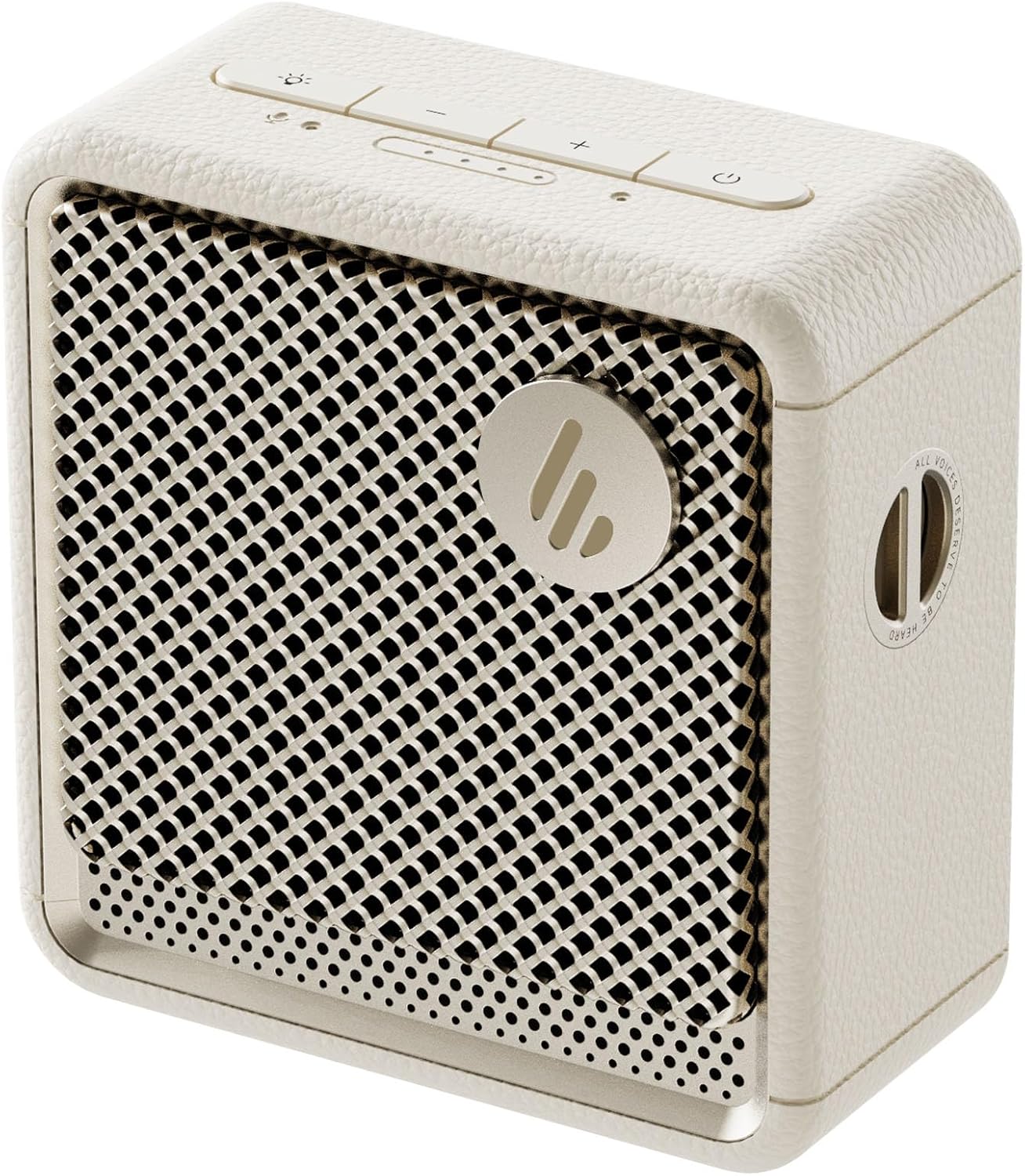
Obrázek: Přední strana view of the Edifier ES20 Portable Bluetooth Speaker in Ivory, showcasinjeho kompaktní design a mřížku reproduktoru.

Image: The Edifier ES20 speaker placed on a desk, demonstrating its suitability for home or office environments.
Mezi klíčové vlastnosti patří:
- Prémiová kvalita zvuku: 6W (RMS) output with a 1.7'' full-range driver and 2'' passive bass radiators for rich, punchy sound.
- Bluetooth V5.4 & Stereo Pairing: Seamless wireless connectivity and the ability to pair two speakers for stereo sound.
- IP67 vodotěsný a prachotěsný: Designed to withstand splashes, rain, and dust, making it ideal for outdoor use.
- Long Lasting Playtime: Až 15 hodin přehrávání na jedno nabití.
- Ambientní osvětlení: Features a customizable ambient light system for enhanced atmosphere.
- Vestavěný mikrofon: High-sensitivity microphone for clear hands-free communication.
- Snadné ovládání: Intuitive top-mounted buttons and control via the EDIFIER ConneX app.
Průvodce nastavením
Co je v krabici
Než začnete, ujistěte se, že jsou v balení všechny součásti:
- Edifier ES20 Portable Bluetooth Speaker
- Popruh
- Rychlý průvodce
- Kabel USB-C na USB-C
- Důležité bezpečnostní pokyny

Image: A visual representation of the Edifier ES20 speaker and its included accessories, such as the strap, charging cable, and documentation.
Nabíjení reproduktoru
The ES20 speaker comes with a built-in rechargeable battery. Before first use, it is recommended to fully charge the speaker.
- Connect the provided USB-C to USB-C cable to the charging port on the speaker.
- Druhý konec kabelu připojte ke kompatibilnímu napájecímu adaptéru USB (není součástí balení) nebo k portu USB počítače.
- The battery indicator lights on the top panel will illuminate to show charging progress. All lights will be solid when fully charged.
Počáteční párování Bluetooth
Follow these steps to connect your ES20 speaker to a Bluetooth device for the first time:
- Ensure the speaker is charged and powered on. The Bluetooth indicator light will flash, indicating it's in pairing mode.
- Na svém zařízení (chytrý telefon, tablet, notebook) povolte Bluetooth a vyhledejte dostupná zařízení.
- Select "EDIFIER ES20" from the list of found devices.
- Once connected, the Bluetooth indicator light on the speaker will remain solid.
For advanced features and easier control, download the EDIFIER ConneX app from your device's app store.

Image: Screenshots illustrating the EDIFIER ConneX mobile application, which provides additional control and customization options for the speaker.
Návod k obsluze
Funkce tlačítek
The ES20 speaker features intuitive top-mounted buttons for easy control:

Image: A detailed diagram outlining the functions of each button on the top panel of the ES20 speaker, including power, volume, playback, and lighting controls.
| Tlačítko/Indikátor | Funkce |
|---|---|
| Tlačítko napájení | Press and hold for 1.5s to power on/off. Short press to play/pause. |
| Zvýšení hlasitosti (+) | Krátkým stisknutím zvýšíte hlasitost. |
| Snížit hlasitost (-) | Krátkým stisknutím snížíte hlasitost. |
| Tlačítko režimu/světla | Short press to cycle through sound effects. Press and hold for 1.5s to cycle through ambient light modes. |
| Tlačítko Bluetooth | Short press to disconnect current Bluetooth device. Press and hold for 1.5s to enter Bluetooth pairing mode. Double press to enable/disable stereo pairing. |
| Indikátor napájení baterie | Zobrazuje aktuální úroveň nabití baterie. |
| Indikátor režimu | Blue for Bluetooth mode, White for Bluetooth stereo pairing mode. |
Bluetooth Stereo párování
You can pair two ES20 speakers together for a true wireless stereo experience. This requires two ES20 units.
- Ensure both ES20 speakers are powered on and not connected to any other Bluetooth devices.
- On one speaker (this will be the primary speaker), double-press the Bluetooth button. The Bluetooth indicator will flash rapidly.
- The primary speaker will automatically search for and connect to the second ES20 speaker.
- Once connected, the Bluetooth indicator on both speakers will remain solid, and you will hear an audible confirmation.
- Now, connect your device to the primary ES20 speaker via Bluetooth as you normally would.

Image: Two ES20 speakers, one black and one ivory, positioned to illustrate Bluetooth stereo pairing, with a smartphone displaying music playback.
Bluetooth Multi-Point Connectivity
The ES20 supports connecting to two Bluetooth devices simultaneously, allowing for seamless switching between audio sources.
- Connect the first device to the ES20 speaker via Bluetooth.
- Once connected, put the speaker back into pairing mode (press and hold the Bluetooth button for 1.5s).
- Connect the second device to the ES20 speaker.
- The speaker will now be connected to both devices. To switch audio playback, simply pause playback on the active device and start playback on the other.

Image: A visual representation of the ES20 speaker connected to multiple smartphones, highlighting its Bluetooth multi-point connectivity feature.
Systém okolního osvětlení
The ES20 features an ambient light system with multiple modes to enhance your listening experience or provide utility.
- Dýchání: Light gently fades in and out.
- Duha: Cycles through a spectrum of colors.
- Statický: Jedna, stálá barva.
- Glittering and Colorful: Dynamic, multi-color effects.
- Nouzové světlo: Flashing red light for signaling.
To change the ambient light mode, press and hold the Mode/Light button for 1.5 seconds.

Image: The ES20 speaker showcasing its ambient light system, with icons representing different light effects like breathing, rainbow, static, glittering, and emergency light.
Více zvukových efektů
Optimize your audio experience by selecting from four preset sound modes:
- Hudba: Vyvážený zvukový profesionálfile pro běžný poslech hudby.
- Hra: Enhanced audio cues for gaming.
- Film: Optimized for dialogue and cinematic soundscapes.
- Outdoor: Zvýšená hlasitost a basy pro venkovní prostředí.
To cycle through sound effects, short press the Mode/Light button.

Image: The ES20 speaker set in a natural environment, surrounded by icons representing its various sound effect modes: Music, Game, Movie, and Outdoor.
Built-in MEMS Microphone
The ES20 includes a high-sensitivity MEMS microphone with intelligent noise cancellation, allowing for clear hands-free calls when connected to your smartphone.

Image: The ES20 speaker positioned next to a smartphone showing an active call screen, illustrating the use of its built-in MEMS microphone for hands-free communication.
Údržba
Čištění
- Use a soft, dry cloth to clean the surface of the speaker.
- Nepoužívejte abrazivní čisticí prostředky, vosky ani rozpouštědla, protože by mohly poškodit povrchovou úpravu.
- For the speaker grille, use a soft brush to gently remove dust or debris.
Voděodolná a prachotěsná ochrana (IP67)
While the ES20 is IP67 rated for water and dust resistance, proper care is essential to maintain its integrity:
- Před vystavením reproduktoru vodě nebo prachu se ujistěte, že je kryt nabíjecího portu bezpečně uzavřen.
- Do not intentionally submerge the speaker beyond 1 meter (3 feet) or for longer than 30 minutes.
- After exposure to water, especially saltwater or chlorinated water, rinse the speaker with fresh water and allow it to air dry completely before charging or using.
- Nevystavujte reproduktor po delší dobu extrémním teplotám nebo přímému slunečnímu záření.

Image: The black version of the ES20 speaker partially submerged in water, illustrating its IP67 waterproof and dustproof protection rating.
Péče o baterie
- Chcete-li prodloužit životnost baterie, vyhněte se častému úplnému vybíjení reproduktoru.
- Charge the speaker regularly, even if not in use, to prevent deep discharge.
- Pokud reproduktor delší dobu nepoužíváte, skladujte jej na chladném a suchém místě.

Image: A circular graphic depicting the 15-hour playtime of the ES20 speaker, with the speaker itself at the center.
Odstraňování problémů
| Problém | Možná příčina | Řešení |
|---|---|---|
| Reproduktor se nezapne. | Slabá baterie; Tlačítko napájení nebylo správně stisknuto. | Charge the speaker fully. Press and hold the power button for 1.5 seconds. |
| Nelze spárovat se zařízením Bluetooth. | Reproduktor není v režimu párování; Bluetooth zařízení vypnuto; Reproduktor je příliš daleko od zařízení; Rušení. | Ensure speaker is in pairing mode (flashing Bluetooth light). Turn device Bluetooth off/on. Move speaker closer to device. Avoid strong Wi-Fi signals or other Bluetooth devices. |
| Žádný zvuk nebo nízká hlasitost. | Volume too low on speaker or device; Paused playback; Incorrect audio output selected on device. | Increase volume on both speaker and device. Ensure music is playing. Check device's audio output settings. |
| Zkreslení zvuku. | Příliš vysoká hlasitost; Slabý signál Bluetooth. | Lower the volume. Move speaker closer to the Bluetooth device. |
| Stereo párování selhalo. | Only one speaker in pairing mode; Speakers too far apart. | Ensure both speakers are powered on and not connected to other devices before initiating stereo pairing. Keep speakers within close proximity during pairing. |
If the issue persists, try resetting the speaker by holding the power button for 10 seconds, or consult the EDIFIER ConneX app for further assistance.
Specifikace
Detailed technical specifications for the Edifier ES20 Portable Bluetooth Speaker:

Image: A comprehensive table listing the technical specifications of the ES20 speaker, including output power, frequency response, dimensions, and weight.
| Funkce | Detail |
|---|---|
| Název modelu | ES20 |
| Typ reproduktoru | přenosný reproduktor |
| Celkový výstupní výkon | 6 W (RMS) |
| Jednotky řidiče | Full-range: φ43mm, Passive bass radiator: φ55mm |
| Frekvenční odezva | 93Hz – 19KHz |
| Odstup signálu od šumu | ≥85 dB (A) |
| Verze Bluetooth | V5.4 |
| Kodeky | SBC |
| Protokol připojení | Bluetooth, EDIFIER ConneX App |
| Životnost baterie | 15 hodiny |
| Hodnocení IP | IP67 (vodotěsný a prachotěsný) |
| Rozměry produktu (Š × V × H) | 90.4mm × 93.7mm × 49.7mm (3.55"D x 3.68"W x 1.95"H) |
| Čistá hmotnost | 326 g (1.01 liber) |
| Kontrolní metoda | Dotek |

Image: The ES20 speaker with its dimensions (width, height, depth) clearly marked, providing a visual reference for its compact size.
Záruka a podpora
The Edifier ES20 Portable Bluetooth Speaker comes with a limited warranty. Please refer to the "Warranty Card" included in your product packaging for detailed terms and conditions.
For technical support, troubleshooting assistance beyond this manual, or warranty claims, please visit the official Edifier website or contact their customer service. The EDIFIER ConneX app may also provide direct support options or frequently asked questions.
Více informací a podpůrných zdrojů naleznete na Obchod Edifier na Amazonu.
Ask a question about this manual
Ask about setup, troubleshooting, compatibility, parts, safety, or missing instructions. Manuals+ will review the question and use this page’s manual context to help answer it.