
1. Úvod
Děkuji za nákupasing the DANFI AUDIO DF TE-2017 Vinyl Record Player. This manual provides essential information for the safe and correct operation of your new record player. Please read it thoroughly before use and retain it for future reference.
2. Obsah balení
- DANFI AUDIO DF TE-2017 Vinyl Record Player
- Adaptér 45 RPM
- Power Cord & Adapter (100-240V~)
- Náhradní jehla
- Slipmat pro gramofon
- Uživatelská příručka (tento dokument)
3. Konec produktuview
The DANFI AUDIO DF TE-2017 is a versatile 3-speed belt-drive turntable with built-in speakers, Bluetooth wireless playback, USB/SD recording, AUX input, and RCA output. It features a clear dust cover and a digital display for easy operation.

Obrázek 1: Přední a zadní strana View of the TE-2017 Record Player with Labeled Components. This image displays the turntable platter, spindle, 45 RPM adapter, tone arm lift lever, speed selection switch, auto stop on/off switch, tone arm lock, stylus, speakers, AUX input, Mode/TF/USB controls, LED display, RCA audio out, and power port.
4. Nastavení
- Rozbalení: Opatrně vyjměte gramofon a veškeré příslušenství z obalu. Obal si uschovejte pro budoucí přepravu nebo skladování.
- Instalace krytu proti prachu: Slide the clear plastic dust cover into the brackets located at the rear of the turntable. Ensure it is securely seated.
- Připojení napájení: Connect the power adapter to the DC 5V/1A port on the rear of the record player and plug it into a wall outlet.
- Umístění: Umístěte gramofon na stabilní, rovný povrch mimo dosah přímého slunečního záření, zdrojů tepla a nadměrného prachu či vibrací.
- Ochrana stylusu: Remove the stylus protective cap before playing a record.
5. Návod k obsluze
5.1 Přehrávání vinylových desek
- Zapnutí: Turn the ON/OFF/VOLUME knob clockwise to power on the unit and adjust the volume.
- Vyberte režim: Set the PH/BT/AUX/USB switch to 'PH' (Phono) mode.
- Záznam o místě: Place a vinyl record on the turntable platter. If playing a 7-inch single, use the included 45 RPM adapter.
- Vyberte rychlost: Adjust the 3-speed selection switch (33, 45, 78 RPM) to match the record's speed.
- Auto-Stop (Optional): If desired, set the Auto Stop ON/OFF switch to 'ON'. The turntable will stop spinning automatically when the record finishes.
- Pozice raménka přenosky: Gently lift the tone arm using the lift lever. Move the tone arm over the desired track of the record.
- Spodní raménko tónu: Slowly lower the tone arm onto the record using the lift lever. The music will begin to play.
- Úprava výšky tónu: V případě potřeby použijte knoflík pro ovládání výšky tónu (PITCH) k jemnému doladění rychlosti přehrávání.
- Ukončit přehrávání: At the end of the record, lift the tone arm, return it to its rest, and lower the lift lever. Turn the ON/OFF/VOLUME knob counter-clockwise to power off.
Video 1: Demonstration of Vinyl Playback Mode on an LP&No.1 Turntable with Built-in Speakers. This video illustrates how to place a record, position the tone arm, and initiate playback, highlighting the smooth operation of the turntable.
5.2 Bezdrátové přehrávání přes Bluetooth
- Zapnutí: Turn the ON/OFF/VOLUME knob clockwise to power on the unit.
- Vyberte režim: Set the PH/BT/AUX/USB switch to 'BT' (Bluetooth) mode. The digital display will show 'BT' and the indicator light will blink blue, indicating pairing mode.
- Spárovat zařízení: On your smartphone, tablet, or other Bluetooth-enabled device, search for 'Turntable' in the Bluetooth settings and select it to pair. Once connected, the indicator light will stop blinking and remain solid blue.
- Přehrát hudbu: Start playing music on your paired device. The audio will stream through the record player's built-in speakers.
- Upravit hlasitost: Control the volume using the ON/OFF/VOLUME knob on the record player or your paired device.
Video 2: Konecview of Record Player with Speakers, demonstrating Bluetooth connectivity. This video shows how to switch to Bluetooth mode, pair a mobile device, and stream audio wirelessly to the turntable's speakers.
5.3 USB/SD Recording and Playback
- Vložení USB/SD karty: Insert a USB flash drive or SD card into the corresponding port on the front panel.
- Vyberte režim: Set the PH/BT/AUX/USB switch to 'USB' mode. The digital display will show 'USB'.
- Přehrávání: The unit will automatically detect and play audio files from the USB/SD device. Use the control buttons (Previous Song, Pause & Play, Next Song) to navigate tracks.
- Recording Vinyl to USB/SD:
- Start playing a vinyl record as described in section 5.1.
- Press the 'REC' button (if available, typically near the USB/SD slot) to begin recording. The indicator light may change to confirm recording is active.
- Press 'REC' again to stop recording. The recorded audio will be saved as an MP3 file on the USB/SD device.
- Use the 'SPLIT' button (if available) to create separate tracks during recording.
Video 3: USB Playback & Vinyl to MP3 Recording demonstration. This video shows how to insert a USB drive, initiate recording from vinyl, and manage recorded files, highlighting the digital conversion feature.
5.4 Vstup AUX
- Zapnutí: Turn the ON/OFF/VOLUME knob clockwise to power on the unit.
- Vyberte režim: Set the PH/BT/AUX/USB switch to 'AUX' mode.
- Připojit zařízení: Connect an external audio device (e.g., MP3 player, CD player) to the AUX IN port on the rear of the record player using a 3.5mm audio cable (not included).
- Přehrát zvuk: Přehrávejte zvuk z externího zařízení. Zvuk bude vycházet z reproduktorů gramofonu.
- Upravit hlasitost: Control the volume using the ON/OFF/VOLUME knob on the record player or the external device.
5.5 RCA výstup
- Connect External Speakers: Connect external powered speakers or an amplifier to the RCA OUT ports (red for right, white for left) on the rear of the record player using an RCA cable (not included).
- Přehrát zvuk: Play a vinyl record or stream via Bluetooth/AUX. The audio will be routed through the connected external audio system.
- Upravit hlasitost: Control the volume primarily through your external audio system. The record player's volume knob may still affect the output level.
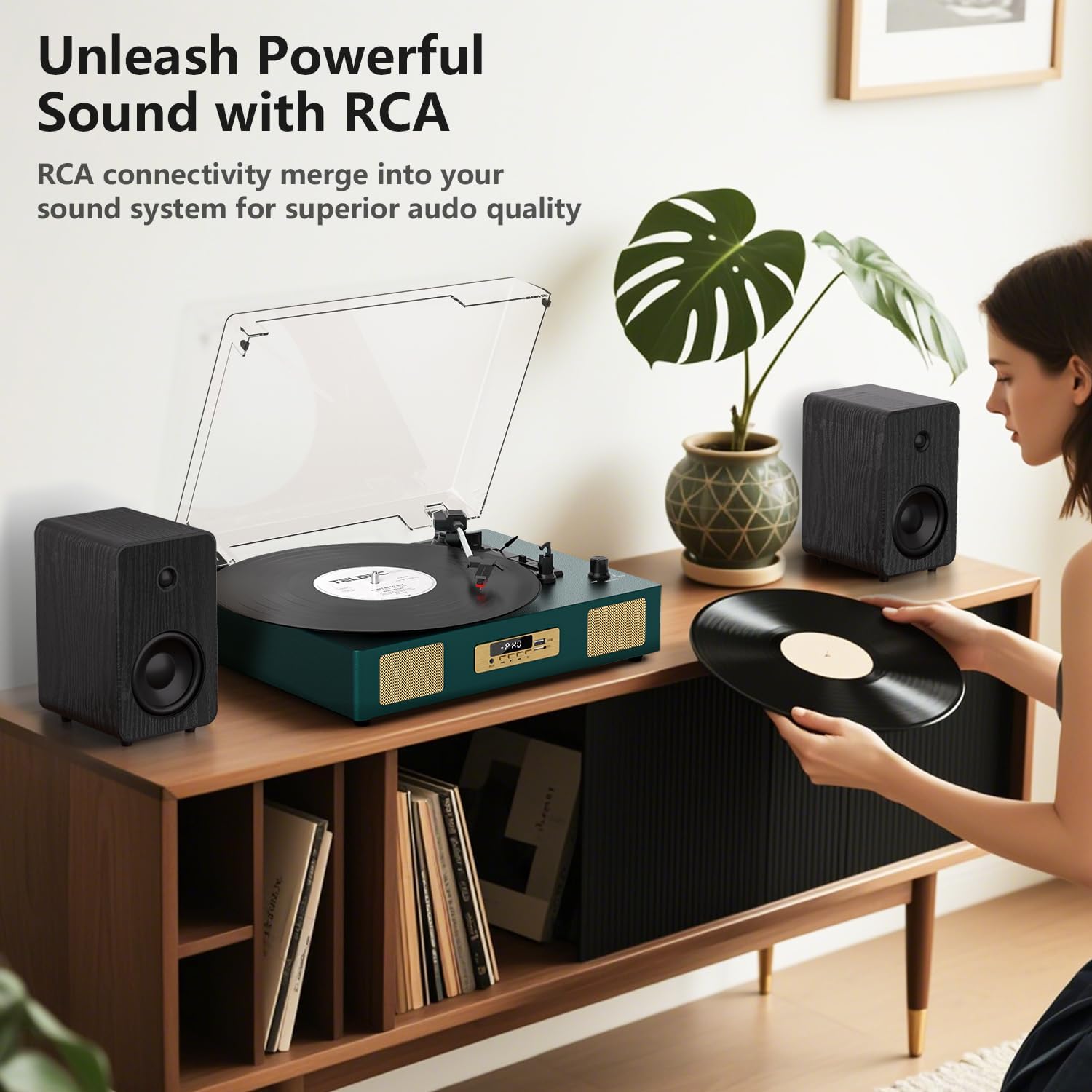
Obrázek 2: Zadní view of the TE-2017 Record Player, illustrating the RCA output ports connected to external speakers for enhanced audio quality.
5.6 Jack pro sluchátka
For private listening, plug 3.5mm headphones into the headphone jack located on the front panel. The built-in speakers will be muted automatically.
6. Údržba
- Čištění stylusu: K jemnému čištění stylusu zezadu dopředu použijte měkký kartáček (není součástí balení). Nepoužívejte nadměrnou sílu.
- Čištění gramofonu: Otřete přístroj měkkým, suchým hadříkem. Nepoužívejte abrazivní čisticí prostředky ani rozpouštědla.
- Protiprachový kryt: Pokud gramofon nepoužíváte, mějte kryt proti prachu zavřený, abyste jej ochránili před prachem a nečistotami.
- Péče o záznamy: Handle records by their edges. Store them vertically in their sleeves to prevent warping and dust accumulation.
7. Řešení problémů
| Problém | Možná příčina | Řešení |
|---|---|---|
| Žádná síla | Napájecí adaptér není připojen nebo je zásuvka vadná. | Ujistěte se, že je napájecí adaptér bezpečně připojen a zásuvka je funkční. |
| Žádný zvuk z reproduktorů | Příliš nízká hlasitost; zvolen nesprávný režim; připojena sluchátka. | Increase volume; select correct mode (PH, BT, AUX, USB); disconnect headphones. |
| Gramofon se neotáčí | Power off; belt dislodged; auto-stop engaged prematurely. | Ensure power is on; check belt (refer to maintenance); try disabling auto-stop. |
| Přeskakující nebo zkreslený zvuk | Znečištěná nebo poškozená deska; znečištěný nebo opotřebovaný hrot; gramofon není v rovině. | Vyčistěte desku; vyčistěte nebo vyměňte hrot; ujistěte se, že gramofon je na rovném povrchu. |
| Bluetooth není párování | Incorrect mode; device too far; device already paired. | Ensure 'BT' mode is selected; move device closer; unpair from other devices. |
8. Specifikace
- Značka: DANFI AUDIO DF
- Model: TE-2017
- Rychlosti gramofonu: 33 1/3, 45, 78 ot./min
- Typ pohonu: Řemenový pohon
- Konektivita: Bluetooth Receiver, USB, SD Card, AUX Input, RCA Output
- Speciální vlastnosti: Digital Recorder, WAV Converter, Digital Display, Pitch Control, Auto-Stop
- Zdroj napájení: Elektrický s kabelem (DC 5V/1A)
- Signal-to-noise ratio (dB): 78 dB
- Rozměry produktu: 35.56 x 27.94 x 12.45 cm (14 x 11 x 4.9 palce)
- Hmotnost: 3.07 kg (6.77 lb)
9. Záruka a podpora
For warranty information or technical support, please refer to the contact details provided with your purchase or visit the official DANFI AUDIO DF webUschovejte si doklad o koupi pro případné reklamace.