
Zavedení
This manual provides detailed instructions for the setup, operation, and maintenance of your VOKSUN S300 Vinyl Turntable. Please read this manual thoroughly before using the product to ensure proper function and longevity.
Komponenty produktu
Familiarize yourself with the various parts of your VOKSUN S300 turntable.

Obraz: Nadview of the VOKSUN S300 turntable, highlighting key components such as the RCA out port, Line-in (AUX IN) port, USB port, DC IN jack, speakers, 45RPM adaptor, lift lever, AUTO-STOP ON/OFF switch, PREV/NEXT button/MODE Knob, Speed switch, Power OFF/ON/Volume-/Volume+, Status indicator, Headphone port, Tonearm, Tonearm lock, Cartridge with needle, and Platter.
- RCA Out Port: Pro připojení k externímu amplifikátory nebo aktivní reproduktory.
- Line-in (AUX IN) Port: Pro připojení externích audio zařízení pomocí 3.5mm kabelu.
- USB port: For connecting USB flash drives for digital recording or playback.
- DC IN Jack: Pro připojení napájecího adaptéru.
- Řečníci: Built-in stereo speakers for direct audio output.
- 45RPM Adaptor: Používá se pro přehrávání 7palcových desek s velkým středovým otvorem.
- Zvedací páka: Zvedne a spustí tonearm.
- AUTO-STOP ON/OFF Switch: Povolí nebo zakáže funkci automatického zastavení na konci záznamu.
- PREV/NEXT button/MODE Knob: Controls track selection and mode switching (e.g., Bluetooth, AUX, Phono).
- Přepínač rychlosti: Volí rychlost přehrávání (33, 45 nebo 78 otáček za minutu).
- Power OFF/ON/Volume-/Volume+: Multifunction knob for power and volume control.
- Indikátor stavu: Displays the current operational status or mode.
- Port pro sluchátka: Pro soukromý poslech se sluchátky.
- Rameno: Holds the cartridge and needle.
- Zámek raménka přenosky: Zajišťuje raménko přenosky, když se nepoužívá.
- Cartridge with Needle: Reads the grooves of the vinyl record.
- Talíř: The rotating platform where the record is placed.
Nastavení
1. Vybalení a umístění
- Opatrně vyjměte gramofon z obalu.
- Umístěte gramofon na stabilní, rovný povrch mimo dosah přímého slunečního záření, zdrojů tepla a nadměrného prachu či vibrací.
- Zajistěte dostatečné větrání kolem jednotky.
2. Připojení napájení
- Connect the provided power cable to the DC IN jack on the back of the turntable.
- Plug the other end of the power cable into a suitable wall outlet (230 Volts).
3. Počáteční příprava
- Unlock the tonearm lock to free the tonearm.
- Remove the protective stylus cover from the needle.
Návod k obsluze
1. Přehrávání vinylových desek
- Otevřete víko otočného talíře.
- Umístěte vinylovou desku na talíř.
- Select the appropriate speed (33, 45, or 78 RPM) using the Speed Switch.
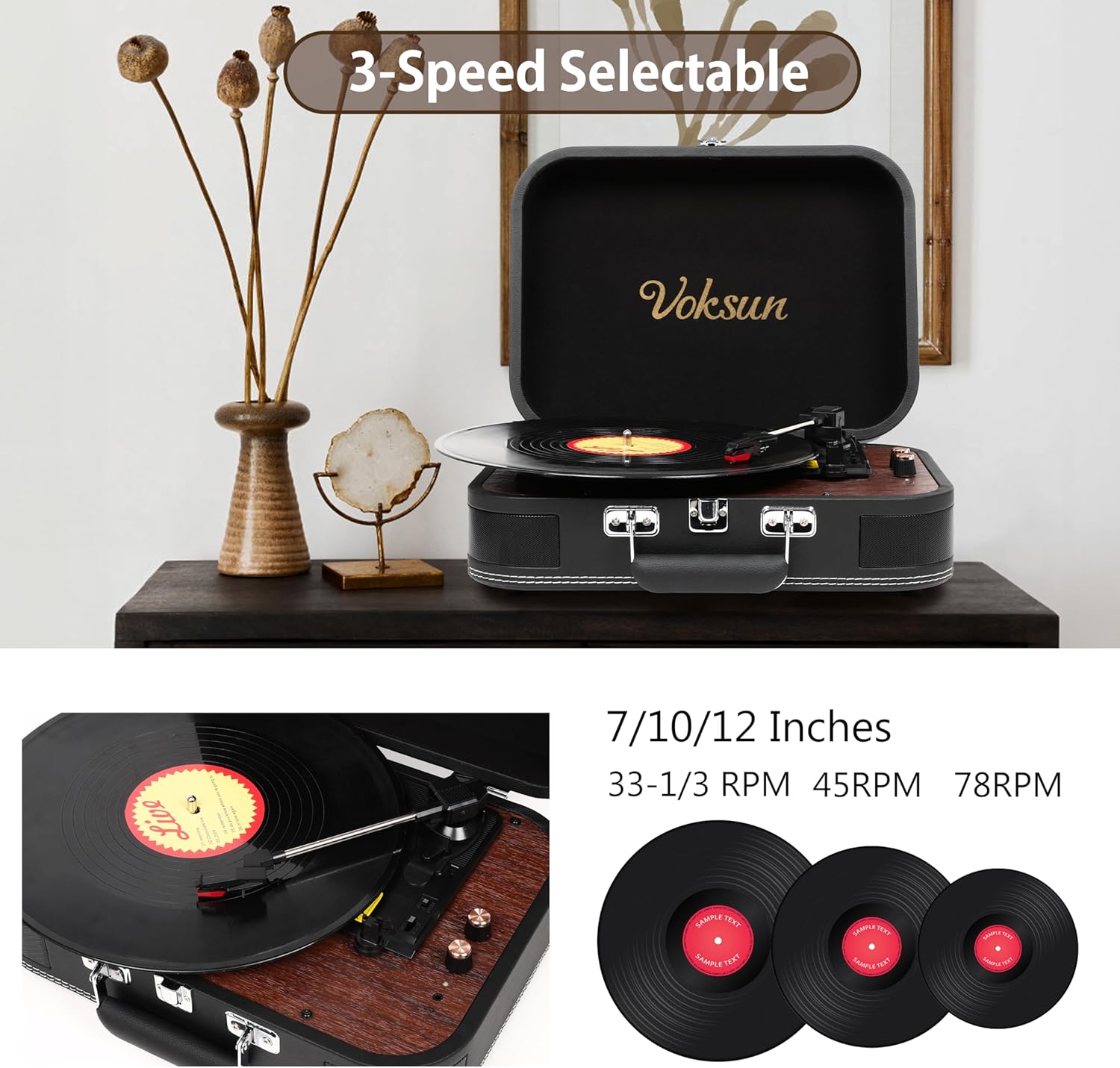
Obraz: Illustration of the turntable's 3-speed capability (33-1/3 RPM, 45 RPM, 78 RPM) and compatibility with 7, 10, and 12-inch vinyl records.
- For 7-inch records with a large center hole, place the 45RPM adaptor on the spindle before placing the record.
- Turn the Power OFF/ON/Volume knob clockwise to power on the unit and set the desired volume.
- Lift the tonearm using the Lift Lever.
- Carefully position the tonearm over the desired starting groove of the record.
- Gently lower the tonearm onto the record using the Lift Lever. The record will begin to play.
- To enable or disable automatic stopping at the end of a record, use the AUTO-STOP ON/OFF switch.
- When finished, lift the tonearm, return it to its rest, and secure it with the tonearm lock.
2. Bluetooth Input (Streaming to Turntable)
You can stream music wirelessly from your Bluetooth-enabled devices to the turntable's built-in speakers.
- Zapněte gramofon.
- Use the MODE Knob to select Bluetooth input mode. The status indicator will typically show a blue light or flash to indicate pairing mode.
- On your external device (smartphone, tablet, PC), enable Bluetooth and search for "VOKSUN" or a similar device name.
- Select the turntable from the list of available devices to pair.
- Once paired, you can play music from your device through the turntable's speakers.

Obraz: A visual representation of the turntable's Bluetooth wireless capability, showing a smartphone screen with music playing, indicating a successful connection to the turntable for music streaming.
3. Bluetooth Output (Streaming from Turntable)
You can play your vinyl records through an external Bluetooth speaker.
- Ujistěte se, že je váš externí Bluetooth reproduktor v režimu párování.
- Turn on the turntable and select Phono mode (for playing records).
- Activate Bluetooth output on the turntable (refer to the MODE Knob or specific button for Bluetooth Out, if available, otherwise it might automatically search when in Phono mode and a Bluetooth speaker is nearby). The turntable will search for and connect to the nearest available Bluetooth speaker.
- Once connected, audio from your vinyl record will play through the external Bluetooth speaker.
4. Pomocný vstup (AUX IN)
Connect external audio devices (e.g., MP3 players, smartphones) via a 3.5mm audio cable.
- Connect one end of a 3.5mm audio cable to the Line-in (AUX IN) port on the turntable.
- Druhý konec připojte ke konektoru pro sluchátka nebo audio výstupu vašeho externího zařízení.
- Use the MODE Knob to select AUX IN mode.
- Play audio from your external device. The sound will be output through the turntable's speakers.

Obraz: A user enjoying music from the turntable with headphones, illustrating the 3.5mm AUX IN and Headphone port functionality for personal listening or connecting external devices.
5. RCA výstup
Připojte gramofon k externímu ampreproduktory nebo aktivní reproduktory pro vylepšený zvukový výstup.
- Connect an RCA cable to the RCA Out ports on the back of the turntable.
- Connect the other end of the RCA cable to the corresponding audio input on your ampzesilovač nebo aktivní reproduktory.
- Ujistěte se, že vaše ampjsou reproduktory/reproduktory zapnuté a nastavené na správný vstup.

Obraz: A diagram illustrating the connectivity options on the back of the turntable, including RCA Out jacks for external speakers, AUX IN jack for headphones/MP3/smartphone, and a USB port for flash drives.
6. Vinyl-to-Digital Recording (USB)
Record your vinyl records directly to a USB flash drive in WAV format.
- Vložte USB flash disk do USB portu.
- Place a vinyl record on the platter and set the correct speed.
- Začněte přehrávat desku.
- Press the REC button (if available, or refer to specific instructions for recording via the MODE Knob). The turntable will begin recording the audio to the USB drive.
- Press the REC button again to stop recording. The recorded WAV file bude uložen na USB disk.

Obraz: A conceptual diagram illustrating the Vinyl-Digital Recording feature, where audio from a vinyl record is transformed into WAV format files and saved onto a USB flash drive.
Údržba
1. Čištění
- Wipe the turntable's exterior with a soft, dry cloth. Do not use abrasive cleaners or solvents.
- Gently clean the stylus with a soft brush designed for turntable needles, brushing from back to front.
- Keep your vinyl records clean to prevent dust buildup on the stylus.
2. Péče o stylus
- The stylus (needle) is a delicate component. Avoid touching it with your fingers.
- A worn stylus can damage records and degrade sound quality. Replace the stylus approximately every 200-300 hours of playback, or if you notice a decrease in sound quality.
- Viz pokyny výrobce website or contact support for replacement stylus information.
3. Skladování
- When not in use, ensure the tonearm is secured with the tonearm lock and the protective stylus cover is in place.
- Store the turntable in a dry place to prevent damage from moisture.
- Close the lid to protect the platter and tonearm from dust.
Odstraňování problémů
Pokud narazíte na problémy s gramofonem, podívejte se na následující běžné problémy a jejich řešení:
| Problém | Možná příčina | Řešení |
|---|---|---|
| Žádná síla | Napájecí kabel není připojen; zásuvka není aktivní. | Ensure power cable is securely connected to the turntable and a working power outlet. Check the power switch. |
| Žádný zvuk z reproduktorů | Volume too low; incorrect mode selected; stylus cover still on; tonearm not lowered. | Increase volume. Select correct input mode (Phono, AUX, Bluetooth). Remove stylus cover. Lower tonearm onto record. |
| Přeskakující nebo zkreslený zvuk | Dirty record; dirty or worn stylus; turntable not level; excessive vibration. | Clean the record. Clean or replace the stylus. Ensure turntable is on a stable, level surface. Avoid placing near vibrating objects. |
| Problémy s párováním pomocí rozhraní Bluetooth | Zařízení je příliš daleko; nesprávný režim; rušení. | Ensure devices are within range. Select correct Bluetooth mode on turntable. Restart both devices. |
| Nefunguje automatické zastavení | AUTO-STOP switch is OFF. | Ensure the AUTO-STOP switch is set to ON. Note that some records may not trigger auto-stop due to variations in groove run-out. |
Specifikace
| Značka | VOKSUN |
| Model | S300 |
| Rychlosti přehrávání | 33 1/3, 45, 78 ot./min |
| Kompatibilní velikosti desek | 7, 10, 12 palců |
| Konektivita | Bluetooth In, Bluetooth Out, AUX In (3.5mm), USB, RCA Out |
| Vestavěné reproduktory | Yes (Stereo, 5 Watts total) |
| Zdroj napájení | Elektrický kabel |
| svtage | 230 voltů |
| Typ motoru | Stejnosměrný motor |
| Speciální funkce | Auto-Stop, Vinyl-to-Digital Recording (WAV via USB) |
| Rozměry (balení) | 39.79 x 31.9 x 19.7 cm |
| Hmotnost (balení) | 2.76 kg |
Záruka a podpora
Specific warranty information is not provided in this manual. Please refer to the product packaging, the retailer's website, or contact VOKSUN customer support for details regarding warranty coverage and technical assistance.