
1. Nastavení
This section provides instructions for the initial setup of your HP OmniDesk Desktop PC M02-0010. Please follow these steps carefully to ensure proper functionality.
1.1 Vybalení a obsah
Opatrně vyjměte všechny součásti z obalu. Zkontrolujte, zda jsou přítomny všechny níže uvedené položky.

Image: Contents of the HP OmniDesk Desktop PC M02-0010 box, including the desktop tower, keyboard, mouse, power supply, and setup instructions.
- HP OmniDesk Desktop M02-0010 PC
- HP USB black wired keyboard
- HP USB black wired mouse
- 180 W 80 Plus Gold certified power supply
- Setup instructions document
1.2 Připojení periferních zařízení
Before powering on your desktop, connect the essential peripherals.

Image: The HP OmniDesk Desktop PC M02-0010 tower with the included wired keyboard and mouse connected, ready for use.
- Připojení monitoru: Connect your monitor to the desktop using an HDMI or DisplayPort cable. The desktop supports dual display output.
- Připojení klávesnice a myši: Plug the USB cables from the keyboard and mouse into any available USB Type-A ports on the desktop.
- Připojte napájení: Connect the power supply to the desktop's power input and then plug the power cord into a wall outlet.
- Zapnutí: Press the power button located on the front of the desktop tower.
2. Návod k obsluze
This section details the general operation and key features of your HP OmniDesk Desktop PC M02-0010.
2.1 Překročení systémuview

Obrázek: Overview of the HP OmniDesk Desktop PC M02-0010, highlighting its Intel Core i3-14100 processor, Intel UHD Graphics 730, 8GB DDR5 RAM, 512GB SSD, Wi-Fi 6, Bluetooth 5.4, Windows 11, and dual display support.
The HP OmniDesk Desktop PC M02-0010 is equipped with an Intel Core i3-14100 processor, 8 GB DDR5 RAM, and a 512 GB PCIe Gen4 NVMe M.2 SSD for efficient performance and storage. It runs on Windows 11 Home and includes Microsoft Copilot for enhanced productivity.
2.2 Porty a konektivita
The desktop offers various ports for connecting external devices and features advanced wireless connectivity.

Image: A detailed diagram showing the front and rear ports of the HP OmniDesk Desktop PC M02-0010, including USB Type-A, USB Type-C, HDMI, DisplayPort, RJ-45, and headphone/microphone combo jack.
- Přední porty: Headphone/microphone combo, USB Type-A 5Gbps (x2), USB Type-C 10Gbps (x1).
- Zadní porty: USB 2.0 Type-A (x4), RJ-45 (Ethernet), HDMI Out (x1), DisplayPort 1.4 (x1).
- Bezdrátové připojení: Integrated Wi-Fi 6 and Bluetooth 5.4 for fast and reliable wireless connections.
2.3 Dual Display Support
The HP OmniDesk supports connecting two monitors simultaneously via its HDMI Out and DisplayPort 1.4, allowing for an expanded workspace and improved productivity.

Image: A family interacting with the HP OmniDesk Desktop PC M02-0010, demonstrating its use in a home environment and highlighting dual monitor support for enhanced online experiences.
3. Údržba
Pravidelná údržba pomáhá zajistit dlouhou životnost a optimální výkon vašeho stolního počítače HP OmniDesk.
3.1 Čištění
- Vnější: Použijte měkký hadřík, který nepouští vlákna dampVnější povrchy otřete vodou nebo jemným čisticím roztokem. Vyhněte se agresivním chemikáliím.
- Průduchy: Pravidelně používejte stlačený vzduch k odstranění prachu z větracích otvorů, abyste zabránili přehřátí. Před čištěním větracích otvorů se ujistěte, že je počítač vypnutý.
- Obrazovka (pokud je k dispozici): For connected monitors, follow the monitor manufacturer's cleaning instructions.
3.2 Aktualizace softwaru
Keep your operating system and drivers updated to ensure security and performance. Windows 11 Home will typically manage updates automatically, but you can manually check for updates through the Settings menu.
4. Řešení problémů
This section provides solutions to common issues you might encounter with your HP OmniDesk Desktop PC.
4.1 Bez napájení
- Ensure the power cord is securely connected to both the desktop and a working electrical outlet.
- Ověřte funkčnost elektrické zásuvky zapojením jiného zařízení.
- Zkontrolujte napájecí jednotku, zda nesvítí nějaké kontrolky.
4.2 Žádné zobrazení na monitoru
- Zkontrolujte, zda je monitor zapnutý a zda je správně vybrán jeho vstupní zdroj (např. HDMI, DisplayPort).
- Ensure the video cable (HDMI or DisplayPort) is securely connected to both the desktop and the monitor.
- Zkuste připojit monitor k jinému video portu na stolním počítači, pokud je k dispozici.
4.3 Peripheral Not Responding
- Check that the USB cable for the keyboard or mouse is firmly plugged into a USB port.
- Zkuste zapojit periférii do jiného USB portu.
- Restartujte počítač.
5. Specifikace
Detailed technical specifications for the HP OmniDesk Desktop PC M02-0010.
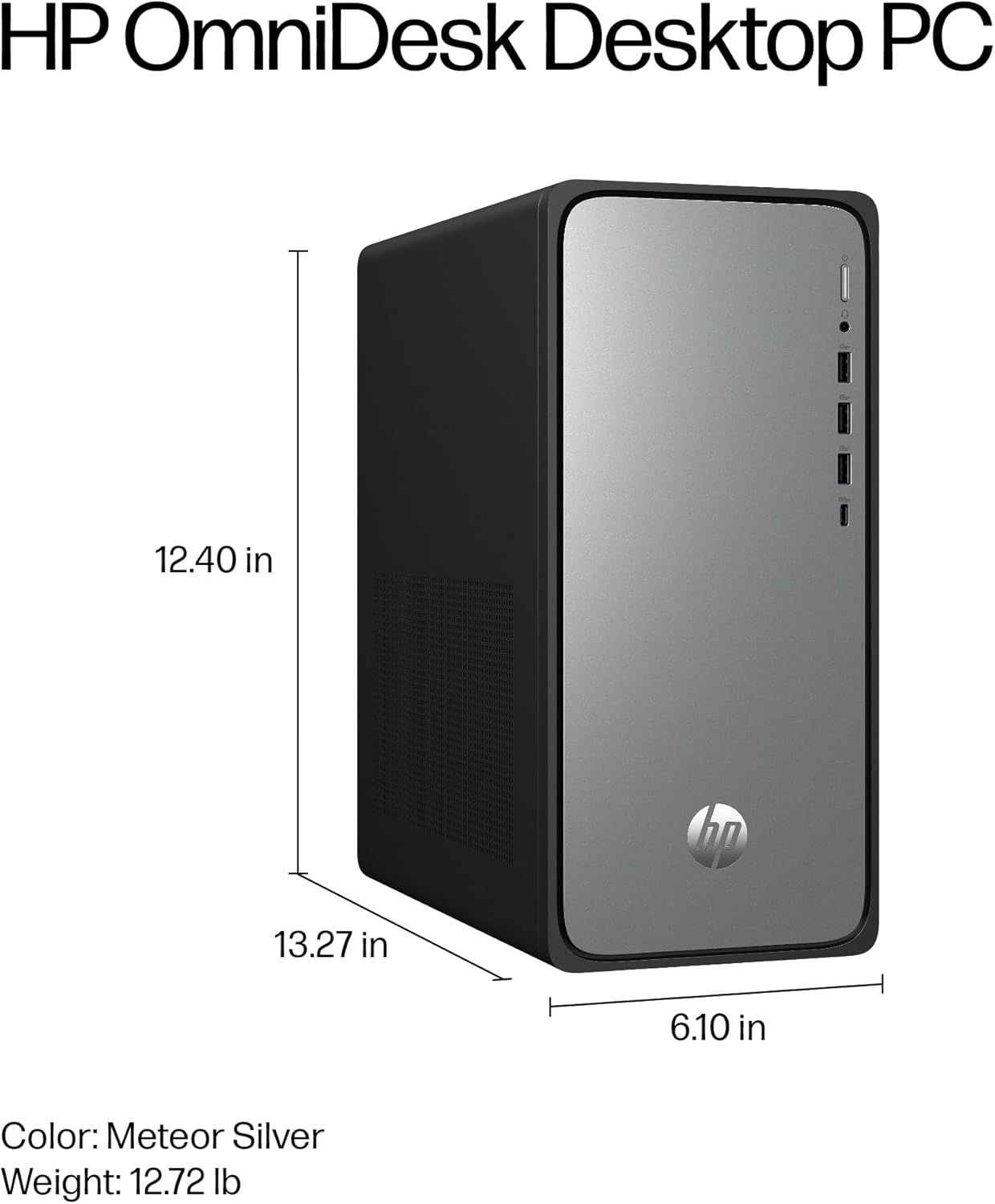
Image: A diagram illustrating the physical dimensions of the HP OmniDesk Desktop PC M02-0010: 13.27 inches (length), 6.10 inches (width), and 12.40 inches (height).
| Funkce | Specifikace |
|---|---|
| Číslo modelu | M02-0010 (B5RK6AA#ABA) |
| Procesor | Intel Core i3-14100 (4.7 GHz) |
| BERAN | 8 GB DDR5 (4800 MHz) |
| Skladování | 512GB PCIe Gen4 NVMe M.2 SSD |
| Grafika | Grafická karta Intel UHD 730 (integrovaná) |
| Operační systém | Windows 11 Home |
| Bezdrátové připojení | Wi-Fi 6, Bluetooth 5.4 |
| Porty (přední) | 1x Headphone/microphone combo, 2x USB Type-A 5Gbps, 1x USB Type-C 10Gbps |
| Porty (zadní) | 4x USB 2.0 typu A, 1x RJ-45, 1x HDMI výstup, 1x DisplayPort 1.4 |
| Rozměry (DxŠxV) | 13.27 x 6.1 x 12.4 palce |
| Hmotnost položky | 11.49 libry |
| Barva | Meteor silver, jack black chassis |
6. Informace o životním prostředí
The HP OmniDesk Desktop PC M02-0010 is designed with environmental sustainability in mind.

Image: The HP OmniDesk Desktop PC M02-0010 shown in a natural setting, accompanied by icons indicating 20% recycled metal, 50% post-consumer recycled plastic, EPEAT Gold with Climate+ certification, and ENERGY STAR certification.
- Constructed with 20% recycled metal and 50% post-consumer recycled plastic.
- EPEAT Gold with Climate+ certified.
- Certifikace ENERGY STAR pro energetickou účinnost.
7. Záruka a podpora
Your HP OmniDesk Desktop PC M02-0010 comes with comprehensive support and warranty coverage.
- Záruka na hardware: 1letá omezená záruka na hardware.
- Technická podpora: 1-year limited technical support for software and initial setup.
- MyHP Application: Utilize the MyHP application to customize, optimize, and secure your device. It provides tips, easy-to-access settings, and helpful messages to maintain smooth operation.
For further assistance, please refer to the official HP support webwebu nebo se obraťte na zákaznický servis HP.