
Zavedení
Thank you for choosing the LAMAX W9.2 Action Camera. This manual provides essential information for the proper setup, operation, and maintenance of your device. Please read it thoroughly before use to ensure optimal performance and longevity of your camera.
Konec produktuview
The LAMAX W9.2 is a versatile action camera designed to capture high-quality videos and photos in various environments. It features dual displays, advanced stabilization, and a robust waterproof design.
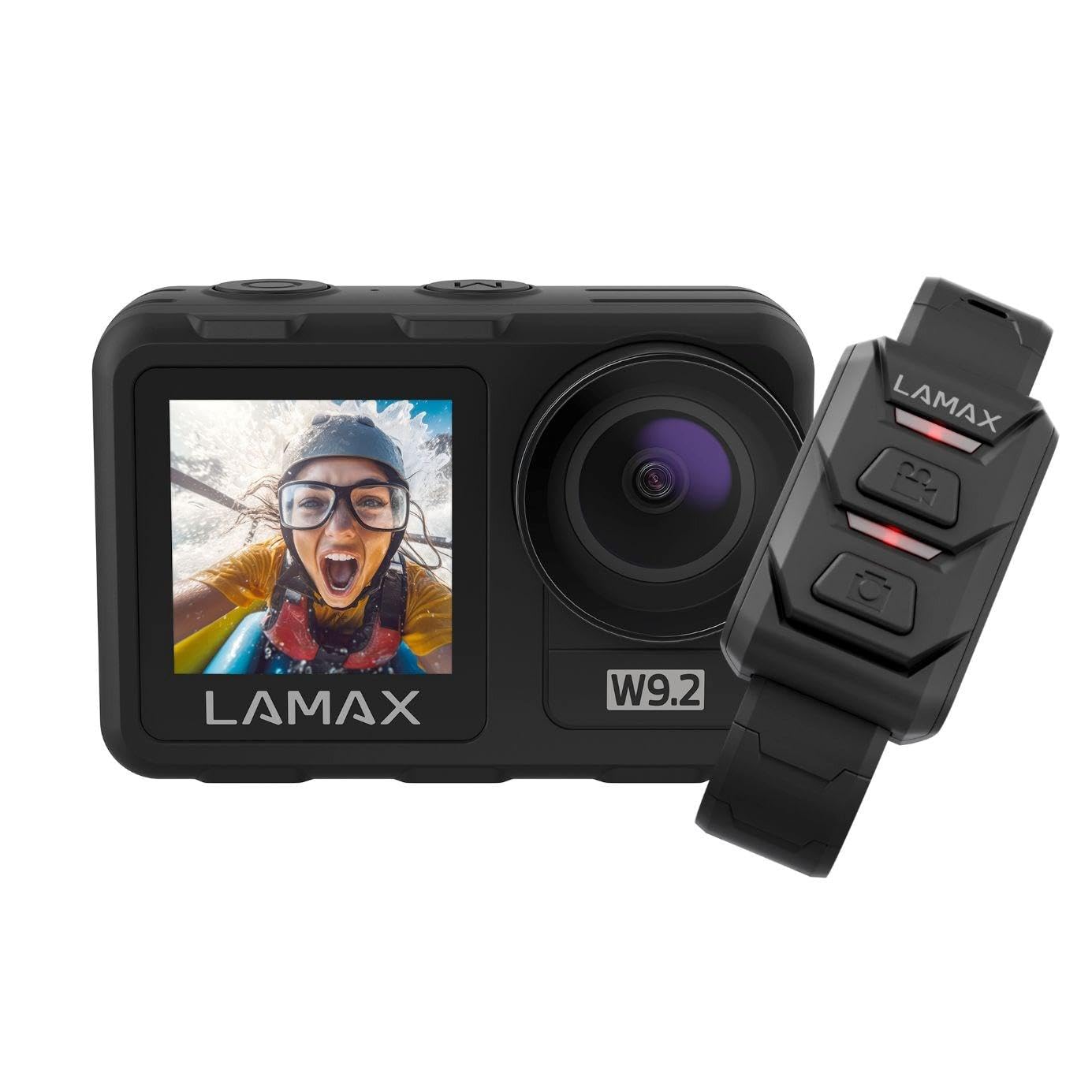
Obrázek: Přední strana view of the LAMAX W9.2 Action Camera, showcasing its compact design and dual display feature.
Klíčové vlastnosti:
- Duální displej: A 2-inch rear touchscreen for settings and playback, and a 1.4-inch front screen for selfie framing.
- Video ve vysokém rozlišení: Up to 5K at 60 frames per second (FPS) and 1080p at 120 FPS.
- Vodotěsný design: Waterproof up to 12 meters (40 feet) without an additional case. With a waterproof case, it can be used up to 40 meters (130 feet).
- MAXSmooth Stabilization: Advanced electronic image stabilization for smooth footage.
- Fotografie s rozlišením 20 megapixelů: Pořizujte statické snímky ve vysokém rozlišení.
- Integrované Wi-Fi: For quick transfer and sharing of content to your mobile device.
- Kreativní režimy: Includes slow motion, timelapse, accelerated video, and long exposure.
- Flexibilní ovládání: Touchscreen operation, physical buttons, and remote control compatibility.
Nastavení
1. Instalace baterie
- Na fotoaparátu vyhledejte přihrádku na baterie.
- Otevřete kryt přihrádky.
- Insert the provided battery, ensuring the correct orientation of the contacts.
- Bezpečně zavřete kryt bateriového prostoru.
- Charge the battery fully before first use using the supplied USB cable.
2. Vložení paměťové karty
- The camera requires a microSD card (not included) for storing photos and videos.
- Insert the microSD card into the designated slot until it clicks into place.
- Ensure the card is formatted in the camera's settings menu for optimal performance.
- Use a high-speed microSD card (Class 10 or UHS-I/UHS-3 recommended) for 4K/5K recording.
3. Počáteční zapnutí
- Press and hold the Power/Mode button to turn on the camera.
- Postupujte podle pokynů na obrazovce a nastavte jazyk, datum a čas.
Obsluha fotoaparátu
Základní ovládání:
- Tlačítko napájení / režimu: Press and hold to power on/off. Press briefly to switch between video, photo, and playback modes.
- Tlačítko závěrky/výběru: Press to start/stop recording video or take a photo. In menu, use to confirm selection.
- Tlačítka nahoru/dolů: Navigate menu options or zoom (if applicable).
- Zadní dotyková obrazovka: Swipe and tap to access settings and modes.
- Přední displej: Primarily for framing selfies or monitoring camera status.
Nahrávání videa:
- Switch to video mode using the Power/Mode button or touchscreen.
- Adjust video resolution and other settings via the touchscreen menu.
- Press the Shutter/Select button to begin recording. A red indicator light will flash.
- Opětovným stisknutím tlačítka spouště/výběru zastavíte nahrávání.
Fotit:
- Switch to photo mode.
- Adjust photo settings (e.g., resolution, exposure) via the touchscreen menu.
- Press the Shutter/Select button to take a photo.
Wi-Fi připojení:
- Enable Wi-Fi in the camera settings.
- Download the official LAMAX app on your smartphone.
- Connect your phone to the camera's Wi-Fi network (SSID and password displayed on camera screen).
- Use the app to control the camera, view živé footage a převod files.
Kreativní režimy:
- Zpomalený pohyb: Nahrává video s vyšší snímkovou frekvencí pro zpomalené přehrávání.
- timelapse: Captures a series of photos at set intervals and stitches them into a video.
- Accelerated Video: Records video at a lower frame rate for fast-motion playback.
- Dlouhá expozice: Allows for longer shutter speeds to capture more light in low-light conditions.
- Access these modes through the camera's menu and adjust settings as desired.
Pokyny pro hydroizolaci
The LAMAX W9.2 is designed to be waterproof up to 12 meters (40 feet) without an external housing. For deeper dives, an additional waterproof case is required, extending its capability to 40 meters (130 feet).
- Before submerging the camera, ensure all port covers (battery, USB, HDMI) are securely closed.
- Regularly inspect the seals for any dirt, debris, or damage. Clean and replace if necessary.
- Po použití ve slané vodě opláchněte fotoaparát sladkou vodou a důkladně jej osušte.
- Do not open the battery or memory card compartment while the camera is wet or submerged.
Údržba
- Čištění: Use a soft, lint-free cloth to clean the camera body and lenses. For stubborn dirt, slightly dampOpláchněte hadřík vodou. Vyhněte se agresivním chemikáliím.
- Skladování: Fotoaparát skladujte na chladném a suchém místě mimo dosah přímého slunečního záření a extrémních teplot. Pokud jej skladujete delší dobu, vyjměte baterii.
- Péče o baterie: Do not expose batteries to high temperatures or dispose of them in fire. Recycle used batteries responsibly.
- Aktualizace firmwaru: Podívejte se na oficiální stránky LAMAX webpravidelně aktualizujte firmware na webu, abyste zajistili optimální výkon a přístup k novým funkcím.
Odstraňování problémů
Kamera se nezapíná:
- Ujistěte se, že je baterie plně nabitá a správně vložená.
- Pokud je k dispozici, zkuste jinou baterii.
- Press and hold the Power/Mode button for at least 5 seconds.
Nahrávání se neočekávaně zastaví:
- Zkontrolujte, zda není paměťová karta plná.
- Ensure you are using a high-speed memory card (Class 10 or higher).
- Naformátujte paměťovou kartu ve fotoaparátu.
- The camera might be overheating in extreme conditions; allow it to cool down.
Problémy s připojením Wi-Fi:
- Ensure Wi-Fi is enabled on the camera and your smartphone.
- Restartujte fotoaparát i smartphone.
- Make sure you are within the Wi-Fi range.
- Verify the correct Wi-Fi password.
Špatná kvalita obrazu/videa:
- Vyčistěte čočku fotoaparátu.
- Check resolution settings.
- Zajistěte dostatečné osvětlení.
- Verify MAXSmooth stabilization is enabled for video.
Specifikace
| Název modelu | W9.2 |
| Rozlišení videa | Up to 5K/60FPS, 4K, 1080p/120FPS |
| Rozlišení fotografie | 20 megapixelů |
| Vodotěsná hloubka | 12m (without case), 40m (with waterproof case) |
| Stabilizace | MAXSmooth (Anti-shake) |
| Displeje | Rear: 2-inch Touchscreen; Front: 1.4-inch |
| Konektivita | Wi-Fi, HDMI |
| Technologie fotosenzoru | CMOS |
| Formát záznamu videa | MOV |
| Speciální funkce | Slow motion, Timer, Wind noise reduction |
| Rozměry | 3.2 x 6.4 x 4.2 cm |
| Hmotnost | 127 g |
| Baterie | C batteries (included) |
Záruka a podpora
For warranty information and technical support, please refer to the official LAMAX webnebo se obraťte na místního distributora. Uschovejte si doklad o koupi pro případ reklamace.
Online zdroje: For the latest information, FAQs, and firmware updates, visit the official LAMAX support page: www.lamax.eu