
Zavedení
This manual provides essential information for the setup, operation, maintenance, and troubleshooting of your Onn 22 inch 1080P 100 Hz FHD LED Monitor. Please read this guide thoroughly before using the product to ensure optimal performance and safety.
The Onn 22 inch FHD LED Monitor is designed for a variety of applications, offering a vivid 1920x1080 resolution, a 100Hz refresh rate, and a 6.5ms response time for efficient performance. Its slim profile and T-shaped base are ideal for saving desk space.
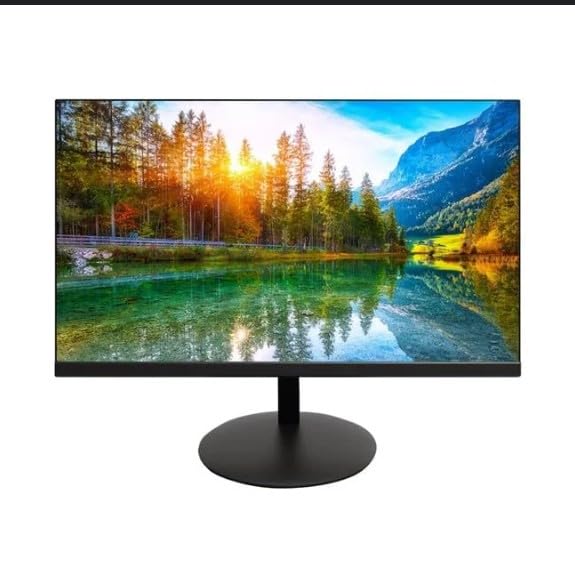
The image shows the Onn 22 inch FHD LED Monitor, highlighting its 100Hz refresh rate and 1080p resolution. The monitor features a slim design and a T-shaped base.
Pokyny pro nastavení
- Rozbalení: Carefully remove the monitor and all accessories from the packaging. Ensure all components are present: monitor, T-shaped base, HDMI cable, and power adapter.
- Sestavení stojanu: Attach the T-shaped base to the monitor. The design is screw-less for easy assembly. Ensure it is securely fastened.
- Připojení k zařízení:
The monitor supports both HDMI and VGA inputs. Connect the provided HDMI cable from your computer's HDMI output to the HDMI IN port on the monitor. Alternatively, use a VGA cable for VGA input.

This image displays the rear panel of the Onn monitor, illustrating the available input ports: HDMI IN, VGA IN, and the DC 12V power input. These ports are essential for connecting the monitor to a computer or other devices.
- Připojení napájení: Connect the power adapter to the DC 12V input port on the monitor, then plug the adapter into a power outlet.
- Nastavení monitoru: The monitor is capable of swivel, tilt, rotation, and height adjustment. Adjust the screen to your preferred viewúhel sklonu pro ergonomické pohodlí.
- Nastavení dvou monitorů: This monitor is suitable for a fully functioning dual monitor setup. Connect a second monitor using the appropriate cables and configure your operating system's display settings.
Návod k obsluze
- Zapnutí/vypnutí: Press the power button, usually located on the bottom or back of the monitor, to turn it on or off.
- Výběr vstupu: If the monitor does not automatically detect the input source, use the On-Screen Display (OSD) menu buttons to manually select between HDMI and VGA inputs.
- Navigace v nabídce OSD: Use the physical buttons on the monitor (typically on the back or bottom edge) to navigate the OSD menu. This allows you to adjust settings such as brightness, contrast, color temperature, and input source.
- Rozlišení a obnovovací frekvence: The monitor supports a native resolution of 1920x1080 at a 100Hz refresh rate. Ensure your computer's display settings are configured to these specifications for the best visual experience.
- Adaptivní synchronizace: The monitor features Adaptive Sync for gaming, which helps to reduce screen tearing and stuttering. Ensure this feature is enabled in your graphics card settings if supported.
Údržba
- Čištění obrazovky: Jemně otřete obrazovku měkkým hadříkem, který nepouští vlákna. V případě odolných skvrn lehceampen the cloth with water or a non-abrasive, monitor-specific cleaning solution. Avoid spraying liquids directly onto the screen.
- Čištění Casing: K čištění monitoru používejte měkký, suchý hadřík casing. Do not use strong detergents or solvents, as they may damage the finish.
- Větrání: Abyste zabránili přehřátí, ujistěte se, že ventilační otvory monitoru nejsou zablokované.
- Skladování: Pokud monitor delší dobu nepoužíváte, skladujte jej na chladném a suchém místě, mimo dosah přímého slunečního záření a extrémních teplot.
Odstraňování problémů
- Bez napájení:
- Zkontrolujte, zda je napájecí kabel pevně připojen k monitoru i k elektrické zásuvce.
- Ověřte, zda zásuvka funguje správně.
- Bez signálu:
- Ujistěte se, že je videokabel (HDMI nebo VGA) pevně připojen k monitoru i k počítači.
- Vyberte správný vstupní zdroj pomocí nabídky OSD monitoru.
- Zkontrolujte, zda je počítač zapnutý a není v režimu spánku.
- Blikání obrazovky nebo špatná kvalita obrazu:
- Zkontrolujte video kabel, zda není poškozený nebo zda nejsou uvolněné spoje.
- Adjust the resolution and refresh rate settings on your computer to match the monitor's specifications (1920x1080, 100Hz).
- Obnovte nastavení monitoru na tovární nastavení pomocí nabídky OSD.
- Tlačítka nereagují:
- Unplug the monitor from the power outlet, wait for 30 seconds, and then plug it back in.
If problems persist, please refer to the support information provided in the "Support and Warranty" section.
Specifikace
| Značka | Onn |
| Číslo modelu | 100140681 |
| Název modelu | OTTO |
| Velikost obrazovky | 21.5 palce |
| Typ zobrazení | LED, LCD |
| Rezoluce | 1920 × 1080 (FHD 1080p) |
| Obnovovací frekvence | 100 Hz |
| Doba odezvy | 6.5 milisekund |
| Hardwarové rozhraní | hdmi, vga |
| Speciální funkce | Nastavení výšky |
| Viewúhel | 160 stupňů |
| Poměr stran | 16:9 |
| Rozměry produktu | 49.2 x 20 x 37.2 cm; 3.24 kg |
Podpora a záruka
For technical support, product inquiries, or warranty information, please visit the official Onn support webnebo kontaktujte jejich zákaznický servis.
- Oficiální podpora Webmísto: onnsupport.ca
- Záruka: Specific warranty details may vary by region and purchase date. Please refer to the documentation included with your product or visit the support webstránky, kde najdete nejaktuálnější informace o záruce.


