
1. Úvod
This manual provides essential information for the safe and efficient installation, operation, and maintenance of the Weidmuller UR20-FBC-MOD-TCP-ECO I/O Module. Please read this manual thoroughly before attempting to install or operate the device.
The UR20-FBC-MOD-TCP-ECO is an industrial I/O module designed for robust performance in various automation applications. It features a 24 VDC input voltage and push-in termination style for reliable connections.
2. Bezpečnostní informace
- Always disconnect power before installing, wiring, or servicing the module.
- Instalaci a údržbu by měl provádět pouze kvalifikovaný personál.
- Ensure proper grounding to prevent electrical shock and ensure correct operation.
- Operate the module within the specified environmental conditions (temperature, humidity).
- Do not expose the module to excessive moisture or corrosive substances.
3. Konec produktuview
The Weidmuller UR20-FBC-MOD-TCP-ECO is a compact I/O module designed for distributed control systems. It integrates seamlessly into industrial networks, providing reliable data acquisition and control capabilities.
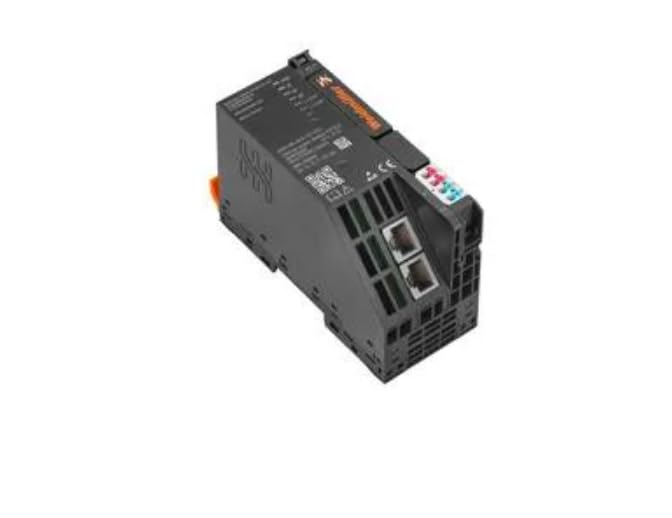
3.1 Klíčové vlastnosti
- Kompaktní design pro prostorově úspornou instalaci.
- Push-in termination technology for quick and reliable wiring.
- Široký rozsah provozních teplot (-20°C až +60°C).
- Ethernet/TCP communication capabilities.
4. Nastavení a instalace
4.1 Montáž
- Ensure the DIN rail is securely mounted in a suitable enclosure.
- Zarovnejte klip DIN lišty modulu s horní hranou DIN lišty.
- Press the module firmly downwards until it clicks into place on the DIN rail.
- Zkontrolujte, zda je modul bezpečně upevněn a nekývá se.
4.2 Zapojení
The UR20-FBC-MOD-TCP-ECO utilizes push-in termination for electrical connections. Ensure all wires are stripped to the recommended length before insertion.
- Napájení: Connect a stable 24 VDC power supply to the designated power terminals. Observe correct polarity (+ and -).
- Internetové připojení: Connect standard Ethernet cables to the RJ45 ports for network communication.
- V/V připojení: Connect field devices to the appropriate input/output terminals as per your system design. Refer to the system documentation for specific pin assignments.
- Ensure all connections are firm and free from loose strands.
4.3 Počáteční zapnutí
After all connections are made and verified, apply power to the module. Observe the status indicator LEDs for proper initialization.
5. Provoz
Once powered, the UR20-FBC-MOD-TCP-ECO module will establish communication with the connected network controller. The module's operational status can be monitored via its integrated LED indicators.
5.1 Stavové indikátory
Refer to the module's labeling for the exact meaning of each LED. Typically, these include:
- LED napájení: Indikuje stav napájení.
- LED stavu sítě: Indicates network connection and communication activity.
- I/O Status LEDs: Indicate the status of individual input/output channels.
5.2 Síťová komunikace
The module communicates over Ethernet using TCP/IP protocols. Configuration of network parameters (e.g., IP address) is typically performed via the connected controller or a dedicated configuration tool.
6. Údržba
Regular maintenance ensures the longevity and reliable operation of the I/O module.
- Čištění: Pravidelně čistěte vnější povrch modulu měkkým, suchým hadříkem. Nepoužívejte abrazivní čisticí prostředky ani rozpouštědla. Před čištěním se ujistěte, že je odpojeno napájení.
- Inspekce: Regularly inspect wiring connections for tightness and signs of damage or corrosion. Check for any physical damage to the module housing.
- Aktualizace firmwaru: Consult the Weidmuller website or your system integrator for information on available firmware updates. Follow all instructions carefully when performing updates.
7. Řešení problémů
Tato část obsahuje pokyny pro řešení běžných problémů. V případě složitých problémů kontaktujte technickou podporu.
| Problém | Možná příčina | Řešení |
|---|---|---|
| Žádná indikace napájení LED diodou | No power supply; incorrect wiring; faulty module. | Check 24 VDC power supply; verify wiring polarity; test with a known good power source. |
| Network Status LED off/flashing incorrectly | No network connection; incorrect network settings; faulty cable. | Check Ethernet cable connection; verify network configuration (IP address, subnet mask); replace cable. |
| I/O neodpovídá | Incorrect I/O wiring; faulty field device; software configuration error. | Verify I/O wiring; test field device independently; check controller software configuration. |
8. Technické specifikace
| Parametr | Hodnota |
|---|---|
| Číslo modelu | UR20-FBC-MOD-TCP-ECO |
| Číslo dílu | 2659700000 |
| Výrobce | Weidmuller |
| Vstupní objemtage | 24 V DC |
| Styl ukončení | Push-In |
| Minimální provozní teplota | -20 °C |
| Maximální provozní teplota | +60 °C |
| Hmotnost položky | 6.99 libry |
9. Informace o záruce
Weidmuller products are manufactured to high-quality standards. For specific warranty terms and conditions, please refer to the official Weidmuller warranty statement available on their webnebo se obraťte na místního distributora. Uschovejte si doklad o koupi pro případ reklamace.
10. Technická podpora
For technical assistance, product inquiries, or service requests, please contact your authorized Weidmuller distributor or visit the official Weidmuller webweb s podpůrnými zdroji a kontaktními informacemi.