
Zavedení
This manual provides detailed instructions for the operation and maintenance of your Casio WS-1400H Series digital watch. Please read this manual carefully to ensure proper use and to fully utilize all features of your watch.
The Casio WS-1400H is designed for active individuals, featuring a 60-lap memory stopwatch, 100-meter water resistance, and a long-lasting 10-year battery.
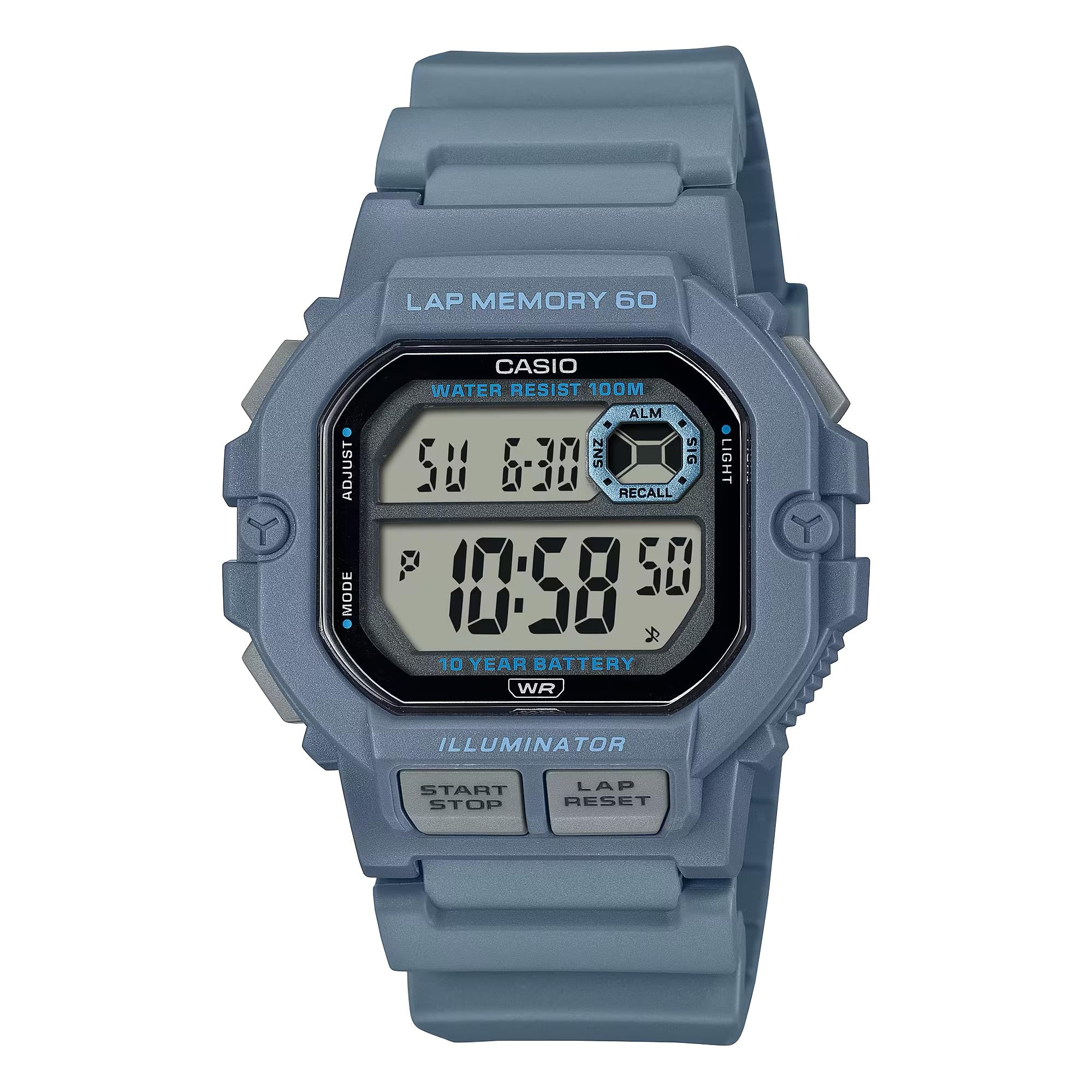
Image: Casio WS-1400H Series Digital Watch, showcasing its design and digital display.
Nastavení
Počáteční nastavení času a data
- V režimu měření času stiskněte a podržte tlačítko UPRAVIT button (usually top-left) until the seconds begin to flash, indicating the setting screen.
- Stiskněte tlačítko MODE button (usually bottom-left) to cycle through the settings: Seconds → Hour → Minute → Year → Month → Day.
- Použijte START/STOP button (usually top-right) to increase the flashing value, or the KOLO/RESET button (usually bottom-right) to decrease it.
- Jakmile jsou všechna nastavení správná, stiskněte tlačítko UPRAVIT tlačítko pro opuštění obrazovky nastavení.
Informace o baterii
Your Casio WS-1400H watch is powered by a CR2025 battery, providing approximately 10 years of operation. When the display becomes dim or functions become unreliable, it is time to replace the battery. It is recommended to have battery replacement performed by a qualified watch technician to ensure proper sealing and water resistance.
Provozní režimy
The watch features several modes accessible by pressing the MODE tlačítko.
Režim měření času
Displays the current time (hour, minute, second), day of the week, and date. This is the default mode.
Režim stopek
The stopwatch measures elapsed time, split times, and two finishes. It has a 60-lap memory function.
- To enter Stopwatch Mode: Press the MODE button until 'STW' or 'STOPWATCH' appears.
- To start/stop: Press the START/STOP button (front button).
- To record a lap/split time: Press the KOLO/RESET button while the stopwatch is running.
- To reset: With the stopwatch stopped, press the KOLO/RESET tlačítko.
- Na view lap memory: In Stopwatch Mode, press the UPRAVIT button to cycle through recorded lap times.
Režim odpočítávání
The countdown timer can be set for a specific duration and will alert you when the time expires.
- To enter Timer Mode: Press the MODE button until 'TMR' or 'TIMER' appears.
- To set the timer: Press and hold the UPRAVIT button until the hour/minute digits flash. Use START/STOP a KOLO/RESET to adjust values, and MODE Pro přepínání mezi hodinami a minutami stiskněte UPRAVIT potvrdit.
- To start/stop the timer: Press the START/STOP tlačítko.
- To reset the timer: With the timer stopped, press the KOLO/RESET tlačítko.
Režim alarmu
Hodinky disponují několika denními alarmy a hodinkami.urly časový signál.
- To enter Alarm Mode: Press the MODE tlačítko , dokud se nezobrazí „ALM“ nebo „ALARM“.
- To set an alarm: Press and hold the UPRAVIT button until the hour digits flash. Use START/STOP a KOLO/RESET to adjust values, and MODE Pro přepínání mezi hodinami a minutami stiskněte UPRAVIT potvrdit.
- To turn alarms ON/OFF: In Alarm Mode, press the START/STOP button to toggle through alarms and the hourly časový signál.
Režim duálního času
Allows you to keep track of a second time zone.
- To enter Dual Time Mode: Press the MODE button until 'DT' or 'DUAL TIME' appears.
- To set dual time: Press and hold the UPRAVIT button until the hour digits flash. Use START/STOP a KOLO/RESET to adjust values, and MODE Pro přepínání mezi hodinami a minutami stiskněte UPRAVIT potvrdit.
LED podsvícení
The watch features an LED backlight for illumination in low-light conditions.
- To activate: Press the SVĚTLO button (usually top-right or a dedicated button).
- Afterglow duration: The backlight can be set to illuminate for 1.5 seconds or 3 seconds. This setting is typically adjusted in Timekeeping Mode's setting screen, cycling through options with the MODE button after setting time.
Údržba
Voděodolnost
Your watch is rated for 100-meter water resistance. This means it is suitable for swimming, showering, and snorkeling. However, it is not suitable for scuba diving. Nepoužívejte tlačítka, pokud jsou hodinky mokré nebo ponořené.
Čištění
Wipe the watch regularly with a soft, dry cloth to remove dirt and moisture. For stubborn dirt, use a soft cloth dampened with water and a mild neutral detergent, then wipe dry.
Výměna baterie
As mentioned, the CR2025 battery has a 10-year life. When replacement is needed, it is strongly recommended to take the watch to an authorized Casio service center or a professional watch repair shop. This ensures the watch's water resistance is maintained after the battery compartment is opened.
Odstraňování problémů
- Displej je prázdný nebo tmavý: Baterie může být slabá nebo vybitá. Vyměňte baterii.
- Čas je nesprávný: Re-adjust the time and date settings as described in the Setup section. Ensure the correct AM/PM setting is selected.
- Tlačítka nereagují: Ensure the watch is not in a frozen state due to extreme cold. If the issue persists, a battery reset (AC reset) might be required by a professional.
- Voda uvnitř hodinek: Hodinky ihned odneste do autorizovaného servisního střediska. Nepokoušejte se hodinky sami otevírat.
Specifikace
| Číslo modelu | WS-1400H-2AVCF |
| Výrobce | Casio |
| Rozměry produktu | 5 x 7 x 5 palce; 5.26 unce |
| Baterie | 1 LR44 battery (CR2025 equivalent), included |
| Voděodolnost | 100 metrů (10 bankomatů) |
| Životnost baterie | Přibližně 10 let |
| Stopwatch Memory | 60 kol |
Záruka a podpora
For warranty information, service, and support, please refer to the official Casio website or contact Casio customer service directly. Keep your proof of purchase for warranty claims.
Oficiální Casio Webmísto: www.casio.com


