
1. Úvod
This manual provides detailed instructions for the installation, operation, and maintenance of the TMEZON MZ-VDP-NE160 4-wire doorbell camera. This outdoor station is designed to work seamlessly with compatible TMEZON videophone monitors, such as the MZ-IP-V728TW, to provide secure and convenient visitor management for your property.
2. Bezpečnostní informace
Please read and understand all safety instructions before installing or operating this device. Failure to follow these instructions may result in electric shock, fire, or damage to the product.
- Elektrická bezpečnost: Installation should be performed by a qualified electrician or technician. Ensure power is disconnected before any wiring work.
- Vystavení vodě: While designed for outdoor use, avoid direct high-pressure water jets. Ensure all connections are properly sealed.
- Teplota: Nevystavujte zařízení extrémním teplotám mimo jeho provozní rozsah.
- Čištění: K čištění používejte měkký, suchý hadřík. Nepoužívejte abrazivní čisticí prostředky nebo rozpouštědla.
3. Obsah balení
Ověřte, zda jsou v balení přítomny všechny komponenty:
- 1 x TMEZON MZ-VDP-NE160 Doorbell Camera Unit
- Montážní šrouby a hmoždinky
- Kabelové konektory
- Uživatelská příručka (tento dokument)
4. Konec produktuview
The TMEZON MZ-VDP-NE160 is an outdoor doorbell camera unit. It features a camera for video surveillance, a microphone for audio input, a speaker for audio output, and a call button to initiate communication with the indoor monitor.
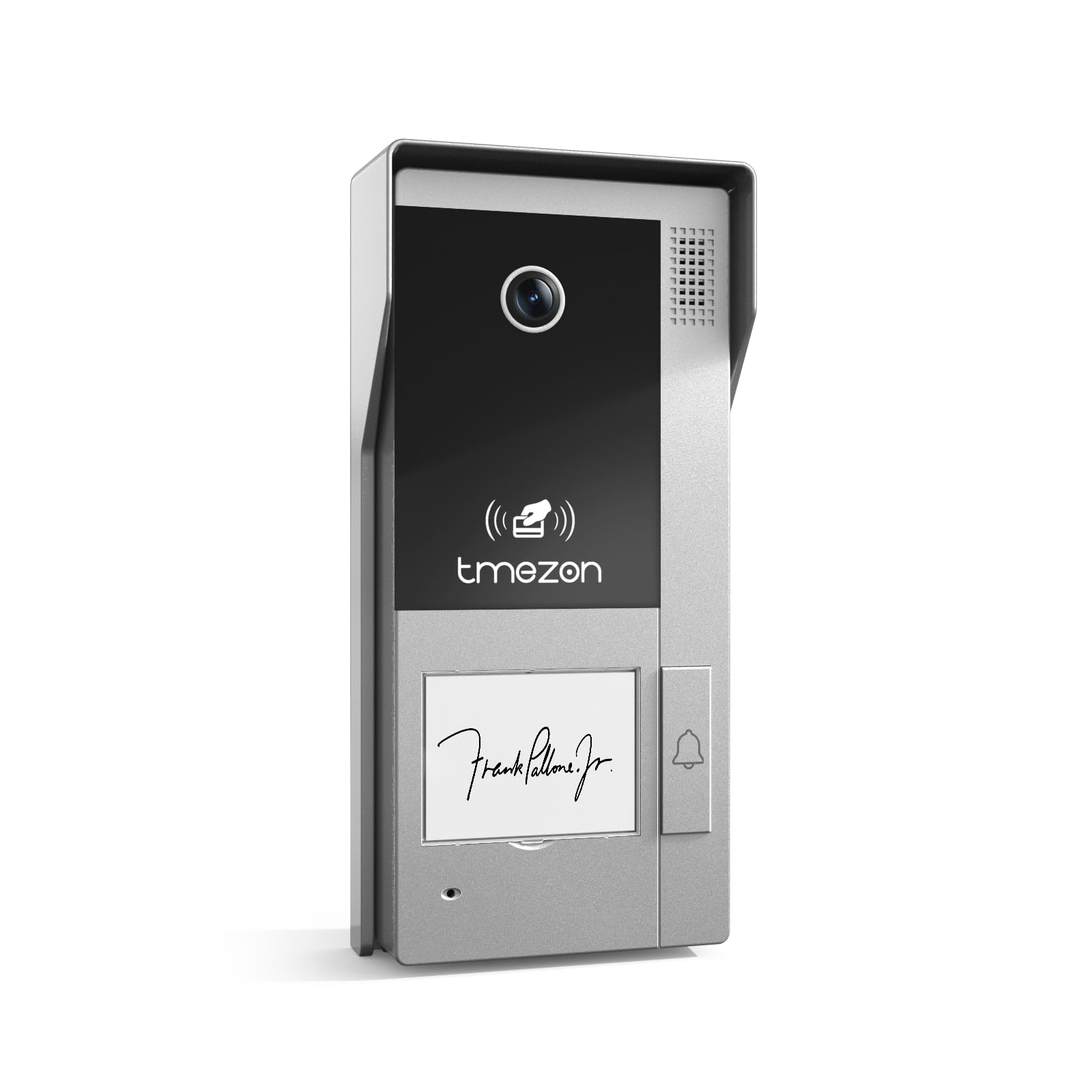
Obrázek 1: Přední strana view of the TMEZON MZ-VDP-NE160 doorbell camera, showing the camera lens, call button, microphone, and speaker grille.
Mezi klíčové komponenty patří:
- Objektiv fotoaparátu: Captures video feed.
- Volací tlačítko: Activates the indoor monitor and initiates communication.
- Mikrofon: Captures audio from visitors.
- Reproduktor: Allows two-way audio communication.
- Wiring Terminal (Rear): For connecting the 4-wire cable to the indoor monitor and power supply.
5. Nastavení a instalace
The MZ-VDP-NE160 is a 4-wire system. Proper wiring is crucial for correct operation. It is recommended to consult a professional for installation if you are unfamiliar with electrical wiring.
5.1 Místo montáže
- Choose a location near your entrance, typically at a height of 1.4 to 1.6 meters (4.6 to 5.2 feet) from the ground, ensuring a clear view návštěvníků.
- Avoid direct sunlight or strong light sources that could cause glare on the camera.
- Ujistěte se, že montážní povrch je rovný a stabilní.
5.2 Schéma zapojení (obecně)
The doorbell camera connects to the indoor monitor (e.g., MZ-IP-V728TW) using a 4-wire cable. The typical connections are:
- Drát 1: Zvuk
- Drát 2: Video
- Drát 3: Země (GND)
- Drát 4: Napájení (DC 12V)
Note: Refer to the specific wiring diagram provided with your indoor monitor for precise connection details. Ensure polarity is correct for power connections.
5.3 kroky instalace
- Odpojit napájení: Before starting, ensure all power to the existing doorbell system and the indoor monitor is turned off at the circuit breaker.
- Montážní držák: Secure the mounting bracket (if applicable, or the unit directly) to the wall using the provided screws and wall plugs.
- Kabelové připojení: Connect the 4-wire cable from the indoor monitor to the corresponding terminals on the rear of the MZ-VDP-NE160 doorbell camera. Ensure connections are secure.
- Zabezpečená jednotka: Attach the doorbell camera unit to the mounting bracket or directly to the wall, ensuring it is firmly in place.
- Obnovit napájení: Once all connections are made and secured, restore power to the system.
- Testovací systém: Test the doorbell functionality by pressing the call button and verifying communication with the indoor monitor.
6. Návod k obsluze
The TMEZON MZ-VDP-NE160 doorbell camera operates in conjunction with your TMEZON indoor monitor.
- Visitor Call: When a visitor presses the call button on the MZ-VDP-NE160, the indoor monitor will ring and display the video feed from the doorbell camera.
- Obousměrná komunikace: On the indoor monitor, you can answer the call to engage in two-way audio communication with the visitor.
- Door Release (if connected): If an electronic door lock is connected to your indoor monitor system, you can typically unlock the door from the indoor monitor during a call.
- Sledování: Some indoor monitors allow you to manually view the live video feed from the doorbell camera at any time, even without a visitor pressing the button.
7. Údržba
Regular maintenance helps ensure the longevity and optimal performance of your doorbell camera.
- Čištění: Periodically wipe the camera lens and the front panel with a soft, slightly damp hadříkem odstraňte prach a nečistoty. Nepoužívejte agresivní chemikálie ani abrazivní materiály.
- Kontrola připojení: Annually, inspect the wiring connections for any signs of corrosion or loosening. Ensure the unit is securely mounted.
- Aktualizace softwaru: While this specific unit does not have user-updatable software, ensure your indoor monitor's firmware is up to date for best compatibility and features.
8. Řešení problémů
If you encounter issues with your MZ-VDP-NE160 doorbell camera, refer to the following common problems and solutions:
| Problém | Možná příčina | Řešení |
|---|---|---|
| No video/audio on indoor monitor |
|
|
| Tlačítko volání nereaguje |
|
|
| Špatná kvalita videa |
|
|
If the problem persists after attempting these solutions, please contact TMEZON customer support.
9. Specifikace
| Funkce | Detail |
|---|---|
| Model | MZ-VDP-NE160 |
| Značka | TMEZON |
| Rozměry produktu (D x Š x V) | 1 x 1 x 1 cm |
| Typ zapojení | 4-vodičový systém |
| Provozní svtage | 240 Volts (System dependent, typically 12V DC for the unit itself, 240V might refer to power supply input) |
| Spotřeba energie | 5 wattů |
| Barva | Šedá |
| Zahrnuté komponenty | Jednotka zvonku |
10. Záruka a podpora
For warranty information and technical support, please refer to the documentation provided with your complete TMEZON videophone system or visit the official TMEZON webUschovejte si účtenku jako doklad o koupi pro případ reklamace.
For direct assistance, you may contact TMEZON customer service through their official channels.