
Taiahiro Bk6301
Uživatelská příručka k bezdrátové mechanické herní klávesnici a myši Taiahiro BK6301
Model: Bk6301
1. Úvod
Thank you for choosing the Taiahiro Bk6301 Wireless Mechanical Gaming Keyboard and Mouse Combo. This manual provides detailed instructions for setting up, operating, and maintaining your new peripheral devices. This combo offers versatile connectivity options including 2.4G wireless, Bluetooth 5.0, and wired USB-C, ensuring compatibility with various devices.
2. Obsah balení
Prosím, ověřte, zda jsou v balení přítomny všechny položky:
- Taiahiro Bk6301 Wireless Mechanical Gaming Keyboard
- Taiahiro Wireless Gaming Mouse
- USB 2.4G Receiver (stored in mouse battery compartment)
- USB-C na USB-A nabíjecí/datový kabel
- Uživatelská příručka
- 1 AA Battery (for mouse, may be pre-installed or included separately)

Image 2.1: Contents of the Taiahiro Bk6301 Keyboard and Mouse Combo package, including the keyboard, mouse, USB receiver, and USB-C cable.
3. Konec produktuview
3.1 Funkce klávesnice
- Rozložení 98 kláves: Compact design with a full numeric keypad.
- Mechanické modré spínače: Provide tactile and audible feedback for typing.
- RGB podsvícení: Přizpůsobitelné světelné efekty.
- Nastavitelný stojan na klávesy: Allows for ergonomic positioning.
- Vícerežimové připojení: Supports 2.4G wireless, Bluetooth 5.0, and wired USB-C.
- Dobíjecí baterie: Built-in 2000mAh battery for wireless operation.
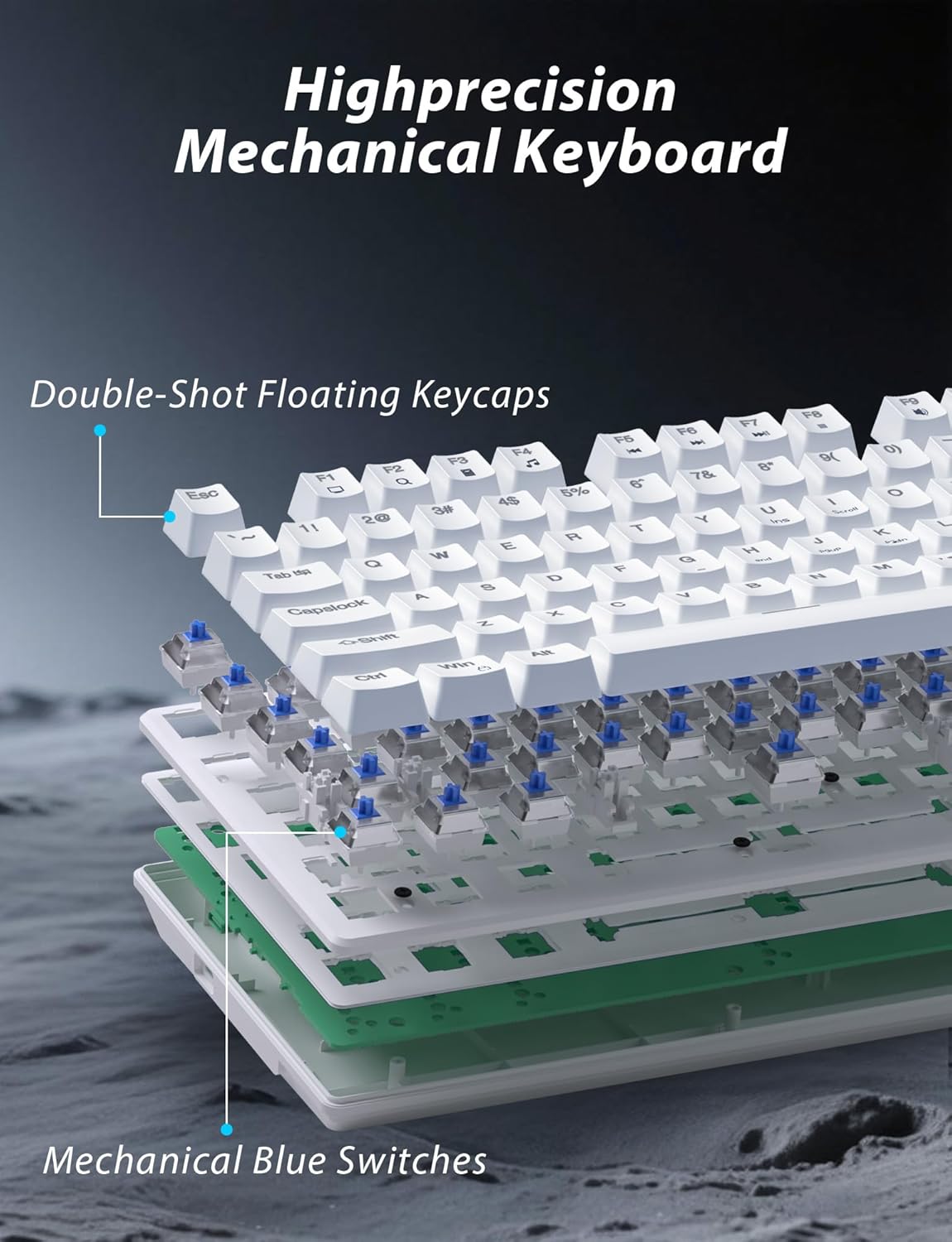
Obrázek 3.1: Rozložený view illustrating the internal structure of the mechanical keyboard, highlighting the double-shot floating keycaps and mechanical blue switches.

Obrázek 3.2: Boční strana view of the keyboard demonstrating its ergonomic design and adjustable stand for comfortable use.
3.2 Funkce myši
- Ergonomický design: Shaped for comfortable grip.
- Nastavitelné DPI: Four levels (800/1600/2400/3200) for precision control.
- Tlačítka vpřed/zpět: Convenient side buttons for navigation.
- Duální připojení: Supports 2.4G wireless and Bluetooth.

Image 3.3: The wireless gaming mouse, highlighting its ergonomic shape and four adjustable DPI levels.
4. Pokyny k nastavení
4.1 Připojení klávesnice
The keyboard supports three connection modes: 2.4G wireless, Bluetooth, and wired USB-C.

Image 4.1: The keyboard displaying its three connectivity options: Bluetooth, 2.4GHz wireless, and USB-C wired connection.
2.4G bezdrátový režim:
- Locate the USB 2.4G receiver, typically stored in the mouse's battery compartment.
- Vložte USB přijímač do volného USB portu na vašem počítači.
- On the keyboard, slide the mode switch (usually located on the top edge or bottom) to the '2.4G' position.
- Klávesnice by se měla automaticky připojit.
Režim Bluetooth:
- Slide the mode switch on the keyboard to the 'BT' (Bluetooth) position.
- The keyboard's indicator light will flash, indicating it is in pairing mode.
- On your device (computer, laptop, smartphone), open Bluetooth settings and search for new devices.
- Select "Taiahiro Bk6301" or a similar name from the list of available devices to pair.
- Po spárování bude kontrolka svítit nepřerušovaně.
Kabelový režim USB-C:
- Připojte dodaný kabel USB-C k portu USB-C na klávesnici.
- Druhý konec (USB-A) připojte k volnému portu USB v počítači.
- The keyboard will function as a wired device and will charge simultaneously.
4.2 Připojení myši
The mouse supports 2.4G wireless and Bluetooth connectivity.

Image 4.2: The underside of the mouse, illustrating the battery compartment for one AA battery and the storage slot for the tiny USB receiver.
Instalace baterie:
- Otevřete kryt baterie na spodní straně myši.
- Insert one AA battery, ensuring correct polarity.
- Zavřete přihrádku na baterie.
2.4G bezdrátový režim:
- Ensure the USB 2.4G receiver is plugged into your computer.
- Posuňte přepínač režimů na spodní straně myši do polohy „2.4 G“.
- Myš by se měla automaticky připojit.
Režim Bluetooth:
- Slide the mode switch on the underside of the mouse to the 'BT' (Bluetooth) position.
- The mouse will enter pairing mode.
- V zařízení otevřete nastavení Bluetooth a vyhledejte nová zařízení.
- Select "Taiahiro Mouse" or a similar name from the list to pair.
5. Návod k obsluze
5.1 Funkce klávesnice
Ovládání podsvícení:
Klávesnice má přizpůsobitelné RGB podsvícení.
- Změna režimu podsvícení: Stiskněte Fn + Home pro cyklické přepínání mezi 18 různými světelnými efekty.
- Upravit jas: Stiskněte Fn + ↑ (Up Arrow) or Fn + ↓ (Down Arrow) to adjust between 5 brightness levels.
- Upravit rychlost: Stiskněte Fn + ← (Left Arrow) or Fn + → (Right Arrow) to adjust between 5 lighting speed levels.

Image 5.1: Keyboard layout highlighting the function key combinations for controlling backlight modes, brightness, and speed.
Multimediální funkce:
Access multimedia controls by pressing the Fn key in combination with the designated F-keys (F1-F12).
- Fn+F1: Přehrávač médií
- Fn+F2: Snížit hlasitost
- Fn+F3: Zvýšení hlasitosti
- Fn+F4: Ztlumit
- Fn+F5: Zastávka
- Fn+F6: Předchozí stopa
- Fn+F7: Přehrát/Pozastavit
- Fn+F8: Další stopa
- Fn+F9: E-mail
- Fn+F10: Web Prohlížeč
- Fn+F11: Můj počítač
- Fn+F12: Kalkulačka
5.2 Funkce myši
Nastavení DPI:
Stiskněte tlačítko Tlačítko DPI (located behind the scroll wheel) to cycle through the four DPI settings: 800, 1600, 2400, and 3200. Each press changes the sensitivity, allowing you to adjust cursor speed to your preference.
6. Údržba
6.1 Čištění
- Klávesnice: Use a soft, dry cloth to wipe the surface. For deeper cleaning, use compressed air to remove debris from between keys. Avoid using harsh chemicals or abrasive materials.
- Myš: Otřete povrch myši měkkým, lehce navlhčeným hadříkem.amp cloth. Ensure no liquid enters the internal components.
6.2 Správa baterie
- Klávesnice: The keyboard has a built-in rechargeable battery. Connect the USB-C cable to a power source (e.g., computer USB port, USB wall adapter) to charge. The indicator light will show charging status.
- Myš: The mouse uses one AA battery. Replace the battery when the mouse performance degrades or it stops responding. Ensure proper polarity when inserting a new battery.
7. Řešení problémů
If you encounter issues with your Taiahiro keyboard and mouse combo, please refer to the following solutions:
| Problém | Možné řešení |
|---|---|
| Klávesnice/myš nereaguje (2.4G) |
|
| Klávesnice/myš se nepřipojuje (Bluetooth) |
|
| Keyboard backlight not working or stuck |
|
| Keys not responding or double-typing |
|
8. Specifikace
| Funkce | Detail |
|---|---|
| Číslo modelu | Bk 6301 |
| Konektivita | Bluetooth 5.0, bezdrátové připojení 2.4G, kabelové připojení USB-C |
| Typ klávesnice | Mechanická herní klávesnice |
| Rozložení klíče | 98 Keys (with Numeric Keypad) |
| Typ přepínače | Mechanické modré spínače |
| podsvícení klávesnice | RGB (18 režimů, 5 úrovní jasu, 5 úrovní rychlosti) |
| Baterie klávesnice | Dobíjecí 2000mAh |
| Úrovně DPI myši | 800/1600/2400/3200 |
| Baterie do myši | 1 x AA baterie |
| Kompatibilní zařízení | Personal Computer, Laptop, Smartphone |
| Hmotnost položky | 2.72 libry (kombinace) |
| Rozměry balení | 15 x 5.59 x 3.11 palce |
9. Záruka a podpora
9.1 Informace o záruce
Taiahiro products are covered by a limited warranty from the date of purchase. Please refer to the warranty card included in your package or visit the official Taiahiro website for detailed warranty terms and conditions. This warranty typically covers manufacturing defects and material faults under normal use.
9.2 Zákaznická podpora
For technical assistance, troubleshooting, or any questions regarding your Taiahiro Bk6301 combo, please contact our customer support team. You can find contact information on the Taiahiro official website or through your purchase platform. When contacting support, please have your product model number (Bk6301) and purchase details ready.
Ask a question about this manual
Ask about setup, troubleshooting, compatibility, parts, safety, or missing instructions. Manuals+ will review the question and use this page’s manual context to help answer it.