
Zavedení
This manual provides detailed instructions for the Micool Bluetooth Headset V5.4 (Model DY20PLUS). Please read this manual carefully before using the product to ensure proper operation and to maximize its features and lifespan. This headset is designed for clear communication and comfortable wear, featuring advanced noise cancellation and long battery life.
Bezpečnostní informace
To ensure safe and proper use of your headset, please observe the following guidelines:
- Do not expose the headset to extreme temperatures, direct sunlight, or high humidity.
- Avoid dropping or subjecting the headset to strong impacts, which may damage internal components.
- Do not attempt to disassemble, repair, or modify the headset. This will void the warranty and may cause harm.
- Keep the headset and its accessories out of reach of children and pets.
- Use only the provided USB-C charging cable or a certified equivalent to prevent damage to the battery.
- Vyhněte se dlouhodobému poslechu při vysoké hlasitosti, abyste předešli poškození sluchu.
Obsah balení
Prosím, ověřte, zda jsou v balení přítomny všechny položky:
- Micool Bluetooth Headset (DY20PLUS)
- Nabíjecí kabel USB-C
- Uživatelská příručka
- Additional Eartips (Sizes L, M, S)
- Háček na ucho

Image: Micool Bluetooth Headset and its accessories, including different sized eartips and a charging cable.
Konec produktuview
Familiarize yourself with the various components and controls of your Micool Bluetooth Headset:

Obrázek: Přední strana view of the Micool Bluetooth Headset, highlighting the main call button, volume controls, and the LED battery indicator lights.
- Multifunkční tlačítko: Used for power on/off, answering/ending calls, and playing/pausing music.
- Tlačítka pro ovládání hlasitosti +/-: Adjust volume, skip tracks, and check battery level.
- LED displej napájení: Indicates the remaining battery level with four segments.
- Mikrofon: Equipped with dual-mic noise reduction for clear voice input during calls.
- Nabíjecí port USB-C: For connecting the charging cable to power the headset.
Nastavení
1. Nabíjení náhlavní soupravy
Before initial use, fully charge your headset to ensure optimal battery performance.
- Připojte nabíjecí kabel USB-C k nabíjecímu portu sluchátek s mikrofonem.
- Připojte druhý konec kabelu ke zdroji napájení USB (např. počítači, nástěnnému adaptéru).
- The LED power display will illuminate to indicate charging. A full charge typically takes approximately 1.5-2 hours.
2. Spárování se zařízením
The headset utilizes Bluetooth 5.4 for a stable and efficient wireless connection up to 50 meters.
- Ensure the headset is powered off and fully charged.
- Press and hold the Multi-function Button for approximately 3-5 seconds until the LED indicator flashes blue and red alternately. This indicates the headset is in pairing mode.
- On your desired device (smartphone, tablet, laptop), enable Bluetooth and search for available devices.
- Select "DY20PLUS" from the list of found devices.
- Once successfully connected, the LED indicator will flash blue slowly.
3. Connecting to Two Devices Simultaneously (Multi-point Connection)
The DY20PLUS supports connecting to two Bluetooth devices concurrently, allowing seamless switching between them.
- Pair the headset with the first device following the steps above.
- Disable Bluetooth on the first device. The headset will re-enter pairing mode (flashing blue and red).
- Spárujte sluchátka s druhým zařízením.
- Re-enable Bluetooth on the first device. The headset should automatically connect to both devices. You can now receive calls or play audio from either device.
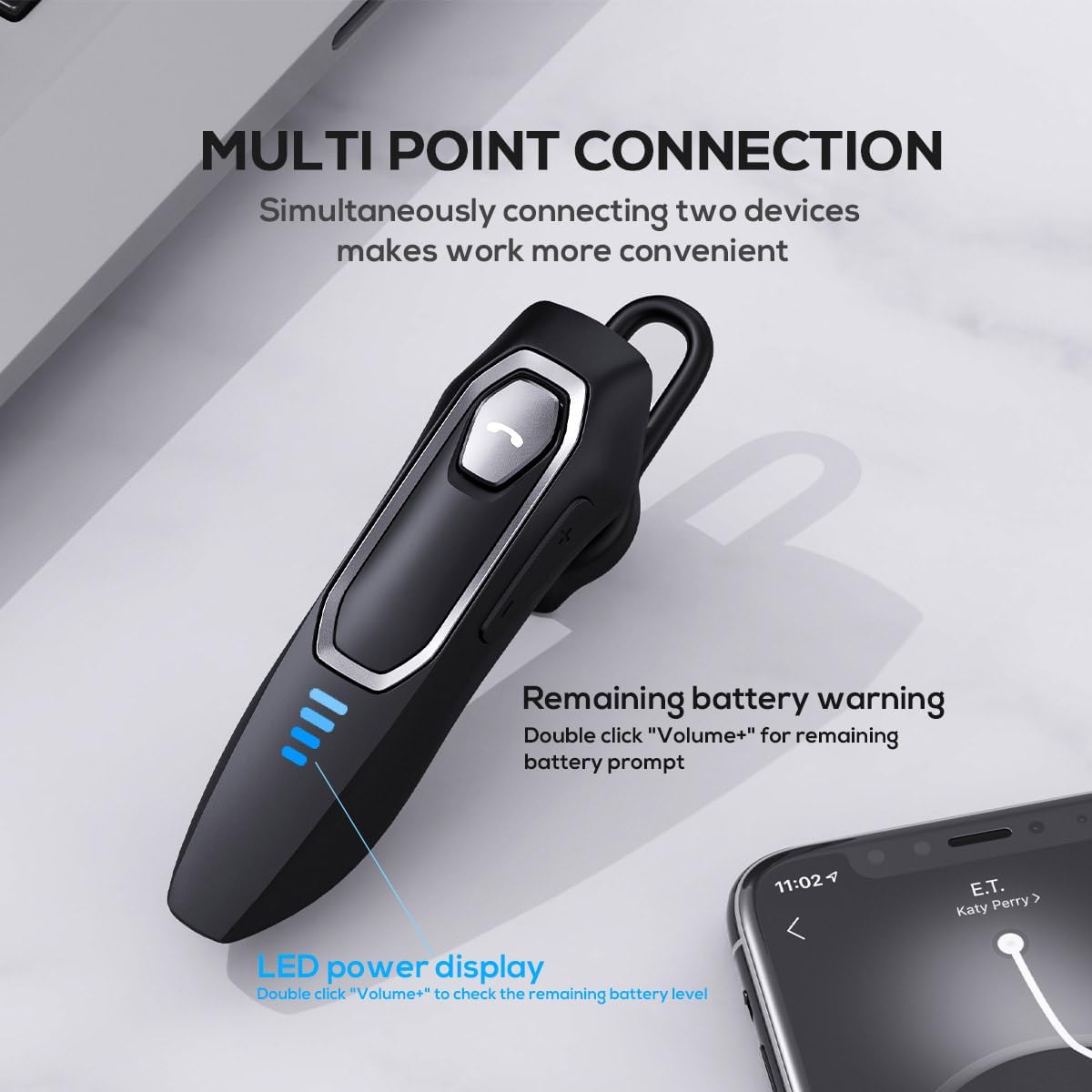
Image: The Micool headset demonstrating its multi-point connection capability, allowing simultaneous connection to two devices.
Návod k obsluze
Zapnutí/vypnutí
- Zapnutí: Stiskněte a podržte multifunkční tlačítko po dobu 3 sekund.
- Vypnout: Stiskněte a podržte multifunkční tlačítko po dobu 5 sekund.
Správa hovorů
- Přijmout/ukončit hovor: Krátce stiskněte multifunkční tlačítko.
- Odmítnout hovor: Stiskněte a podržte multifunkční tlačítko po dobu 2 sekund.
- Ztlumit/zapnout mikrofon: During a call, press and hold the Volume "-" button for approximately 2 seconds.
- Opakování posledního odchozího hovoru: Triple-tap the Multi-function Button.

Image: Illustration of the mute function, activated by holding the Volume '-' button.
Přehrávání hudby
- Přehrát/pozastavit: Krátce stiskněte multifunkční tlačítko.
- Další skladba: Press and hold the Volume "+" button for 2 seconds.
- Předchozí skladba: Press and hold the Volume "-" button for 2 seconds.
Ovládání hlasitosti
- Zvýšení hlasitosti: Short press the Volume "+" button.
- Snížit hlasitost: Short press the Volume "-" button.
Hlasový asistent
- Aktivace hlasového asistenta (Siri, Google Assistant atd.): Double-click the Multi-function Button.
LED displej napájení
- The four LED lights indicate the remaining battery level, with each light representing approximately 25% charge.
- To check the remaining power, double-click the Volume "+" button.
Image: The LED power display on the headset, indicating battery level.
Údržba
Proper maintenance will help extend the life of your Micool Bluetooth Headset:
- Clean the headset regularly with a soft, dry, lint-free cloth.
- Do not use abrasive cleaners, solvents, or strong chemicals, as these may damage the surface or internal components.
- Sluchátka skladujte na chladném a suchém místě mimo dosah přímého slunečního záření a extrémních teplot.
- Ensure the USB-C charging port is free of dust and debris to maintain proper charging connection.
- If the headset gets wet, wipe it dry immediately. Do not charge it until it is completely dry.
Odstraňování problémů
Pokud se setkáte s jakýmikoli problémy s náhlavní soupravou, podívejte se na následující běžné problémy a jejich řešení:
| Problém | Možná příčina | Řešení |
|---|---|---|
| Sluchátka se nezapnou. | Slabá nebo vybitá baterie. | Charge the headset fully using the provided USB-C cable. |
| Nelze spárovat se zařízením. | Sluchátka nejsou v režimu párování; Bluetooth na zařízení je vypnutý; zařízení je příliš daleko. | Ensure headset is in pairing mode (flashing red/blue); enable Bluetooth on your device; move device closer (within 50m). Clear previous Bluetooth connections if necessary. |
| Žádný zvuk nebo špatná kvalita zvuku. | Volume too low; headset not connected; audio source issue; interference. | Adjust headset and device volume; re-pair headset; check audio source; move away from other wireless devices. |
| Mikrofon nefunguje. | Mute function active; microphone blocked; device settings. | Deactivate mute function (hold Volume "-" for 2s); ensure microphone is clear; check microphone settings on your device. |
| Krátká výdrž baterie. | Headset not fully charged; high volume usage; aging battery. | Ensure full charge before use; reduce volume; if issue persists after full charge, contact support. |
Specifikace
- Název modelu: DY20PLUS
- Technologie připojení: Bezdrátové (Bluetooth)
- Verze Bluetooth: 5.4
- Rozsah Bluetooth: Až 50 metrů
- Výdrž baterie (doba hovoru): Až 36 hodin
- Výdrž baterie (přehrávání hudby): Až 45 hodin
- Doba nabíjení: Přibližně 1.5-2 hodiny
- Nabíjecí port: USB-C
- Kontrola hluku: Active Noise Cancellation (Dual-Mic)
- Kompatibilní zařízení: Smartphones, Tablets, Smart Speakers
- Hmotnost: 2.08 unce (cca 59 gramů)
- Materiál: Akrylonitrilbutadienstyren (ABS)
- Úroveň odolnosti proti vodě: Vodě odolný
- Frekvenční rozsah: 20 Hz - 20,000 XNUMX Hz
Záruka a podpora
Micool products are designed for reliability and performance. For detailed warranty information, including coverage and terms, please refer to the warranty card included with your product or visit the official Micool webmísto.
For technical support, troubleshooting assistance, or any inquiries regarding your Micool Bluetooth Headset, please contact our customer service team through the contact information provided on your product packaging or via the Micool Amazon Store:
Micool Amazon Store: Navštivte obchod
Our support team is available to assist you with any questions or concerns you may have.