
Zavedení
The FIREBAT Mini PC A6 is a compact yet powerful desktop computer designed for a wide range of applications, including office work, business operations, home entertainment, and gaming. It features an advanced AMD Ryzen 7 6800H processor and AMD Radeon 680M graphics, offering a balance of high performance and efficient power consumption. This manual provides essential information for setting up, operating, maintaining, and troubleshooting your Mini PC.

Obrázek 1: Přední a zadní část view of the FIREBAT Mini PC A6.
Obsah balení
Než začnete, ujistěte se, že balení obsahuje všechny položky:
- 1 x FIREBAT A6 AMD R7 6800H Mini PC
- 1 x 19V/6.3A 120W US Adapter
- 1 x držák VESA
- 1 x HDMI kabel
- 1 x Uživatelská příručka

Figure 2: Contents included in the FIREBAT Mini PC A6 package.
Průvodce nastavením
Počáteční nastavení
- Connect the power adapter to the DC-in port on the Mini PC and plug it into a power outlet.
- Connect your monitor or TV to the Mini PC using the provided HDMI cable or a DisplayPort cable. The device supports triple 4K monitor output.
- Connect your keyboard and mouse to the available USB 3.0 ports. Wireless peripherals can also be used.
- Stiskněte tlačítko napájení na přední straně Mini PC pro jeho zapnutí.
- Follow the on-screen instructions to complete the initial setup of the Windows 11 Pro operating system.
Montáž VESA
The FIREBAT Mini PC A6 includes a VESA mount for convenient installation behind a compatible monitor or TV, saving desk space and creating a clean setup.
- Attach the VESA mount bracket to the back of your monitor/TV using appropriate screws.
- Align the Mini PC with the mounted bracket and slide it into place until it clicks securely.
- Ensure all cables are properly connected and managed for optimal performance and aesthetics.
Video 1: Official unboxing and initial setup of the FIREBAT Mini PC A6, demonstrating the contents and basic connections.
Operating Your Mini PC
Klíčové vlastnosti a výkon
The FIREBAT Mini PC A6 is engineered for robust performance across various tasks:
- Procesor: Equipped with an AMD Ryzen 7 6800H processor (8 cores/16 threads, up to 4.7GHz), based on ZEN 3+ architecture and TSMC 6nm FinFET technology. This provides excellent performance for multi-threaded tasks.
- Grafika: Features an integrated AMD Radeon 680M GPU (2200MHz), offering powerful graphics processing capabilities for gaming and multimedia.
- Paměť a úložiště: Comes with 16GB SO-DIMM DDR5 4800MHz RAM and a 512GB M.2 PCIe 3.0 2280 SSD. The system supports dual-channel memory expansion up to 64GB (32GB x 2) and dual M.2 PCIe 3.0/4.0 SSD interfaces for higher performance and capacity.
- Konektivita: Offers extensive connectivity options including 1x Type-C (PD/DP/DATA, up to 10Gbps), 6x USB 3.0, 1x DisplayPort 1.4 (4K@120Hz), 1x HDMI 2.0 (4K@60Hz), 1x 3.5mm audio jack (HP&MIC), and 1x 2.5Gbps RJ45 LAN port. Wireless connectivity includes WiFi 6 and Bluetooth 5.2.
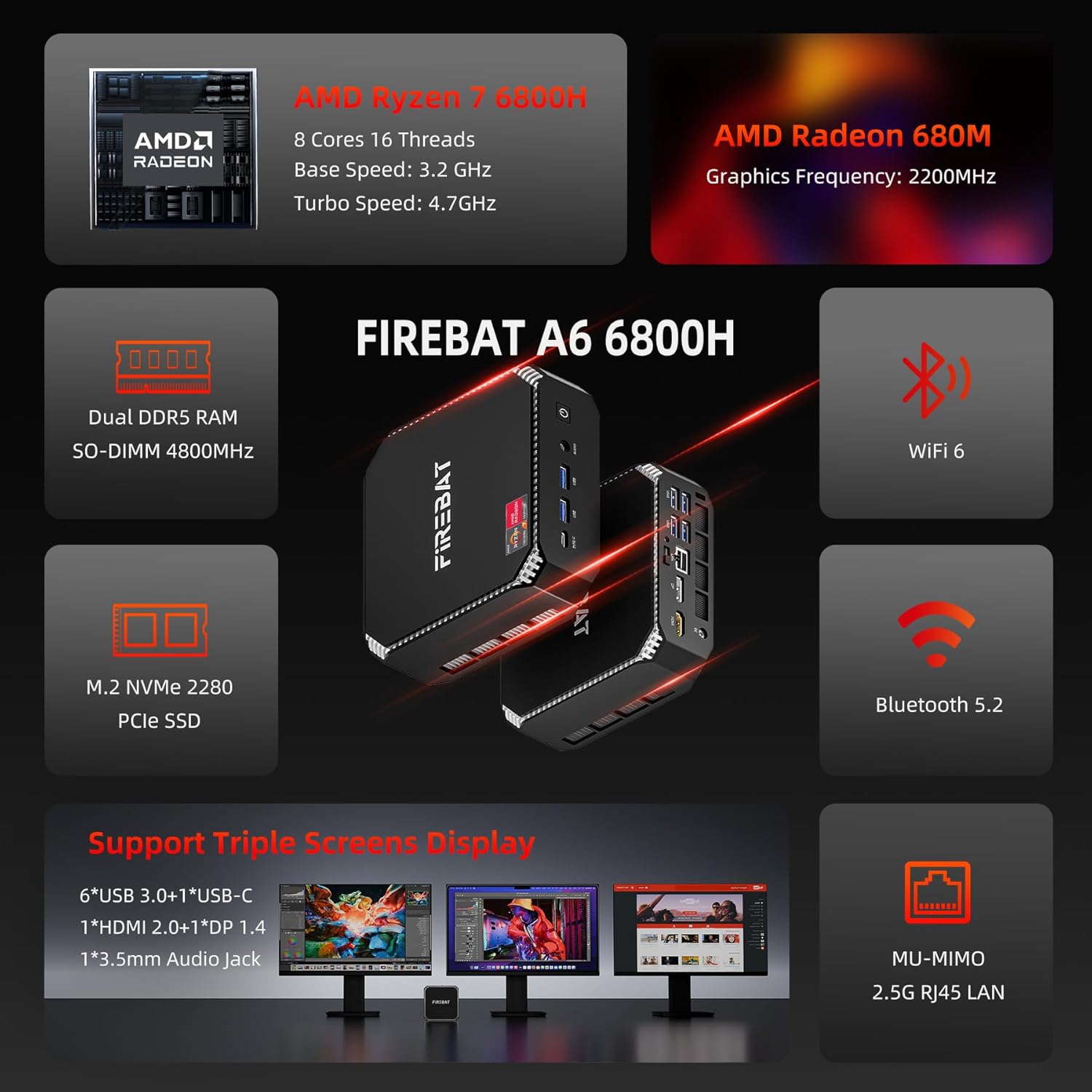
Obrázek 3: Přesview of the FIREBAT Mini PC A6's core features and specifications.
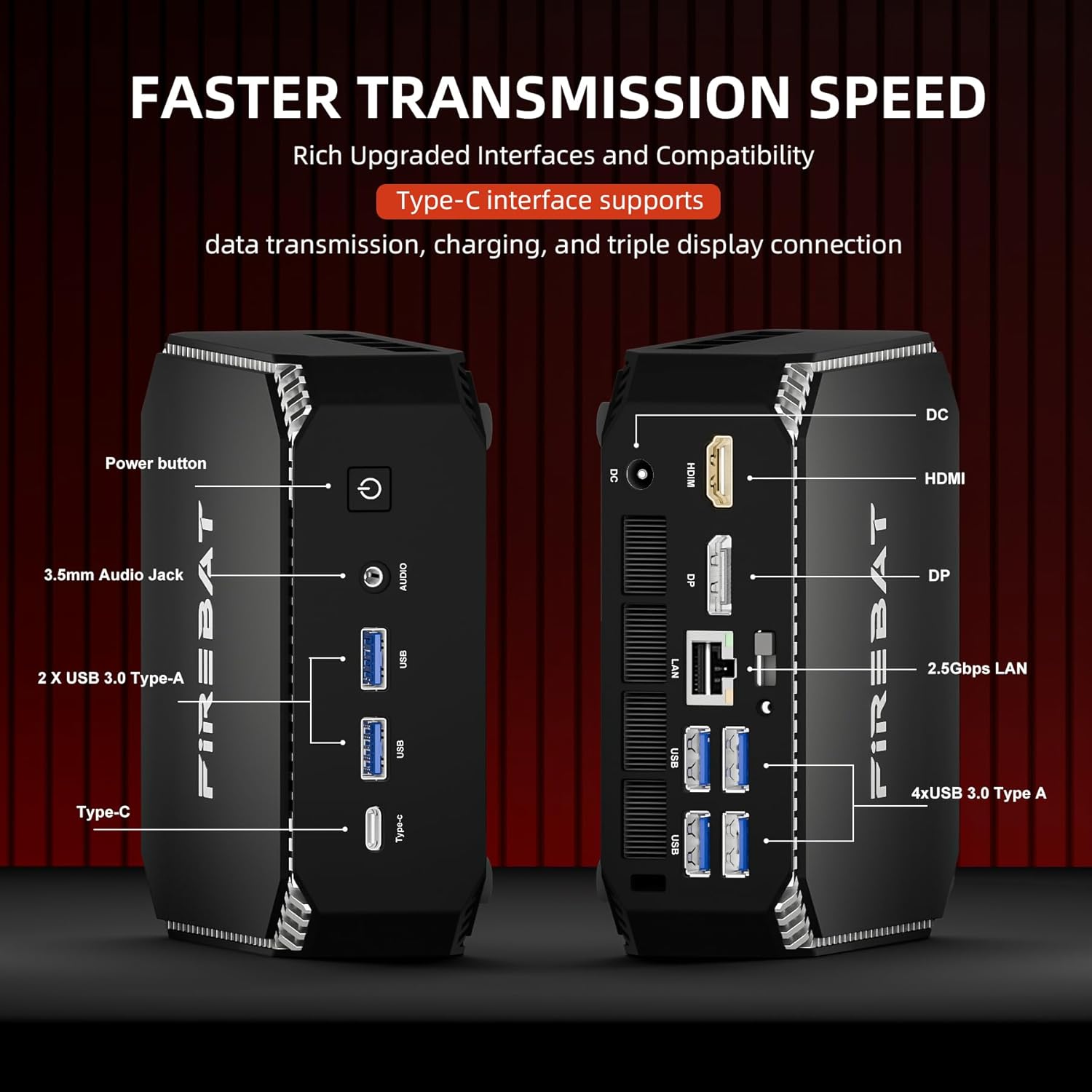
Obrázek 4: Detailní view of the front and rear ports and interfaces on the Mini PC.

Figure 5: Illustration of the expandable RAM and dual M.2 SSD slots for storage upgrades.
Scénáře použití
The Mini PC A6 is versatile and suitable for:
- Obchod a kancelář: Efficiently handle demanding applications and multi-threaded tasks.
- Školství: Ideal for learning environments, supporting various educational software and online resources.
- Domácí kino: Connect to your TV for 4K streaming and media consumption.
- Hraní: Enjoy a smooth gaming experience with its powerful integrated graphics.
Video 2: Stručný přehledview of the FIREBAT Ryzen 7 6800H Mini Computer A6 Model, highlighting its compact design and various applications.
Údržba
To ensure the longevity and optimal performance of your FIREBAT Mini PC, consider the following maintenance tips:
- Chlazení: The Mini PC features an ultra-efficient and fast cooling system with high-efficiency thermal grease, a cooling fan, and dual heat pipes, enabling 7x24 hours of silent operation. Ensure proper airflow around the device and keep ventilation openings clear of obstructions.
- Čištění: Pravidelně čistěte vnější povrch Mini PC měkkým, suchým hadříkem. Nepoužívejte tekuté čisticí prostředky přímo na zařízení.
- Upgrady: When upgrading RAM or SSDs, handle components carefully. Refer to the detailed instructions provided by FIREBAT or consult professional assistance if unsure.

Figure 6: Illustration of the internal cooling components, including the fan and heat pipes.
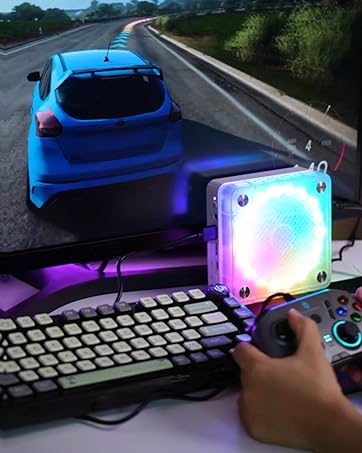
Figure 7: Chart illustrating the low noise levels of the FIREBAT Mini PC A6 during operation.
Odstraňování problémů
If you encounter issues with your Mini PC, consider the following common solutions:
- Bez displeje: Ensure all video cables (HDMI/DP) are securely connected to both the Mini PC and the monitor. Verify the monitor input source is correctly selected.
- Nefunkční periferie: Check USB connections. If a specific USB port is unresponsive, try another port. Ensure drivers for peripherals are up to date.
- Problémy s výkonem: Close unnecessary applications. Ensure your operating system and drivers (especially AMD Radeon GPU drivers) are updated to the latest versions.
- Přístup k interním komponentám: If you need to open the Mini PC for upgrades (RAM/SSD), proceed with caution. Some users have reported the top cover can be difficult to remove initially. Apply gentle, even pressure to avoid damage.
- Nestabilita systému: Perform a system restart. If issues persist, consider reinstalling the operating system or contacting support.
Specifikace
| Funkce | Detail |
|---|---|
| Značka | FIREBAT |
| Číslo modelu | A6 |
| Procesor | AMD Ryzen 7 6800H (8 Cores/16 Threads, up to 4.7GHz) |
| Grafický koprocesor | Grafická karta AMD Radeon 680M |
| BERAN | 16GB SO-DIMM DDR5 4800MHz (Expandable to 64GB) |
| Pevný disk | 512GB PCIe 3.0 2280 SSD (Dual M.2 slots) |
| Operační systém | Default (Windows 11 Pro pre-installed) |
| USB porty | 6 x USB 3.0, 1 x USB-C (PD/DP/DATA) |
| Video výstup | 1 x HDMI 2.0 (4K@60Hz), 1 x DisplayPort 1.4 (4K@120Hz) |
| Síť | 2.5Gbps RJ45 LAN, WiFi 6 (802.11ax), Bluetooth 5.2 |
| Zvuk | 3.5mm Audio Jack (HP&MIC) |
| Spotřeba energie | Up to 54W (45W TDP) |
| Hmotnost položky | 1 libry |
| Rozměry produktu | 5 x 5 x 1.5 palce |
Podpora a záruka
FIREBAT is committed to providing quality products and support. For any inquiries, technical assistance, or warranty information, please contact us:
- E-mail: support@firebatpc.com
- Webmísto: www.firebatpc.com
Konkrétní záruční podmínky naleznete v dokumentaci k nákupu.