
1. Úvod
This manual provides comprehensive instructions for the Mycket portable DAB/DAB+/FM radio, Model D009. It covers setup, operation, maintenance, and troubleshooting to ensure optimal performance and longevity of your device. Please read this manual carefully before using the product.
The Mycket D009 radio features advanced signal reception technology for clear audio, Bluetooth 5.0 for wireless streaming, USB playback, AUX-in connectivity, a dual alarm clock, and a sleep timer. Its integrated rechargeable battery offers portability for use in various environments.
2. Bezpečnostní pokyny
- Nevystavujte zařízení dešti, vlhkosti ani extrémním teplotám.
- Zabraňte pádu zařízení nebo jeho vystavení silným nárazům.
- Nerozebírejte ani se nepokoušejte o opravu zařízení sami. Veškerý servis svěřte kvalifikovanému personálu.
- Uchovávejte zařízení mimo dosah zdrojů tepla, jako jsou radiátory, topná tělesa, sporáky nebo jiné přístroje (včetně amplifikátory), které produkují teplo.
- Use only the specified charging cable and power adapter (5V via USB) to charge the device.
- Během provozu a nabíjení zajistěte dostatečné větrání kolem zařízení.
- Baterie a elektronické součástky zlikvidujte zodpovědně v souladu s místními předpisy.
3. Konec produktuview
3.1 Obsah balení
- 1 x Mycket Portable DAB Radio (Model D009)
- 1 x USB nabíjecí kabel
- 1 x Uživatelská příručka
3.2 Rozložení a ovládací prvky zařízení
Familiarize yourself with the main components and controls of your Mycket radio.

Obrázek 1: Přední view of the Mycket D009 portable DAB radio, showing the speaker grille, LCD display, control buttons (MODE, OK, O/M, FAV, 1-4), and the telescopic antenna extended. The right side shows the DC 5V USB-C port, reset button, and headphone jack.
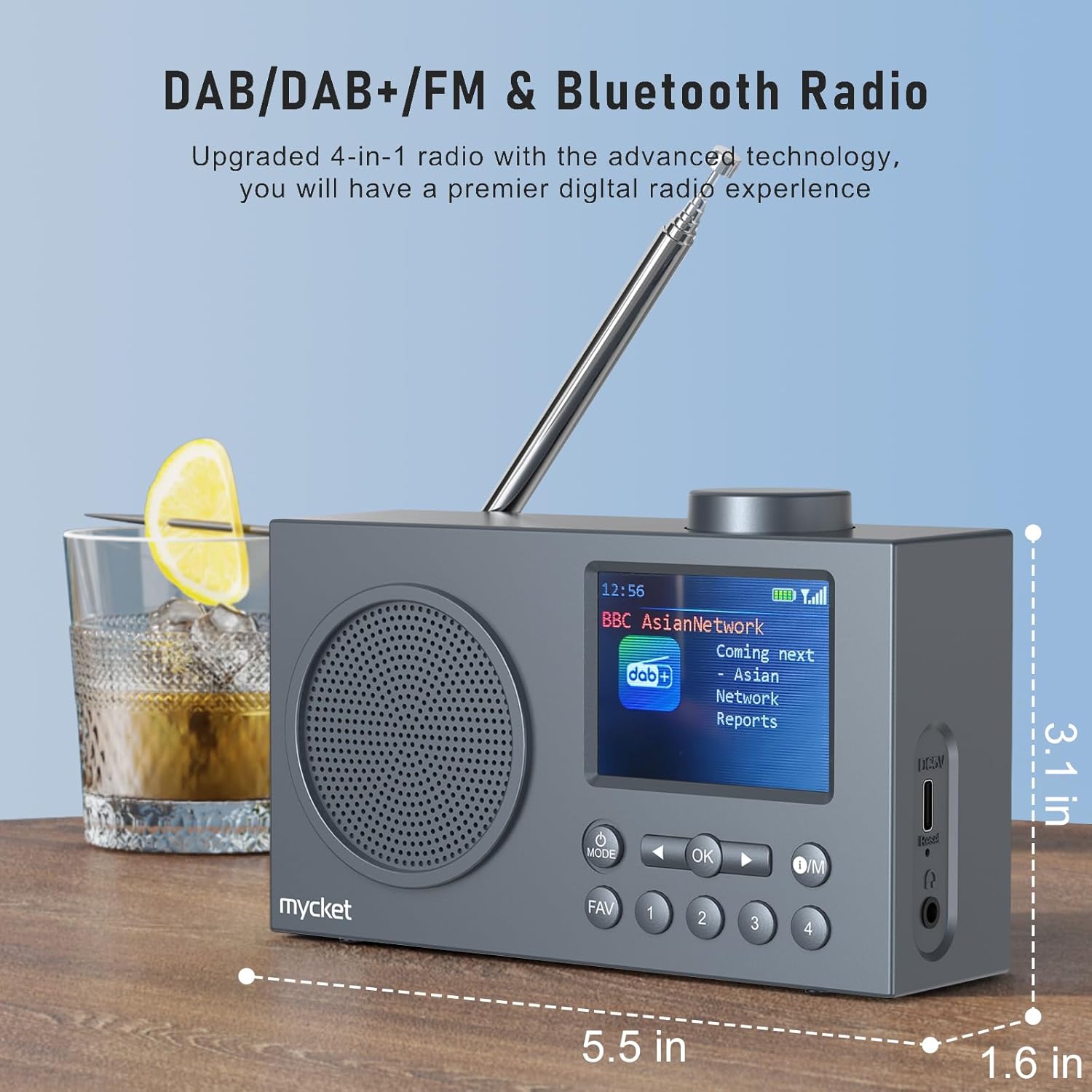
Obrázek 2: Strana view of the Mycket D009 radio illustrating its compact dimensions: approximately 5.5 inches (length), 1.6 inches (width), and 3.1 inches (height). The image also highlights its DAB/DAB+/FM and Bluetooth capabilities.
- Zobrazit: 2.4-inch TFT color display for station information, time, and settings.
- Reproduktor: Integrated Hi-Fi speaker for audio output.
- Teleskopická anténa: Pro optimální příjem rádiového signálu.
- Tlačítko MODE: Switches between DAB, FM, Bluetooth, USB, and AUX modes.
- Tlačítko OK: Potvrzuje výběry nebo vstupuje do nabídek.
- Tlačítko O/M: Power On/Off and Menu access.
- Tlačítko FAV: Accesses favorite presets.
- Číselná tlačítka (1-4): Direct access to stored presets.
- Navigační tlačítka (vlevo/vpravo): Navigates menus or tunes stations.
- Knoflík hlasitosti: Upravuje hlasitost zvuku.
- DC 5V USB-C Port: Pro nabíjení interní baterie.
- Resetovací tlačítko: Resets the device (use a thin object to press).
- 3.5mm konektor pro sluchátka: Pro soukromý poslech.
4. Nastavení
4.1 Nabíjení baterie
The radio is equipped with a built-in 2200mAh lithium battery. Before first use, fully charge the device.
- Connect the provided USB charging cable to the DC 5V USB-C port on the side of the radio.
- Druhý konec kabelu USB připojte ke kompatibilnímu napájecímu adaptéru USB (není součástí balení) nebo k portu USB počítače.
- The charging indicator on the display will show the charging status. A full charge typically takes approximately 2.5 hours and provides up to 12 hours of playback time at 70% volume.

Obrázek 3: The Mycket D009 radio display showing a full battery indicator, emphasizing its long playback time on a single charge.
4.2 Nastavení antény
Pro optimální příjem rádia plně vysuňte teleskopickou anténu. Upravte její polohu pro dosažení nejlepší kvality signálu.
4.3 Počáteční zapnutí
Stiskněte a podržte O/M button to power on the radio. The display will light up, and the device will typically start in the last used mode or initiate a DAB scan if it's the first use.
5. Návod k obsluze
5.1 Přepínání režimů
Stiskněte tlačítko MODE button repeatedly to cycle through available modes: DAB, FM, Bluetooth, USB, and AUX.
5.2 Provoz rádia DAB/DAB+
- Přepněte do režimu DAB pomocí MODE tlačítko.
- The radio will automatically perform a full scan for available DAB/DAB+ stations upon first use or if no stations are found. To initiate a manual scan, press and hold the OK button, then select "Full Scan" from the menu.
- Once the scan is complete, use the navigation buttons (Left/Right) to browse through the list of available stations.
- Stiskněte OK vybrat a poslouchat stanici.

Obrázek 4: The Mycket D009 radio display showing a DAB station and highlighting the auto-scan and 40 preset features (20 DAB & 20 FM).
5.2.1 Storing DAB Presets
The radio supports up to 20 DAB presets.
- Nalaďte požadovanou DAB stanici.
- Press and hold one of the number buttons (1-4) nebo FAV button to save the current station to a preset slot. Follow the on-screen prompts to select a slot if using the FAV button.
- To recall a preset, briefly press the corresponding number button or the FAV button and select from the list.
5.3 Provoz FM rádia
- Přepněte do režimu FM pomocí MODE tlačítko.
- Pro automatické vyhledávání stanic FM stiskněte a podržte OK button. The radio will scan and store available stations.
- To manually tune, use the navigation buttons (Left/Right) to adjust the frequency.
- Stiskněte OK pro potvrzení stanice.
5.3.1 Storing FM Presets
The radio supports up to 20 FM presets, similar to DAB presets.
- Nalaďte požadovanou FM stanici.
- Press and hold one of the number buttons (1-4) nebo FAV button to save the current station.
- To recall a preset, briefly press the corresponding number button or the FAV button and select from the list.
5.4 Bluetooth 5.0 Pairing
Connect your smartphone or tablet to the radio via Bluetooth for wireless audio streaming.
- Přepněte do režimu Bluetooth pomocí MODE button. The radio display will show "Bluetooth Pairing" or similar.
- Na svém mobilním zařízení povolte Bluetooth a vyhledejte dostupná zařízení.
- Select "Mycket D009" from the list of devices.
- Once paired, the radio will confirm the connection, and you can play audio from your device through the radio.

Obrázek 5: The Mycket D009 radio displaying "Playing" in Bluetooth mode, next to a smartphone showing "Mycket D009" as a connected Bluetooth device.
5.5 Přehrávání z USB
Přehrávejte zvuk MP3 filepřímo z USB disku.
- Vložte USB disk obsahující MP3 filedo portu USB.
- Přepněte do režimu USB pomocí MODE tlačítko.
- Rádio automaticky detekuje a začne přehrávat MP3 files. Use the navigation buttons to skip tracks.
5.6 Připojení AUX-in
Connect external audio devices using a 3.5mm audio cable (not included).
- Connect one end of a 3.5mm audio cable to the AUX-in port on the radio.
- Druhý konec připojte ke konektoru pro sluchátka nebo audio výstupu vašeho externího zařízení.
- Přepněte do režimu AUX pomocí MODE tlačítko.
- Ovládejte přehrávání z externího zařízení.
5.7 Funkce budíku
Nastavte až dva nezávislé alarmy.
- Stiskněte a podržte O/M tlačítko pro vstup do menu.
- Navigate to "Alarm Settings" using the navigation buttons and press OK.
- Vyberte Alarm 1 nebo Alarm 2.
- Set the alarm time, source (DAB, FM, or Buzzer), and volume.
- Potvrďte nastavení stisknutím OK.
5.8 Funkce časovače spánku
Nastavte rádio tak, aby se po uplynutí určité doby automaticky vypnulo.
- Stiskněte a podržte O/M tlačítko pro vstup do menu.
- Navigate to "Sleep Timer" and press OK.
- Vyberte požadovanou dobu trvání (např. 15, 30, 60 minut).
- The radio will automatically power off after the set time.
5.9 Použití sluchátek
Connect 3.5mm headphones to the headphone jack for private listening. The internal speaker will be muted automatically.
6. Údržba
- Čištění: K čištění vnějšího povrchu rádia používejte měkký, suchý hadřík. Nepoužívejte abrazivní čisticí prostředky ani rozpouštědla.
- Péče o baterie: Chcete-li prodloužit životnost baterie, vyvarujte se častého úplného vybíjení. Zařízení pravidelně nabíjejte, i když jej delší dobu nepoužíváte.
- Skladování: Rádio skladujte na chladném a suchém místě mimo dosah přímého slunečního záření a extrémních teplot.
7. Řešení problémů
| Problém | Možná příčina | Řešení |
|---|---|---|
| Žádné napájení / Rádio se nezapne. | Baterie je vybitá. | Nabijte rádio pomocí dodaného USB kabelu. |
| Špatný příjem rádia (DAB/FM). | Antenna not fully extended or positioned correctly. Weak signal area. | Fully extend and adjust the telescopic antenna. Try moving the radio to a different location. Perform a full scan for stations. |
| Párování Bluetooth selhalo. | Radio not in Bluetooth mode. Device too far. Bluetooth not enabled on external device. | Ensure the radio is in Bluetooth mode. Keep devices within range (approx. 10 meters). Enable Bluetooth on your external device and search for "Mycket D009". |
| Z reproduktoru není slyšet žádný zvuk. | Hlasitost je příliš nízká. Jsou připojena sluchátka. | Increase the volume. Disconnect headphones if not intended for private listening. |
| Přehrávání z USB nefunguje. | USB drive not inserted correctly. Incompatible file formát. | Ujistěte se, že je USB disk zcela zasunut. Zkontrolujte, zda files jsou ve formátu MP3. |
| Zařízení nereaguje. | Dočasná softwarová závada. | Press the reset button on the side of the radio using a thin object (e.g., a paperclip). |
8. Specifikace
| Značka | Mycket |
| Model | D009 |
| Režimy rádia | DAB, DAB+, FM |
| Verze Bluetooth | 5.0 |
| Možnosti přehrávání | FM, DAB, DAB+, Bluetooth, USB MP3, AUX-in |
| Výstupní výkon reproduktoru | 5 wattů |
| Reproduktorová jednotka | 4 Ω10 W 78 mm x 1 |
| Zobrazit | 2.4palcový TFT barevný LCD |
| Předvolby | 40 (20 DAB, 20 FM) |
| Typ baterie | Built-in Lithium-ion (18650) |
| Kapacita baterie | 2200 mAh (3.7V - 2.2 Ah) |
| Doba přehrávání | Approx. 8-9 hours at 70% volume (up to 12 hours) |
| Doba nabíjení | Přibl. 2.5 hodin |
| Vstup napájení | 5V přes USB |
| Rozměry (produkt) | Přibližně 14 cm (D) x 4 cm (Š) x 7.8 cm (V) |
| Výstupní připojení | 3.5mm jack pro sluchátka |
9. Záruka a podpora
Mycket products are designed for reliability and performance. This product comes with:
- Záruka 12-měsíc: Enjoy a hassle-free 12-month warranty from the date of purchase.
- Zákaznická podpora: For any questions, issues, or support needs, please contact Mycket customer service.
Uschovejte si prosím doklad o koupi pro uplatnění záruky.