
Konec produktuview
The GPD Win 4 2025 Handheld Gaming PC is a powerful portable gaming console designed for high-performance gaming on the go. Featuring the latest AMD Ryzen AI 9 HX 370 processor and Radeon 890M graphics, it delivers desktop-level performance in a compact form factor. With a 6-inch 1080P display and a unique OcuLink slide-up backlit keyboard, it offers a versatile and immersive gaming experience.
Klíčové vlastnosti
- Unmatched CPU Performance: Equipped with an AMD Ryzen AI 9 HX 370 CPU, featuring 16 cores and 24 threads, reaching turbo speeds of up to 5.1GHz for ultra-smooth gaming and efficient multitasking.
- Superior Graphics Power: Features an AMD Radeon 890M GPU with 16 Compute Units and a max frequency of 2900MHz, capable of running demanding AAA games at high settings.
- Extensive Memory Options: Offers 32GB LPDDR5X RAM at 7500 MT/s for seamless multitasking and quick loading.
- Expansive Storage Capacity: Includes 2TB M.2 NVMe 2280 SSD storage for lightning-fast boot-up and ample space for games and applications.
- Compact, Portable Design: Weighs just 598g with dimensions of 8.6 x 3.6 x 1.1 inches, featuring a full QWERTY keyboard, ALPS OEM dual 3D joysticks, Wi-Fi 6E, Bluetooth 5.3, and USB4.

Image: GPD Win 4 2025 Handheld Gaming PC with its slide-up keyboard and integrated game controls.
Začínáme
Počáteční nabití
Before first use, fully charge your GPD Win 4 2025 using the provided USB-C charger. Connect the charger to the USB-C port located at the bottom of the device. The charging indicator light will show the charging status.
Zapnutí
Press and hold the power button located on the top edge of the device until the screen illuminates. The device will boot into Windows 11 Home.
Základní konektivita
Once powered on, follow the on-screen prompts to set up Windows 11. Connect to your Wi-Fi network via the settings menu. Bluetooth 5.3 is available for connecting wireless peripherals.

Image: The top edge of the GPD Win 4 2025, highlighting the power button, volume controls, USB-C, and OcuLink ports.
Obsluha zařízení
Zobrazit
The GPD Win 4 2025 features a 6-inch H-IPS touchscreen display with a resolution of 1920 x 1080 pixels (Full HD) and 368 PPI. It supports both 40Hz and 60Hz refresh rates, protected by Gorilla Glass 5. The display slides up to reveal the physical keyboard.

Obrázek: Detailní záběr view of the GPD Win 4 2025's vibrant 6-inch touchscreen display.
Keyboard and Gamepad
The device integrates a full QWERTY keyboard that slides out from beneath the screen. It features ALPS OEM dual 3D joysticks, a D-Pad, game buttons (A, B, X, Y), and an optical finger mouse for precise control. The keyboard has a white backlight for use in low-light conditions.

Image: A detailed diagram illustrating the various controls and ports on the GPD Win 4 2025.

Image: User's hands demonstrating the use of the slide-up keyboard for in-game chat or text input.
Porty a připojení
- USB-C (USB4): Pro nabíjení a přenos dat.
- OcuLink (SFF-8612): Dedicated port for external GPU connections.
- Slot pro microSD kartu: Pro rozšiřitelné úložiště.
- 3.5mm konektor pro sluchátka: Pro audio výstup.
- Wi-Fi 6E & Bluetooth 5.3: Pro bezdrátové připojení.

Obrázek: Boční view of the GPD Win 4 2025, showing the MicroSD card slot and the switch to toggle between mouse and controller modes.
External GPU Support (OcuLink)
The integrated OcuLink port allows for connection to external GPU (eGPU) docking stations, such as the GPD G1. This significantly boosts graphics performance, enabling higher frame rates and resolutions for demanding games when docked.
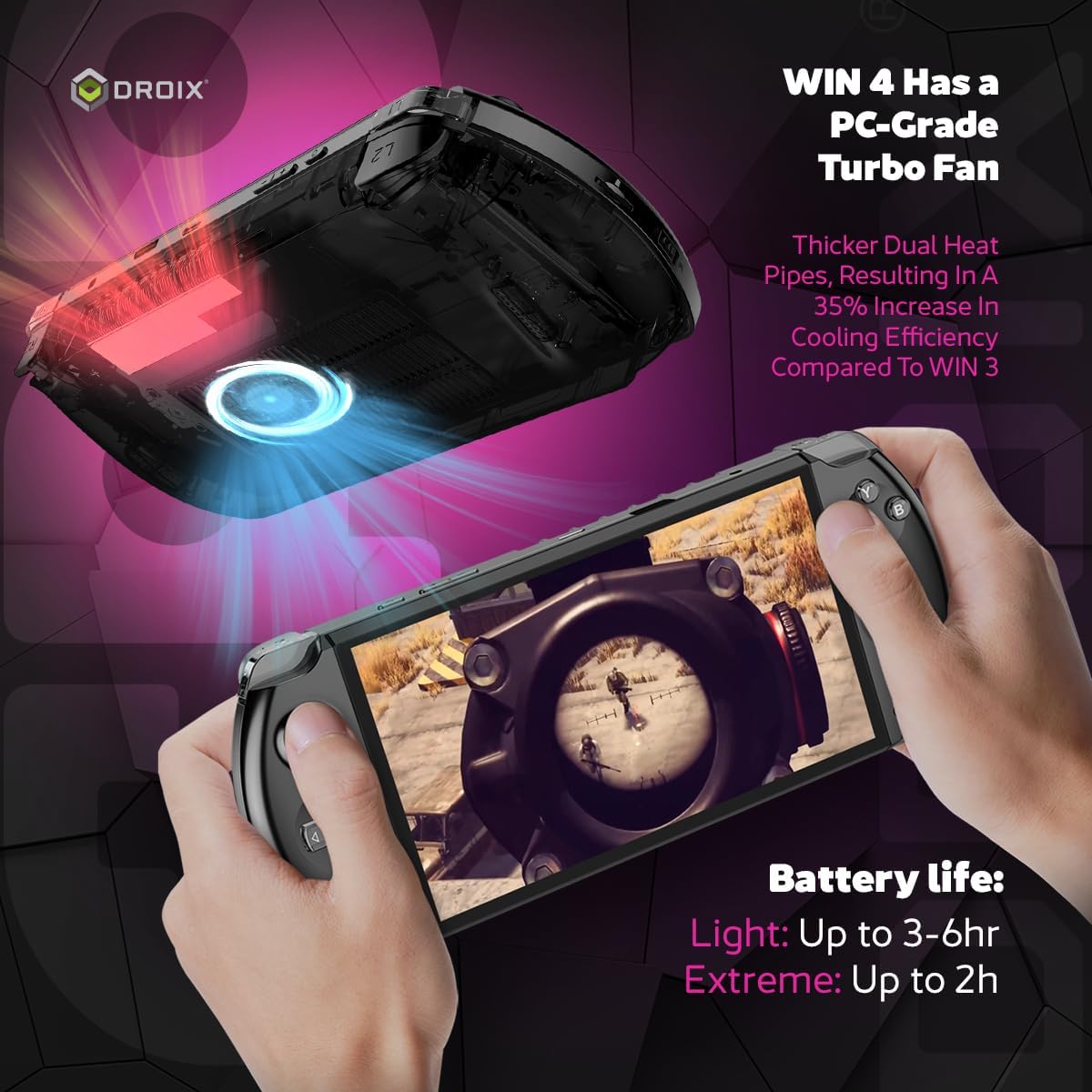
Image: The GPD Win 4 2025 connected to an external GPD G1 eGPU and an external monitor, demonstrating its expandability.
Výkon
Procesor a grafika
The GPD Win 4 2025 is powered by the AMD Ryzen AI 9 HX 370 processor, featuring 16 cores and 24 threads with a turbo frequency of up to 5.1GHz. Graphics are handled by the integrated AMD Radeon 890M GPU, which has 16 Compute Units and a max frequency of 2900MHz.
Paměť a úložiště
It comes with 32GB of LPDDR5X RAM operating at 7500 MT/s, ensuring smooth multitasking and application performance. For storage, it includes a 2TB M.2 NVMe 2280 SSD, providing fast load times and ampprostor pro vaši herní knihovnu.
Životnost baterie
The device is equipped with a 45.62Wh Lithium Polymer battery. Average usage can provide 3-6 hours of playtime, depending on the demand of the applications and games. Under full load at 28W TDP, the battery life is approximately 57 minutes.
Video: Oficiální zprávaview of the GPD WIN 4 2025, showcasing its features and performance in various games and applications.
Údržba
To ensure the longevity and optimal performance of your GPD Win 4 2025, regular maintenance is recommended.
Péče o zařízení
- Udržujte zařízení čisté otíráním měkkým suchým hadříkem.
- Nevystavujte zařízení extrémním teplotám nebo přímému slunečnímu záření.
- Protect the screen from scratches by using a screen protector or a protective case when not in use.
Chladicí systém
The GPD Win 4 2025 features a PC-grade turbo fan with thicker dual heat pipes, resulting in a 35% increase in cooling efficiency compared to previous models. Ensure the air inlets and outlets are not obstructed to maintain proper airflow and prevent overheating.
Odstraňování problémů
If you encounter any issues with your GPD Win 4 2025, refer to the common troubleshooting steps below.
- Zařízení se nezapíná: Ensure the device is fully charged. If it still doesn't power on, try holding the power button for 10-15 seconds for a hard reset.
- Problémy se zobrazením: If the screen flickers or shows abnormalities, try adjusting the refresh rate in Windows display settings.
- Problémy s připojením: For Wi-Fi or Bluetooth issues, try restarting the device and your router. Ensure drivers are up to date.
- Přehřívání: Check that the air vents are clear of obstructions. Reduce the TDP settings in the system's power options if prolonged high-performance usage causes excessive heat.
Podrobné technické specifikace
| Specifikace | Hodnota |
|---|---|
| Velikost zobrazení na stojící obrazovce | 6 palce |
| Rozlišení obrazovky | 1926 x 1080 pixelů |
| Maximální rozlišení obrazovky | 1080p Full HD pixelů |
| Procesor | 3.3 GHz AMD Ryzen AI 9 HX 370 |
| BERAN | 32 GB LPDDR5X |
| Grafický koprocesor | AMD Radeon 890M |
| Velikost paměti Flash | 2 TB |
| Bezdrátový typ | 802.11ax (Wi-Fi 6E) |
| Průměrná výdrž baterie (v hodinách) | 6 hodiny |
| Operační systém | Windows 11 Home |
| Hmotnost položky | 1.32 libry |
| Rozměry produktu | 8.66 x 1.1 x 3.62 palce |
| Barva | 2025 - Raven Black |
Záruka a podpora
Warranty information for this product is not available in the provided data. Please refer to the product packaging or the manufacturer's official webpodrobné záruční podmínky naleznete na webu.
Customer support contact information is not available in the provided data. Please refer to the product packaging or the manufacturer's official webstránky pro možnosti podpory.