
1. Úvod
This manual provides detailed instructions for the setup, operation, and maintenance of your Irfora D1007 TAM Cordless Telephone. Please read this manual thoroughly before using the device to ensure proper functionality and to familiarize yourself with all features. Keep this manual for future reference.
2. Obsah balení
Ověřte, zda jsou všechny níže uvedené položky součástí balení. Pokud některé položky chybí nebo jsou poškozené, kontaktujte prosím svého prodejce.
- 1 x sluchátko
- 1 x Cradle (Base Unit)
- 1 x telefonní kabel
- 2 x Rechargeable Batteries (400mAh, 1.2V each)
- 1 x Power Cord (US/EU Plug, as per region)
- 1 x Uživatelská příručka (anglicky)

Image: The complete package contents of the Irfora D1007 TAM Cordless Telephone, showing the handset, base unit, power adapter, telephone line cable, two rechargeable batteries, and the user manual.
3. Product Layout and Components
Familiarize yourself with the various parts of your cordless telephone and base unit.
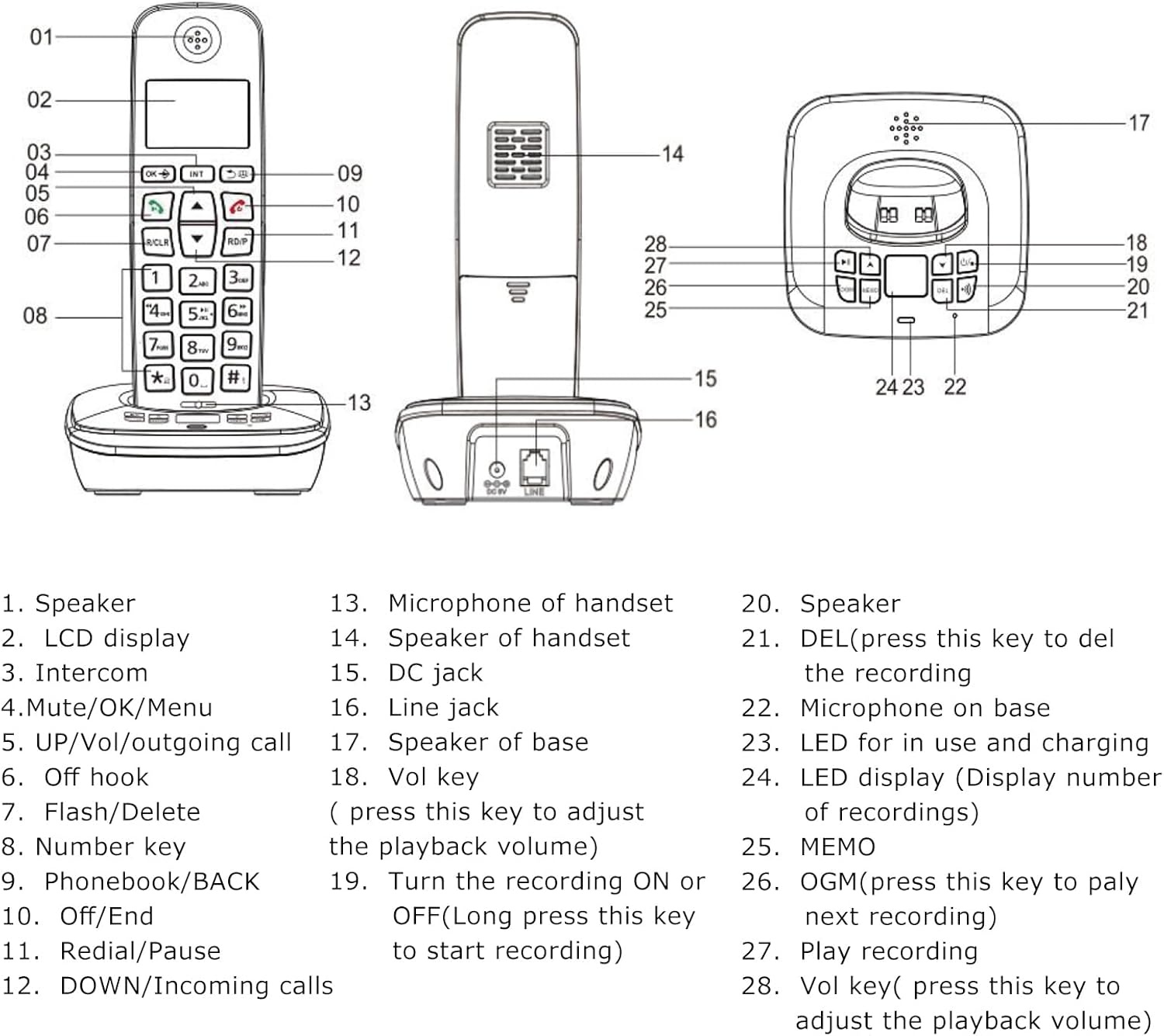
Image: A detailed diagram illustrating the handset and base unit with numbered labels pointing to specific components for easy identification.
Handset Components:
- Reproduktor
- LCD display (3 lines)
- Intercom button (INT)
- Mute/OK/Menu button
- UP/Vol/Outgoing call button
- Off hook button (Green call button)
- Flash/Delete button (R/CLR)
- Number keys (0-9, *, #)
- Phonebook/BACK button
- Off/End button (Red call button)
- Redial/Pause button (RD/P)
- DOWN/Incoming calls button
- Microphone of handset
Base Unit Components:
- Speaker of handset
- DC jack (Power input)
- Line jack (Telephone line input)
- Speaker of base
- Vol key (Volume adjustment for playback)
- Turn the recording ON or OFF (Long press to start recording)
- DEL (Press to delete the recording)
- Microphone on base
- LED for in use and charging indication
- LED display (Display number of recordings)
- Tlačítko MEMO
- OGM (Press to play next recording)
- Play recording button
- Vol key (Press to adjust playback volume)
4. Nastavení
4.1 Instalace baterie
- Otevřete kryt bateriového prostoru na zadní straně sluchátka.
- Insert the two rechargeable batteries, ensuring correct polarity (+ and -).
- Bezpečně zavřete kryt bateriového prostoru.
4.2 Připojení základní jednotky
- Connect one end of the telephone line cable to the LINE jack on the base unit and the other end to your telephone wall socket.
- Connect the power cord to the DC jack on the base unit and plug the adapter into a power outlet.
4.3 Počáteční nabíjení
Place the handset on the base unit. For the first use, charge the handset for at least 12 hours. A full charge typically takes 10 hours. This ensures optimal battery performance and longevity.
4.4 Registrace sluchátka
Your handset may be pre-registered. If not, or if you wish to register additional handsets (up to 5 per base unit), refer to the detailed registration steps in the full user manual. The system supports a maximum of 4 base units per handset.

Obrázek: Strana view of the base unit, highlighting the DC power input and the telephone line jack for connecting to power and the telephone network.
5. Návod k obsluze
5.1 Základní funkce volání
- Uskutečnění hovoru: Press the green call button, then dial the number. Alternatively, dial the number first (pre-dial) and then press the green call button.
- Příjem hovoru: Když telefon zazvoní, stiskněte zelené tlačítko pro volání.
- Ukončení hovoru: Press the red call button or place the handset back on the base unit.
- Opakovaná volba: Press the RD/P button to redial the last number called.
- Nastavení hlasitosti: During a call, use the UP/DOWN buttons to adjust the earpiece or hands-free volume.
- Ztlumit: During a call, press the Mute button to temporarily disable your microphone. Press again to unmute.

Obrázek: Detailní záběr view of the handset's keypad, emphasizing the design of the buttons for comfortable and easy use.
5.2 Answering Machine (TAM) Functions
The base unit features a digital answering machine with up to 60 minutes of message recording capacity.
- Nahrávání odchozí zprávy (OGM): The base can record two groups of OGM. Refer to the full manual for detailed steps on recording your personalized outgoing message.
- Přehrávání zpráv: Press the OGM button on the base unit to play recorded messages. Use the Vol keys to adjust playback volume.
- Nahrávání poznámek: The system supports memo recording up to 120 seconds.
- Mazání zpráv: Press the DEL button on the base unit to delete recordings.
- Hlasové výzvy: The answering machine provides voice prompts in English, Spanish, French, and German.
5.3 Telefonní seznam
Store up to 50 phone book memories, each with a maximum of 12 characters for the name and 20 digits for the number.
- Přidání záznamu: Přejděte do nabídky Telefonní seznam, vyberte možnost „Přidat nový“, zadejte jméno a číslo a poté uložte.
- Searching/Dialing: Press the Phonebook button to access your stored contacts. Use the UP/DOWN buttons to scroll, then press the green call button to dial.
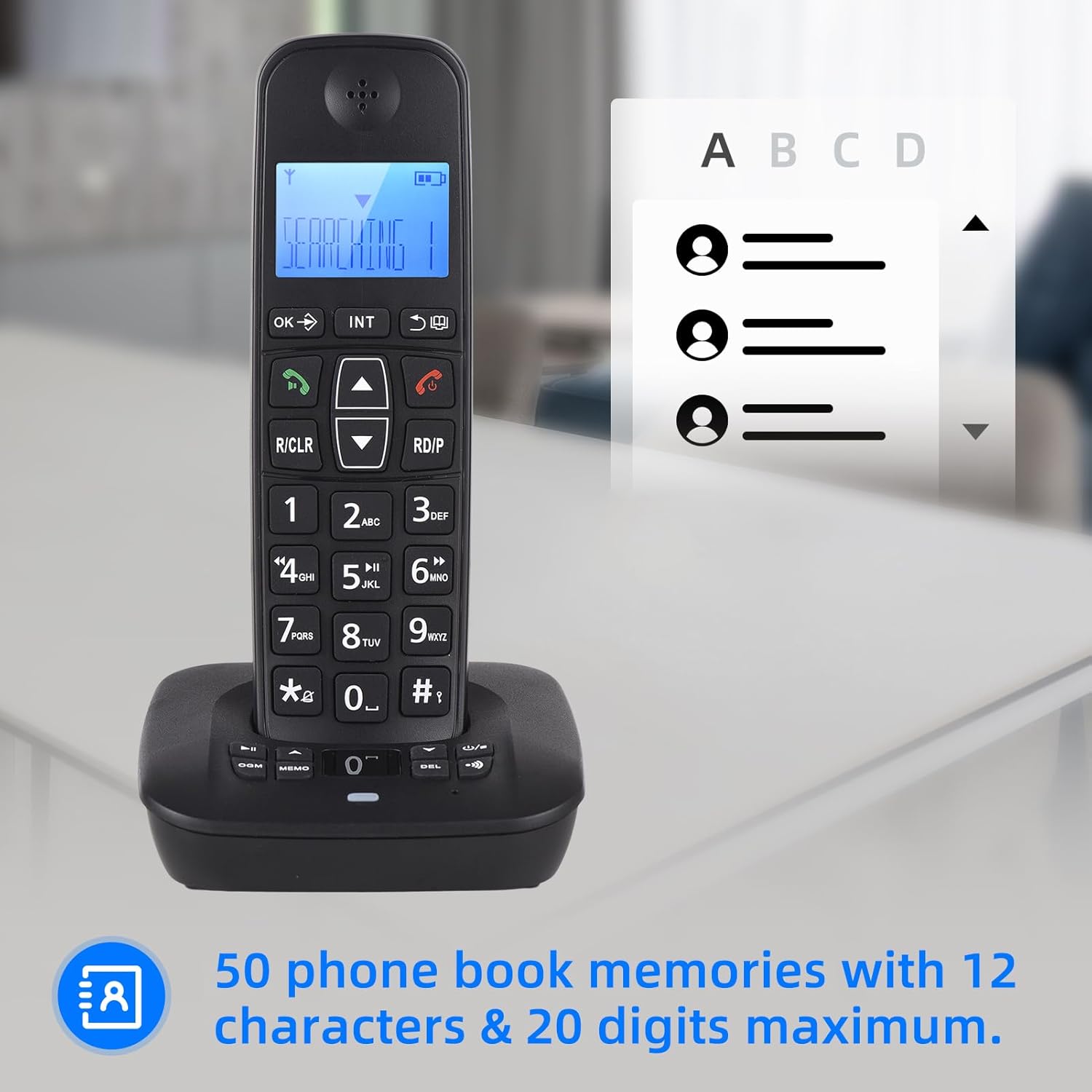
Image: The handset display showing the phonebook feature, indicating the capacity for 50 entries with space for names and numbers.
5.4 ID volajícího
The phone stores up to 30 incoming numbers and 10 outgoing numbers.
- Viewing Incoming Calls: Press the DOWN button to access the incoming call list.
- Viewing Outgoing Calls: Press the RD/P button repeatedly to cycle through outgoing calls.

Image: The handset on its base, with icons representing Caller ID, 30 incoming number memories, and 10 outgoing number memories.
5.5 Intercom and Conference Call
- Interkom: If you have multiple registered handsets, you can make intercom calls between them. Press the INT button and select the desired handset.
- Přepojení hovoru: Transfer an external call to another handset.
- Konferenční hovor: Conduct a three-way conference call involving an external call and two internal handsets.
5.6 Ringing Tones
- Výběr: Vyberte si z 10 různých vyzváněcích tónů.
- Přizpůsobení: Set different melodies for different types of calls (e.g., internal vs. external).
LCD displej 5.7
The handset features a 3-line LCD display for clear visibility of caller ID, menu options, and phonebook entries.

Image: A close-up of the handset's LCD screen, demonstrating its 3-line display capability for showing information clearly.
6. Údržba
- Čištění: Otřete sluchátko a základnu měkkým hadříkemamp tkanina. Nepoužívejte abrazivní čisticí prostředky nebo rozpouštědla.
- Péče o baterie: Use only the specified rechargeable batteries. If the phone will not be used for an extended period, remove the batteries.
- Prostředí: Chraňte telefon před nadměrným teplem, přímým slunečním zářením a vlhkostí.
7. Řešení problémů
If you encounter issues with your telephone, try the following basic troubleshooting steps:
- Žádný oznamovací tón: Ensure the telephone line cable is securely connected to both the base unit and the wall socket. Check if the power adapter is properly plugged in.
- Nelze uskutečňovat/přijímat hovory: Verify that the handset is charged. Check if the telephone line is active.
- Handset Not Registering: Follow the registration steps in the full user manual. Ensure the handset is within range of the base unit.
- Špatná kvalita zvuku: Check for interference from other electronic devices. Ensure the handset is within optimal range of the base.
- Záznamník nenahrává: Check the available memory. Ensure the answering machine function is enabled.
V případě složitějších problémů se podívejte na podrobnou část o řešení problémů v kompletní uživatelské příručce nebo kontaktujte zákaznickou podporu.
8. Specifikace
- Model: D1007 TAM
- Barva: Černý
- Materiál: Plast
- Vstup: 100-240V, 50/60Hz
- Frekvence: 1.8/1.9 GHz
- Interface Languages: Portugu, Spanish, English, French, German, Italian, Dutch, Hungarian, Greek, Polish, Danish, Norwegian, Swedish, Turkish, Russian, Ukrainian (16 kinds)
- Baterie: 2 x Rechargeable Batteries (400mAh, 1.2V each)
- Velikost sluchátka: 18 x 5.3 x 2 cm (7 x 2 x 0.9 palce)
- Cradle Size: 11 x 10.5 x 4.3 cm (4.3 x 4.1 x 1.6 palce)
- Doba hovoru: Up to 10 hours continued talk
- Pohotovostní doba: Up to 120 hours on standby
- Kapacita záznamníku: Max. 60 minut
- Phonebook Memories: 50 entries (12 characters & 20 digits max)
- Incoming Call Memories: 30 čísla
- Outgoing Call Memories: 10 čísla
9. Záruka a podpora
For warranty information and customer support, please refer to the documentation provided at the time of purchase or visit the official Irfora webwebu. Uschovejte si účtenku jako doklad o koupi.