
Zavedení
Thank you for choosing the POYBPCY CS112 Dash Cam. This manual provides essential information for setting up, operating, and maintaining your new dash camera system. The CS112 offers advanced features including 4K front recording, 1080P rear recording, built-in 5GHz WiFi, CPL filter, WDR, 24-hour parking mode, G-sensor, and loop recording to ensure comprehensive coverage and peace of mind on the road.
Konec produktuview a Komponenty
The POYBPCY CS112 Dash Cam system includes the main front dash camera unit and a rear camera, along with necessary accessories for installation and operation. Familiarize yourself with the components before proceeding with setup.
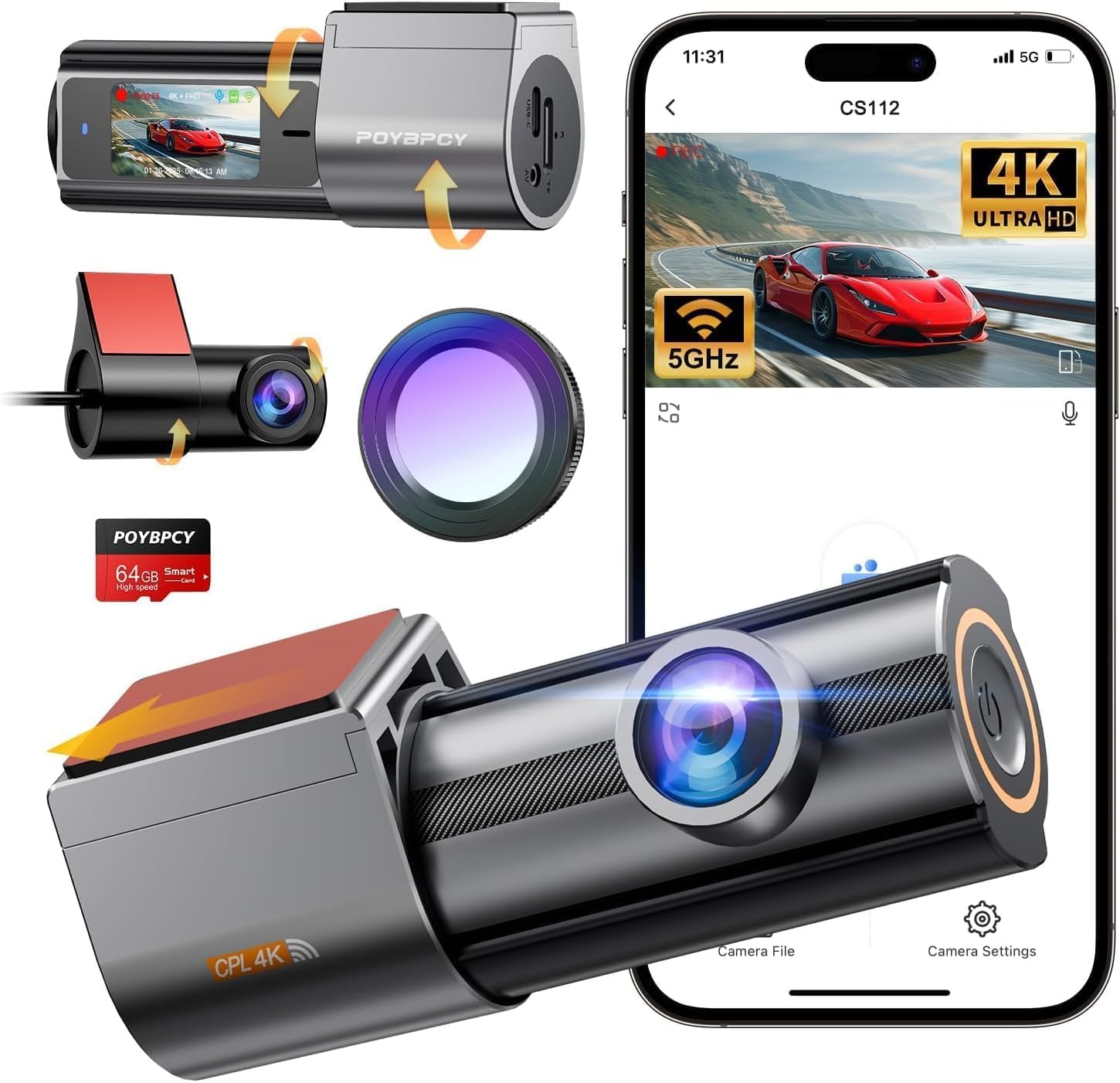
Obrázek: Overview of the POYBPCY CS112 Dash Cam, showing the front unit, rear camera, CPL filter, and the accompanying smartphone application interface.

Image: Detailed diagram illustrating the various parts of the CS112 dash cam, including the CPL, lens, speaker, multi-function side button, removable stand, recording indicator, 1.47-inch display, Type-C power port, Micro SD card slot, reset button, and rear camera connection.
Co je v krabici:
- Dash Camera (Main Unit)
- 1080p zadní kamera
- Nabíječka do auta
- Držák do auta
- Nabíjecí kabel
- Uživatelská příručka
- Páčidlo (pro vedení kabelů)
- Resetovat PIN
- Čtečka karet
- Cable Hiding Clips
- Nálepka 3M
- 64GB SD karta (součástí balení)
- Statické samolepky

Image: Visual representation of all items included in the POYBPCY CS112 Dash Cam package.
Nastavení a instalace
The POYBPCY CS112 Dash Cam is designed for straightforward installation. Follow these steps to set up your device.
Instalace přední kamery:
- Vyčistěte oblast čelního skla, kde bude namontována palubní kamera. Ujistěte se, že je bez prachu a mastnoty.
- Apply the static sticker to the chosen area on the windshield. This helps in easy removal and repositioning without leaving residue.
- Attach the car mount to the static sticker.
- Slide the main dash cam unit onto the car mount. The dash cam supports 360-degree rotation for optimal viewing úhly.
- Connect the Type-C power cable from the car charger to the dash cam's power port.
- Route the power cable neatly along the windshield edge and down to your car's cigarette lighter socket using the provided cable hiding clips and crowbar.
Instalace zadní kamery:
- Identify a suitable location on your rear windshield for the rear camera. Ensure it provides a clear view and does not obstruct your driving vision.
- Clean the chosen area on the rear windshield.
- Attach the rear camera using its 3M adhesive. The rear camera also supports 360-degree rotation for flexible positioning.
- Připojte kabel zadní kamery k portu AV-IN hlavní jednotky palubní kamery.
- Route the rear camera cable discreetly along the vehicle's interior trim to the front dash cam unit.

Image: Visual guide for simplified installation and wiring of the front and rear dash cameras, including the car charger connection.
Video: Overview of the POYBPCY CS112 Dash Cam, demonstrating its features, components, and ease of installation. This video highlights the product's design and key functionalities.
Návod k obsluze
Understand the core functionalities of your POYBPCY CS112 Dash Cam to maximize its performance and ensure optimal recording.
Režimy nahrávání:
- Nepřetržité nahrávání ve smyčce: The dash cam automatically records video in segments (e.g., 1, 3, or 5 minutes) and continuously overwrites the oldest files when the memory card is full. This ensures that recording never stops. The included 64GB SD card provides ample storage, and the system supports up to 256GB cards.
- G-senzor (nouzové nahrávání): In the event of a sudden impact or collision, the built-in G-sensor automatically detects the event and locks the current video segment, preventing it from being overwritten. This footage is stored in a separate, protected folder to serve as crucial evidence.
- 24hodinový parkovací režim: For continuous monitoring even when your vehicle is parked and turned off, the dash cam offers a 24-hour parking mode. This feature requires a separate hardwire kit (not included) to provide constant power to the device. When activated, the dash cam will record incidents like vandalism or hit-and-runs.

Image: Explanation of G-Sensor, 24-Hour Parking Monitor (requires hardwire kit), and Seamless Loop Recording functionalities.

Image: Depiction of the G-sensor automatically locking important footage in the event of a collision or sudden movement to prevent overwriting.

Image: Explanation of loop recording intervals (1/3/5 minutes) and how the dashcam overwrites old videos when the card is full. Shows compatibility with cards up to 256GB.

Image: Visualizing the 24-hour parking mode, which continues recording at a low frame rate to protect the car and its contents after the engine is turned off. Note: This feature requires a hardwire kit (not included).
Video Quality and Features:
- 4K UHD Front & 1080P FHD Rear Recording: The front camera records in Ultra HD 4K (3840x2160P) and the rear camera in Full HD 1080P, capturing clear and detailed footage of the road ahead and behind.
- Širokoúhlé objektivy: Equipped with a 170° front ultra-wide-angle lens and a 140° rear wide-angle lens, the system reduces blind spots and provides maximum road coverage.
- Super Night Vision with WDR & CPL: The dash cam features a large F2.0 aperture and a 6-layer lens for increased light intake. Wide Dynamic Range (WDR) technology combined with a CPL (Circular Polarizing Lens) optical filter reduces glare and reflections from strong light sources (like headlights or sun), enhancing color, contrast, and overall clarity for clear night and day recordings.

Image: Demonstrates the 4K Ultra HD recording capability of the front camera and 1080P Full HD of the rear camera.

Image: Shows the extensive coverage provided by the 170° front and 140° rear ultra-wide-angle lenses, effectively reducing blind spots.

Image: Comparison demonstrating how the removable CPL filter removes glare and reduces interference, ensuring clear images when recording videos, versus footage without the CPL filter where the dashboard is highly reflective, reducing video image clarity.

Image: Illustrates the effectiveness of Super Night Vision combined with the CPL filter in reducing strong light and halos from oncoming car headlights, resulting in clearer night vision images.
Connectivity and App Control:
The CS112 features built-in 5GHz WiFi for fast and seamless connection to your smartphone via the dedicated mobile application (available for Android and iOS). This allows you to:
- Adjust dash cam settings and parameters.
- View živé footagz obou kamer.
- Stáhnout nahrané video filepřímo do vašeho telefonu.
- Share videos and photos to social media platforms.

Image: Depicts the 5GHz WiFi App Control feature, showing how to connect to the dash cam and easily view recorded videos via the Vidure app, with options for sharing to social media.

Image: POYBPCY brand logo and slogan, emphasizing the brand's commitment to capturing driving moments.
Údržba
Správná údržba zajistí dlouhou životnost a optimální výkon vaší palubní kamery.
- Čisté čočky: Regularly wipe the front and rear camera lenses with a soft, lint-free cloth to ensure clear video quality. Avoid abrasive materials that could scratch the lens.
- Formátovat SD kartu: It is recommended to format the included 64GB SD card monthly to prevent data corruption and ensure smooth loop recording. This can typically be done through the dash cam's settings menu or via the mobile app.
- Zkontrolujte připojení: Periodically check all cable connections (power, rear camera) to ensure they are secure and free from damage.
- Aktualizace softwaru: Zkontrolujte výrobce website or the mobile app for any available firmware updates to ensure your dash cam has the latest features and bug fixes.
Odstraňování problémů
If you encounter issues with your dash cam, refer to the following common troubleshooting tips:
| Problém | Možná příčina | Řešení |
|---|---|---|
| Palubní kamera se nezapíná. | Volné připojení k napájení, vadná nabíječka do auta, problém se zásuvkou ve vozidle. | Ensure the car charger is securely plugged into both the dash cam and the vehicle's power outlet. Test the charger in another vehicle or use a different compatible charger. Check vehicle's fuse for the power outlet. |
| Nahrávání se zastaví nebo zamrzne. | SD card full, corrupted, or incompatible; firmware issue. | Format the SD card regularly. Try a different high-speed (Class 10 or U3) SD card up to 256GB. Perform a factory reset. Check for firmware updates. |
| Špatná kvalita videa (rozmazané, tmavé). | Dirty lens, CPL filter misaligned, low light conditions, incorrect settings. | Clean the camera lenses. Adjust the CPL filter rotation. Ensure WDR and Night Vision settings are enabled. Check video resolution settings. |
| Problémy s připojením k Wi-Fi. | Incorrect WiFi password, app not updated, interference. | Ensure correct WiFi password. Update the mobile app to the latest version. Restart both the dash cam and your smartphone. Try connecting in a different location to rule out interference. |
| Parkovací režim nefunguje. | Hardwire kit not installed or faulty, incorrect settings. | Verify that a hardwire kit is correctly installed and providing constant power. Check parking mode settings in the dash cam or app. |
Specifikace
Key technical specifications for the POYBPCY CS112 Dash Cam:
- Název modelu: CS112 Dash Cam Front and Rear
- Rozměry produktu: 8.62 x 5.31 x 2.24 palce
- Hmotnost položky: 1.1 libry
- Rozlišení záznamu videa: Front 4K (3840x2160P), Rear 1080P
- Pole View: Front 170 Degrees, Rear 140 Degrees
- Technologie připojení: Wi-Fi (5 GHz)
- Speciální vlastnosti: 360 Degree Rotation, App Control, Built-In WiFi, CPL & WDR Night Vision, Loop Recording, Parking Monitor (requires hardwire kit)
- Zahrnuté komponenty: Dash Camera, 1080P Rear Camera, Car Charger, Car Mount, Charging Cable, User Manual, 64GB SD Card, etc.
- Typ montáže: Držák na čelní sklo
- Baterie: Vyžaduje 1 lithiovou baterii (součástí balení)
- Výrobce: POYBPCY
- Datum první dostupnosti: 19. dubna 2025
Záruka a podpora
POYBPCY is committed to providing reliable products and excellent customer service.
- Záruční servis: We provide a 36-month warranty service for the POYBPCY CS112 Dash Cam. Please retain your proof of purchase for warranty claims.
- Technická podpora: Lifetime technical support is available for all POYBPCY products.
- Online podpora: Expect a 24-hour online support response for any inquiries or assistance you may need.

Image: Illustration of available support channels, including 24-hour online support, 3-year extended warranty coverage, and lifetime technical support.