
1. Úvod
Thank you for choosing the ZHANGUSY Car Video Smart Box. This device is designed to enhance your in-car entertainment and connectivity by providing wireless CarPlay, wireless Android Auto, and smart TV box functionalities, including access to streaming services like Netflix and YouTube, directly on your vehicle's display. This manual provides essential information for setup, operation, maintenance, and troubleshooting to ensure optimal performance and a seamless user experience.
2. Konec produktuview
The ZHANGUSY Car Video Smart Box is a compact and powerful accessory that transforms your wired CarPlay or Android Auto system into a versatile smart entertainment hub. It features a 2024 upgraded core chip for stable and fast wireless connections, supporting Bluetooth 5.0 and 5G WiFi for superior performance.
Klíčové vlastnosti:
- Bezdrátové CarPlay a Android Auto: Convert your vehicle's wired CarPlay or Android Auto to wireless for convenient smartphone integration.
- Smart TV Box Functionality: Access popular streaming applications like Netflix and YouTube directly on your car's screen.
- Plug and Play: Simple three-step installation with automatic reconnection after initial setup.
- Vysoký výkon: Equipped with a 2024 upgraded core chip, Bluetooth 5.0, and 5G WiFi for fast and stable connectivity.
- Univerzální kompatibilita: Supports iPhone 6 and later (iOS 10+) and Android 11 and later (with latest Android Auto function), compatible with over 800 vehicle models that have factory wired CarPlay or Android Auto.
- Přenosný design: Compact and lightweight for easy integration into your vehicle.

Image: The ZHANGUSY Car Video Smart Box, a compact black device with a glossy finish and silver trim.
3. Bezpečnostní informace
Please read and follow these safety guidelines to prevent damage to the device or vehicle, and to ensure safe operation:
- Nepokoušejte se zařízení rozebírat nebo upravovat.
- Udržujte zařízení mimo dosah vody, vlhkosti a extrémních teplot.
- Ensure the device is securely placed and does not obstruct your view nebo zasahovat do ovládání vozidla.
- Avoid operating the device in a manner that distracts you from driving. Always prioritize road safety.
- Používejte pouze dodané kabely a příslušenství, abyste předešli poškození.
4. Obsah balení
Prosím, ověřte, zda jsou v balení přítomny všechny položky:
- ZHANGUSY Car Video Smart Box
- Kabel USB-A na USB-C
- Kabel USB-C na USB-C
- Uživatelská příručka (tento dokument)
5. Nastavení
The ZHANGUSY Car Video Smart Box is designed for a simple plug-and-play setup. Follow these steps for initial installation:
Kontrola kompatibility:
Before installation, confirm that your vehicle has a factory-installed wired CarPlay or wired Android Auto system. This device requires an existing wired connection to function wirelessly.
- Pro uživatele iPhone: Your vehicle must have wired CarPlay.
- Pro uživatele telefonů Android: Your vehicle must have wired Android Auto.
Note: This adapter does not convert wired CarPlay to wireless for Android phones, nor wired Android Auto to wireless for iPhones.

Image: Diagram illustrating vehicle and mobile phone compatibility. It shows that the device works with cars having wired CarPlay (for iPhone 6+ and iOS 10+) or wired Android Auto (for Android 11+).
Kroky instalace:
- Připojte zařízení: Plug one end of the provided USB cable into the ZHANGUSY Car Video Smart Box and the other end into your vehicle's USB port that supports wired CarPlay or Android Auto.
- Vehicle Display: Once connected, your vehicle's display should recognize the Smart Box and show its interface.
- Spárování telefonu: On the Smart Box interface, navigate to the Wireless CarPlay or Wireless Android Auto option. Enable Bluetooth and Wi-Fi on your smartphone and pair it with the Smart Box via Bluetooth. Follow the on-screen prompts to complete the connection.
After the initial pairing, the Smart Box will automatically connect to your phone each time you start your vehicle, provided Bluetooth and Wi-Fi are enabled on your phone.
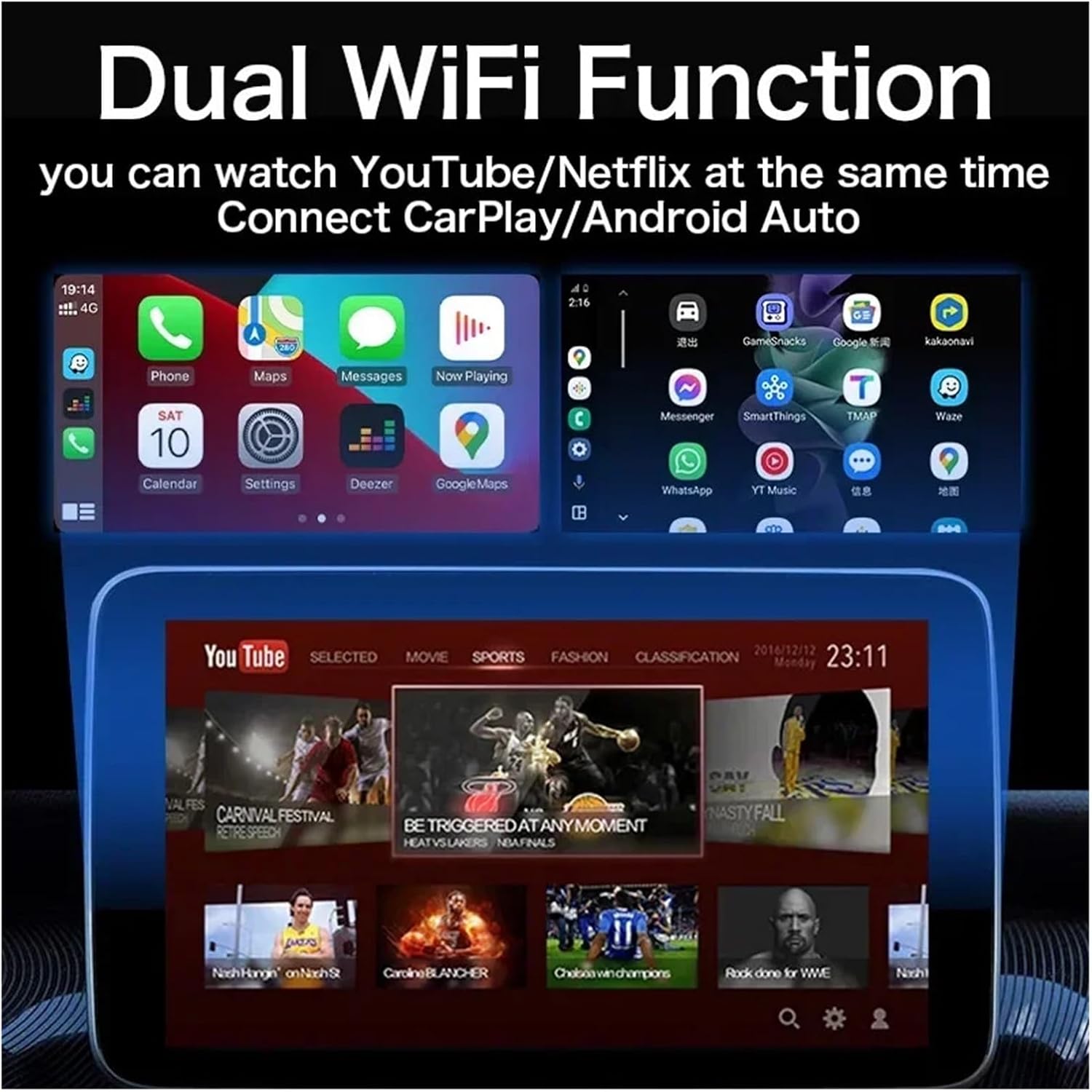
Image: A visual representation of the Wireless CarPlay and Android Auto interfaces displayed on a car's infotainment screen, showing compatible iPhone and Android phone models.
6. Návod k obsluze
Using Wireless CarPlay / Android Auto:
Once your phone is successfully paired, the Smart Box will launch the corresponding wireless CarPlay or Android Auto interface. You can then use your phone's features, such as navigation, music, calls, and messages, directly from your car's display using touch controls, voice commands, or steering wheel controls.
Accessing Smart TV Box Features (Netflix, YouTube):
The ZHANGUSY Car Video Smart Box comes with pre-installed applications like Netflix and YouTube. To use these features:
- Ensure the Smart Box is connected to a Wi-Fi network (e.g., your phone's hotspot or an in-car Wi-Fi).
- From the Smart Box's main menu, select the desired application (Netflix or YouTube).
- Pokud budete vyzváni, přihlaste se pomocí přihlašovacích údajů k účtu.
- Enjoy streaming content on your car's display.

Image: A car's infotainment screen displaying the interfaces for YouTube and Netflix, indicating built-in app functionality.
Dual WiFi Function:
The device supports Dual WiFi functionality, allowing you to connect to a Wi-Fi network for streaming (e.g., YouTube/Netflix) while simultaneously maintaining a connection for Wireless CarPlay/Android Auto. This ensures uninterrupted entertainment and navigation.
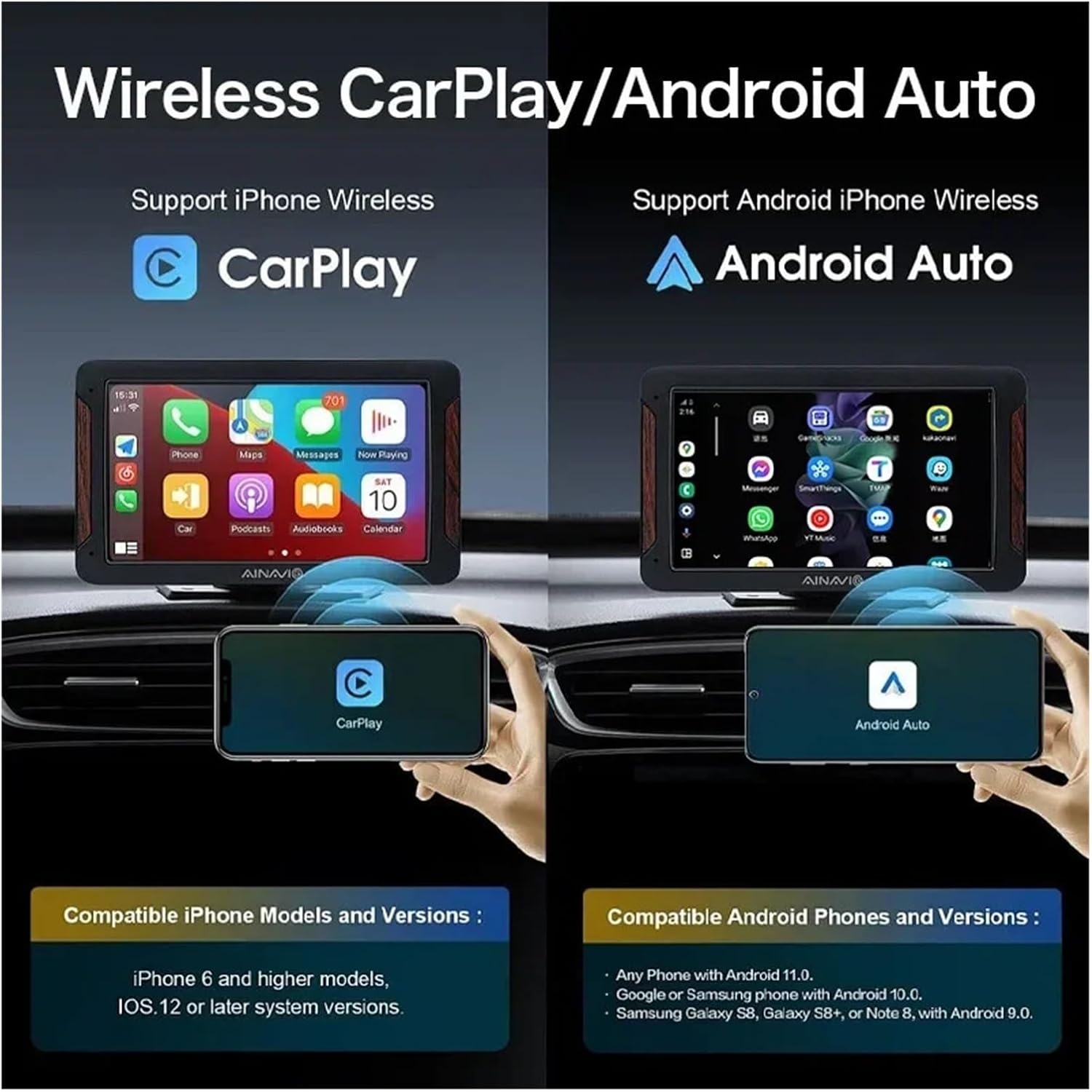
Image: An illustration showing a car's screen simultaneously displaying a phone's CarPlay interface at the top and a YouTube video at the bottom, demonstrating the dual WiFi capability.
7. Údržba
To ensure the longevity and optimal performance of your ZHANGUSY Car Video Smart Box, follow these simple maintenance guidelines:
- Čištění: Use a soft, dry cloth to wipe the device. Avoid using liquid cleaners or abrasive materials.
- Skladování: Pokud zařízení delší dobu nepoužíváte, skladujte jej na chladném a suchém místě mimo dosah přímého slunečního záření.
- Péče o kabely: Handle USB cables gently. Avoid bending or twisting them excessively to prevent internal damage.
- Aktualizace softwaru: Periodically check for firmware updates (if available) through the device's settings to ensure the best performance and compatibility.
8. Řešení problémů
If you encounter issues with your ZHANGUSY Car Video Smart Box, please refer to the following common problems and solutions:
Zařízení se nezapíná:
- Ensure the USB cable is securely connected to both the Smart Box and the vehicle's USB port.
- Zkuste jiný USB port ve vašem vozidle, pokud je k dispozici.
- Verify that the vehicle's USB port provides power.
No Wireless CarPlay / Android Auto Connection:
- Confirm your vehicle has factory wired CarPlay or Android Auto.
- Ujistěte se, že je na vašem smartphonu povoleno Bluetooth a Wi-Fi.
- Delete previous Bluetooth pairings for the Smart Box on your phone and re-pair.
- Restart your smartphone and the vehicle's infotainment system.
- Check the compatibility note in Section 5: The device does not convert wired CarPlay to wireless for Android phones, nor wired Android Auto to wireless for iPhones.
Streaming Apps (Netflix/YouTube) Not Working:
- Ensure the Smart Box is connected to a stable Wi-Fi network with internet access.
- Zkontrolujte rychlost svého internetového připojení.
- Verify that you are logged into your streaming service accounts.
- Clear the cache of the respective app within the Smart Box settings, if available.
Slow Performance or Lag:
- Ujistěte se, že máte aktuální operační systém telefonu.
- Minimize background applications on your smartphone.
- Check for any firmware updates for the Smart Box.
9. Specifikace
| Funkce | Specifikace |
| Model | Car Video Smart Box |
| Bezdrátové připojení | Bluetooth 5.0, 5G WiFi |
| Operační systém | Android 12 (3-in-1 system) |
| Předinstalované aplikace | Netflix, YouTube |
| Compatibility (iPhone) | iPhone 6 and later, iOS 10 and above (with wired CarPlay) |
| Compatibility (Android) | Android 11 and later (with wired Android Auto) |
| Rozměry | Přibližně 3 x 2 x 1 cm |
| Hmotnost | Přibližně 50 g |
| Výrobce | Haibinbaihuoshanghang |

Image: A detailed diagram highlighting the BT 5.0 chip module and 5G WiFi chip module, emphasizing the powerful performance and faster transmission capabilities.
10. Záruka a podpora
For warranty information and technical support, please refer to the seller's policies on the platform where you purchased the ZHANGUSY Car Video Smart Box. If you encounter any issues not covered in this manual, please contact the seller directly for assistance.
Uschovejte si prosím doklad o koupi pro případné reklamace.