
Konec produktuview
The SIXTOP Android 13 Double DIN Car Radio is an advanced in-car entertainment and navigation system featuring a 9-inch touchscreen display. It integrates modern connectivity options such as wireless CarPlay, Android Auto, Bluetooth 5.0, and Wi-Fi. Designed for a seamless user experience, it offers GPS navigation, FM/RDS radio, and supports a reversing camera for enhanced safety.
This unit operates on Android 13, providing a fast and responsive interface with access to a wide range of applications. It comes with 4GB RAM and 64GB ROM, ensuring smooth performance for all functions.
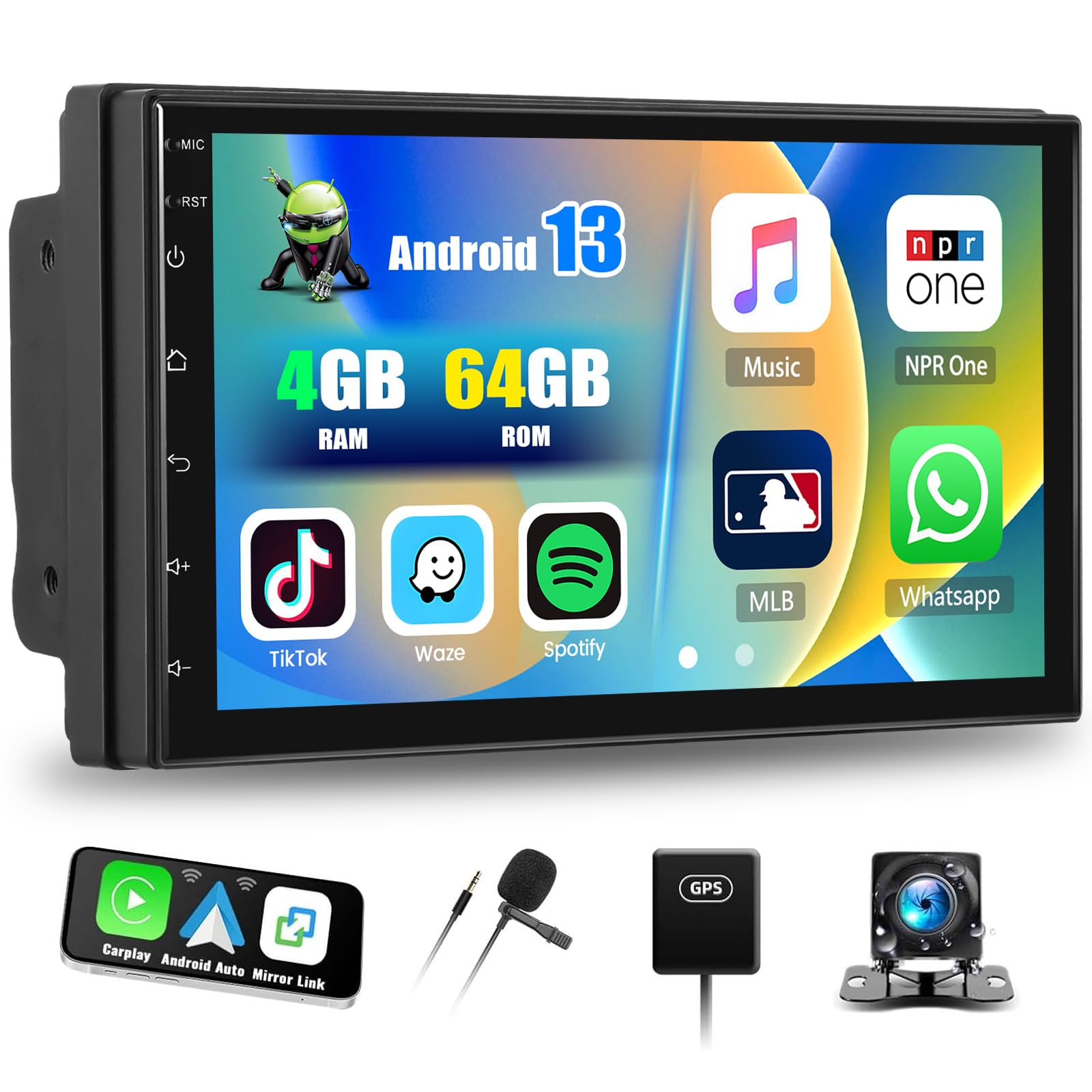
Main unit of the SIXTOP Android 13 Double DIN Car Radio, showcasinjeho 9palcový dotykový displej.
Nastavení a instalace
This section provides general guidelines for setting up your SIXTOP Android 13 Double DIN Car Radio. Professional installation is recommended for optimal performance and safety.
Obsah balení
Before installation, verify that all components are present in the package. The standard package includes:
- Main Head Unit (9-inch touchscreen)
- Power Cable (ISO interface)
- RCA kabel
- USB kabely (dva USB porty)
- GPS anténa
- Vstupní kabel zadní kamery
- Montážní držáky
- Externí mikrofon
- Zadní kamera AHD
- Uživatelská příručka

Illustration of the various components included in the product package, such as the main unit, cables, antennas, and camera.
Připojení vodičů
- Připojení napájení: Connect the provided power cable to your vehicle's wiring harness. Ensure correct polarity for constant power (B+), accessory power (ACC), and ground (GND).
- Připojení reproduktorů: Connect the speaker wires from the head unit to your vehicle's speakers. Ensure each speaker is connected to the correct channel (Front Left, Front Right, Rear Left, Rear Right).
- GPS anténa: Namontujte anténu GPS na místo s volným view of the sky, typically on the dashboard or under the windshield. Connect it to the GPS input on the head unit.
- USB porty: Connect the dual USB cables to the corresponding ports on the head unit. Route them to a convenient location for connecting USB devices.
- Zadní kamera: Connect the rear camera input cable to the head unit. Install the AHD rear camera at the back of your vehicle and connect its video output to the input cable. Ensure the camera's power is connected to the reverse light circuit for automatic activation.
- Externí mikrofon: Connect the external microphone to the dedicated input for improved call quality. Position it near the driver for optimal voice capture.
- RCA kabely: Use RCA cables for connecting external amplišty nebo subwoofery, pokud je to požadováno.
- Ovládání na volantu: Connect the steering wheel control wires (Key1, Key2) to your vehicle's steering wheel control interface, if applicable. Refer to your vehicle's wiring diagram for specific connections.
Počáteční zapnutí
After all connections are made, turn on your vehicle's ignition. The unit should power on automatically. Follow any on-screen prompts for initial setup, such as language selection and time zone.
Návod k obsluze
1. Bezdrátové CarPlay a Android Auto
Connect your iPhone or Android phone wirelessly to access CarPlay or Android Auto features. This allows you to use phone applications for navigation, music, calls, and messages directly on the car radio's screen.
- Ujistěte se, že je na vašem smartphonu povoleno Bluetooth a Wi-Fi.
- On the car radio, navigate to the CarPlay/Android Auto application.
- Select your phone from the list of available devices to establish a connection.
- Follow any on-screen prompts on both the car radio and your phone to complete the pairing process.

The car radio display showing the CarPlay and Android Auto interfaces, allowing seamless smartphone integration.
2. Mirror Link (Wireless)
Mirror Link allows you to cast your smartphone's screen onto the car radio display via Wi-Fi. This feature is compatible with both iOS (AirPlay) and Android devices.
- Ensure your phone and the car radio are connected to the same Wi-Fi network.
- Otevřete aplikaci Mirror Link v autorádiu.
- On your smartphone, activate screen mirroring (e.g., AirPlay for iOS, Smart View/Cast for Android).
- Select the car radio from the list of available devices to begin mirroring.
3. Bluetooth Connectivity (Version 5.0)
The integrated Bluetooth 5.0 module enables hands-free calling and wireless music streaming.
- Párování: Go to the Bluetooth settings on the car radio and your phone. Hledat and select the car radio's Bluetooth name (e.g., "SIXTOP Car Radio") to pair.
- Hands-free volání: Once paired, you can make and receive calls directly through the car radio. The external microphone ensures clear audio.
- Přehrávání hudby: Stream audio from your phone to the car radio. Controls for play, pause, skip are available on the touchscreen.
- Synchronizace kontaktů: The unit supports automatic loading of your phone's contact book.

Screenshots illustrating Bluetooth hands-free calling and music playback features on the car radio.
4. Wi-Fi and GPS Navigation
Connect to Wi-Fi to download applications, stream online content, and utilize online navigation services. The built-in GPS module supports both online and offline navigation.
- Wi-Fi připojení: Přejděte do Nastavení > Wi-Fi, vyberte svou síť a zadejte heslo.
- GPS navigace: The unit is compatible with popular navigation apps like Waze, Navfree, and Google Maps. You can download offline maps from the Play Store for navigation without an internet connection.

The car radio screen displaying Wi-Fi connection status and a GPS navigation map with route information.
5. Rádio FM/RDS
Access FM radio stations with clear sound quality. The RDS (Radio Data System) feature provides additional information like station name and traffic announcements.
- tuning: Use the touchscreen to manually tune or scan for available FM stations.
- Předvolby: Uložte si až 18 oblíbených stanic pro rychlý přístup.
- RDS: When available, RDS will display station information and can provide traffic updates.
6. Reversing Display and Camera
The unit automatically displays the rear camera feed when the vehicle is in reverse gear, aiding in safe parking and maneuvering.
- Automatická aktivace: The display switches to the camera view při zařazení zpátečky.
- AHD kamera: The included AHD camera provides clear, high-definition video, including night vision capabilities.
- Vodicí linie: Parking guide lines are displayed on the screen and can be adjusted for accuracy.

The car radio screen showing the reversing camera view with dynamic parking guide lines, enhancing safety during parking maneuvers.
7. Ovládání na volantu
Control essential functions of the car radio directly from your vehicle's steering wheel buttons, allowing you to keep your hands on the wheel and focus on driving.
- Přizpůsobení: Map your steering wheel buttons to control functions like volume, track change, mode selection, and answering calls.
- Bezpečnost: Reduces distractions by providing convenient access to common controls.
8. Split Screen and EQ Sound
The split-screen function allows you to run two applications simultaneously, while the built-in equalizer provides extensive audio customization.
- Rozdělená obrazovka: Drag an app icon to one side of the screen to activate split-screen mode. You can adjust the size and position of each application.
- Ekvalizér (EQ): The 32-frequency equalizer allows for precise audio tuning, including panoramic surround sound adjustments, to match your preferences and vehicle acoustics.

The car radio display showing the split-screen functionality, allowing two applications to run side-by-side, and the detailed equalizer settings for audio customization.
Údržba
Správná údržba zajistí dlouhou životnost a optimální výkon vašeho autorádia.
- Čištění obrazovky: Dotykovou obrazovku jemně otřete měkkým hadříkem, který nepouští vlákna. V případě odolných šmouh lehceampOtřete hadřík vodou nebo čisticím prostředkem vhodným pro obrazovky. Vyhněte se agresivním chemikáliím nebo abrazivním materiálům.
- Aktualizace softwaru: Periodically check for software updates via the Wi-Fi connection to ensure you have the latest features and security patches.
- Větrání: Ujistěte se, že ventilační otvory jednotky nejsou zablokované, aby nedošlo k jejímu přehřátí.
- Připojení kabelů: Občas zkontrolujte všechna kabelová připojení, abyste se ujistili, že jsou bezpečná a nepoškozená.
Odstraňování problémů
Tato část se zabývá běžnými problémy, se kterými se můžete setkat. V případě složitějších problémů kontaktujte zákaznickou podporu.
Žádná síla
- Check the vehicle's fuse box for blown fuses related to the car radio.
- Verify that the power cables (B+, ACC, GND) are correctly and securely connected.
- Ujistěte se, že je zapnuté zapalování vozidla.
Žádný zvuk
- Zkontrolujte úroveň hlasitosti a ujistěte se, že přístroj není ztlumený.
- Zkontrolujte, zda jsou všechna připojení reproduktorových kabelů bezpečná.
- Ujistěte se, že je vybrán správný zdroj zvuku.
Ztráta signálu GPS
- Ujistěte se, že je anténa GPS správně připojena a namontována na místě s volným view z nebe.
- Přesuňte vozidlo na otevřené prostranství, dále od vysokých budov nebo hustého porostu.
Problémy s připojením Bluetooth
- Ujistěte se, že je Bluetooth povoleno jak v autorádiu, tak i ve smartphonu.
- Smažte předchozí párování na obou zařízeních a zkuste je znovu spárovat.
- Restartujte autorádio i chytrý telefon.
CarPlay/Android Auto se nepřipojuje
- Verify that Wi-Fi is enabled on both devices.
- Ujistěte se, že máte aktuální operační systém telefonu.
- Try restarting the car radio and your phone.
Dotyková obrazovka nereaguje
- Proveďte měkký reset stisknutím resetovacího tlačítka (pokud je k dispozici) nebo vypnutím zapalování vozidla a jeho opětovným nastartováním.
- Ujistěte se, že je obrazovka čistá a bez nečistot.
Technické specifikace
| Systém | Android 13 |
| Procesor | RK3326S (4 Cores) |
| BERAN | 4 GB |
| ROM | 64 GB |
| Velikost obrazovky | 9 palců |
| Rozlišení obrazovky | 1024 x 600 |
| Rádiový čip | UMW2652 |
| Výstupní výkon | 4 x 45 W (Max 180 Watts) |
| Verze Bluetooth | 5.0 |
| Provozní teplota | -20 °C až 75 °C |
| Ampliifier Chip | YD7388 |
| Rozhlasové pásmo | FM/RDS (18 memory functions) |
| Reverzní vstup | AHD/CVBS |
| Externí mikrofon | Podporováno |
| Rozdělená obrazovka | Podporováno |
| Mapy | Vestavěné offline mapy (pro stahování dat je vyžadováno připojení k internetu) |
| Wi-Fi | Podporováno |
| CarPlay / Android Auto | Pouze bezdrátové připojení |
| Zrcadlový odkaz | Pouze bezdrátové připojení |
| USB porty | Duální USB |
| Zvukové formáty | APE/FLAC/WAV/MP3/WMA atd. |
| Video formáty | MKV/RMVB/AVI/MP4/MDV atd. |
| Formáty obrázků | PNG/JPEG/JPG/GIF/WBMP/BNP atd. |
| Factory Settings Keyword | 8317 |
| Podporované jazyky | Čínština, angličtina, francouzština, italština, korejština, japonština, arabština, španělština, portugalština, ruština, turečtina, vietnamština, hebrejština, polština, němčina. |
| Hmotnost položky | 1100 gramů |
Záruka a podpora
SIXTOP provides comprehensive support for your product.
- Záruka: This product includes a one-year warranty from the date of purchase.
- Vrácení: Returns are supported within one month of purchase.
- Technická podpora: For any questions or issues before or after purchase, please contact customer service. Responses are typically provided within 24 hours.
- Kontakt: For support, please refer to the contact information provided with your purchase or on the official SIXTOP webmísto.