
Zavedení
Thank you for choosing the AOLON Curve Smart Watch. This device is designed to enhance your daily life with advanced health monitoring, fitness tracking, and smart communication features. This manual provides essential information for setting up, operating, and maintaining your new smart watch.

Image: The AOLON Curve Smart Watch in Rose Gold, showcasinjeho elegantní design a zářivý displej.
Co je v krabici
Upon opening your AOLON Curve Smart Watch package, you should find the following items:
- AOLON Curve Smart Watch (with Watch Band attached)
- Nabíjecí kabel
- Uživatelská příručka (tento dokument)

Image: A visual representation of the product packaging contents, showing the watch, charging cable, and user manual.
Nastavení
1. Počáteční nabíjení
Before first use, fully charge your smart watch. A full charge typically takes approximately 2.5 hours. The watch offers up to 7 days of normal use and over 20 days in power-saving mode on a single charge.
- Připojte magnetický nabíjecí kabel k nabíjecím bodům na zadní straně hodinek.
- Zapojte USB konec kabelu do standardního USB napájecího adaptéru (není součástí balení) nebo do USB portu počítače.
- Displej hodinek bude ukazovat stav nabíjení.

Image: The smart watch connected to its magnetic charging cable, illustrating the charging process and battery icon.
2. Stažení a spárování aplikace
To unlock the full potential of your AOLON Curve Smart Watch, download the companion app and pair it with your smartphone.
- Scan the QR code in your physical manual or search for „GloryFit“ in the Apple App Store (for iOS) or Google Play Store (for Android).
- Nainstalujte GloryFit aplikace na vašem smartphonu.
- Ujistěte se, že je na vašem smartphonu povoleno Bluetooth.
- Open the GloryFit app, navigate to the "Device" section, and tap "Add Device".
- Select "Aolon Curve2" from the list of available devices to pair.
- Dokončete proces párování podle pokynů na obrazovce.

Image: A step-by-step guide illustrating how to download the GloryFit app and connect the AOLON Curve Smart Watch to a smartphone.
Ovládání chytrých hodinek
1. Základní navigace
The AOLON Curve Smart Watch features a 1.83-inch HD full-view curved display with a responsive touchscreen and an optical rotary button for intuitive navigation.
- Přejetí nahoru/dolů: Procházení nabídek a oznámení.
- Přejetí doleva/doprava: Přístup k rychlým funkcím nebo různým ciferníkům.
- Klepněte na: Vyberte položku nebo potvrďte akci.
- Stiskněte boční tlačítko: Návrat na domovskou obrazovku nebo zapnutí/vypnutí.
- Rotate Side Button: Scroll through menus or adjust settings.

Obrázek: Podrobný view of the smart watch's 1.83-inch HD display with 3D curved glass, highlighting its visual clarity.
2. Přizpůsobení ciferníků
Personalize your watch with over 120 customizable watch faces available through the GloryFit app. You can also set your own photos as watch faces.
- From the watch home screen, long-press the display to quickly change watch faces.
- For more options, open the GloryFit app and navigate to the watch face selection menu.

Image: Various digital and analog watch faces shown on the smart watch, demonstrating customization options.
3. Volání přes Bluetooth
With its built-in microphone and speaker, the smart watch allows you to make and receive calls directly from your wrist when connected to your phone via Bluetooth.
- To make a call, access the dial pad or contact list on your watch.
- To answer an incoming call, tap the green phone icon on the watch screen.
- To reject a call, tap the red phone icon.

Image: A user interacting with the smart watch to manage calls while driving, highlighting the Bluetooth calling feature.
4. Chytrá oznámení
Receive real-time notifications for messages, alarms, and other app alerts directly on your watch. Note that message reply is not supported directly from the watch.
- Ensure notification permissions are granted to the GloryFit app on your smartphone.
- Přejeďte prstem dolů po ciferníku na view nedávná oznámení.

Image: The smart watch displaying various app notifications, indicating its intelligent notification reminder feature.
5. Monitorování zdraví
The AOLON Curve Smart Watch provides continuous monitoring of key health metrics.
- Srdeční frekvence: Continuous heart rate tracking with alerts for abnormal rates.
- Kyslík v krvi (SpO2): Sledujte hladinu kyslíku v krvi.
- Monitorování spánku: Tracks sleep duration, quality, and stages (deep, light, REM, awake).
- Sledování stresu: Poskytuje vhled do vaší úrovně stresu.
- Women's Cycle Tracking: Podporuje sledování menstruačních cyklů.
- Upomínky na sedavý způsob života: Alerts you to move after prolonged periods of inactivity.
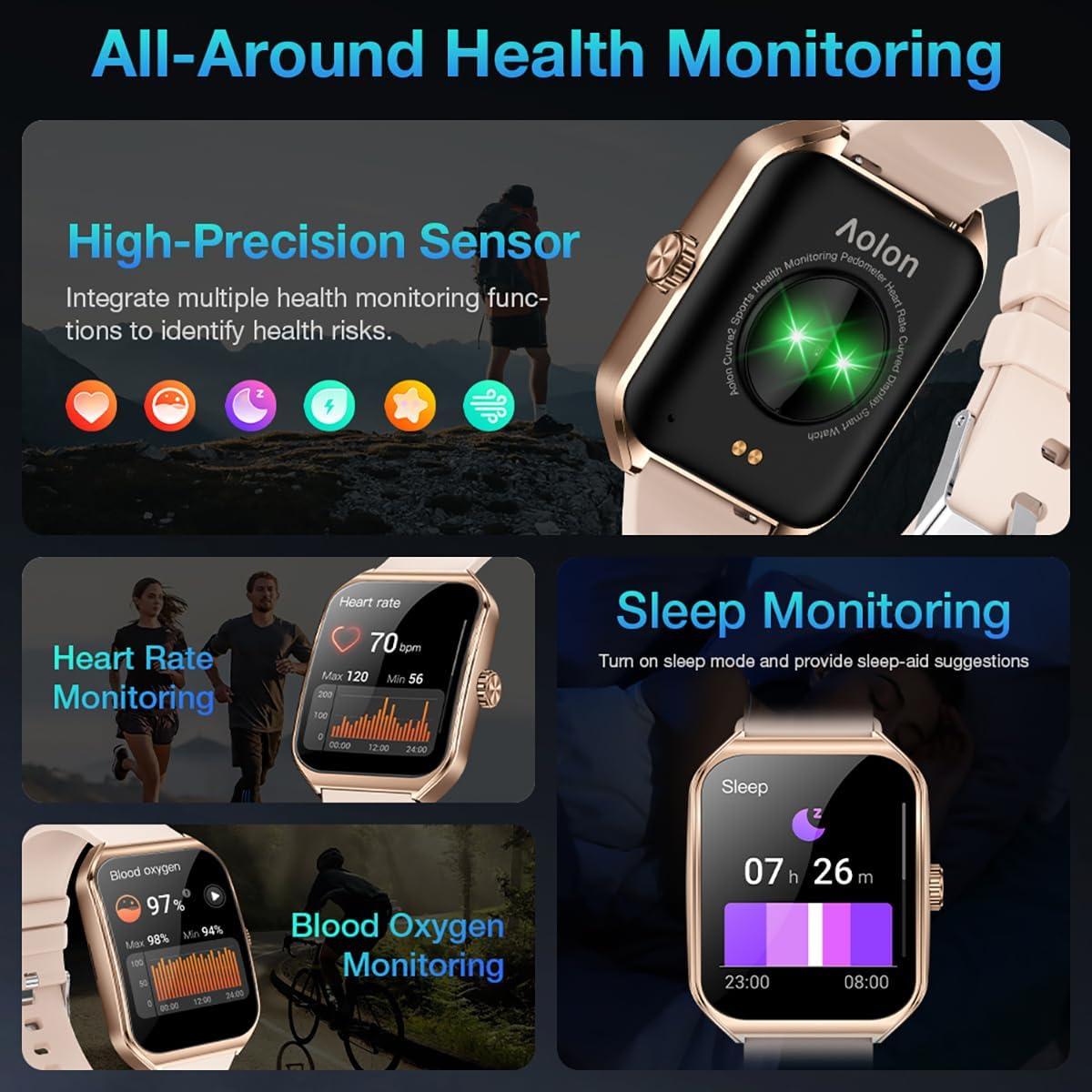
Image: A collage showing the smart watch monitoring heart rate, blood oxygen, and sleep, emphasizing its comprehensive health tracking capabilities.
Video: Demonstrates the 24/7 health monitoring features of the AOLON Smart Watch, including heart rate and SpO2 tracking.
6. Sportovní režimy a sledování aktivity
The watch supports over 60 sports modes, allowing you to accurately monitor heart rate, calorie consumption, and exercise duration.
- Select your desired sports mode from the watch menu (e.g., outdoor run, indoor run, outdoor walk, ball games, dance, gymnastics).
- When connected to your phone, the watch can record and track your exercise routes using your phone's GPS.
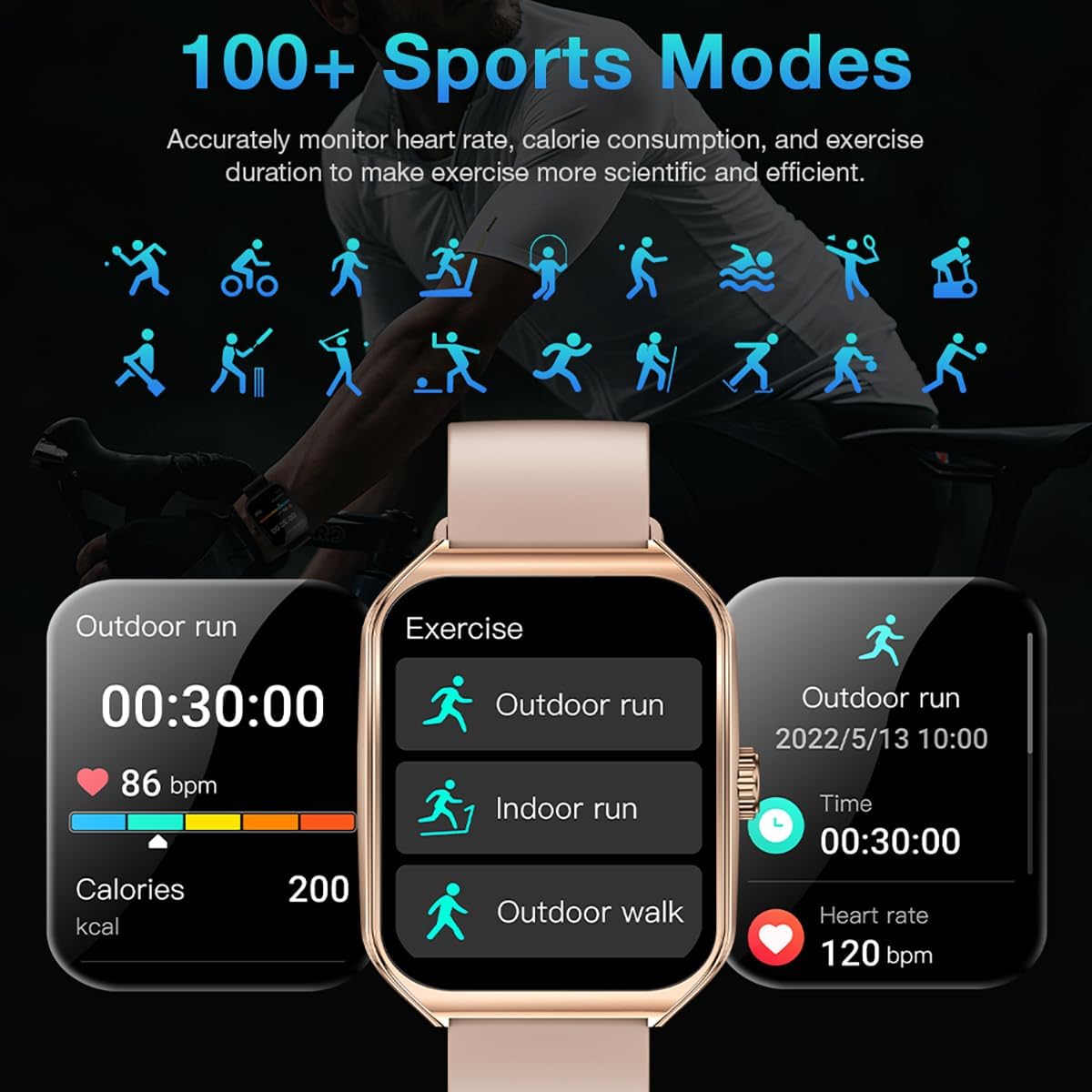
Image: The smart watch interface showing different sports modes and real-time exercise data like heart rate, calories, and distance.
7. Další chytré funkce
The AOLON Curve Smart Watch integrates several convenient features for daily use:
- Hlasový asistent AI: Quickly activate your voice assistant for tasks like making calls, checking weather, or setting alarms.
- Předpověď počasí: Získejte aktuální informace o počasí v reálném čase.
- Ovládání hudby: Ovládejte přehrávání hudby na svém smartphonu.
- Budík: Nastavovat a spravovat alarmy.
- Stopky a časovač: Essential timing functions.
- Najděte svůj telefon: Vyhledejte spárovaný smartphone.
- Svítilna: A simple flashlight function.
- Kalkulačka: Základní výpočty na zápěstí.
- Funkce SOS: Pro nouzové situace.
Video: Overview of the Curve2 Smart Watch features, including fitness tracking, notifications, and various smart functions.
Údržba
1. Čištění hodinek
Regular cleaning helps maintain the appearance and functionality of your smart watch.
- Otřete obrazovku a tělo měkkým hadříkemamp tkanina.
- The silicone strap is washable. You can gently clean it with mild soap and water.
- Vyhněte se používání agresivních chemikálií nebo abrazivních materiálů.
2. Voděodolnost (IP67)
The AOLON Curve Smart Watch is IP67 waterproof, meaning it is resistant to dust and can withstand immersion in water up to 1 meter for 30 minutes. It is suitable for daily use and light water activities like hand washing or rain exposure.
- Do not use the watch for diving, hot showers, or prolonged submersion in water.
- Nevystavujte hodinky tlaku vody nebo páry.

Image: The smart watch partially submerged in water, illustrating its IP67 water resistance feature.
Odstraňování problémů
If you encounter issues with your AOLON Curve Smart Watch, please refer to the following common solutions:
- Hodinky se nezapínají: Ujistěte se, že jsou hodinky plně nabité. Připojte je k nabíjecímu kabelu a nechte je nabíjet alespoň 30 minut, než se je pokusíte zapnout.
- Nelze spárovat s telefonem:
- Ujistěte se, že máte v telefonu zapnutou funkci Bluetooth a hodinky jsou v dosahu.
- Restartujte telefon i hodinky.
- Check if the GloryFit app has necessary permissions (location, Bluetooth, notifications).
- If previously paired, try unpairing and re-pairing the device through the GloryFit app.
- Nepřesné zdravotní údaje:
- Ujistěte se, že hodinky máte na zápěstí pevně připevněné, ne příliš těsné ani příliš volné.
- Vyčistěte senzor na zadní straně hodinek.
- Environmental factors or skin conditions can sometimes affect sensor accuracy.
- Nezobrazují se oznámení:
- Verify that notification permissions are enabled for the GloryFit app in your phone's settings.
- Ujistěte se, že jsou hodinky připojeny k telefonu přes Bluetooth.
- Check the notification settings within the GloryFit app to ensure specific app notifications are enabled.
Specifikace
| Velikost displeje | 1.83 palce |
| Typ zobrazení | HD Curved Display with 3D Curved Glass |
| Konektivita | Bluetooth 5.0 |
| Kapacita baterie | 245 miliamp hodiny |
| Výdrž baterie (běžné používání) | Až 7 dní |
| Výdrž baterie (úsporný režim) | Více než 20 dny |
| Doba nabíjení | Přibl. 2.5 hodin |
| Voděodolnost | IP67 |
| Monitorování zdraví | Heart Rate, SpO2, Sleep, Stress, Women's Cycle |
| Sportovní režimy | 60+ režimů |
| Kompatibilita | Android a iOS |
| Hmotnost | 40g (watch body only) |
| Číslo modelu | 5d738664-f1e0-4256-942f-d938b44e5e53 |
Záruka a podpora
AOLON provides a Záruka 12 měsíců for your smart watch. If you encounter any issues or require assistance, please contact our customer service team.
- Služby zákazníkům: Available 24 hours a day. Please contact us through Amazon Customer Service for prompt assistance.