
A ~ T ~S30~UR4
Uživatelská příručka univerzálního dálkového ovladače
Model: S30-S1B (A ~ T ~S30~UR4)
Zavedení
This manual provides comprehensive instructions for the Generic S30 Universal Remote Control, designed for seamless operation with U-Verse receivers and compatible televisions. Please read this manual carefully to ensure proper setup and optimal performance of your remote control.
The S30 remote offers a reliable replacement solution, featuring easy pairing and a wide range of compatibility to simplify your entertainment system control.
Konec produktuview
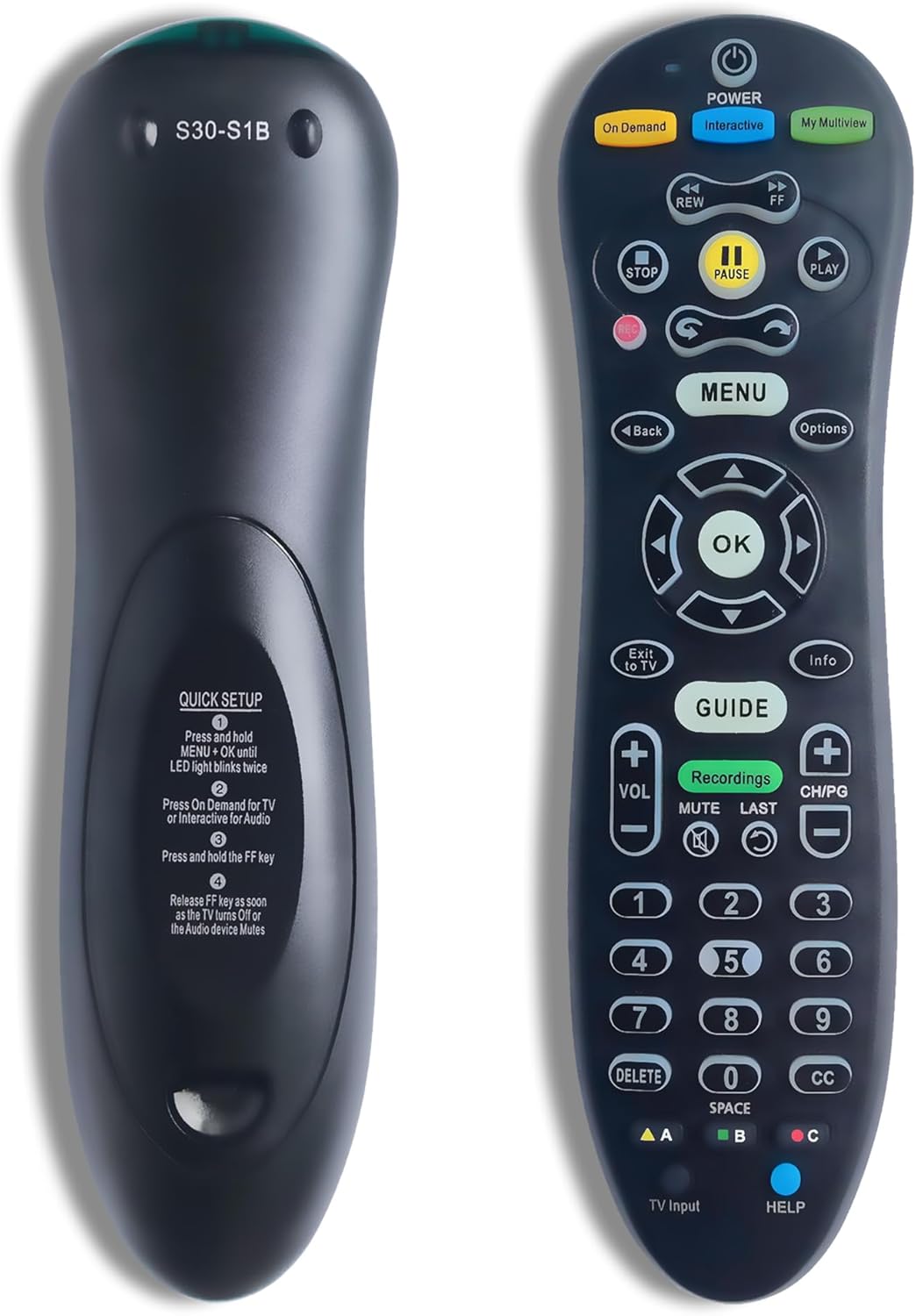
Obrázek: Přední a zadní strana view of the Generic S30 Universal Remote Control. The front displays the array of control buttons including power, channel, volume, navigation, and number keys. The back panel features a label with the model number S30-S1B and a "QUICK SETUP" guide with four steps for pairing.
Klíčové vlastnosti:
- Seamless Pairing Process: Straightforward connectivity with your TV and U-Verse receiver.
- Široká kompatibilita: Engineered to support a broad range of TVs and U-Verse receivers.
- Reliable Replacement: A dependable alternative for lost or broken original remotes.
- Enhanced Button Functions: Access and manage advanced features with ease.
- Stylový a odolný design: Ergonomic and modern design for long-lasting performance.
Nastavení a párování
Follow these steps to pair your S30 Universal Remote Control with your television and U-Verse receiver.
Quick Setup Guide (from remote back):
- Stiskněte a podržte MENU tlačítko a OK button simultaneously until the LED light on the remote blinks twice.
- Stiskněte tlačítko Na požádání button for TV pairing or the Interaktivní button for Audio device pairing.
- Stiskněte a podržte FF (Fast Forward) key.
- Uvolněte FF key as soon as the TV turns off or the audio device mutes. This indicates successful pairing.
If the pairing is unsuccessful, repeat the steps. Ensure there are no obstructions between the remote and the device during the pairing process.
Návod k obsluze
The S30 Universal Remote Control provides intuitive access to various functions of your U-Verse receiver and television. Below is a guide to common button functions:
| Název tlačítka | Funkce |
|---|---|
| MOC | Turns the connected device (TV/Receiver) on or off. |
| Na požádání | Přístup k obsahu na vyžádání. |
| Interaktivní | Accesses interactive features or audio device control. |
| My Multiview | Activates My Multiview funkce. |
| REW / FF | Rewind / Fast Forward playback. |
| STOP / PAUSE / PLAY | Controls media playback (stop, pause, play). |
| MENU | Otevře hlavní nabídku. |
| Zadní | Návrat na předchozí obrazovku nebo do nabídky. |
| Možnosti | Displays options for the current selection. |
| OK | Potvrdí výběr nebo vstoupí do nabídky. |
| Směrová podložka | Prochází menu a možnostmi (nahoru, dolů, vlevo, vpravo). |
| Exit to TV | Switches back to live TV. |
| Info | Zobrazuje informace o programu. |
| PRŮVODCE | Opens the program guide. |
| Nahrávky | Accesses recorded programs. |
| VOL +/- | Upravuje hlasitost nahoru nebo dolů. |
| CH/PG +/- | Changes channels or pages up/down. |
| ZTLUMIT | Ztlumí nebo zapne zvuk. |
| POSLEDNÍ | Returns to the last viewed kanál. |
| Číselné klávesy (0-9) | Přímý vstup do kanálu. |
| VYMAZAT | Deletes selected items. |
| CC | Aktivuje nebo deaktivuje skryté titulky. |
| PLOCHA | Used for text input or specific functions. |
| A / B / C (Colored Buttons) | Context-sensitive functions, often for interactive menus. |
| TV vstup | Cykluje mezi vstupními zdroji televizoru. |
| POMOC | Accesses help features. |
Údržba
- Čištění: K čištění dálkového ovladače používejte měkký, suchý hadřík. Nepoužívejte tekuté čisticí prostředky ani abrazivní materiály.
- Výměna baterie: When the remote's performance degrades or the LED indicator does not light up, replace the batteries. Use only new, high-quality batteries of the specified type (e.g., AAA). Ensure correct polarity.
- Skladování: Dálkový ovladač skladujte na chladném a suchém místě mimo dosah přímého slunečního záření a extrémních teplot.
Odstraňování problémů
| Problém | Možná příčina / řešení |
|---|---|
| Dálkový ovladač nereaguje. | Check batteries; replace if necessary. Ensure line of sight to the device. Re-pair the remote if it has lost connection. |
| Buttons not working correctly. | Ensure the remote is pointed directly at the device. Clean any debris around the buttons. Re-pair the remote. |
| Remote only controls one device. | The S30 remote is designed to control a U-Verse receiver and a TV. Ensure both devices were paired correctly using the respective steps. |
| LED light does not blink during setup. | Ensure batteries are inserted correctly and have sufficient charge. Verify that the correct buttons (MENU + OK) are pressed simultaneously and held. |
Specifikace
- Číslo modelu: A ~ T ~S30~UR4 (S30-S1B)
- Značka: Obecný
- Výrobce: S30
- Barva: Černý
- Speciální funkce: Podsvícený
- Maximální počet podporovaných zařízení: 1 (designed to control U-Verse receiver and TV as an integrated system)
- Kompatibilní zařízení: Set Top Box (U-Verse Receiver), Television
Záruka a podpora
Informace o záruce nebo technickou podporu získáte od prodejce nebo výrobce. webmísto, kde byl produkt zakoupen. Uschovejte si účtenku jako doklad o koupi.
For further assistance, you may also contact the seller through the platform where the product was acquired.
Ask a question about this manual
Ask about setup, troubleshooting, compatibility, parts, safety, or missing instructions. Manuals+ will review the question and use this page’s manual context to help answer it.