
1. Úvod
This manual provides essential information for the assembly, operation, maintenance, and troubleshooting of your Hbada E2 Ergonomic Office Chair. Please read these instructions carefully before use to ensure proper function and longevity of your chair.

Figure 1: Hbada E2 Ergonomic Office Chair, side view.
2. Bezpečnostní informace
- Vždy pečlivě dodržujte montážní návod.
- Keep the chair away from direct heat sources to prevent material damage.
- Do not exceed the maximum weight capacity of the chair. Refer to specifications for details.
- Ensure all screws and connections are tightened securely before use and periodically check for looseness.
- Používejte židli na rovném a stabilním povrchu.
3. Nastavení a montáž
Assembly is required for this product. Detailed step-by-step assembly instructions and all necessary tools are included in the product packaging. Please refer to the separate assembly guide for a complete walkthrough. Ensure all components are present before beginning assembly.

Figure 2: Hbada E2 Ergonomic Office Chair, front view sestaveného výrobku.
4. Návod k obsluze (Úpravy)
The Hbada E2 chair offers multiple adjustment features to customize your seating experience for optimal comfort and support.
4.1. Nastavení opěrky hlavy
The 3D adjustable headrest can be positioned to support your neck and head effectively.
- Vertikální nastavení: Adjust the headrest up or down by up to 10 cm.
- Nastavení vpřed a vzad: Move the headrest forward or backward by up to 3 cm.
- Otáčení: Rotate the headrest up to 60 degrees to find your preferred angle.

Figure 3: Headrest adjustment capabilities.
4.2. Nastavení bederní opěrky
The 6-way adjustable lumbar support provides comprehensive lower back protection.
- Nastavení vpřed a vzad: Adjust the lumbar support in 3 levels.
- Vertikální nastavení: Move the lumbar support up or down.
- Left-Right Suspension: The floating structure adapts to your movements.

Figure 4: Lumbar support dynamic adjustment features.
4.3. Nastavení loketní opěrky
The 3D armrests can be adjusted to provide optimal elbow support.
- Nastavení výšky: Adjust armrest height by up to 7.5 cm.
- Nastavení vpřed a vzad: Move armrests forward or backward by up to 5 cm.
- Otáčení: Rotate armrests 40 degrees left and right.

Figure 5: Armrest adjustment options.
4.4. Recline Function and Locking
The chair features a reclining function with three lockable tilt angles.
- Recline up to 135 degrees.
- Lockable angles for 90° (comfortable office), 115° (leisure and entertainment), and 138° (short nap).

Figure 6: Three-level locking recline positions.
4.5. Wired Control Adjustment
The aluminum alloy wired control allows for easy adjustment without bending down.
- Simply toggle the adjuster for one-touch operation of chair functions.

Figure 7: Wired control for easy adjustments.
5. Údržba
Regular maintenance ensures the longevity and optimal performance of your Hbada E2 chair.
- Čištění: For the mesh fabric, gently wipe with a damp cloth and mild soap. Avoid harsh chemicals. For the frame, use a soft, dry cloth.
- Inspekce: Pravidelně kontrolujte všechny šrouby a vruty, zda jsou pevně utažené. V případě potřeby je dotáhněte.
- Kolečka: Pro zajištění plynulého pohybu udržujte kolečka bez vlasů a nečistot.
- Vyhněte se přetížení: Do not place excessive weight on the chair or armrests beyond the specified capacity.
6. Řešení problémů
If you encounter any issues with your Hbada E2 chair, please refer to the following common solutions:
- Vrzání židle: Check and tighten all assembly bolts. A small amount of silicone spray on moving parts may help, but avoid contact with mesh or upholstery.
- Chair Not Adjusting: Ensure no obstructions are blocking the adjustment mechanisms. Verify that the wired control is functioning correctly.
- Kolečka se neotáčejí hladce: Clean any debris from the caster wheels. Ensure they are properly inserted into the chair base.
- Gas Lift Issues: If the chair does not hold its height, the gas lift may need replacement. Contact customer support for assistance.
For persistent issues or concerns not addressed here, please contact Hbada customer support.
7. Specifikace
| Funkce | Detail |
|---|---|
| Značka | Hbada |
| Název modelu | E2 |
| Barva | Bílý |
| Rozměry produktu (D x Š x V) | 30.51"H x 22.24"Š x 18.11"V |
| Materiál | Alloy Steel (Frame), Mesh (Back, Seat), Foam (Fill) |
| Styl zad | Pletivo |
| Styl paže | 3D nastavitelné |
| Počet poloh vleže | 3 |
| Zahrnuté komponenty | Arm Pad, Cushion |
| Doporučení pro povrch | Tvrdá podlaha, koberec |
| Výrobce | Hbada |
| Datum první dostupnosti | 18. prosince 2024 |
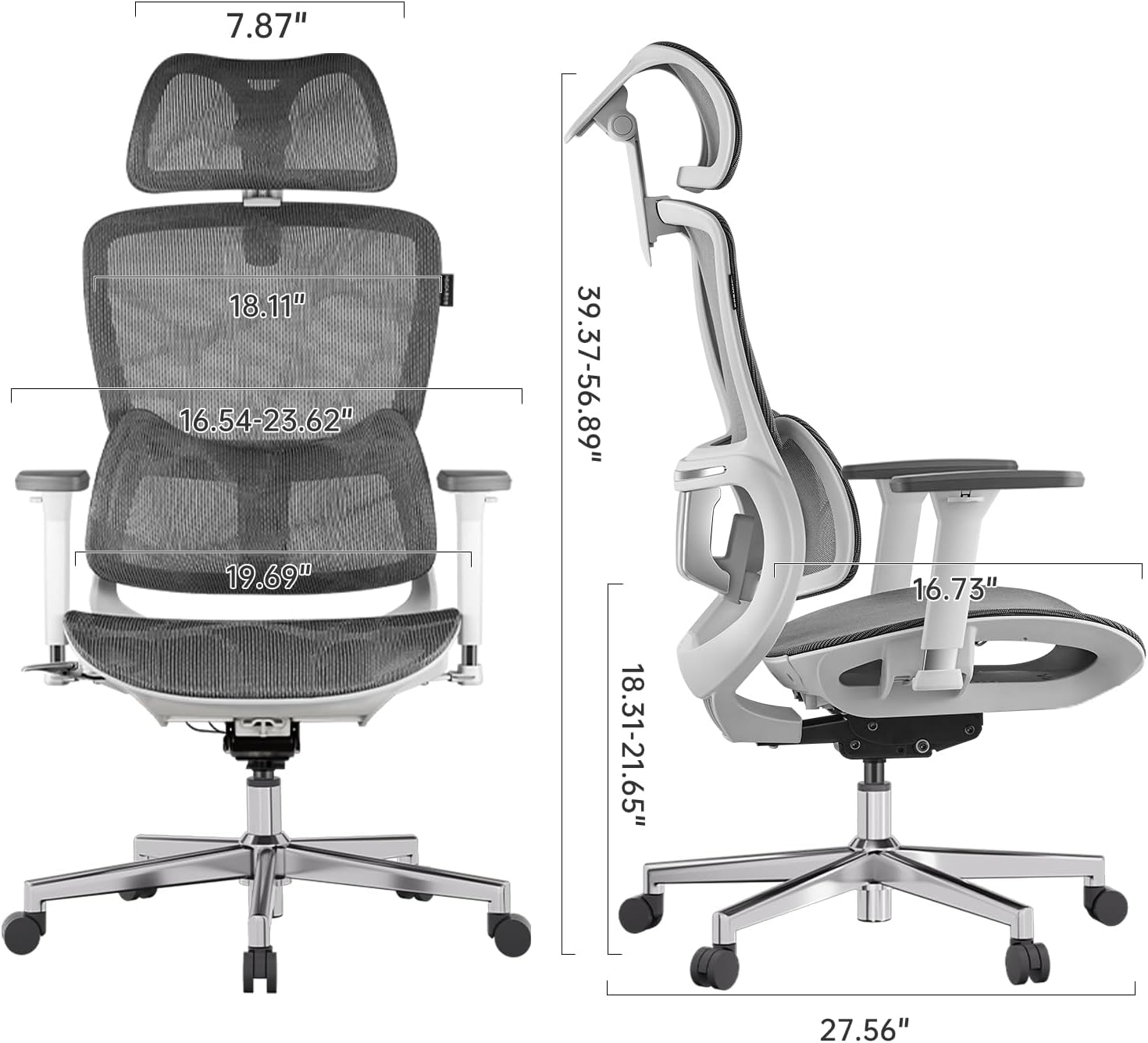
Figure 8: Detailed dimensions of the Hbada E2 Office Chair.
8. Záruka a podpora
Hbada is committed to providing high-quality products and customer satisfaction.
8.1. Zásady vrácení
Tento produkt je možné vrátit do 30 dnů od zakoupení v souladu s podmínkami pro vrácení zboží prodejce.
8.2. Plány ochrany
Optional protection plans are available for purchase to extend coverage beyond the standard warranty:
- Dvouletý ochranný plán: Jednorázová platba 44.99 USD.
- Dvouletý ochranný plán: Jednorázová platba 56.99 USD.
- Kompletní ochrana: Monthly billing of $16.99, covering eligible past and future purchases.
These plans offer additional coverage and are separate from any manufacturer's warranty.
8.3. Zákaznická podpora
For product inquiries, assembly assistance, or warranty claims, please visit the official Hbada store or contact their customer service directly.

Figure 9: Hbada's commitment to customer service.
Navštivte Hbada Store pro více informací.