
Zavedení
Děkuji za nákupasing the JYX D58 Portable Karaoke Machine. This manual provides essential information for the safe and efficient operation of your device. Please read it thoroughly before use and retain it for future reference.
Bezpečnostní informace
- Nevystavujte zařízení vodě ani nadměrné vlhkosti.
- Vyhněte se extrémním teplotám.
- Nepokoušejte se jednotku rozebírat ani opravovat sami. Kontaktujte kvalifikovaný servisní personál.
- Uchovávejte mimo dosah dětí.
- Use only the provided charging cable and power adapter (if applicable).
Obsah balení
Zkontrolujte prosím, zda jsou v balení přítomny všechny položky:
- JYX D58 Karaoke Machine (Speaker Unit)
- Bezdrátové mikrofony (x2)
- Nabíjecí kabel (USB Type-C)
- Pomocný kabel
- Návod k použití (tento dokument)

Konec produktuview
Reproduktorová jednotka
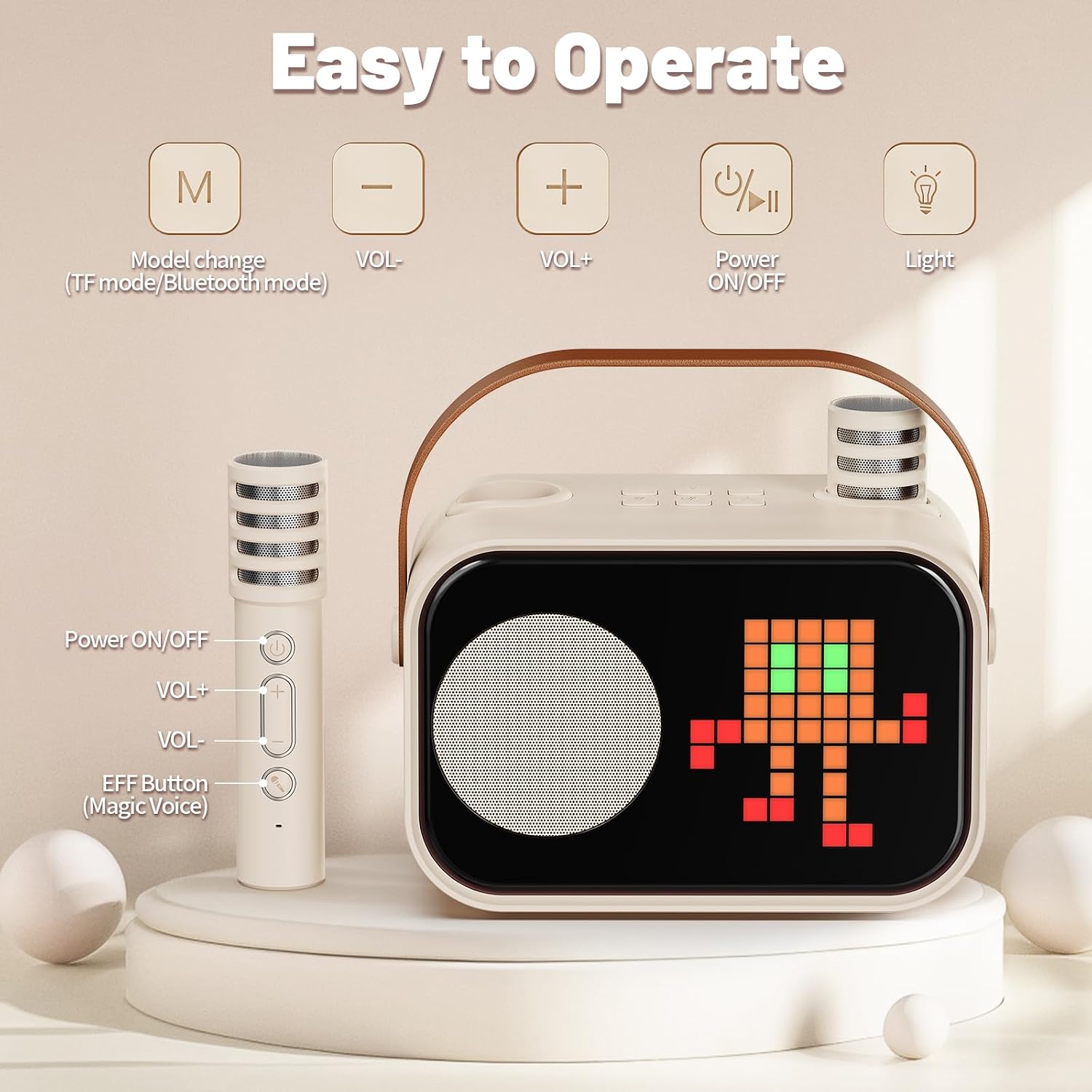
The main speaker unit features a compact design with a durable leather handle for portability. It includes a display screen, speaker grille, and control buttons on the top panel.

Control Panel and Microphones
The speaker's top panel includes buttons for mode change, volume adjustment, power, and light control. The wireless microphones have their own power, volume, and voice effect buttons.
Nastavení
1. Nabíjení zařízení
Before first use, fully charge the karaoke machine and both microphones.
- Connect the provided USB Type-C charging cable to the charging port on the speaker unit and a compatible USB power adapter (not included).
- Connect the charging cable to the charging port on each microphone.
- The charging indicator will show the charging status. A full charge typically takes 2-3 hours for the speaker.
2. Zapnutí/vypnutí
- Reproduktor: Press and hold the Power ON/OFF button on the speaker's top panel until the display illuminates.
- Mikrofony: Press and hold the Power ON/OFF button on each microphone.
- To power off, repeat the process for both the speaker and microphones.
3. Párování mikrofonů
The wireless microphones are designed for direct connection to the speaker. They should automatically pair when both the speaker and microphones are powered on and in close proximity. If pairing issues occur, ensure both devices are charged and try restarting them.
Návod k obsluze
1. Připojení Bluetooth
- Power on the JYX D58 karaoke machine. It will automatically enter Bluetooth pairing mode.
- Na smartphonu, tabletu nebo jiném zařízení s podporou Bluetooth přejděte do nastavení Bluetooth.
- Hledat available devices and select "JYX D58" from the list.
- Once connected, you will hear a confirmation sound, and the speaker's display may indicate a successful connection.
2. Versatile Playback Options
The JYX D58 supports multiple audio input methods:
- Bluetooth: Připojte se bezdrátově k vašim chytrým zařízením.
- AUX-IN: Use the provided auxiliary cable to connect to devices with a 3.5mm audio output.
- Vstup TF karty: Insert a TF (microSD) card loaded with MP3 audio filedo určeného slotu.
- USB: Vložte USB flash disk se zvukem ve formátu MP3 filedo portu USB.
Press the 'M' (Mode change) button on the speaker to switch between input modes (Bluetooth, AUX, TF Card, USB).

3. Funkce mikrofonu
- Nastavení hlasitosti: Use the VOL+ and VOL- buttons on the microphone to adjust your vocal volume.
- Efekty změny hlasu: Press the 'EFF Button' (Magic Voice) on the microphone to cycle through four different voice effects.
- Direct Connect Design: The microphones can be inserted directly into the speaker for storage and a streamlined setup.
4. Accompaniment Mode
The accompaniment mode allows you to remove the original vocals from a song, enabling you to sing along. To activate this mode, refer to the specific instructions on the speaker's display or consult the quick start guide included with the product for button combinations.
5. Dynamické světelné efekty
The JYX D58 features dynamic lighting with 10 modes and 50 pattern designs that synchronize with your music.
- Press the 'Light' button on the speaker's top panel to cycle through different lighting modes and patterns.
- Hold the 'Light' button to turn the lighting effects off or on.
Údržba
- Čištění: Zařízení otřete měkkým, suchým hadříkem. Nepoužívejte abrazivní čisticí prostředky ani rozpouštědla.
- Skladování: Karaoke zařízení skladujte na chladném a suchém místě mimo dosah přímého slunečního záření a extrémních teplot.
- Péče o baterie: To prolong battery life, fully charge the device before long periods of storage and recharge it at least once every three months.
Odstraňování problémů
| Problém | Možná příčina | Řešení |
|---|---|---|
| Žádná síla | Baterie je vybitá. | Plně nabijte reproduktor a mikrofony. |
| Žádný zvuk z reproduktoru | Příliš nízká hlasitost; nesprávný režim vstupu; zařízení není připojeno. | Increase speaker volume. Ensure correct input mode (Bluetooth, AUX, TF, USB). Reconnect Bluetooth device. |
| Mikrofon nefunguje | Microphone battery depleted; microphone not powered on; microphone not paired. | Charge microphone. Power on microphone. Restart speaker and microphone to re-establish pairing. |
| Nestabilní připojení Bluetooth | Zařízení je příliš daleko od reproduktoru; rušení. | Přesuňte připojené zařízení blíže k reproduktoru. Vyhněte se překážkám mezi zařízeními. |
Specifikace
| Značka | JYX |
| Název modelu | D58 |
| Číslo modelu | D58-T |
| Rozměry produktu (DxŠxV) | 15 x 8.5 x 12.5 cm |
| Hmotnost položky | 840 g |
| Zdroj napájení | Napájení z baterie |
| svtage | 5 voltů |
| Doba přehrávání | 8+ hodiny (cca) |
| Doba nabíjení | 2-3 hodin (cca) |
| Technologie připojení | Bluetooth 5.3, pomocný, USB |
| Audio Input Compatible With | Microphone, AUX IN, TF Card, USB, Bluetooth |
| Kompatibilní zařízení | Guitar, Smartphone, Tablet, Television |
| Zahrnuté komponenty | Karaoke Machine (Speaker), 2 Wireless Microphones, Charging Cable, Auxiliary Cable, Instruction Manual |

Záruka a podpora
For warranty information or technical support, please refer to the warranty card included in your package or contact JYX customer service through their official website or the retailer where the product was purchased. Please have your model number (D58-T) and purchase details ready.