
1. Úvod
Welcome to the user manual for your Nothing Phone (3a). This guide provides detailed instructions on setting up, operating, maintaining, and troubleshooting your device to ensure optimal performance and user experience.

Figure 1.1: The Nothing Phone (3a) showcasing its unique transparent back design and Glyph Interface.
2. Nastavení
2.1. Rozbalení a počáteční kontrola
Upon receiving your Nothing Phone (3a), carefully open the packaging and inspect the contents. Ensure all items listed in the "What's in the Box" section are present and undamaged.
- Nothing Phone (3a) device
- USB-C kabel
- Vysunutí zásobníku SIM
- Předem nanesená ochranná fólie na displej
2.2. Vložení SIM karty
- Vyhledejte držák SIM karty na boku telefonu.
- Vložte nástroj pro vysunutí SIM karty do malého otvoru vedle držáku a pevně zatlačte, dokud držák nevyskočí.
- Vložte kartu (karty) Nano-SIM do slotu zlatými kontakty dolů.
- Opatrně vložte zásobník SIM karty zpět do telefonu, dokud nezacvakne na místo.
2.3. Průvodce počátečním zapnutím a nastavením
Press and hold the power button on the right side of the phone until the Nothing logo appears. Follow the on-screen instructions to complete the initial setup, including language selection, Wi-Fi connection, Google account sign-in, and data transfer.
3. Ovládání telefonu Nothing (3a)
3.1. Nothing OS 3.1 Overview
The Nothing Phone (3a) runs on Nothing OS 3.1, an intuitive and customizable Android-based operating system. It features functional adaptations for an optimized user experience.

Figure 3.1: Visual representation of Nothing OS 3.1's customizable interface.
3.2. Kamerový systém
The Nothing Phone (3a) is equipped with an advanced camera system designed to capture high-quality photos and videos.
- Hlavní fotoaparát: 50-MP OIS (Optical Image Stabilization) main camera for detailed and stable shots.
- Teleobjektiv: 50-MP telephoto lens with up to 30x Ultra Zoom for capturing distant subjects.
- Ultraširokoúhlý fotoaparát: 8-MP ultra-wide-angle lens for expansive landscape and group shots.
- Přední kamera: 32-MP front camera for sharp selfies and video calls.

Figure 3.2: Detailed breakdown of the Phone (3a)'s Elite Camera System components.

Figure 3.3: Illustration of the telephoto zoom lens technology and its capability to capture distant scenes.
3.3. Essential Key and Essential Space
The Essential Key is a new physical button on the side of your device. A short press captures screen content, while a long press allows you to record voice notes, ideas, and inspirations. The Essential Space organizes your captures and provides personalized suggestions.

Figure 3.4: The Essential Key and its integration with the Essential Space for content organization.
3.4. Rozhraní glyfů
The Glyph Interface on the back of the phone provides unique LED light and sound notifications for calls, messages, and other alerts, offering a distinct visual and auditory experience.

Figure 3.5: The Glyph Interface on the rear of the Nothing Phone (3a), demonstrating its illuminated patterns.
4. Údržba
4.1. Správa baterií
The Nothing Phone (3a) features a 5,000 mAh battery with 50W fast charging. To maximize battery lifespan:
- Vyhněte se extrémním teplotám.
- Pro nabíjení použijte dodaný kabel USB-C.
- Vyhněte se častému úplnému vybíjení baterie.

Figure 4.1: Visual representation of the 5,000 mAh battery capacity.
4.2. Čištění zařízení
Use a soft, lint-free cloth to clean the screen and back of your phone. For stubborn smudges, slightly damphadřík vodou. Nepoužívejte agresivní chemikálie ani abrazivní materiály.
4.3. Aktualizace softwaru
Pravidelně kontrolujte a instalujte aktualizace softwaru, abyste zajistili, že vaše zařízení má nejnovější funkce, bezpečnostní záplaty a vylepšení výkonu. Přejděte na Nastavení > Systém > Aktualizace softwaru pro kontrolu aktualizací.
5. Řešení problémů
5.1. Běžné problémy a jejich řešení
| Problém | Možná příčina | Řešení |
|---|---|---|
| Telefon se nezapíná | Vybitá baterie, pád softwaru | Charge the phone for at least 30 minutes. Perform a forced restart by holding the power button for 10-15 seconds. |
| Aplikace padá nebo zamrzávají | App bug, insufficient RAM, outdated software | Clear app cache/data. Close background apps. Update the app or phone software. |
| Slabá výdrž baterie | High screen brightness, background apps, network issues | Adjust screen brightness. Close unused apps. Disable unnecessary features like GPS/Bluetooth. |
5.2. Obnovení továrního nastavení
If issues persist, a factory reset may be necessary. This will erase all data on your phone, so ensure you have backed up important information. Navigate to Nastavení > Systém > Možnosti resetování > Vymazat všechna data (obnovení továrního nastavení).
6. Specifikace
Key technical specifications for the Nothing Phone (3a) (Model: A059).
| Funkce | Detail |
|---|---|
| Název modelu | Nic Telefon (3a) |
| Číslo modelu | A059 |
| Operační systém | Android 15, Nothing OS 3.1 |
| Zobrazit | 6.77-inch Flexible FHD+ AMOLED, 120 Hz, 1.07 billion colors |
| Procesor | Snapdragon 7s Gen 3 (2.5 GHz, 8-core) |
| BERAN | 12 GB (up to 20GB RAM Boost) |
| Skladování | 256 GB |
| Hlavní fotoaparát | 50-MP OIS |
| Teleobjektiv | 50-MP (30x Ultra Zoom) |
| Ultraširokoúhlý fotoaparát | 8 MP |
| Přední kamera | 32 MP |
| Baterie | 5,000 mAh (rychlonabíjení 50 W) |
| Rozměry | 7.75 x 0.83 x 16.35 cm |
| Hmotnost | 201 gramů |
| Odolnost vůči vodě/prachu | IP64 |
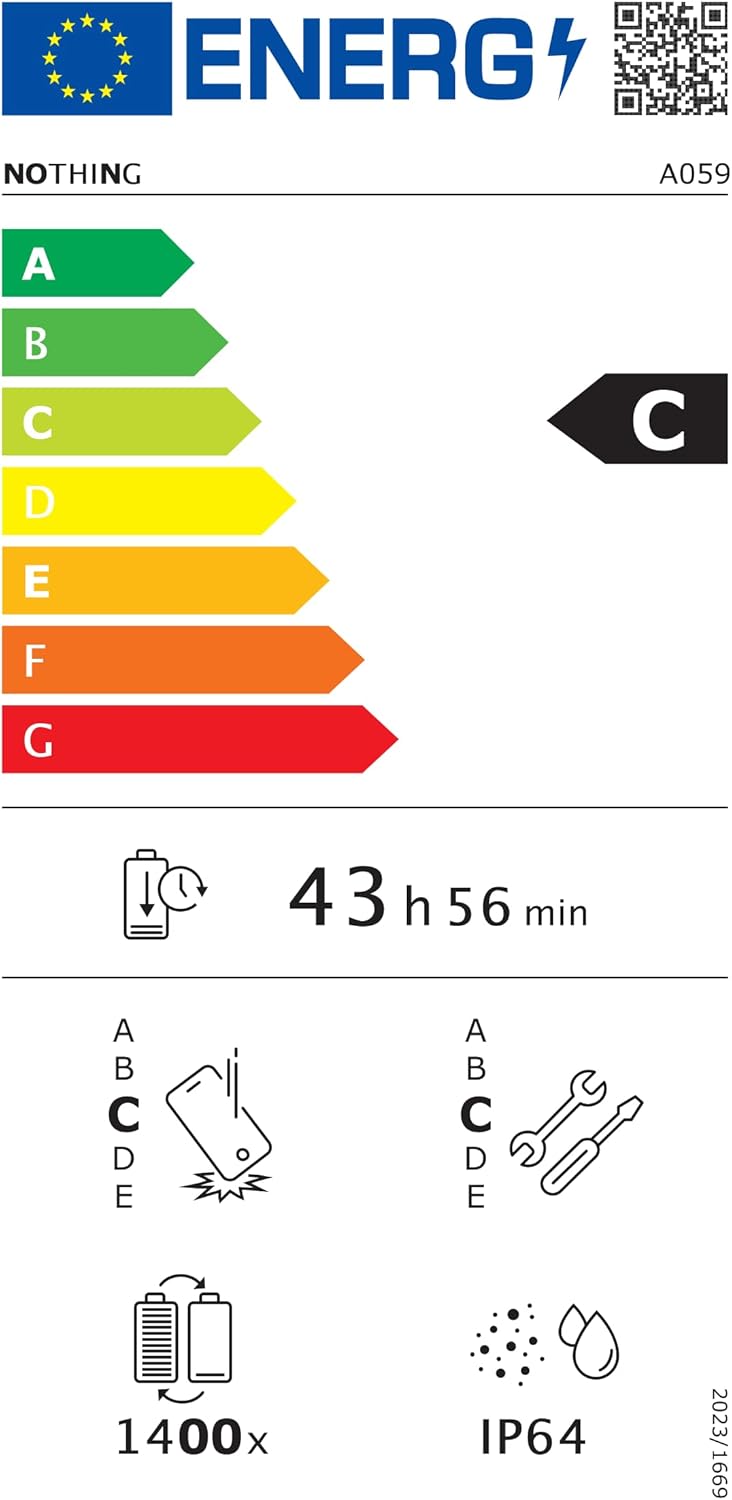
Figure 6.1: EU Energy Label for Nothing Phone (3a), indicating energy efficiency and IP64 rating. More details available at eprel.ec.europa.eu/qr/2179652.
7. Záruka a podpora
Your Nothing Phone (3a) comes with a manufacturer's warranty. Please refer to the warranty card included in your product packaging for specific terms and conditions.
For further assistance, technical support, or warranty claims, please visit the official Nothing support webwebu nebo kontaktujte jejich zákaznický servis. Více informací naleznete na Nothing Store na Amazonu.