
BYTECH BC-AU-BE-146-WT
User Manual: BYTECH TWS Earbuds
Model: BC-AU-BE-146-WT
Zavedení
Thank you for choosing the BYTECH TWS Earbuds. This manual provides essential information for setting up, operating, and maintaining your new wireless earbuds. Please read this manual carefully before use to ensure optimal performance and longevity of your device.
These earbuds feature advanced Bluetooth 5.3 technology and True Wireless Stereo (TWS) connectivity, offering a seamless audio experience.
Co je v krabici?
- BYTECH TWS Earbuds (Left and Right)
- Bezdrátové nabíjecí pouzdro
- Uživatelská příručka (tento dokument)
- (Note: Charging cable may be included but not explicitly listed in product specifications. Please check packaging.)
Konec produktuview

Obrázek 1: The BYTECH TWS Earbuds in their open wireless charging case. The case features a digital display indicating the battery level, and the earbuds are white with a sleek design. The case also shows subtle color gradients, possibly from an LED indicator.
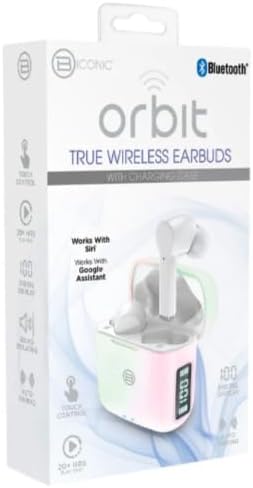
Obrázek 2: Retail packaging for the BYTECH Orbit True Wireless Earbuds. The box highlights key features such as Bluetooth connectivity, touch control, 20+ hours of play, auto pairing, and compatibility with Siri and Google Assistant.
Nastavení
1. Nabíjení sluchátek a pouzdra
Before first use, fully charge the earbuds and the charging case. Place the earbuds into the charging case. The case is equipped with wireless charging capability. Connect the charging case to a power source using a compatible charging cable (not explicitly listed as included, please check your package) or place it on a wireless charging pad.
- Digitální displej na nabíjecím pouzdře bude zobrazovat stav baterie.
- Ensure the earbuds are properly seated in their slots for charging.
2. Párování s vaším zařízením (Bluetooth)
- Ujistěte se, že jsou sluchátka nabitá.
- Open the charging case. The earbuds will automatically enter pairing mode (indicated by flashing lights on the earbuds, if applicable).
- Na smartphonu nebo zařízení s podporou Bluetooth přejděte do nastavení Bluetooth.
- Zapněte Bluetooth.
- Hledat new devices. You should see "BYTECH BC-AU-BE-146-WT" or a similar name appear in the list of available devices.
- Select the device name to connect. Once connected, a voice prompt will confirm the successful pairing, and the indicator lights on the earbuds will stop flashing.
- For subsequent uses, the earbuds will automatically connect to the last paired device when taken out of the case, provided Bluetooth is enabled on your device.
These earbuds support True Wireless Stereo (TWS) connectivity, meaning both earbuds connect to each other wirelessly to provide a stereo sound experience.
Ovládání sluchátek
The BYTECH TWS Earbuds feature intuitive touch controls for various functions. While specific touch gestures are not detailed in the product description, common functions typically include:
- Přehrát/pozastavit: Jediným klepnutím na jedno sluchátko.
- Další skladba: Dvakrát klepněte na pravé sluchátko.
- Předchozí skladba: Dvakrát klepněte na levé sluchátko.
- Přijmout/ukončit hovor: Během příchozího hovoru klepněte jedním klepnutím na kterékoli sluchátko.
- Odmítnout hovor: Během příchozího hovoru stiskněte a podržte kterékoli ze sluchátek po dobu 2 sekund.
- Aktivovat Voice Assistant: Triple tap or press and hold (check specific model behavior) to activate Siri (for iOS devices) or Google Assistant (for Android devices).
- Ovládání hlasitosti: Some models allow volume adjustment via touch (e.g., tap and hold left for volume down, right for volume up). If not, adjust volume directly on your connected device.
Please refer to the quick start guide included in your packaging for precise touch control instructions specific to your BC-AU-BE-146-WT model.
Údržba
Správná údržba zajistí dlouhou životnost a optimální výkon vašich sluchátek.
- Čištění: Regularly clean the earbuds and charging case with a soft, dry, lint-free cloth. Do not use abrasive cleaners, alcohol, or chemical solvents. Gently remove any earwax or debris from the earbud tips and speaker mesh using a small, soft brush or cotton swab.
- Skladování: Pokud sluchátka nepoužíváte, vždy je uchovávejte v nabíjecím pouzdře, abyste je chránili před prachem, nečistotami a fyzickým poškozením. Pouzdro skladujte na chladném a suchém místě mimo dosah přímého slunečního záření a extrémních teplot.
- Péče o baterie: Abyste prodloužili životnost baterie, vyvarujte se častého úplného vybíjení sluchátek a pouzdra. Pravidelně je nabíjejte, i když je delší dobu nepoužíváte.
- Voděodolnost: These earbuds are not specified as water-resistant. Avoid exposure to water, sweat, and high humidity to prevent damage.
Odstraňování problémů
If you encounter issues with your BYTECH TWS Earbuds, try the following solutions:
- Sluchátka se nespárují se zařízením:
- Ujistěte se, že jsou sluchátka nabitá a vyjmutá z pouzdra.
- Vypněte a zapněte Bluetooth na vašem zařízení.
- Forget the device ("BYTECH BC-AU-BE-146-WT") from your device's Bluetooth settings and try pairing again.
- Ujistěte se, že k sluchátkům nejsou připojena žádná jiná zařízení.
- Funguje pouze jedno sluchátko:
- Vložte obě sluchátka zpět do nabíjecího pouzdra, zavřete víko, počkejte několik sekund a poté je znovu vyjměte.
- Ujistěte se, že jsou obě sluchátka nabitá.
- Zkuste resetovat sluchátka (konkrétní postup resetování naleznete v průvodci rychlým spuštěním).
- Žádný zvuk nebo nízká hlasitost:
- Zkontrolujte úroveň hlasitosti na připojeném zařízení i na sluchátkách.
- Ujistěte se, že jsou sluchátka správně usazena v uších.
- Vyčistěte mřížku reproduktoru sluchátek od nečistot.
- Problémy s nabíjením:
- Ensure the charging cable (if used) is securely connected and functional.
- Pokud používáte bezdrátové nabíjení, ujistěte se, že je pouzdro správně umístěno na nabíjecí podložce.
- Zkontrolujte, zda se v nabíjecím portu pouzdra nenacházejí nějaké nečistoty.
Pokud problémy přetrvávají, kontaktujte prosím zákaznickou podporu.
Specifikace
| Funkce | Specifikace |
|---|---|
| Značka | BYTECH |
| Název modelu | BC-AU-BE-146-WT |
| Číslo modelu | BC-AU-BE-146-WT |
| Technologie připojení | Bluetooth 5.3 |
| Form Factor | Do ucha (intraurální) |
| Barva | Bílý |
| Zahrnuté komponenty | Bezdrátové nabíjecí pouzdro |
| Výrobce | Biconic |
| ASIN | B0DPRCBT76 |
| První dostupný termín | 6. prosince 2024 |
Záruka a podpora
For warranty information and customer support, please refer to the documentation included with your product packaging or visit the official BYTECH webZáruční podmínky se mohou lišit v závislosti na regionu a prodejci.
Uschovejte si doklad o koupi pro případné reklamace.
Ask a question about this manual
Ask about setup, troubleshooting, compatibility, parts, safety, or missing instructions. Manuals+ will review the question and use this page’s manual context to help answer it.