
1. Úvod
This manual provides essential instructions for the safe and efficient operation, installation, and maintenance of your G21 Osmo 2200 W Reverse Osmosis System. Please read this manual thoroughly before using the appliance and retain it for future reference. This system is designed to provide purified and remineralized water with adjustable temperature settings.
2. Bezpečnostní pokyny
- Ujistěte se, že je spotřebič umístěn na stabilním, rovném povrchu mimo dosah přímého slunečního záření a zdrojů tepla.
- Neponořujte spotřebič, napájecí kabel ani zástrčku do vody ani jiných kapalin.
- Keep out of reach of children. The appliance features a child safety lock, but supervision is always recommended.
- Use only potable water with this system.
- Před čištěním nebo prováděním jakékoli údržby spotřebič odpojte ze zásuvky.
- Do not operate the appliance if the power cord or plug is damaged. Contact qualified service personnel for repairs.
- Zajistěte řádné větrání kolem jednotky.
3. Konec produktuview
The G21 Osmo 2200 W Reverse Osmosis System is a countertop water purification unit featuring advanced filtration and instant heating capabilities.
Klíčové vlastnosti:
- Removes up to 99% of impurities from water.
- Provides clean, healthy, and great-tasting water.
- Filtration capacity of 7.8 liters per hour (LPH).
- Rapid 3-second heating function.
- Six adjustable temperature levels from 25°C to 95°C.
- Uživatelsky přívětivý dotykový displej.
- Integrated child safety lock.
- Automatic filter change indicator.
- Reduces limescale, extending the lifespan of other appliances.
Komponenty:


4. Nastavení
4.1 Vybalení a umístění:
- Opatrně vyjměte všechny součásti z obalu.
- Place the main unit on a clean, dry, and stable countertop. Ensure there is adequate space around the unit for ventilation.
- Insert the drip tray into its designated slot at the front base of the unit.
4.2 Instalace filtru:
- Open the filter compartment cover, usually located on the side or back of the unit.
- Identify the PAC, RO, and CF filters. Each filter is typically labeled.
- Insert each filter into its corresponding slot, twisting gently until securely locked. Refer to the markings on the unit for correct filter placement.
- Zavřete kryt přihrádky filtru.
4.3 Initial Water Filling and Flushing:
- Vyjměte nádrž na vodu z jednotky.
- Fill the water tank with clean, potable tap water up to the 'MAX' line.
- Place the filled water tank back into the unit.
- Zapojte napájecí kabel do uzemněné elektrické zásuvky.
- The system will automatically begin an initial flushing cycle to prepare the filters. This process may take several minutes. Follow any on-screen prompts.
- Discard the water from the first few cycles as recommended by the system's display or until the water quality indicator shows optimal levels.
5. Návod k obsluze
5.1 Zapnutí/vypnutí:
Press the 'Power' button on the touchscreen to turn the unit on or off.
5.2 Using the Touchscreen:
The intuitive touchscreen allows you to select desired water temperatures and dispense water.
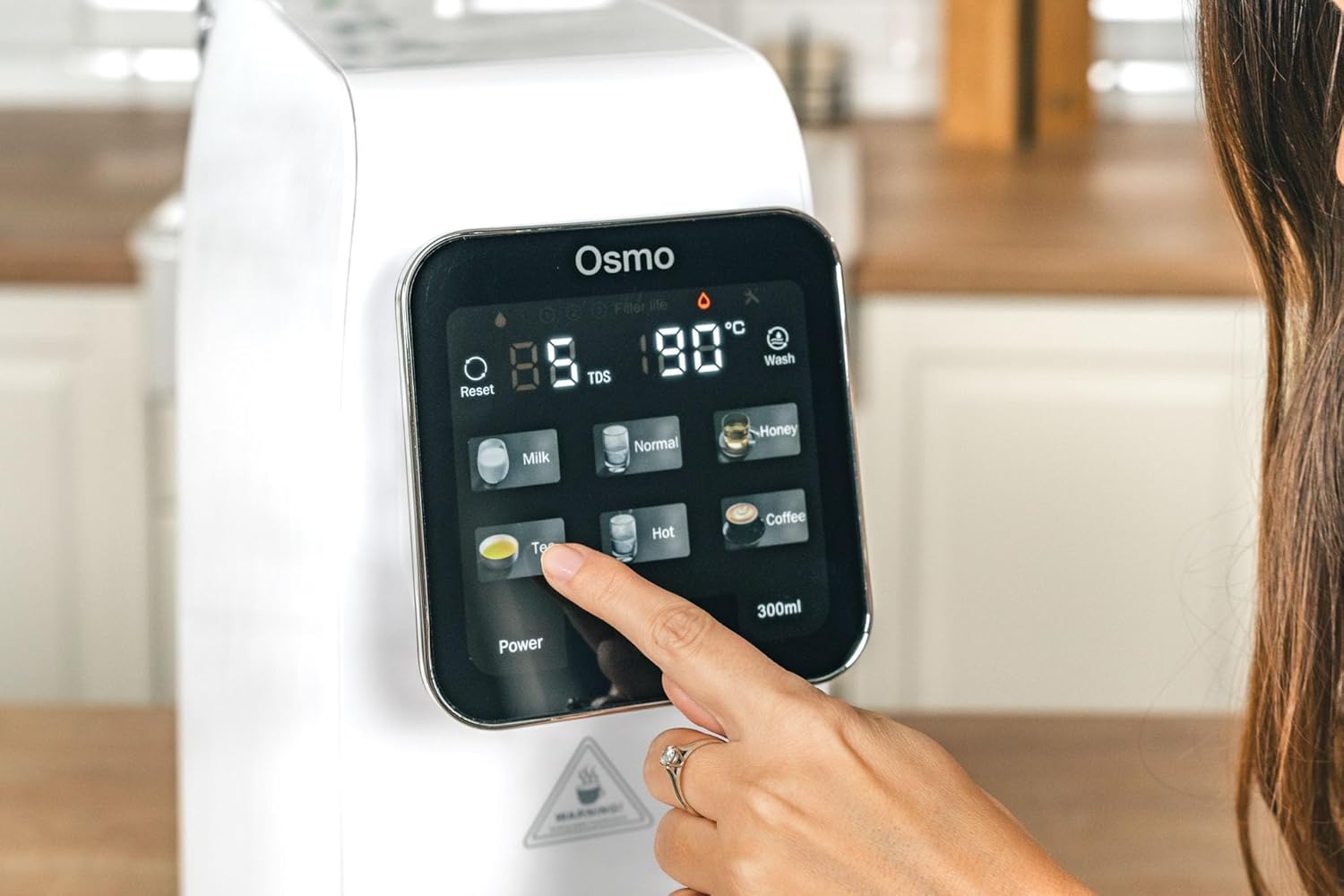
5.3 Selecting Temperature Levels:
The system offers six temperature presets:
- Normální: Room temperature purified water.
- 25 °C: Ideal for specific beverages or cooling.
- 45 °C: Suitable for baby formula or warm drinks.
- 60 °C: For certain teas or warm water needs.
- 80 °C: Optimální pro zelený čaj.
- 95 °C: Perfect for black tea, coffee, or instant noodles.
Tap the desired temperature icon on the touchscreen. The system will rapidly heat the water to the selected temperature.
5.4 Dispensing Water:
After selecting the temperature, place your cup or container under the dispenser nozzle. Press the dispense button (often labeled with a water drop icon or a volume, e.g., '300ml') to start dispensing. Press again to stop, or it will stop automatically after dispensing the preset volume.
5.5 Child Safety Lock:
To activate or deactivate the child safety lock, press and hold the designated lock icon on the touchscreen for a few seconds. This prevents accidental dispensing of hot water.
5.6 Filter Change Indicator:
The touchscreen display will show an indicator when a filter needs replacement. Refer to the maintenance section for filter replacement procedures.
6. Údržba
6.1 Čištění jednotky:
- Odpojte spotřebič ze zásuvky.
- Otřete vnější část jednotky měkkým, damp tkanina. Nepoužívejte abrazivní čisticí prostředky nebo rozpouštědla.
- Remove and empty the drip tray regularly. Clean it with mild soap and water, then rinse thoroughly and dry before reinserting.
- Clean the water tank with mild soap and water. Rinse thoroughly to remove all soap residue before refilling.
6.2 Výměna filtru:
The system will indicate when filters need replacement. Typically, PAC and CF filters require more frequent replacement than the RO filter. Always use genuine G21 replacement filters.
- Odpojte spotřebič.
- Otevřete kryt přihrádky filtru.
- Otočte starý filtr proti směru hodinových ručiček, abyste jej odemkli a vyjmuli.
- Insert the new filter into the slot, aligning the markings, and twist clockwise to lock it in place.
- Zavřete kryt přihrádky filtru.
- Plug in the appliance and perform a flushing cycle as per initial setup instructions to prime the new filter.
7. Řešení problémů
- Bez napájení: Ujistěte se, že je napájecí kabel bezpečně zapojený do funkční zásuvky. Zkontrolujte jistič.
- Bez dávkování vody: Check if the water tank is properly installed and filled. Ensure the child safety lock is not activated.
- Pomalý tok vody: This may indicate clogged filters. Check the filter change indicator and replace filters if necessary.
- Neobvyklá chuť/vůně: Perform a flushing cycle. If the issue persists, replace the filters.
- Kódy chyb: Refer to the specific error code displayed on the touchscreen and consult the G21 support webnebo se obraťte na zákaznický servis.
8. Specifikace
| Funkce | Specifikace |
|---|---|
| Název modelu | CISV-G21-RO |
| Značka | G21 |
| Rozměry (D x Š x V) | 39 x 20 x 45 cm |
| Hmotnost | 9.5 kg |
| Materiál | Polymer |
| Metoda čištění | Reverzní osmóza |
| Kapacita | 7.8 LPH (Liters Per Hour) |
| Úrovně teploty | 25°C, 45°C, 60°C, 80°C, 95°C, Normal |
| Zdroj napájení | Elektrický kabel |
| Typ instalace | Pracovní deska |
| Speciální funkce | Remineralization, Touchscreen, Child Safety, PAC/RO/CF Filters |
9. Záruka a podpora
For warranty information, technical support, or to purchase replacement parts and filters, please refer to the documentation included with your product or visit the official G21 webUschovejte si účtenku jako doklad o koupi pro případ reklamace.