
Zavedení
Welcome to the user manual for your AeroCool D301A Mid-Tower Gaming PC Case. This manual provides essential information for setting up, operating, maintaining, and troubleshooting your new PC case. Please read this manual thoroughly before installation and use to ensure optimal performance and longevity of your system.
Konec produktuview
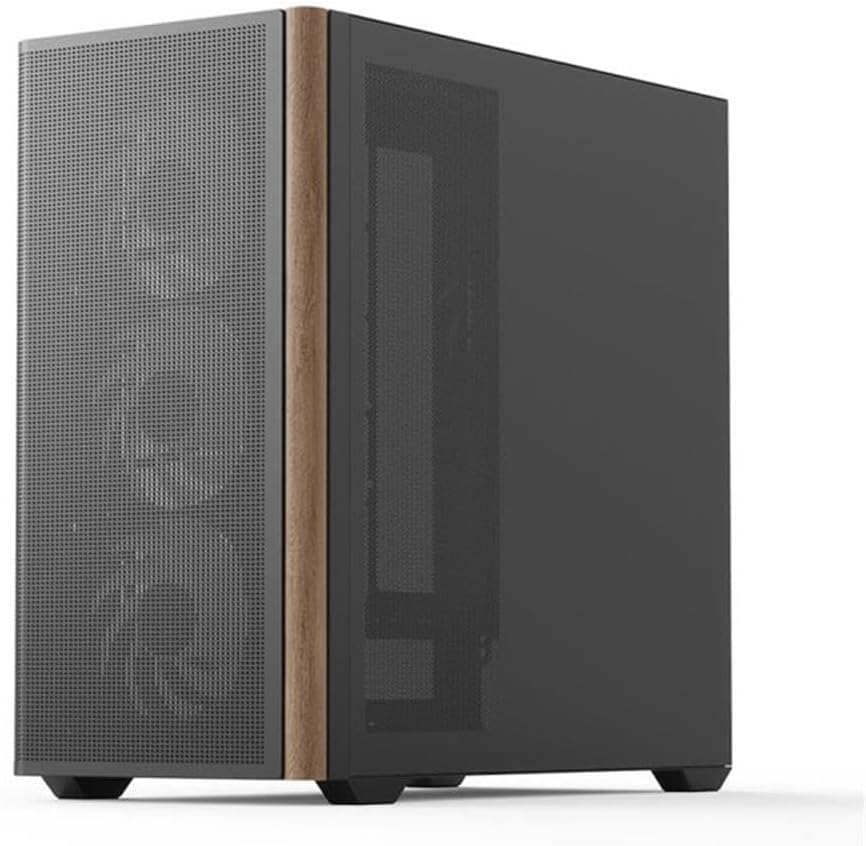
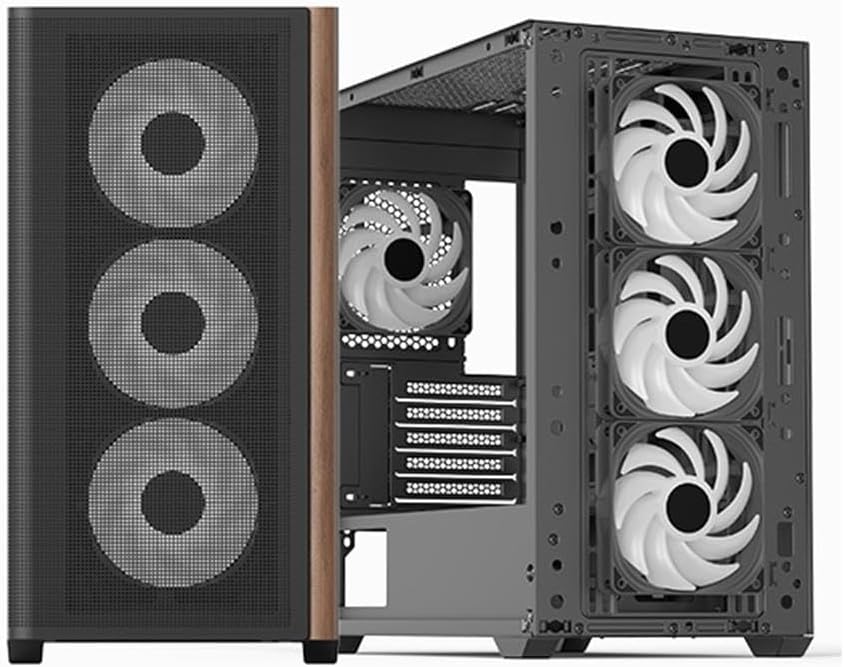
The AeroCool D301A is a compact yet spacious mid-tower case designed for gaming PCs, featuring optimized airflow with a wooden mesh front panel and pre-installed RGB fans. It supports Micro-ATX motherboards and offers excellent compatibility for various components.
Klíčové vlastnosti
- Optimalizované proudění vzduchu: Wooden mesh front panel for superior ventilation.
- Předinstalované ventilátory: Includes 4 RGB fans for immediate cooling and aesthetic appeal.
- Kompatibilita základní desky: Supports ASUS and MSI M-ATX motherboards.
- Konektivita: Features USB Type-C port.
- Design: Slim design with metal and wood accents.
Komponenty a rozvržení




Podpora chlazení


Průvodce nastavením
Vybalování
Carefully remove the PC case from its packaging. Inspect for any damage during transit. Retain the original packaging for future transport or warranty claims.
Instalace komponent
Instalace základní desky:
Secure your Micro-ATX motherboard to the standoffs provided. Ensure all screws are tightened appropriately.Instalace napájecího zdroje (PSU):
Install your PSU in the designated rear-mount area.Instalace úložného disku:
Mount your SSDs/HDDs in the available drive bays.Graphics Card (GPU) and Expansion Card Installation:
Install your GPU and other expansion cards into the PCIe slots.Správa kabelů:
Utilize the cable routing options behind the motherboard tray to ensure clean cable management and optimal airflow.
Připojení periferií
Connect your monitor, keyboard, mouse, and other peripherals to your motherboard's I/O ports.
Návod k obsluze
Zapnutí
After all components are installed and cables are connected, press the power button located on the front I/O panel to start your system.
RGB Fan Control
The pre-installed RGB fans can be controlled via your motherboard's RGB software (compatible with ASUS and MSI RGB sync technologies) or a dedicated fan controller if included with your specific model. Refer to your motherboard manual for detailed RGB software instructions.
Údržba a péče
Čištění
Regularly clean the dust filters located on the front, top, and bottom of the case to maintain optimal airflow and prevent dust buildup. Use a soft cloth for external surfaces and compressed air for internal components.
Airflow Optimization
Ensure that the case has adequate clearance around it for proper air circulation. Avoid blocking the front mesh panel or any fan vents.
Odstraňování problémů
Žádná síla
- Check if the PSU is properly connected to the wall outlet and the motherboard.
- Ujistěte se, že je kabel tlačítka napájení správně připojen k přednímu panelu základní desky.
Ventilátory se netočí / RGB podsvícení se nerozsvítí
- Verify that all fan power cables are securely connected to the motherboard or fan controller.
- Check RGB headers for proper connection.
- Ujistěte se, že je software RGB správně nainstalován a nakonfigurován.
Problémy s přehříváním
- Clean all dust filters and fans.
- Verify fan orientation for proper airflow (intake/exhaust).
- Ensure no cables are obstructing airflow inside the case.
Technické specifikace
| Funkce | Specifikace |
|---|---|
| Značka | Aerocool |
| Výrobce | AeroCool |
| Model | ACCS-MA03043.11 |
| Název modelu | D301A-G-BK-v2 |
| Rozměry produktu | 54 x 51 x 30 cm |
| Hmotnost produktu | 6.95 kg |
| Kompatibilní zařízení | ASUS and MSI m-ATX motherboards |
| Další funkce | Wood accents, RGB lighting |
| Počet portů USB | 3 |
| Typ materiálu | Metal with Wood accents |
| Kompatibilita základní desky | Micro ATX |
| Typ pouzdra | Střední věž |
| Doporučené použití | Hraní |
| Barva | Černý |
| Materiál | Metal with Wood accents |
| Typ montáže napájecího zdroje | Zadní montáž |
| Způsob chlazení | Vzduch |
| Barva osvětlení | RGB |
Záruka a podpora
For warranty information and technical support, please refer to the official Aerocool webnebo se obraťte na místního prodejce. Uschovejte si doklad o koupi pro případné reklamace.
Online zdroje: