
Zavedení
This document serves as the instruction manual for the Generic Replacement Remote Control, designed for various Furrion TV models including FEHD19S0N, FEFD22S0A, and FEFS55F7A LCD LED HDTVs. This remote is a dedicated replacement and aims to provide essential control functions for your television, projector, or audio/video players.
It is important to note that as a replacement unit, some advanced or specific functions present on your original remote control may not be available or fully supported by this replacement. This remote is tested for functionality before dispatch to ensure stable performance and a farther transmitting distance.
Key features include: no programming or setup required (simply install batteries), durable ABS material construction, and sensitive, low power consumption operation.
Konec produktuview

Obrázek 1: Přední strana view of the replacement remote control. This image displays the full layout of the remote, including the power button, numerical keypad, navigation buttons, volume and channel controls, and various function buttons for TV, projector, and audio/video players.
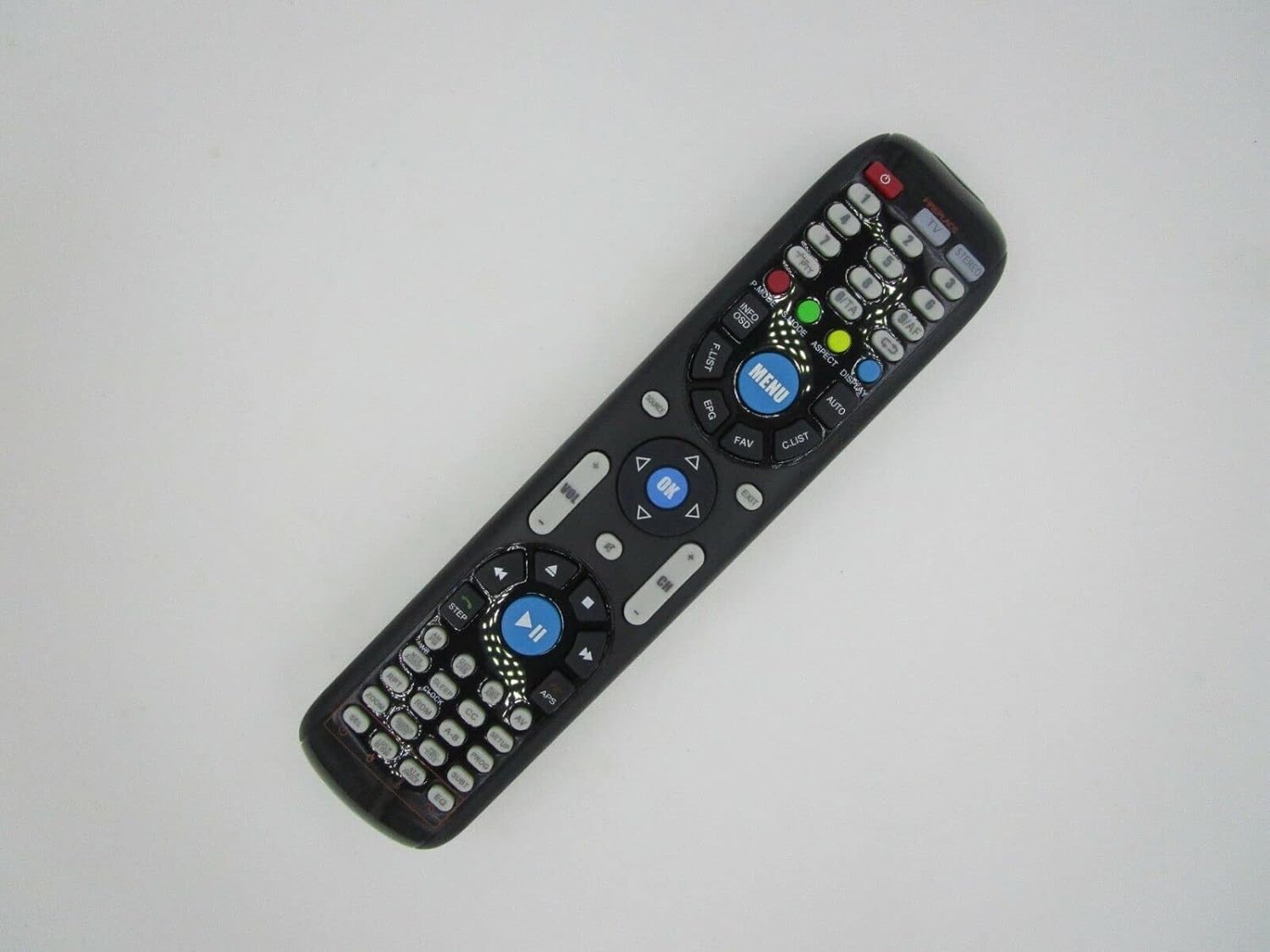
Obrázek 2: Úhlové view of the replacement remote control. This perspective highlights the ergonomic shape and the arrangement of buttons from a slightly elevated side angle, providing a better sense of its physical form.

Obrázek 3: Detail view of the central buttons on the replacement remote control. This detailed image focuses on the MENU, OK, navigation (up, down, left, right), volume, and channel buttons, along with playback controls, illustrating their labels and layout for easy identification.
Nastavení
Instalace baterie
This remote control requires batteries for operation, which are not included in the package. Please ensure you have the correct type and quantity of batteries before proceeding.
- Najděte přihrádku na baterie na zadní straně dálkového ovladače.
- Vysuňte kryt přihrádky na baterie.
- Insert the new batteries, ensuring the positive (+) and negative (-) terminals align correctly with the markings inside the compartment.
- Bezpečně zavřete kryt bateriového prostoru.
Important: Do not mix old and new batteries or different types of batteries. This can lead to reduced performance or battery leakage.
První použití
This replacement remote control is designed for immediate use with compatible models. No programming or complex setup is required. Once batteries are correctly installed, the remote should be ready to operate your device.
Návod k obsluze
Point the remote control directly at the infrared (IR) receiver on your television or compatible device. Ensure there are no obstructions between the remote and the device.
Základní funkce
- Vypínač: Zapíná nebo vypíná zařízení.
- Numerical Keypad (0-9): Used for direct channel input or other numerical selections.
- Zvýšení/snížení hlasitosti (VOL +/-): Nastavuje hlasitost zvuku.
- Kanál nahoru/dolů (CH +/-): Změní televizní kanál.
- Tlačítko ztlumení: Zapíná/vypíná ztlumení zvuku.
- Tlačítko nabídky: Zpřístupňuje hlavní nabídku zařízení.
- Navigační tlačítka (nahoru, dolů, vlevo, vpravo): Používá se k navigaci v nabídkách a možnostech.
- Tlačítko OK/Enter: Potvrzuje výběry v rámci menu.
- Tlačítko zdroje/vstupu: Cyklicky přepíná dostupné vstupní zdroje (např. HDMI, AV).
- Ovládání přehrávání (Přehrát, Pozastavit, Zastavit, Přetočit zpět, Rychle přetočit vpřed): Pro ovládání přehrávání médií na kompatibilních zařízeních.
Please note that the functionality of specific buttons may vary slightly depending on the model of your television or device. As a replacement remote, some advanced or smart TV functions may not be supported.
Údržba
Správná péče a údržba prodlouží životnost vašeho dálkového ovladače.
- Čištění: Use a soft, dry cloth to clean the remote control. For stubborn dirt, a slightly damp Lze použít hadřík, ale dbejte na to, aby se do dálkového ovladače nedostala vlhkost. Nepoužívejte abrazivní čisticí prostředky ani rozpouštědla.
- Výměna baterie: Replace batteries when the remote's performance diminishes or it stops responding. Always replace all batteries at the same time with new ones of the same type.
- Skladování: If the remote control will not be used for an extended period, it is advisable to remove the batteries to prevent leakage and potential damage to the remote.
- Vyhněte se poškození: Nenechávejte dálkový ovladač upustit, nevystavujte ho extrémním teplotám ani jej neponořujte do vody.
Odstraňování problémů
Dálkové nereaguje
- Zkontrolujte baterie: Ujistěte se, že jsou baterie správně vloženy se správnou polaritou (+/-) a nejsou vybité. V případě potřeby je vyměňte za nové.
- Přímá viditelnost: Make sure there are no obstructions between the remote control and the device's IR receiver. The remote requires a clear line of sight.
- Vzdálenost: Ujistěte se, že se nacházíte v efektivním provozním dosahu dálkového ovladače.
- Napájení zařízení: Confirm that the television or device you are trying to control is powered on and functioning correctly.
Certain Functions Not Working
As a replacement remote, it may not support all functions of your original remote control. This is not indicative of a defect. Please refer to the product description or contact the seller if you have specific concerns about unsupported functions.
If the issue persists after following these steps, it is recommended to verify the compatibility of the remote with your specific device model or contact customer support.
Specifikace
| Vlastnictví | Hodnota |
|---|---|
| Značka | Obecný |
| Kompatibilní zařízení | Television, Audio/Video Players, Projector |
| Bezdrátová komunikace | Infračervený (IR) |
| Materiál | ABS/plast |
| Požadavek na baterii | Není součástí dodávky |
| Maximální počet podporovaných zařízení | 1 |
| Barva | FEFD22S0A & FEFD22S0D (refers to compatible models) |
Záruka a podpora
This product is a replacement remote control. For specific warranty information, please refer to the terms and conditions provided by the seller at the time of purchase, or contact the seller directly.
For further assistance, troubleshooting not covered in this manual, or inquiries regarding compatibility, please reach out to the customer support channel provided by the retailer or seller from whom you purchased this remote control. Providing your original remote part number or unit model can assist in resolving specific issues.