
Zavedení
Thank you for choosing the ATTACK SHARK X66 60% Wireless Mechanical Gaming Keyboard. This keyboard is designed for optimal performance and customization, featuring a compact layout, versatile connectivity options, and dynamic RGB lighting. This manual will guide you through the setup, operation, and maintenance of your new keyboard to ensure a seamless user experience.

The ATTACK SHARK X66 keyboard, showing its compact design, coiled USB-C cable, and 2.4G wireless receiver.
Vlastnosti produktu
- 60% kompaktní rozvržení: Features 66 essential keys to maximize desk space while maintaining full functionality.
- CNC Metal Volume Knob: High-quality anodized metal knob for easy volume adjustment and mute function.
- Třírežimové připojení: Supports Bluetooth 5.0, 2.4G wireless, and wired USB-C connections for versatile use across multiple devices.
- Design s možností výměny za provozu: Compatible with 3-pin or 5-pin switches, allowing for easy customization of typing feel.
- Pre-Lubricated Linear Strawberry Switches: Provides a light touch and crisp sound for a smooth typing experience.
- Gasket Structure with 5-Layer Sound Dampening: Reduces noise from key impacts, delivering a pure and pleasant typing sound.
- Odolné PBT krytky kláves: Triple-color OEM height PBT keycaps are abrasion and oil resistant, designed for long-term comfort.
- Živé RGB podsvícení: 16.8 million colors with 18 dynamic lighting effects, including music-synced modes.
- 3000mAh vysokokapacitní baterie: Ensures long-lasting wireless operation.
- Custom Software Support: Allows for customized key functions, macro editing, and lighting effects.
- N-Key Rollover: Ensures accurate registration of multiple simultaneous key presses without ghosting.

Konecview of the ATTACK SHARK X66 keyboard highlighting its mini 60% layout, 3 modes, full RGB backlight, knob design, 3000mAh battery, gasket structure, hot-swap capability, and custom driver support.

Detailed diagram illustrating the 5-layer gasket-mounted structure of the keyboard, including the upper cover, volume knob, PBT keycaps, mechanical switch, fog through positioning plate, PORON filled cotton, shaft underpad, PET singing pad, single key slotted PCB, silica gel, and bottom casing.
Obsah balení
Zkontrolujte prosím balení, zda neobsahuje následující položky:
- ATTACK SHARK X66 Mechanical Gaming Keyboard
- USB-C Coiled Cable
- 2.4G bezdrátový přijímač
- Uživatelská příručka (tento dokument)
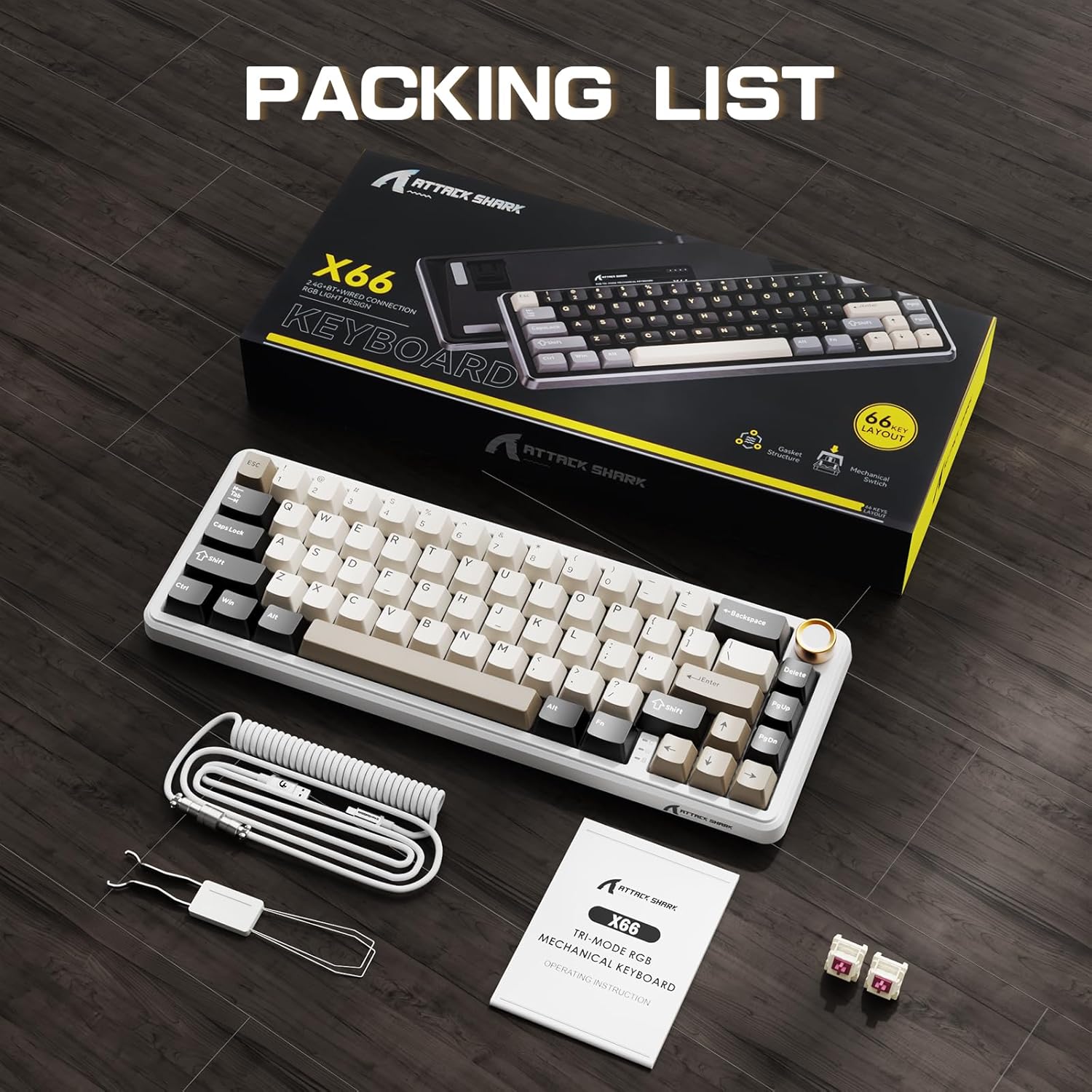
The ATTACK SHARK X66 keyboard, its packaging, coiled cable, and user manual, as found in the box.
Nastavení
Režimy připojení
The ATTACK SHARK X66 keyboard supports three connection modes:
- 2.4G bezdrátový režim: For a stable and low-latency wireless connection.
- Režim Bluetooth: For connecting to multiple devices simultaneously.
- Drátový režim (USB-C): For a direct and reliable connection, also charges the keyboard.

Detailní záběr view of the keyboard's side, showing the 2.4G wireless receiver slot, USB-C port, and switches for Bluetooth (BT), 2.4G, and system compatibility (Win/Mac).
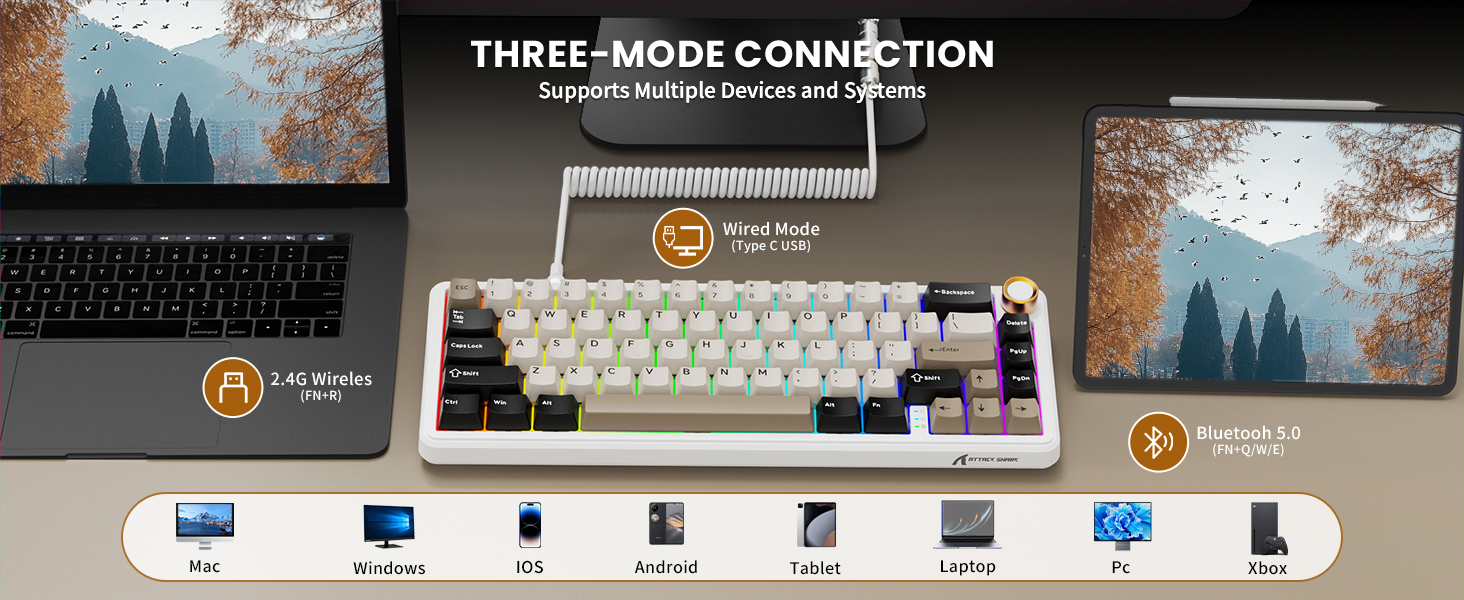
Visual representation of the three connection modes: 2.4G Wireless (FN+R), Wired (Type-C USB), and Bluetooth 5.0 (FN+Q/W/E), along with compatible devices such as Mac, Windows, iOS, Android, Tablet, Laptop, PC, and Xbox.
Bezdrátové připojení 2.4G:
- Locate the 2.4G wireless receiver stored in the slot on the back of the keyboard.
- Zapojte 2.4G přijímač do volného USB portu na vašem počítači.
- Switch the keyboard to 2.4G mode using the toggle switch on the side/back of the keyboard.
- Klávesnice by se měla automaticky připojit.
Připojení Bluetooth:
- Switch the keyboard to Bluetooth mode using the toggle switch.
- Stiskněte a podržte FN+Q, FN + Wnebo FN + E to enter pairing mode for one of the three Bluetooth channels. The indicator light will flash.
- On your device (computer, tablet, smartphone), search for Bluetooth devices and select "ATTACK SHARK X66".
- Once paired, the indicator light will become solid. You can switch between paired devices by pressing FN + Q/W/E.
Kabelové připojení:
- Connect the provided USB-C coiled cable to the keyboard's USB-C port.
- Připojte druhý konec kabelu k volnému portu USB na počítači.
- Klávesnice se automaticky přepne do kabelového režimu a začne se nabíjet.
Kompatibilita systému
The keyboard is compatible with Windows and Mac operating systems. Use the dedicated switch on the side/back of the keyboard to select the appropriate system mode for optimal key mapping.

A close-up of the keyboard's underside, showing the adjustable feet for ergonomic positioning and the system compatibility switch (Win/Mac).
Návod k obsluze
Funkce knoflíku hlasitosti
- Otáčet po směru hodinových ručiček: Zvyšte hlasitost.
- Otočit proti směru hodinových ručiček: Snížit hlasitost.
- Zmáčkni: Ztlumit/Zapnout zvuk.

Detailní view of the high-quality CNC metal volume knob, illustrating its functions: clockwise for volume up, counter-clockwise for volume down, and pressing to mute/unmute sound.

An image highlighting the functional aluminum metal knob, detailing its press-to-mute/unmute, counter-clockwise volume down, and clockwise volume up capabilities.
Ovládání podsvícení RGB
The keyboard features 16.8 million color RGB LEDs with 18 dynamic lighting effects. Use the following key combinations to control the backlight:
- FN + PgDn: Switch Backlight Effect (Cycle through 18 effects).
- FN + \|: Turn on/off Backlight.
- FN + ↑: Jas podsvícení+
- FN + ↓: Jas podsvícení -
- FN + ←: Rychlost podsvícení -
- FN + →: Rychlost podsvícení+
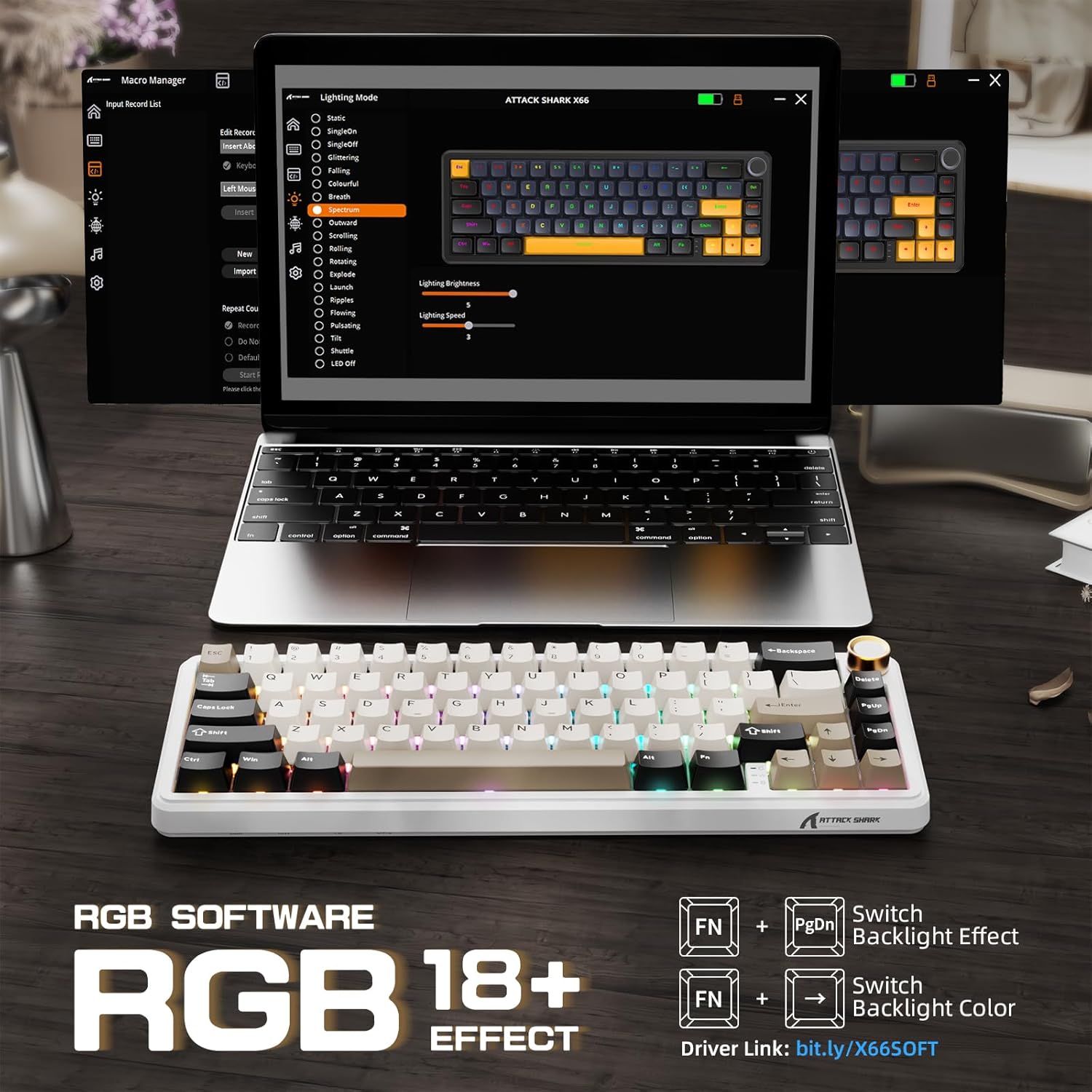
The keyboard displaying various RGB backlight effects, with instructions for controlling them using FN key combinations.

Obrazová ukázkaasing the 16 million RGB backlight, supporting gorgeous RGB backlight and dancing with music rhythm, along with key combinations to adjust 18 backlight effects, turn on/off backlight, adjust brightness, and adjust speed.
Battery Level Check (Wireless Mode)
Chcete-li zkontrolovat stav baterie v bezdrátovém režimu, stiskněte FN + BackSpace. The backlight will temporarily turn off, and the number keys 1 to 0 will light up to indicate the remaining battery percentage (e.g., 1-5 for low, 6-10 for high).

An illustration of the 3000mAh high-capacity battery and how to check its level in wireless mode by pressing FN+BackSpace, with number keys 1-10 indicating battery percentage.
Kontrolky
The keyboard features smart indicator lights for various statuses:
- Indikátor Caps Lock: Indicates Caps Lock status.
- Indikátor Win Lock: Indicates Windows key lock status.
- Indikátor nabíjení: Zobrazuje stav nabíjení.

A close-up of the keyboard's smart indicator lights, showing the Caps Lock (C), Win Lock (W), and Charging Indicator.
Software na zakázku
Enhance your keyboard experience with the custom software. It allows you to:
- Customize key functions for all buttons.
- Edit and assign macros.
- Create customized lighting effects.
- Customize 16 million light colors.
- Support music rhythm lighting effects.
- Set sleep time for power saving.
The software can typically be downloaded from the official ATTACK SHARK website or via the link provided in the product packaging/description (e.g., Driver link: bit.ly/X66SOFT).

Screenshots of the custom software interface, demonstrating options for macro management, lighting mode selection, and various customization features for the keyboard.
Official product video demonstrating the features and functionality of the ATTACK SHARK X66 Keyboard, including its compact design, connectivity options, hot-swappable switches, RGB lighting, and typing experience.
Údržba
Čištění klávesnice
- Před čištěním odpojte klávesnici od zařízení.
- Použijte měkký hadřík, který nepouští vlákna dampKlávesy a šasi otřete malým množstvím vody nebo jemným čisticím roztokem.
- Pro odstranění prachu a nečistot mezi klávesami použijte stlačený vzduch nebo malý kartáč.
- Avoid using harsh chemicals or abrasive materials, as they may damage the keyboard's finish.
Přepínače s možností výměny za provozu
The hot-swappable design allows you to change switches without soldering. Use the included switch puller tool:
- Gently grip the switch with the switch puller and pull upwards to remove it.
- Zarovnejte piny nového 3pinového nebo 5pinového spínače s otvory na desce plošných spojů.
- Nový spínač pevně zatlačte na místo, dokud nezaklapne. Ujistěte se, že kolíky nejsou ohnuté.

A close-up demonstrating the hot-swappable feature, showing a linear switch being removed from the keyboard, with other switches and keycaps visible.

An image illustrating the hot-swappable capability of the keyboard, compatible with both 3-pin and 5-pin mechanical switches, showing switches being inserted and removed.
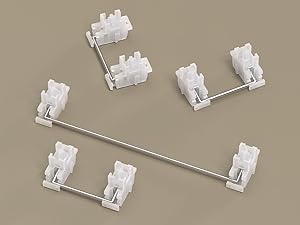
Detailní záběr view of the keyboard's stabilizers, which ensure smooth and consistent key presses for larger keys like the spacebar and shift keys.
Odstraňování problémů
- Klávesnice nereaguje: Ensure the keyboard is charged. Check the connection mode (wired, 2.4G, Bluetooth) and ensure it matches your device's connection. Try restarting the keyboard or your device.
- Problémy s připojením 2.4G: Ensure the 2.4G receiver is securely plugged in. Try a different USB port. Ensure the keyboard is in 2.4G mode.
- Problémy s párováním Bluetooth: Ensure the keyboard is in Bluetooth pairing mode (indicator flashing). Delete previous pairings on your device and try re-pairing. Ensure your device's Bluetooth is enabled.
- RGB osvětlení nefunguje: Check if the backlight is turned off (FN + \|). Adjust brightness (FN + ↑/↓).
- Klávesy se neregistrují nebo se píší dvakrát: Ensure switches are properly seated. If a specific switch is faulty, consider hot-swapping it with a new one.
- Volume knob not working: Ensure the keyboard is powered on and connected. Check for any physical obstructions.
Specifikace
| Funkce | Popis |
|---|---|
| Model | X66 |
| Rozložení | 60 % (66 kláves) |
| Konektivita | Bluetooth 5.0, bezdrátové připojení 2.4G, kabelové připojení USB-C |
| Spínače | Pre-lubricated Linear Strawberry Switches (Hot-Swappable) |
| Klíčenky | PBT Keycaps (OEM Height) |
| Struktura | Gasket Mounted with 5-Layer Sound Dampening |
| Podsvícení | RGB (16.8 Million Colors, 18 Effects) |
| Kapacita baterie | 3000 XNUMX mAh |
| Rozměry | 12.7 x 4.53 x 1.37 palce (32.3 x 11.5 x 3.5 cm) |
| Hmotnost položky | 2.14 libry (0.97 kg) |
| Kompatibilní zařízení | Laptop, PC, Tablet, Smartphone, Mac |

Detailed dimensions of the 60% layout keyboard, showing its length, width, and height.
Záruka a podpora
ATTACK SHARK products are manufactured to the highest quality standards. For warranty information, technical support, or customer service inquiries, please refer to the contact information provided on the product packaging or visit the official ATTACK SHARK webstránky. Uschovejte si prosím doklad o koupi pro případné reklamace.