
1. Úvod
This manual provides instructions for the proper use and maintenance of your Yunir Real Time Language Translator. This compact device features a 2.45-inch touch screen and is designed to facilitate communication across various languages, supporting both online and offline translation capabilities.

Image 1.1: Yunir Real Time Language Translator device.
The translator is equipped with a noise-canceling microphone for clear audio input and a long-lasting battery, making it suitable for travel, business meetings, and language learning.
2. Nastavení
2.1 Obsah balení
Než budete pokračovat, ujistěte se, že jsou přítomny všechny položky:
- 1 x Yunir Translation Device
- 1 x USB kabel
- 1 x Uživatelská příručka (tento dokument)
2.2 Nabíjení zařízení
The device comes with a built-in 1250mAh lithium-ion battery. For optimal performance, fully charge the device before first use.
- Connect the provided USB cable to the charging port on the translator device.
- Druhý konec kabelu USB připojte ke kompatibilnímu napájecímu adaptéru USB (není součástí balení) nebo k portu USB počítače.
- The charging indicator on the device will show its status. A full charge typically provides over 7 days of standby time or more than 8 hours of continuous operation.

Image 2.1: Translator device with USB charging cable.
2.3 Zapnutí/vypnutí
- Zapnutí: Stiskněte a podržte tlačítko napájení (obvykle umístěné na boku), dokud se obrazovka nerozsvítí.
- Vypnutí: Press and hold the power button until a power-off option appears on the screen, then select to confirm.
2.4 Wi-Fi připojení
For online translation features, a stable Wi-Fi connection is required.
- From the home screen, tap on the Nastavení ikona.
- Vybrat Wi-Fi z nabídky.
- Přepnout Wi-Fi On.
- Vyberte požadovanou síť ze seznamu a v případě potřeby zadejte heslo.
- Po připojení se ve stavovém řádku zobrazí ikona Wi-Fi.
2.5 Počáteční nastavení jazyka
Set your preferred system language and default translation languages.
- Přejděte na Nastavení.
- Vybrat Systémový jazyk to choose from options like English, Chinese, Japanese, Korean, etc.
- For translation, select the source and target languages within the translation application interface.
3. Návod k obsluze
The device is designed for intuitive operation via its 2.45-inch touch screen.
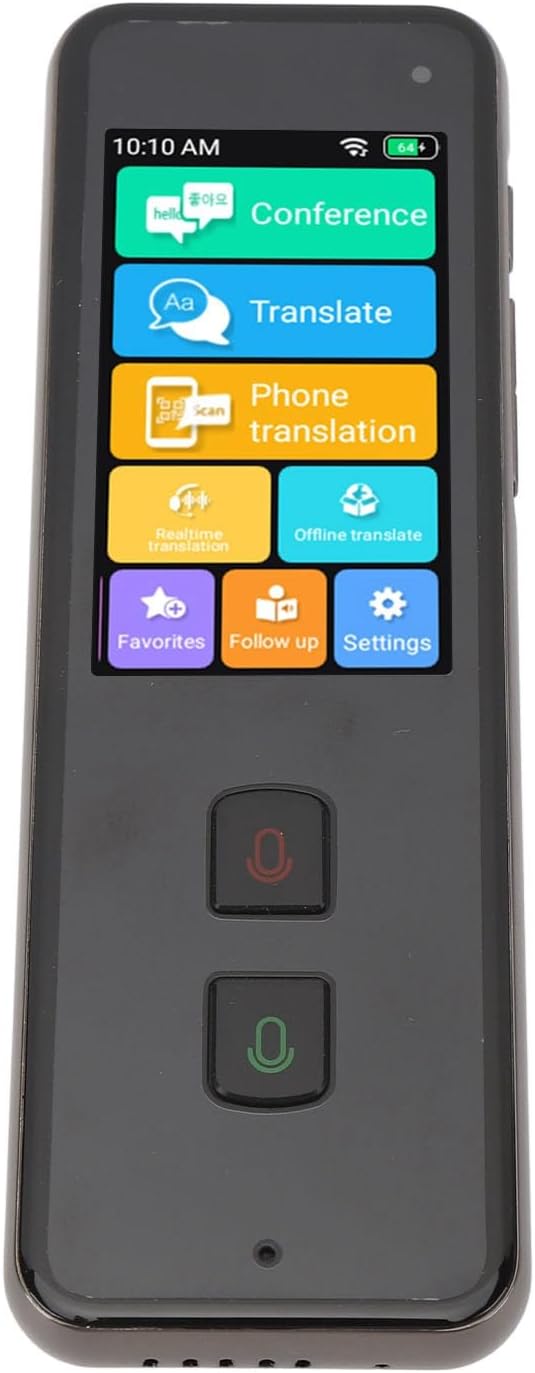
Image 3.1: Translator device screen interface.
3.1 Online Translation (138 Languages)
Ensure the device is connected to Wi-Fi for online translation.
- Na domovské obrazovce klepněte na Přeložit ikona.
- Select your source language (the language you will speak) and target language (the language you want to translate to).
- Press and hold the designated microphone button (usually indicated by a color or icon) for your source language. Speak clearly into the device's microphone.
- Release the button. The device will process your speech and display/speak the translation in the target language.
3.2 Offline Translation (15 Languages)
Offline translation allows use without an internet connection. Ensure necessary language packs are downloaded beforehand.
- Klepněte na Offline Translate na domovské obrazovce.
- Select the desired offline language pairs.
- Proceed with speaking as described in the online translation section.
3.3 Photo Translation (40 Offline, 74 Online)
This feature translates text from images using the built-in 5MP rear camera.
- Klepněte na Telefonní překlad or Překlad v reálném čase icon (depending on the specific interface for camera translation).
- Namiřte fotoaparát na text, který chcete přeložit.
- Ujistěte se, že je text v záběru fotoaparátu dobře osvětlený a jasný.
- The device will capture and translate the text.
3.4 Two-Way Translation
The device supports seamless two-way communication. After one person speaks and the translation is provided, the other person can speak in their language, and the device will translate it back.
3.5 Noise-Canceling Microphone
The integrated noise-canceling microphone helps ensure clear and precise language input, even in environments with background noise. Speak directly into the microphone for best results.
4. Údržba
4.1 Čištění
- K čištění obrazovky a těla zařízení použijte měkký, suchý hadřík, který nepouští vlákna.
- Do not use liquid cleaners, aerosols, or abrasive materials, as these can damage the device.
4.2 Péče o baterii
- Nevystavujte zařízení extrémním teplotám (horkým nebo nízkým), protože to může ovlivnit životnost a výkon baterie.
- If storing the device for an extended period, ensure it has at least a 50% charge to preserve battery health.
- K nabíjení používejte pouze dodaný USB kabel.
4.3 Skladování
Pokud zařízení nepoužíváte, skladujte jej na chladném a suchém místě mimo dosah přímého slunečního záření a vlhkosti.
5. Řešení problémů
| Problém | Možná příčina / řešení |
|---|---|
| Zařízení se nezapne. |
|
| Překlad je nepřesný nebo nefunguje. |
|
| Problémy s připojením k Wi-Fi. |
|
| Špatná kvalita zvuku. |
|
6. Specifikace
| Číslo modelu | Yunirpgyt7v3nz8 |
| Materiál | Hliníková slitina |
| Operační systém | For Android 5.1 |
| Typ obrazovky | 2.45 inch 240 x 432 Touch Screen |
| Paměť | 1GB RAM + 8GB ROM |
| Zadní kamera | 5 MP |
| Wi-Fi | 2.4G (802.11a/b/g/n) |
| Bluetooth | 4.2 |
| Typ baterie | Vestavěná lithium-iontová baterie s kapacitou 1250 mAh |
| Životnost baterie | Over 7 days standby, 8+ hours continuous work |
| Online překlad | 138 Jazyky |
| Překlad offline | 15 Jazyky |
| Překlad fotografií | 40 Offline, 74 Online |
| Systémové jazyky | Danish, Japanese, German, Thai, Vietnamese, Greek, Filipino, Korean, Arabic, French, Spanish, Italian, Portuguese, Russian, English, Chinese, Bengali, Malay, Burmese |
| Rozměry | 6.3 x 3.54 x 1.57 palce (balení) |
| Hmotnost položky | 8.9 unce |
7. Informace o záruce
Specific warranty details for the Yunir Real Time Language Translator (Model: Yunirpgyt7v3nz8) are typically provided at the point of purchase or included with the product packaging. Please refer to the documentation provided by your retailer or contact the manufacturer directly for comprehensive warranty terms and conditions.
8. Zákaznická podpora
For technical assistance, troubleshooting beyond this manual, or inquiries regarding your device, please contact the seller or the manufacturer, Yunir. Refer to your purchase receipt or the product packaging for contact information.