
BETOWEY BT-S5
Uživatelská příručka BETOWEY S5 Motocykl Bluetooth Interkom
Model: BT-S5
Značka: BETOWEY
Zavedení
Thank you for choosing the BETOWEY S5 Motorcycle Bluetooth Intercom. This device is designed to enhance your riding experience by providing clear communication, music playback, and GPS navigation capabilities. Featuring advanced Bluetooth 5.3 technology and multi-person intercom functionality, the S5 ensures stable and high-quality audio for solo rides or group adventures. Please read this manual thoroughly before use to ensure proper operation and maximize the product's lifespan.
Bezpečnostní informace
Always prioritize safety while riding. Ensure the device is securely installed and does not obstruct your vision or control of the motorcycle. Maintain a moderate volume level to remain aware of your surroundings and avoid distractions. Operating this device at excessive volumes can lead to hearing damage and may impair your ability to hear important traffic sounds.
Varování: Do not attempt to install or operate the device while riding. Always stop in a safe location before making adjustments or troubleshooting.
Obsah balení
Ověřte, zda jsou v balení přítomny všechny položky:
- Zařízení interkomu
- Microphone & Headset (includes boom mic and button mic)
- suchý zip Clamp
- USB kabel
- Šroubovák
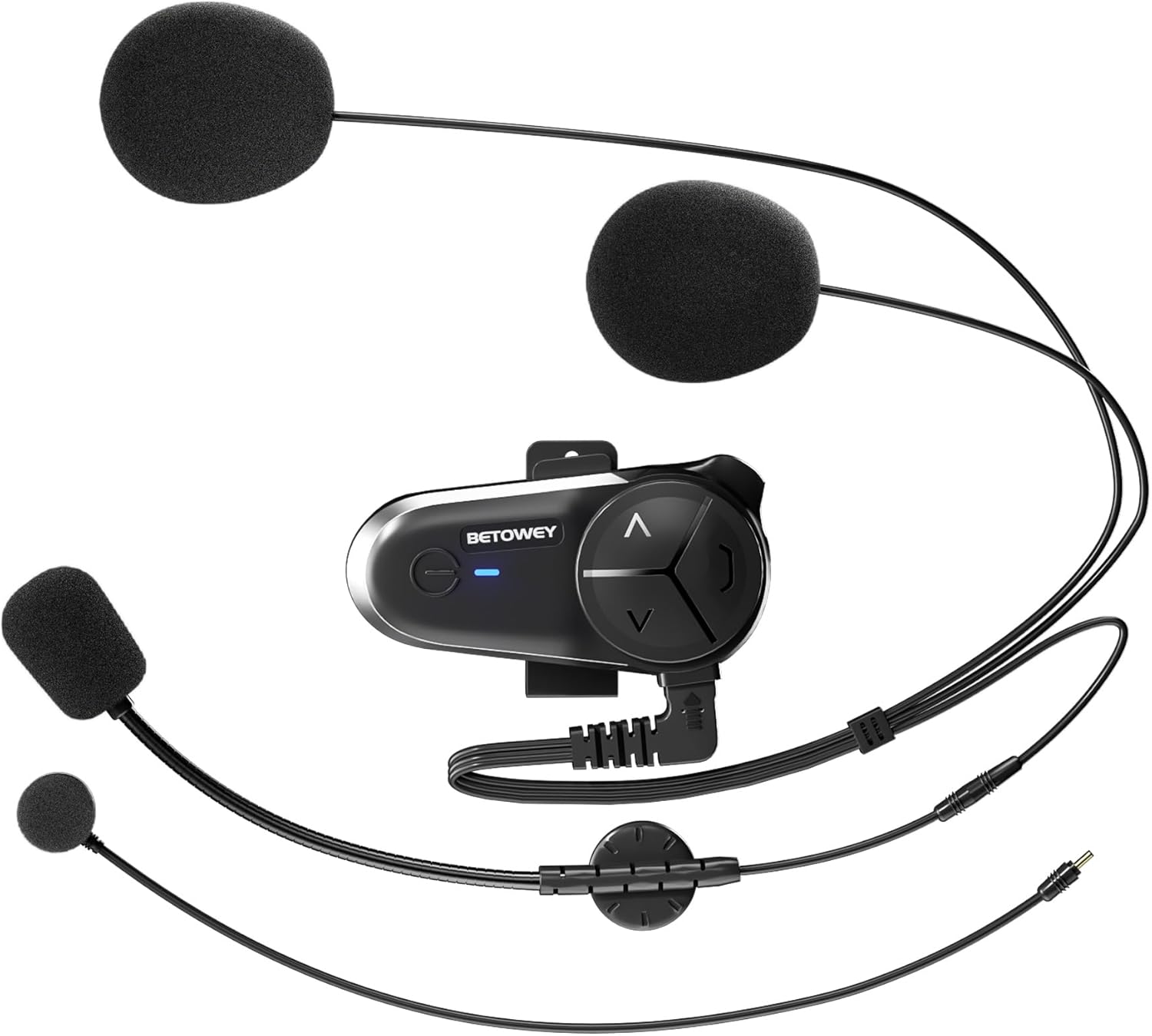
Image: All components included in the BETOWEY S5 package.
Vlastnosti produktu
- Pokročilá technologie Bluetooth 5.3: Equipped with dual Bluetooth chips for clear and stable communication, supporting audio multitasking (intercom, music, FM radio, GPS simultaneously).
- Prodloužená životnost baterie: 1000mAh battery provides up to 150 hours standby and 16 hours continuous operating time.
- Multi-Person Intercom: Supports 2 to 10 riders with a maximum range of 500m between two units and up to 3000m for a group. Compatible with other brands' intercoms.
- Výjimečná kvalita zvuku: 40mm high-fidelity speakers, DSP and CVC noise reduction technology, and an anti-wind microphone reduce environmental noise by up to 98%.
- Snadná instalace a provoz: Designed for simple installation on various helmet types with intuitive controls.

Image: Dual Bluetooth chips enable simultaneous intercom, music, and GPS audio.

Image: High-fidelity speakers with noise reduction for clear sound.

Image: Long-lasting 1000mAh battery for extended use.

Image: Intuitive control design for easy operation.
Průvodce instalací
The BETOWEY S5 offers two installation methods: a velcro clamp for temporary or easy removal, and a screw clamp for a more secure, permanent attachment.
Metoda 1: Suchý zipamp Instalace
- Attach the velcro clamp base to the intercom unit.
- Clean the desired helmet surface thoroughly where the intercom will be mounted.
- Peel off the protective film from the adhesive side of the velcro clamp.
- Firmly press the clamp onto the helmet surface and hold for a few seconds to ensure adhesion.
Method 2: Screw Clamp Instalace
- Připevněte šroub třamp base to the intercom unit.
- Umístěte třamp on the edge of the helmet shell.
- Use the provided screwdriver to tighten the screws, securing the clamp firmly to the helmet. Ensure it is tight but do not overtighten.
After mounting the main unit, install the speakers and microphone inside the helmet. The S5 comes with both a boom microphone (for open-face helmets) and a button microphone (for full-face helmets). Choose the appropriate microphone for your helmet type and position it close to your mouth for optimal voice pickup. Route the speaker wires and microphone cable neatly under the helmet padding.

Image: Visual guide for both velcro and screw clamp způsoby instalace.
Návod k obsluze
Zapnutí/vypnutí
- Zapnutí: Stiskněte a podržte tlačítko napájení přibližně 3 sekundy, dokud se nerozsvítí kontrolka.
- Vypnout: Stiskněte a podržte tlačítko napájení přibližně 3 sekundy, dokud kontrolka nezhasne.
Bluetooth Pairing (First Use)
- Ujistěte se, že je S5 vypnutý.
- Stiskněte a podržte tlačítko napájení po dobu přibližně 5–7 sekund, dokud kontrolka nezačne střídavě blikat červeně a modře, což signalizuje režim párování.
- On your mobile phone or Bluetooth device, search for "BETOWEY S5" in the Bluetooth settings.
- Select "BETOWEY S5" to connect. Once paired, the indicator light will flash blue slowly.
Funkce interkomu
The S5 supports both 2-person and multi-person (up to 10 riders) intercom modes.
- 2-Person Intercom Pairing:
- Ensure both S5 units are powered off.
- On both units, press and hold the Intercom button (usually the large central button) for 5 seconds until the indicator lights flash red and blue alternately.
- Briefly press the Intercom button on one of the units. The units will search and connect. Once connected, the indicator lights will flash blue slowly.
- Multi-Person Intercom (Group Intercom):
- Spárujte první dvě jednotky, jak je popsáno výše.
- To add a third unit, put the third unit into pairing mode (red/blue flashing). On one of the already paired units, briefly press the Intercom button to connect to the third unit.
- Repeat the process for additional units, connecting each new unit to an already connected unit.
- Spuštění/ukončení interkomu: Once paired, a short press of the Intercom button will initiate or end an intercom conversation.

Image: The S5 supports group intercom for up to 10 riders over a 3000m range.
Audio Multitasking (Intercom, Music, GPS)
The S5 allows you to mix audio sources seamlessly. You can listen to music or GPS instructions while maintaining an active intercom conversation. The volume of background audio may automatically adjust when intercom is active.

Image: Multitasking audio allows seamless integration of intercom, music, and GPS.
Přehrávání hudby
- Přehrát/pozastavit: Krátce stiskněte tlačítko Napájení.
- Další skladba: Short press the "Next" button (usually the 'V' or down arrow).
- Předchozí skladba: Short press the "Previous" button (usually the '^' or up arrow).
Ovládání hlasitosti
- Zvýšení hlasitosti: Long press the "Volume Up" button (usually the '^' or up arrow).
- Snížit hlasitost: Long press the "Volume Down" button (usually the 'V' or down arrow).
FM rádio
- Zapnutí/vypnutí FM rádia: Dvakrát stiskněte tlačítko napájení.
- Prohledat kanály: While FM radio is on, long press the "Next" or "Previous" button to scan for stations.

Image: The S5 features a built-in FM radio for entertainment on the go.
Hlasový asistent
- Aktivovat Voice Assistant: Triple-press the Power button to activate your phone's voice assistant (e.g., Siri, Google Assistant).
Údržba
- Čištění: Použijte měkký, damp cloth to clean the exterior of the intercom unit. Do not use harsh chemicals or abrasive cleaners.
- Péče o baterie:
- Před prvním použitím zařízení plně nabijte.
- Recharge the battery when the low battery indicator is active.
- Během nabíjení a skladování se vyhýbejte extrémním teplotám, abyste prodloužili životnost baterie.
- If storing for an extended period, charge the device every 3-6 months to prevent deep discharge.
- Voděodolnost: The BETOWEY S5 is water-resistant (IP67 rated). While it can withstand splashes and light rain, avoid submerging the device in water. Ensure the charging port cover is securely closed when not charging.
Odstraňování problémů
| Problém | Možná příčina | Řešení |
|---|---|---|
| Zařízení se nezapne. | Slabá baterie. | Zařízení plně nabijte. |
| Nelze spárovat s telefonem/interkomem. | Zařízení není v režimu párování; příliš daleko od sebe; rušení. | Ensure device is in pairing mode (flashing red/blue). Bring devices closer. Restart both devices. |
| Špatná kvalita zvuku/šum. | Microphone not positioned correctly; excessive wind noise; volume too low/high. | Adjust microphone position. Ensure anti-wind microphone is used. Adjust volume. |
| Interkom se často odpojuje. | Mimo dosah; překážky; rušení. | Stay within effective range. Avoid major obstacles. Re-pair if necessary. |
Specifikace
| Funkce | Detail |
|---|---|
| Název modelu | BETOWEY BT-S5 |
| Technologie připojení | Bezdrátové (Bluetooth) |
| Verze Bluetooth | 5.3 |
| Kapacita baterie | 1000 XNUMX mAh |
| Životnost baterie (provozní) | Až 16 hodin |
| Životnost baterie (pohotovostní režim) | Až 150 hodin |
| Doba nabíjení | Přibl. 2.5 hodin |
| Dosah interkomu (pro 2 osoby) | Až 500 metrů |
| Dosah interkomu (skupina) | Až 3000 metrů (pro 10 jezdce) |
| Redukce šumu | DSP and CVC Noise Reduction Technology |
| Velikost reproduktoru | 40mm High-Fidelity Speakers |
| Úroveň odolnosti proti vodě | IP67 |
| Rozměry produktu | 3.6 x 1.85 x 0.54 palce |
| Hmotnost položky | 1.69 unce (48 gramů) |
| Výrobce | BETOWEY |

Image: Physical dimensions and weight of the BETOWEY S5 intercom.
Záruka a podpora
BETOWEY products are designed for reliability and performance. For any questions, technical support, or warranty inquiries, please contact our customer service team.
Kontaktní údaje:
- E-mail: betowey_help@outlook.com
Please have your product model (BT-S5) and purchase details ready when contacting support.
Ask a question about this manual
Ask about setup, troubleshooting, compatibility, parts, safety, or missing instructions. Manuals+ will review the question and use this page’s manual context to help answer it.