
1. Úvod
This manual provides comprehensive instructions for the installation, operation, and maintenance of the DS-K1T342DWX Value Series MinMoe Facial Recognition Terminal. This device utilizes advanced deep learning algorithms to ensure high-speed and accurate facial recognition. It supports multiple authentication methods, including face and card recognition, making it suitable for various access control and time attendance applications in diverse environments such as offices, financial institutions, and other secure areas.
2. Bezpečnostní informace
Please read these safety instructions carefully before operating the device to prevent injury to yourself or others and to avoid damage to the device. Keep this manual for future reference.
- Ensure the device is installed by qualified personnel in accordance with all local electrical codes and regulations.
- Používejte pouze napájecí adaptér určený pro toto zařízení. Nesprávná hlasitosttagmůže způsobit poškození nebo požár.
- Nevystavujte zařízení vodě, vlhkosti ani extrémním teplotám.
- Neumisťujte zařízení na přímé sluneční světlo nebo do blízkosti zdrojů tepla.
- Nepokoušejte se zařízení sami rozebírat nebo opravovat. Veškeré opravy svěřte kvalifikovanému servisnímu personálu.
- Clean the screen and lens with a soft, dry cloth. Avoid using abrasive cleaners or solvents.
3. Obsah balení
Verify that all items are present and in good condition upon unpacking. If any items are missing or damaged, contact your supplier immediately.
- DS-K1T342DWX Facial Recognition Terminal with LCD Touch Screen
- Montážní příslušenství (šrouby, hmoždinky)
- Napájecí adaptér (v závislosti na regionu)
- Rychlý průvodce
4. Konec produktuview
The DS-K1T342DWX terminal features a compact design with a high-resolution display and advanced recognition capabilities.
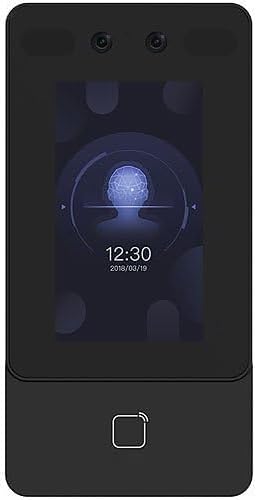
Obrázek 4.1: Přední strana view of the DS-K1T342DWX terminal, showing the LCD touch screen, 2MP wide-angle lens, and fingerprint sensor area.

Obrázek 4.2: Úhlové view of the DS-K1T342DWX terminal, highlighting its slim profile a boční porty.
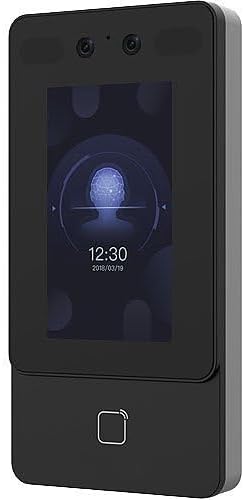
Obrázek 4.3: Alternativní fronta view of the DS-K1T342DWX terminal, providing a clear look at the display interface.
Klíčové komponenty:
- 4.3" LCD Touch Screen: For user interaction, displaying recognition status, time, and configuration menus.
- 2-Megapixel Wide-Angle Lens: Captures facial images for recognition.
- Built-in Card Reading Module: Supports various card types for authentication.
- Mikrofon a reproduktor: Pro obousměrnou audio komunikaci.
- Porty pro připojení: For power, network (TCP/IP, Wi-Fi), and external device connections.
5. Nastavení a instalace
Proper installation is crucial for optimal performance and security. It is recommended that installation be performed by a professional.
5.1 Montáž zařízení
- Choose a suitable mounting location, typically at eye level for facial recognition, ensuring the face recognition distance of 0.3 m to 1.5 m is achievable.
- Use the provided mounting template (if applicable) to mark drilling points on the wall.
- Vyvrtejte otvory a vložte hmoždinky.
- Připevněte montážní konzolu (pokud je samostatná) ke zdi pomocí šroubů.
- Attach the terminal to the mounting bracket or directly to the wall, ensuring it is firmly secured.
5.2 Zapojení a připojení
- Připojení napájení: Connect the power adapter to the device and a suitable power outlet.
- Internetové připojení:
- Wired (TCP/IP): Connect an Ethernet cable from the device's LAN port to your network switch or router.
- Bezdrátové připojení (Wi-Fi): Configure Wi-Fi settings via the device's touch screen or web client after initial power-up.
- Externí zařízení: Connect any required external devices such as door locks, exit buttons, or alarm systems according to the wiring diagram in the detailed installation guide (not provided in this summary).
6. Návod k obsluze
This section outlines the basic operation of the facial recognition terminal.
6.1 Registrace uživatelů
Before users can be authenticated, their facial data and/or card information must be enrolled into the system. The device has a capacity for up to 1500 faces and 3000 cards.
- Access the device's menu (requires administrator credentials).
- Navigate to "User Management" or "Enrollment".
- Select "Add User" and input required user details.
- For facial enrollment, instruct the user to stand within the recognition distance (0.3 m to 1.5 m) and face the camera. The device will capture the facial image.
- For card enrollment, present the card to the built-in card reader.
- Uložte informace o uživateli.
6.2 Metody autentizace
- Rozpoznávání obličeje:
Stand directly in front of the terminal within the specified recognition distance. The device will automatically detect and recognize your face. Recognition duration is less than 0.2 seconds per user, with an accuracy rate of 99% or higher. The device also supports mask recognition for enhanced security.
- Card Authentication:
Present your registered card to the card reading area on the terminal. The device will verify the card and grant access if authorized.
- Combined Authentication:
The terminal can be configured to require both facial recognition and card authentication for increased security.
6.3 Obousměrný zvuk
The device supports two-way audio functionality, allowing communication with client software, indoor stations, and main stations. This feature enhances communication capabilities for access control scenarios.
7. Konfigurace
The terminal's settings and advanced features can be configured via a web client or compatible software.
- Web Klient: Access the device's IP address through a web browser to manage users, configure network settings, set up access rules, and view protokoly.
- Kompatibilita protokolu: The device is compatible with ISAPI and ISUP 5.0 protocols, allowing integration with various security and management platforms.
8. Údržba
Regular maintenance ensures the longevity and optimal performance of your facial recognition terminal.
- Čištění: Gently wipe the LCD touch screen and camera lens with a soft, lint-free cloth. Do not use liquid cleaners or aerosols directly on the device.
- Aktualizace softwaru: Periodically check for firmware updates from the manufacturer to ensure the device has the latest features and security enhancements.
- Záloha dat: Regularly back up user data and configuration settings to prevent data loss.
9. Řešení problémů
Tato část se zabývá běžnými problémy, se kterými se můžete setkat. V případě složitějších problémů kontaktujte technickou podporu.
| Problém | Možná příčina | Řešení |
|---|---|---|
| Zařízení se nezapne. | No power supply or faulty adapter. | Check power connection and adapter. Ensure the outlet is functional. |
| Rozpoznávání obličeje selhává nebo je pomalé. | Incorrect distance, poor lighting, or un-enrolled user. | Ensure user is within 0.3m-1.5m. Improve lighting. Verify user is enrolled. Clean camera lens. |
| Card authentication not working. | Card not enrolled or incorrect card type. | Ensure card is enrolled and compatible with the built-in reader. |
| Nelze se připojit k síti. | Incorrect network settings or cable issue. | Verify Ethernet cable connection or Wi-Fi settings. Check IP address configuration. |
10. Specifikace
Technical specifications for the DS-K1T342DWX Facial Recognition Terminal.
- Model: DS-K1T342DWX
- Zobrazit: 4.3" dotykový LCD displej
- Fotoaparát: 2-Megapixel Wide-Angle Lens
- Kapacita obličeje: Up to 1500 faces
- Kapacita karty: Až 3000 karet
- Face Recognition Distance: 0.3 m až 1.5 m
- Face Recognition Accuracy: 99 % nebo vyšší
- Face Recognition Speed: Less than 0.2 seconds per user
- Režimy ověřování: Face, Card, Face + Card
- Speciální vlastnosti: Mask recognition, Two-way audio
- Konektivita: TCP/IP, Wi-Fi
- Protokoly: ISAPI, ISUP 5.0
- Konfigurace: Web klienta
- Barva: Černý
- Výrobce: Hikvision (as per product specifications)
11. Záruka a podpora
For warranty information and technical support, please refer to the documentation provided with your purchase or contact your vendor. For purchases made through Amazon, you may contact the seller, NATO Security, for assistance with product-related inquiries and support.
For general inquiries or to find more resources, you can visit the manufacturer's official website (Hikvision).