
1. Úvod
The Audizio Avola is a comprehensive audio system designed to provide a wide range of listening options. It integrates Internet Radio, DAB+, FM radio, a CD player, and Bluetooth connectivity into a single, elegant unit. This manual will guide you through the setup, operation, and maintenance of your Avola system, ensuring you can fully utilize its features for an optimal audio experience.
2. Bezpečnostní pokyny
- Napájení: Používejte pouze dodaný napájecí adaptér. Ujistěte se, že hlasitosttage odpovídá požadavkům vašeho regionu.
- Voda a vlhkost: Nevystavujte jednotku dešti, vlhkosti ani kapalinám. Nepokládejte na jednotku předměty naplněné tekutinami, například vázy.
- Větrání: Zajistěte dostatečné větrání kolem jednotky. Neblokujte větrací otvory.
- Zdroje tepla: Udržujte jednotku mimo dosah zdrojů tepla, jako jsou radiátory, topná tělesa, kamna nebo jiná zařízení produkující teplo.
- Čištění: Disconnect the unit from the power supply before cleaning. Use a soft, dry cloth. Do not use liquid cleaners or aerosol cleaners.
- Servis: Nepokoušejte se o opravu jednotky sami. Veškerý servis svěřte kvalifikovanému servisnímu personálu.
- CD přehrávač: Do not insert foreign objects into the CD tray. Handle CDs by their edges to avoid scratches.
3. Obsah balení
Ověřte, zda jsou v balení přítomny všechny položky:
- 1x Audizio Avola Internet Radio
- 1x Dálkové ovládání
- 1x napájecí adaptér
- 1x User Manual (Quick Start Guide)

Image: Audizio Avola unit shown with its remote control and power adapter.
4. Konec produktuview
4.1 Přední panel

Obrázek: Přední strana view of the Audizio Avola with the CD tray closed.
The front panel features the main display, control buttons, a CD tray, and input ports.
- Zobrazit: Color display for navigation and information.
- Ovládací tlačítka: MENU, INFO, REC/DEL, PRESET/REPEAT, STANDBY, I/R, Play/Pause, Stop, Skip/Fast Forward/Rewind.
- Zásobník na CD: Pro vkládání audio CD.
- TUNE/SELECT Knob: Rotate to navigate menus, press to select.
- Knoflík VOLUME: Nastavuje výstupní úroveň zvuku.
- USB port: Pro připojení paměťových zařízení USB.
- Slot pro SD kartu: Pro vkládání paměťových karet SD.
- Vstup AUX: 3.5mm jack pro externí audio zdroje.
- Sluchátkový jack: 3.5mm jack pro soukromý poslech.

Image: Close-up of the Audizio Avola front panel showing USB, SD, AUX, and headphone ports.
4.2 Zadní panel
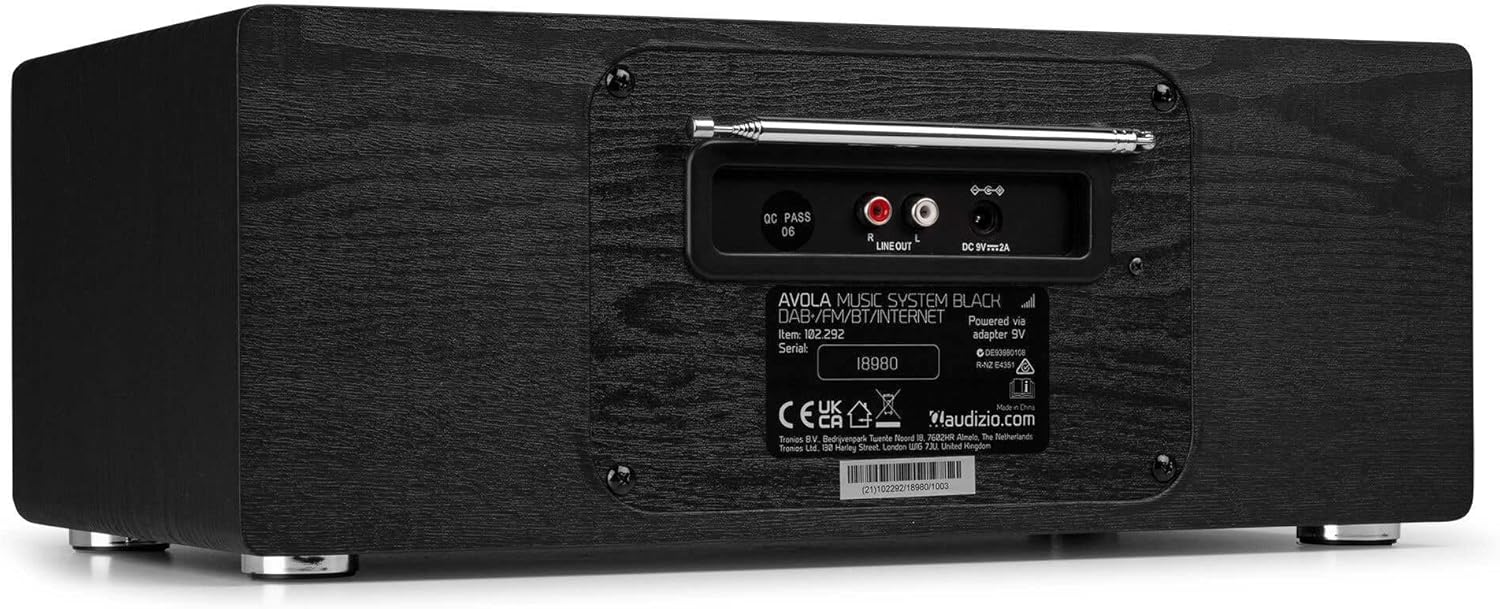
Obrázek: Zadní view of the Audizio Avola, highlighting the antenna and connection ports.
The rear panel houses essential connections:
- Teleskopická anténa: For DAB+ and FM radio reception. Extend fully for best signal.
- LINKOVÝ VÝSTUP (RCA): Pro připojení k externímu amplifikátory nebo reproduktory.
- DC 9V 2A Power Input: Pro připojení napájecího adaptéru.
5. Nastavení
5.1 Připojení napájení
- Connect the power adapter to the DC 9V 2A input on the rear of the Avola unit.
- Zapojte napájecí adaptér do vhodné zásuvky.
- The unit will enter standby mode. Press the STANDBY button on the unit or remote control to power on.
5.2 Nastavení antény
For optimal DAB+ and FM radio reception, fully extend the telescopic antenna located on the rear panel. Adjust its position for the best signal quality.
5.3 Initial Setup (WLAN Connection)
To access Internet Radio features, the Avola must be connected to a Wi-Fi network.
- Upon first power-on, the unit may prompt you to set up the network connection. If not, press MENU, navigate to 'System Settings' and then 'Network'.
- Select 'Wi-Fi Network' and choose 'Scan' to find available networks.
- Ze seznamu vyberte svou síť Wi-Fi.
- Enter your Wi-Fi password using the TUNE/SELECT knob to navigate characters and press to confirm each character.
- Once connected, the display will show a Wi-Fi icon.
6. Provozní režimy
6.1 Internetové rádio
Získejte přístup k tisícům rozhlasových stanic po celém světě prostřednictvím Wi-Fi připojení.
- Press the MENU button and select 'Internet Radio'.
- Stanice můžete procházet podle lokality, žánru nebo vyhledávat konkrétní stanice.
- Use the TUNE/SELECT knob to navigate and select.
- To save a station as a preset, press and hold the PRESET/REPEAT button until the preset menu appears, then select a preset number.

Image: The Audizio Avola display showing the Internet Radio interface.
6.2 DAB+ rádio
Digital Audio Broadcasting Plus offers high-quality digital radio.
- Press the MENU button and select 'DAB Radio'.
- The unit will automatically scan for available DAB+ stations.
- Use the TUNE/SELECT knob to browse and select stations.
- Save presets as described for Internet Radio.
6.3 FM rádio
Listen to traditional analog FM radio broadcasts.
- Press the MENU button and select 'FM Radio'.
- Use the TUNE/SELECT knob to manually tune or press and hold to auto-scan for stations.
- Save presets as described for Internet Radio.
6.4 CD přehrávač
Play your favorite audio CDs.
- Press the MENU button and select 'CD Player'.
- Press the 'Open' button next to the CD tray to open it.
- Carefully place an audio CD onto the tray with the label side facing up.
- Press the 'Open' button again to close the tray. The unit will begin playing the CD automatically.
- Use the Play/Pause, Stop, and Skip buttons for playback control.
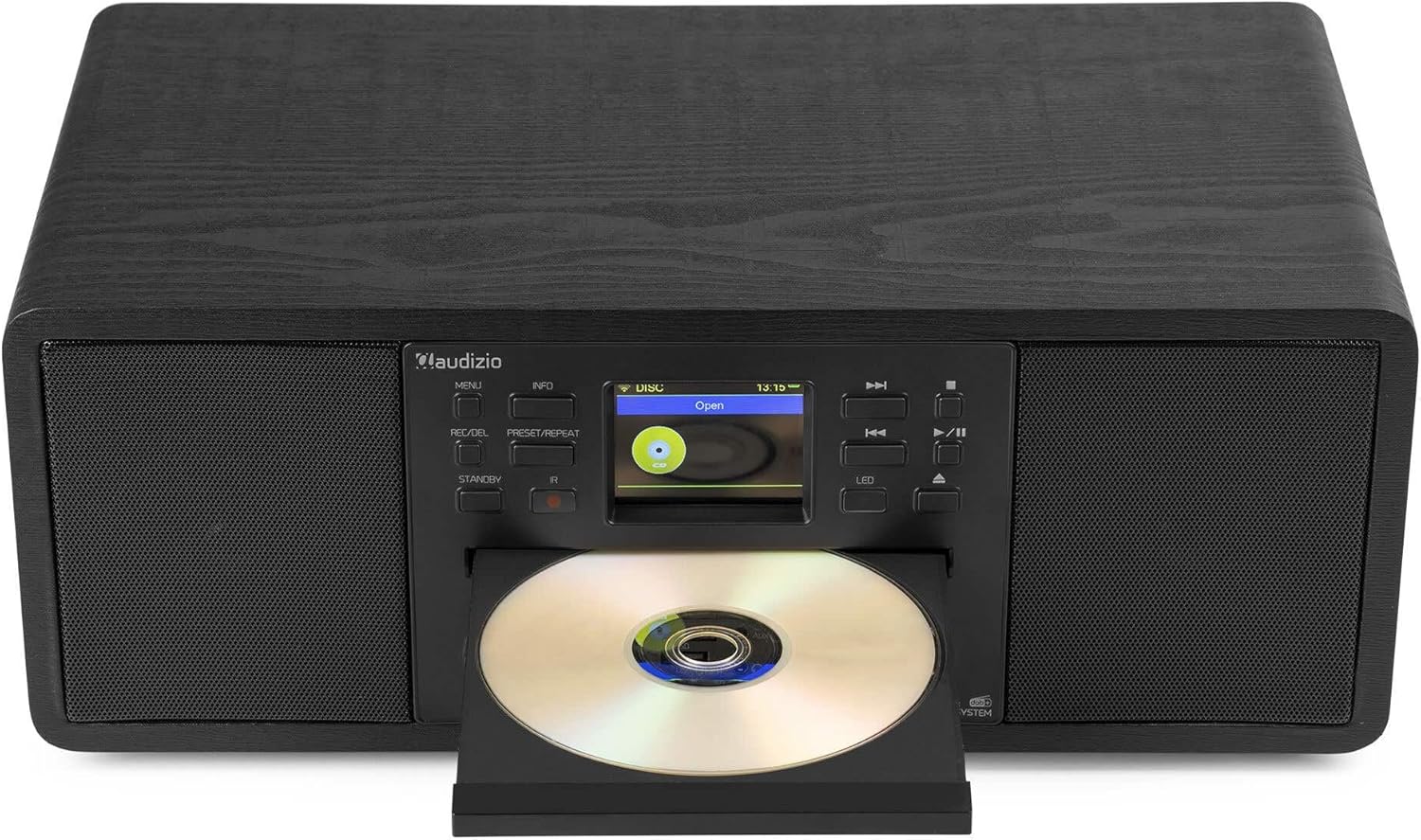
Image: The Audizio Avola with its CD tray open, ready for disc insertion.
6.5 Připojení Bluetooth
Stream audio wirelessly from your smartphone, tablet, or other Bluetooth-enabled devices.
- Press the MENU button and select 'Bluetooth'.
- The Avola will enter pairing mode and become discoverable.
- On your Bluetooth device, search for 'Audizio Avola' in the Bluetooth settings and select it to pair.
- Once connected, the display will show 'BT Connected'. You can now play audio from your device through the Avola.

Image: The Audizio Avola display indicating a successful Bluetooth connection.
6.6 Přehrávání z USB/SD karty
Přehrát zvuk filez USB disků nebo SD karet.
- Insert a USB drive into the USB port or an SD card into the SD card slot on the front panel.
- Press the MENU button and select 'USB' or 'SD' (the unit may automatically switch to the correct mode).
- Procházejte svým files and folders using the TUNE/SELECT knob.
- Press the TUNE/SELECT knob to play a selected track.
7. Údržba
- Čištění jednotky: Use a soft, dry, lint-free cloth to clean the exterior of the unit. Do not use abrasive cleaners, waxes, or solvents.
- Čištění čoček CD: If CD playback becomes erratic, use a commercially available CD lens cleaner disc to clean the laser lens.
- Skladování: Pokud budete jednotku skladovat delší dobu, odpojte ji od napájení a uložte ji na chladném a suchém místě.
8. Řešení problémů
| Problém | Možná příčina | Řešení |
|---|---|---|
| Žádná síla | Napájecí adaptér není připojen nebo je zásuvka vadná. | Zkontrolujte připojení k napájení. Zkuste jinou zásuvku. |
| Žádný zvuk | Příliš nízká hlasitost, aktivované ztlumení nebo vybrán nesprávný zdroj. | Zvyšte hlasitost. Zkontrolujte, zda je aktivní ztlumení. Ujistěte se, že je vybrán správný vstupní zdroj. |
| Internetové rádio se nepřipojuje | Nesprávné heslo k Wi-Fi, slabý signál nebo problém se sítí. | Re-enter Wi-Fi password. Move unit closer to router. Check router status. |
| Slabý příjem DAB+/FM | Anténa není vysunutá nebo je v oblasti slabý signál. | Zcela vysuňte a nastavte teleskopickou anténu. Zkuste jednotku přemístit. |
| CD se nepřehrává | CD inserted incorrectly, dirty/scratched CD, or unsupported format. | Ensure CD is inserted label-side up. Clean or replace CD. Verify CD format (supports CD-DA, MP3). |
| Bluetooth není párování | Device not in pairing mode, or Avola not discoverable. | Ensure both devices are in pairing mode. Check Bluetooth settings on your device. |
9. Specifikace
| Funkce | Specifikace |
|---|---|
| Název modelu | Avola |
| Číslo položky | 102.292 |
| Rozměry (DxŠxV) | 45.8 x 25.8 x 19.7 cm |
| Hmotnost | 4 kg |
| Vstup napájení | 220 Volt (via power adapter) |
| Speaker Output Power (Max) | 60 Wattů |
| Režim zvukového výstupu | Stereo |
| Podporované zvukové formáty | CD-DA, MP3 |
| Technologie připojení | WLAN, Bluetooth, AUX, RCA |
| Kompatibilní zařízení | MP3 Player, PC, Smartphone, Tablet |
| Barva | Černý |
10. Záruka a podpora
Audizio products are designed and manufactured to the highest standards. In the unlikely event of a problem with your product, please contact your retailer for assistance. Keep your proof of purchase for warranty claims. For further support or inquiries, please refer to the official Audizio webnebo kontaktujte jejich zákaznický servis.