
Zavedení
This manual provides essential information for the safe and efficient operation of your SCULPFUN S9 PRO 10W Laser Engraver. The S9 PRO features 10W laser beam shaping technology, offering a 0.06mm ultra-fine laser focus for strong cutting penetration and precision. It is capable of cutting materials such as 15mm thick wood and 10mm acrylic, and engraving ceramics and stainless steel. Please read this manual thoroughly before use to ensure proper setup, operation, and maintenance.

Bezpečnostní informace
Operating a laser engraver involves potential hazards. Adhere to all safety guidelines to prevent injury or damage.
- Ochrana očí: Always wear appropriate laser safety glasses when operating the machine. The integrated laser filter on the S9 PRO blocks 98% of ultraviolet light, allowing observation without additional safety glasses for bystanders, but direct laser exposure should always be avoided.
- Vypínač: The machine is equipped with a secure power switch. Always turn off the machine when not in use or during maintenance.
- Bezpečné umístění: Utilize the fastening holes on the four feet and frame structure to secure the machine and data cables, preventing accidental movement.
- Ochrana povrchu: Use the provided A4-sized steel pad to protect your work surface from laser damage.
- Větrání: Ensure adequate ventilation in your workspace to dissipate fumes produced during engraving and cutting.
- Hořlavé materiály: Do not engrave or cut highly flammable materials without proper precautions.
- Děti a domácí mazlíčci: Keep children and pets away from the operating area. The laser point can attract attention, but direct exposure is dangerous.

Obsah balení
Po vybalení ověřte, zda jsou přítomny všechny komponenty:
- 1 x SCULPFUN S9 Pro 10 W Laser Engraver
- A4-sized steel pad
- Napájecí adaptér
- USB kabel
- Montážní nářadí
- Uživatelská příručka (tento dokument)
Průvodce nastavením
1. Montáž
The SCULPFUN S9 PRO features a fast assembly design, allowing for installation typically within 10 to 20 minutes. Follow the steps below:
- Krok 1: Assemble the main frame components.
- Krok 2: Attach the X-axis and laser module to the frame.
- Krok 3: Připojte všechny potřebné kabely.
- Dokončit: Ujistěte se, že všechna spojení jsou bezpečná a rám je stabilní.
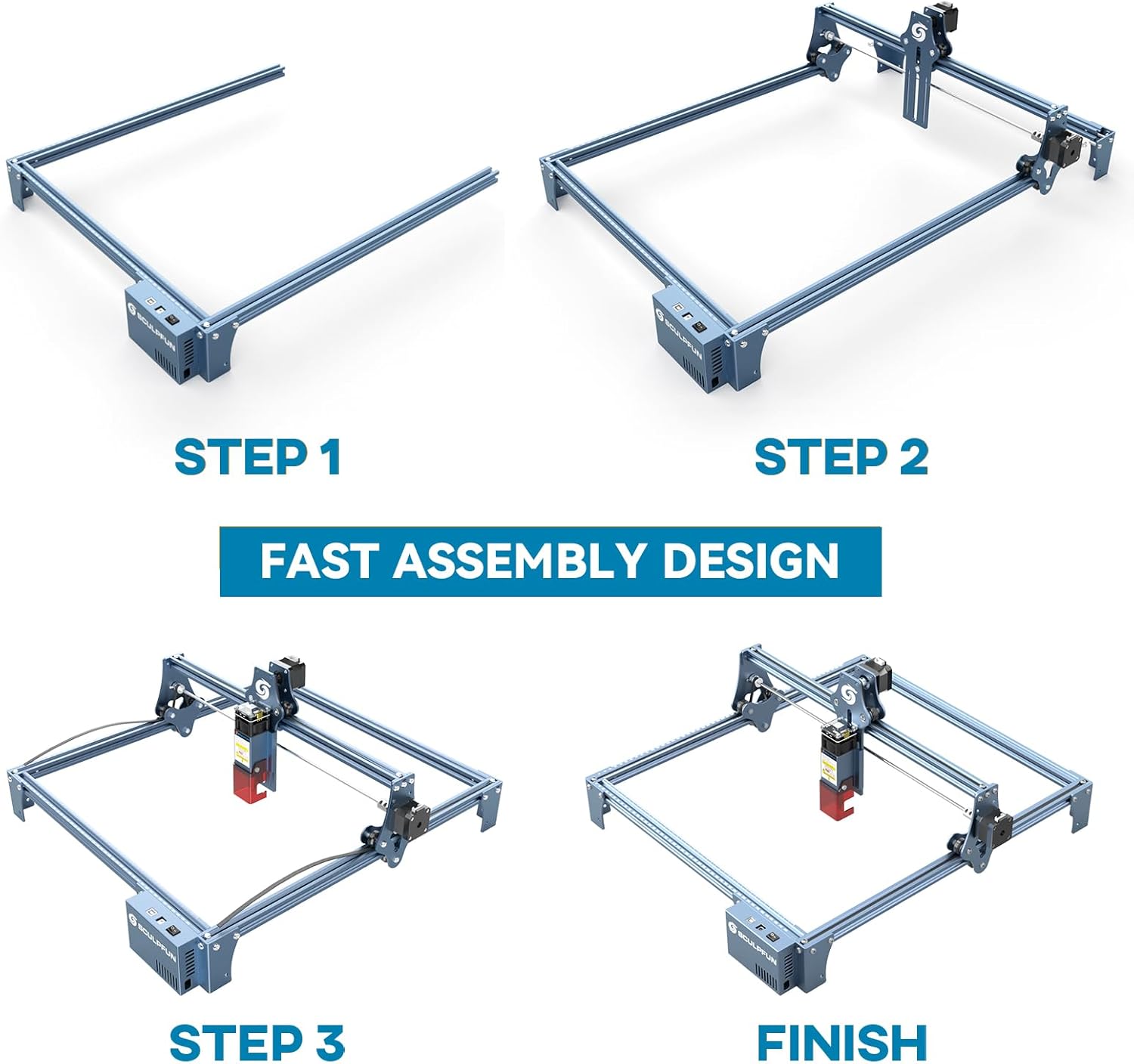
The full-metal structure enhances robustness and engraving accuracy. The X and Y axes include precise scale lines, forming a rectangular measuring ruler for quick object sizing.


2. Nastavení zaostření
The S9 PRO features a quick fixed-focus design. The laser combines a fixed-focus lens with a sliding design for easy adjustment.
- Place the laser module over your material.
- Move the laser module up or down until the focus is achieved.
- Utažením šroubů zajistěte laserový modul na místě.

Návod k obsluze
1. Kompatibilita softwaru
The SCULPFUN S9 PRO is compatible with various advanced engraving software:
- LaserGRBL (Windows)
- LightBurn (Windows, macOS, Linux)
- Benbox
- GrblController
- LiteFire
It supports engraving in PWM mode and various file formats including JPG, PNG, DXF, SVG, AI, G-code, NC, and BMP.

2. Material Capabilities
The 10W laser module provides strong cutting and engraving capabilities across a wide range of materials:
- Řezání: Up to 15mm thick wood, 10mm black acrylic.
- Rytina: Wood, leather, ceramics, stainless steel, aluminum oxide, PCB board, paper, cardboard, dark stone, and more.


3. General Operation Workflow
- Design: Create or import your design using compatible software (e.g., LightBurn, LaserGRBL).
- Umístění materiálu: Place your material on the work surface, ensuring it is flat and secure. Use the integrated rulers for precise positioning.
- Nastavení zaostření: Adjust the laser focus as described in the Setup section.
- Nastavení softwaru: Configure laser power, speed, and passes in your chosen software according to the material and desired effect. Refer to software documentation for detailed settings.
- Zahájení provozu: Spusťte proces gravírování nebo řezání ze softwaru. Během provozu stroj sledujte.
- Dokončení: Once the process is complete, turn off the machine and carefully remove your finished piece.
Údržba
Regular maintenance ensures optimal performance and extends the lifespan of your SCULPFUN S9 PRO.
- Čištění laserové čočky: Periodically clean the laser lens with a soft, lint-free cloth and lens cleaning solution to maintain laser precision.
- Vyčistěte pracovní prostor: Remove debris and dust from the engraving area after each use to prevent interference with machine movement.
- Inspect Belts and Rails: Check the drive belts for tension and wear. Keep the guide rails clean and lubricated if necessary to ensure smooth movement of the laser module.
- Aktualizace firmwaru: Podívejte se na oficiální stránky SCULPFUN webNavštivte webové stránky, kde najdete všechny dostupné aktualizace firmwaru, abyste zajistili, že váš počítač bude mít nejnovější funkce a vylepšení.
Odstraňování problémů
Tato část se zabývá běžnými problémy, se kterými se můžete setkat.
- Laser nesvítí:
- Check if the power cable is securely connected and the power switch is on.
- Verify that the USB cable is connected to your computer and the machine.
- Ensure the software is correctly configured and sending commands.
- Check the laser module connection.
- Špatná kvalita gravírování/řezání:
- Re-check the laser focus. An incorrect focus is a common cause of poor quality.
- Adjust laser power and speed settings in your software. Different materials require different settings.
- Ujistěte se, že materiál je rovný a bezpečně umístěný.
- Pokud se laserová čočka jeví znečištěná, očistěte ji.
- Stroj se nepohybuje správně:
- Check for any obstructions on the rails or belts.
- Ensure belts are properly tensioned and not slipping.
- Ověřte, zda jsou všechny kabely bezpečně připojeny.
- Restartujte software a stroj.
- Problémy s připojením softwaru:
- Ensure the correct COM port is selected in your software.
- Try restarting your computer and the engraver.
- Reinstall the software or drivers if necessary.
For persistent issues, refer to the SCULPFUN support webnebo kontaktujte zákaznický servis.
Specifikace
| Značka | SCULPFUN |
| Číslo modelu | S9PRO10W-ELE |
| Výkon laseru | 10W (Diode Laser) |
| Laserové ostření | 0.06mm (Ultrafine) |
| Přesnost gravírování | 0.01 mm |
| Oblast gravírování | 400 x 410 mm |
| Zdroj napájení | AC |
| Rozměry balení | 61.79 x 38.4 x 13.4 cm |
| Hmotnost balení | 4.95 kg |
| Zahrnuté komponenty | 1 x SCULPFUN S9 Pro 10 W laser engraver |
| Softwarová kompatibilita | LaserGRBL, LightBurn, Benbox, GrblController, LiteFire |
| Podporovaný OS | Windows, macOS, Linux |
| Podporováno File Formáty | JPG, PNG, DXF, SVG, AI, G-code, NC, BMP |
Záruka a podpora
For warranty information, technical support, or service inquiries, please contact SCULPFUN customer support through their official webnebo prodejce, u kterého byl produkt zakoupen. Uschovejte si účtenku jako doklad o koupi.
Výrobce: SCULPFUN
První dostupné datum: 29. listopadu 2024