
1. Úvod
Děkuji za nákupasing the Generic L018 Projector. This portable projector is designed to deliver a high-quality home theater experience with its Native 1080P resolution, 650 ANSI Lumens brightness, and 4K support. Featuring Android 11, Wi-Fi 6, Bluetooth 5.2, and automatic keystone correction and focus, it offers versatile entertainment options for various environments, including bedrooms, home theaters, outdoor settings, and gaming.

Figure 1.1: The L018 Projector, showcasing its compact design and included remote control. The projected image highlights its visual capabilities.

Figure 1.2: Versatile applications of the L018 Projector, suitable for gaming, bedroom viewing, dedicated home theaters, and outdoor movie nights.
2. Důležité bezpečnostní informace
Před použitím projektoru si pečlivě přečtěte všechny bezpečnostní pokyny. Uschovejte si tento návod k obsluze pro budoucí použití.
- Nedívejte se přímo do objektivu projektoru, když je zapnutýamp svítí. Jasné světlo může způsobit poškození očí.
- Zajistěte dostatečné větrání. Neblokujte větrací otvory.
- Nevystavujte projektor dešti nebo vlhkosti, aby nedošlo k požáru nebo úrazu elektrickým proudem.
- Používejte pouze nástavce/příslušenství specifikované výrobcem.
- Během bouřek nebo pokud projektor delší dobu nepoužíváte, odpojte jej ze zásuvky.
- Veškeré opravy svěřte kvalifikovanému servisnímu personálu.
3. Obsah balení
Ověřte, zda jsou v balení přítomny všechny položky:
- Generic L018 Projector
- Dálkové ovládání
- Napájecí adaptér (není výslovně uveden, ale je implicitně určen pro provoz)
- Uživatelská příručka (tento dokument)
4. Konec produktuview
Familiarize yourself with the components of your L018 Projector.

Figure 4.1: Key features and components of the L018 Projector, highlighting its advanced capabilities.
4.1. Rozhraní
The projector includes various ports for connectivity:
- USB port: Pro připojení paměťových zařízení USB.
- Port HDMI: Pro připojení externích zdrojů videa, jako jsou notebooky, herní konzole nebo Blu-ray přehrávače.
- Zvukový výstup: Pro připojení externích reproduktorů nebo sluchátek.
- Příkon: Pro připojení napájecího adaptéru.
5. Nastavení
5.1. Umístění
The L018 Projector features a 360° removable adjustable stand, allowing for flexible placement and projection angles. You can easily rotate and tilt the projector to achieve the perfect viewing angle on a wall, ceiling, or screen.
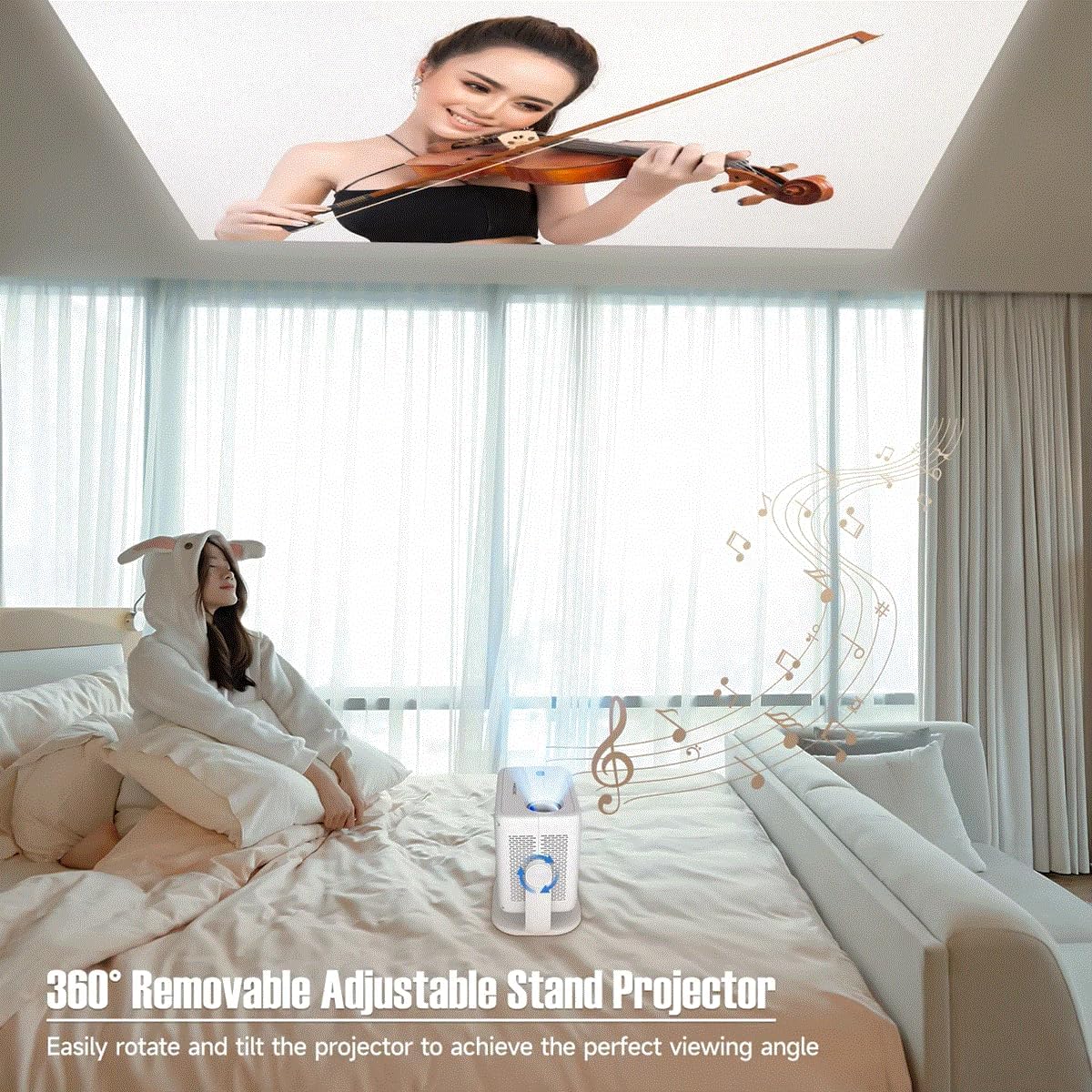
Figure 5.1: The projector's adjustable stand enables projection onto various surfaces, including ceilings, for comfortable viewIng.
5.2. Připojení napájení
- Připojte napájecí adaptér ke vstupnímu portu projektoru.
- Zapojte napájecí adaptér do vhodné elektrické zásuvky.
5.3. Počáteční zapnutí
Press the power button on the projector or the remote control to turn on the device. The projector will automatically perform keystone correction and focus.
6. Návod k obsluze
Video 6.1: This video demonstrates key features of the L018 Projector, including its 360° adjustable stand, automatic focus and keystone correction, projection throw distance capabilities, integrated Bluetooth 5.2 Hi-Fi stereo speaker, 1080P native resolution with 4K support, and wireless screen mirroring functionality.
6.1. Auto Keystone Correction & Focus
The L018 Projector features automatic keystone correction and focus. This means the image will automatically adjust to be rectangular and sharp, even if the projector is placed at an angle. This process typically takes only 2 seconds.
Figure 6.1: The projector automatically corrects image distortion and focuses for a clear picture.
6.2. Image Adjustment (Zoom In & Zoom Out)
You can easily adjust the image size from 50% to 100% without physically moving the projector. After using this function, it may be necessary to slightly move the projector for the auto-focus and keystone correction to re-engage and optimize the image.
6.3. Bezdrátové zrcadlení obrazovky
Seamlessly cast content from your phone, tablet, or laptop to the projector. The built-in Android 11 system and high-performing Allwinner H713 Chip ensure a smooth mirroring experience.

Figure 6.2: The projector delivers sharp and detailed images with high brightness and contrast.
6.4. Konektivita
- Dual-band WiFi 6 (2.4G+5G): Provides ultra-fast and stable connection for streaming and online content without delay.
- Bluetooth 5.2: Pro vylepšený zvukový zážitek připojte externí Bluetooth reproduktory nebo sluchátka.
- HDMI a USB: Wired connectivity options for various devices.

Figure 6.3: The benefits of Dual-band WiFi 6 for fast and stable streaming.
6.5. Zvuk
The projector is equipped with a built-in Hi-Fi Stereo Speaker, allowing you to enjoy an immersive sound experience directly from the device. For private listening or enhanced audio, connect external speakers or headphones via Bluetooth 5.2 or the audio output port.
6.6. Projekční režimy
Projektor nabízí tři různé projekční režimy, které vyhovují vašim viewing needs:
- Standardní režim: Vyvážené nastavení pro obecné účely viewIng.
- Režim zvýraznění: Increases brightness for clearer visibility in brighter environments.
- Režim úspory energie: Reduces power consumption, ideal for extended viewing or when battery life is a concern.
7. Údržba
Pravidelná údržba pomáhá zajistit dlouhou životnost a optimální výkon vašeho projektoru.
- Čištění objektivu: Používejte měkký hadřík bez žmolků, speciálně určený pro optické čočky. Nepoužívejte abrazivní čisticí prostředky ani rozpouštědla.
- Větrací otvory: Periodically check and clean the ventilation openings to prevent dust buildup, which can lead to overheating. Use a soft brush or compressed air.
- Čištění exteriéru: Otřete vnější část projektoru měkkým, suchým hadříkem. V případě odolných skvrn použijte lehceamp Lze použít hadřík a poté otřít do sucha.
- Skladování: Pokud projektor delší dobu nepoužíváte, skladujte jej na chladném a suchém místě, mimo dosah přímého slunečního záření a extrémních teplot.
8. Řešení problémů
Pokud se s projektorem setkáte s problémy, podívejte se na následující běžné problémy a jejich řešení:
| Problém | Možná příčina | Řešení |
|---|---|---|
| Žádná síla | Napájecí kabel není připojen; problém se zásuvkou. | Ensure power cable is securely connected. Try a different outlet. |
| Žádný obrázek | Input source not selected; Cable connection issue; Lens cap on. | Select correct input source. Check HDMI/USB cable connections. Remove lens cap. |
| Rozmazaný obrázek | Out of focus; Projector moved after zoom adjustment. | Allow auto-focus to re-engage (slight movement may help). Ensure projector is within optimal throw distance. |
| Zkreslený obraz (lichoběžník) | Projektor není kolmý k promítací ploše. | Auto keystone correction should fix this. If not, slightly adjust projector position. |
| Žádný zvuk | Příliš nízká hlasitost; Ztlumeno; Externí zvukové zařízení není připojeno/vybráno. | Zvyšte hlasitost. Zapněte zvuk. Zkontrolujte připojení Bluetooth nebo externí audio kabel. |
| Wireless Mirroring Issues | Network instability; Device compatibility. | Ensure both devices are on the same Wi-Fi network. Restart both devices. Check device compatibility. |
9. Specifikace
| Funkce | Popis |
|---|---|
| Název značky | Obecný |
| Číslo modelu položky | Projektor L018 |
| Název barvy | Bílý |
| Speciální funkce | 360° Removable Adjustable Stand Projector, BT5.2 & Hl-Fl Stereo Speaker, Ultra-fast connection Dual-band WiFi6 (2.4G+5G), High-Performing Processor Allwinner H713 Chip |
| Doporučená použití | Vzdělávání, domácí kino, hry, podnikání |
| Technologie připojení | Bluetooth, Wi-Fi, USB, HDMI |
| Rozlišení displeje | 1920 x 1080 (nativní 1080P, podporováno 4K) |
| ANSI lumenů | 650 ANSI |
| Projektovaný rozměr | 30-300 palců |
| Světelný zdroj | LED |
| Měřítko obrazovky | 16:09 |
| Kontrastní poměr | 10,001:1-20,000:1 |
| Korekce lichoběžníkového zkreslení | Automatická oprava |
| Operační systém | Android 11 |
| Procesor | Allwinner H713 Chip |
| Bluetooth | BT5.2 |
| Vestavěný reproduktor | Ano |
| Dálkový ovladač | Ano |
| Projection Throw Ratio | 1.2:1 |
10. Záruka a podpora
For warranty information and customer support, please refer to the documentation provided at the time of purchase or contact the manufacturer directly. Keep your purchase receipt as proof of purchase.
For technical assistance or further inquiries, please visit the official Generic brand webnebo kontaktujte jejich zákaznický servis.