
Zavedení
This manual provides detailed instructions for the safe and efficient operation of your Phomemo M836-B Portable Thermal Printer. The M836-B is an inkless, wireless thermal printer designed for portability and convenience, supporting various paper sizes including US Letter and A4. Please read this manual thoroughly before using the printer to ensure optimal performance and longevity.
Konec produktuview
Klíčové vlastnosti
- Bezinkoustový termální tisk: Utilizes thermal technology, eliminating the need for ink cartridges or ribbons.
- Bezdrátové připojení: Supports Bluetooth for seamless connection with iOS and Android devices.
- USB připojení: Compatible with Windows, macOS, ChromeOS, and Linux via USB Type-C.
- Vysoké rozlišení: Offers a print resolution of 300 DPI for clear text and graphics.
- Přenosný design: Compact and lightweight, ideal for travel and on-the-go printing.
- Multi-Size Paper Support: Accommodates various thermal paper sizes, including US Letter (8.5'' x 11'') and A4.
- Monochromatický výstup: Prints in black and white.

Image: The Phomemo M836-B printer demonstrating its inkless thermal printing capability, highlighting no mess from ink.

Obrázek: Overview of the Phomemo M836-B's key features, including wireless connectivity, inkless operation, 2600mAh battery capacity, and 300 DPI resolution.
Obsah balení
Ověřte, zda jsou v balení přítomny všechny položky:
- Phomemo M836-B Portable Thermal Printer
- Thermal Paper (as specified in the box)
- Kabel USB typu C
- Uživatelská příručka (tento dokument)
Průvodce nastavením
1. Nabíjení tiskárny
- Připojte dodaný kabel USB typu C k nabíjecímu portu tiskárny.
- Druhý konec kabelu USB připojte ke kompatibilnímu napájecímu adaptéru USB (není součástí balení) nebo k portu USB počítače.
- The indicator light will show charging status. Charge the printer fully before first use.
2. Vkládání papíru
The Phomemo M836-B supports both thermal paper rolls and sheet-fed thermal paper.
- Otevřete kryt přihrádky na papír.
- For roll paper: Insert the thermal paper roll into the designated slot, ensuring the printing side faces upwards. Gently pull a small length of paper out.
- For sheet-fed paper: Insert the thermal paper sheet into the input slot, ensuring it is straight and aligned.
- Bezpečně zavřete kryt přihrádky na papír.

Image: Illustration of how to load different types of thermal paper (roll and sheet) into the Phomemo M836-B printer, showing the paper selection mechanism.
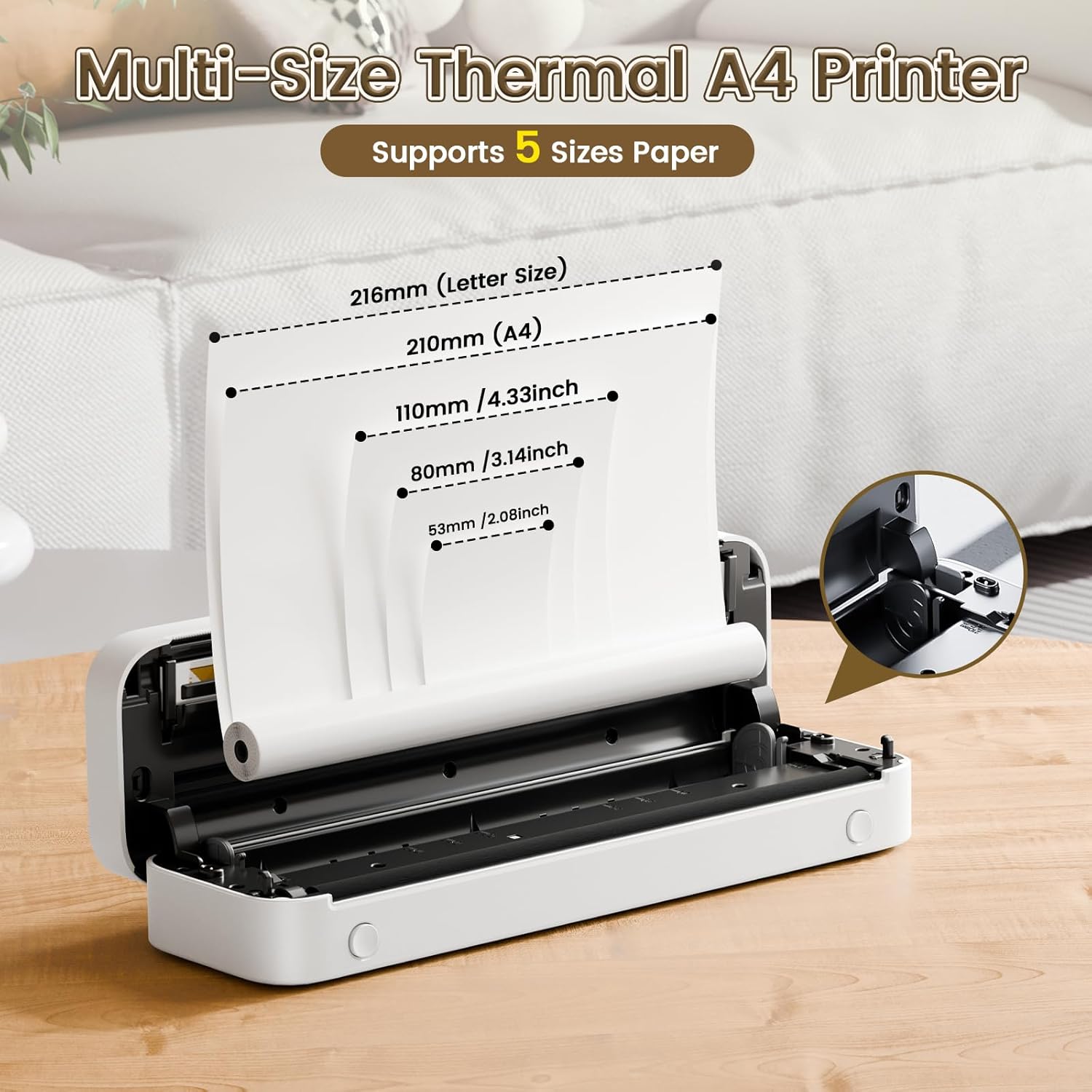
Image: The Phomemo M836-B printer demonstrating support for multiple paper sizes, including US Letter (216mm) and A4 (210mm).
3. Připojení k zařízením
Tiskárna podporuje připojení přes Bluetooth i USB.
Bluetooth Connection (for iOS/Android)
- Download the official Phomemo app from your device's app store.
- Zapněte tiskárnu stisknutím a podržením tlačítka napájení.
- Povolte na svém mobilním zařízení Bluetooth.
- Open the Phomemo app, search for the printer (M836-B), and pair with it.
- Dokončete proces párování podle pokynů na obrazovce.
USB Connection (for Windows/macOS/ChromeOS/Linux)
- Ujistěte se, že je tiskárna zapnutá.
- Připojte tiskárnu k počítači pomocí dodaného kabelu USB typu C.
- Navštivte oficiální stránky Phomemo webweb (www.phomemo.com) to download and install the appropriate drivers for your operating system.
- Once drivers are installed, the printer should be recognized by your computer.

Image: Diagram illustrating the two types of connections supported by the Phomemo M836-B: Bluetooth for Android, iOS, and iPad, and USB for Windows, macOS, ChromeOS, and Linux.
Návod k obsluze
Printing from Mobile Devices
- Ensure your printer is charged, loaded with paper, and connected via Bluetooth to your mobile device.
- Otevřete aplikaci Phomemo.
- Select the document or image you wish to print from within the app.
- Adjust print settings (e.g., paper size, density) as needed.
- Klepnutím na tlačítko tisku spusťte tisk.
Printing from Computers
- Ensure your printer is charged, loaded with paper, and connected via USB to your computer with drivers installed.
- Otevřete dokument popř file chcete tisknout na počítači.
- Jdi na "File" > "Tisk" (nebo použijte klávesovou zkratku Ctrl+P/Cmd+P).
- Select the Phomemo M836-B from the list of available printers.
- Adjust print preferences (e.g., paper size, orientation) as required.
- Klikněte na „Tisk“.
Paper Handling Tips
- Always use high-quality thermal paper for best results.
- Ensure the paper is loaded correctly with the printable side facing the print head.
- Avoid exposing thermal paper to direct sunlight or high temperatures, as this can degrade print quality over time.
- Manually tear off printed documents carefully after printing, as the printer does not have an automatic cutter.
Údržba
Čištění tiskárny
- Vypněte tiskárnu a odpojte ji od zdroje napájení.
- Použijte měkký hadřík, který nepouští vlákna dampTiskovou hlavu jemně otřete isopropylalkoholem. Před použitím ji nechte zcela vyschnout.
- Vnější povrch tiskárny čistěte měkkým, suchým hadříkem. Nepoužívejte abrazivní čisticí prostředky ani rozpouštědla.
Skladování
- Tiskárnu skladujte na chladném a suchém místě mimo dosah přímého slunečního záření a extrémních teplot.
- If storing for an extended period, ensure the printer is fully charged to maintain battery health.
- Keep thermal paper in its original packaging in a dark, cool place to prevent premature fading.
Odstraňování problémů
If you encounter issues with your Phomemo M836-B printer, refer to the following common problems and solutions:
Printer Not Turning On
- Zkontrolujte baterii: Ensure the printer is sufficiently charged. Connect it to a power source and try again.
- Vypínač: Press and hold the power button for a few seconds to ensure it's properly activated.
Connectivity Issues (Bluetooth/USB)
- Bluetooth:
- Ujistěte se, že je na vašem zařízení povoleno rozhraní Bluetooth a že je tiskárna v dosahu.
- Unpair and re-pair the printer in your device's Bluetooth settings.
- Restartujte tiskárnu i mobilní zařízení.
- USB:
- Verify the USB cable is securely connected to both the printer and the computer.
- Ensure the correct printer drivers are installed on your computer. Reinstall if necessary.
- Zkuste jiný port USB nebo kabel.
Poor Print Quality (Blurry, Faded, Streaks)
- Čištění tiskové hlavy: Řiďte se pokyny k čištění v části Údržba.
- Paper Quality/Type: Ensure you are using high-quality thermal paper and that it is loaded correctly.
- Hustota tisku: Adjust print density settings in the Phomemo app or printer driver.
- Skladování papíru: Thermal paper exposed to heat or light can degrade. Try a fresh roll of paper.
Zaseknutý papír
- Vypněte tiskárnu: Immediately turn off the printer.
- Odebrat papír: Gently pull out any jammed paper. Do not force it, as this can damage the printer.
- Znovu načíst: Ensure paper is loaded correctly and not wrinkled or bent before restarting.
Technické specifikace
| Funkce | Specifikace |
|---|---|
| Značka | Phomemo |
| Název modelu | M836-B |
| Technologie připojení | Bluetooth, USB typu C |
| Technologie tisku | Tepelný |
| Tiskový výstup | Monochromatický |
| Maximální rozlišení tisku | 300 DPI |
| Maximální rychlost tisku (černobíle) | 1.5 stránek za minutu |
| Kompatibilní zařízení | Android Devices, Mac, Windows, iPhone, iPad |
| Maximální velikost média | 8.5 x 11 palců (americký formát Letter) |
| Podpora formátů papíru | US Letter, A4 |
| Printing Media Type | Termální papír |
| Hmotnost položky | 1.53 libry (cca 694 g) |
| Rozměry produktu (D x Š x V) | 7.8H x 26.4Š x 4.5V centimetrů |
| Kontrolní metoda | App |
| Země původu | Čína |
Záruka a podpora
Specific warranty details for the Phomemo M836-B Portable Thermal Printer are not provided within this document. For information regarding warranty coverage, technical support, or service, please refer to the warranty card included with your product or contact Phomemo customer service directly through their official webwebu nebo kontaktních informací uvedených na obalu produktu.
Official Phomemo Webmísto: www.phomemo.com