
1. Úvod
This manual provides detailed instructions for the setup, operation, and maintenance of your GIEC G5300 4K Ultra HD Blu Ray Player. Designed for an enhanced home entertainment experience, this player supports true 4K ultra-high-definition picture quality, HDR10, Dolby Vision, BT.2020 color spaces, and Dolby audio decoding for immersive visuals and sound.
2. Bezpečnostní informace
- Ensure proper ventilation around the player to prevent overheating.
- Nevystavujte jednotku dešti nebo vlhkosti, abyste snížili riziko požáru nebo úrazu elektrickým proudem.
- Nepokládejte na přehrávač těžké předměty.
- Neotevírejte casing; veškerý servis svěřte kvalifikovanému personálu.
- Chraňte přehrávač před přímým slunečním zářením, zdroji tepla a silnými magnetickými poli.
- Používejte pouze napájecí adaptér dodaný s jednotkou.
3. Obsah balení
Zkontrolujte prosím, zda jsou ve vašem balení obsaženy všechny níže uvedené položky:
- GIEC G5300 Blu-ray Player (x1)
- HDMI kabel (x1)
- Dálkové ovládání (x1)
- Uživatelská příručka (x1)
4. Konec produktuview
4.1 Přední panel

Obrázek 4.1: Přední strana view of the GIEC G5300 Blu Ray Player, showing the disc tray, display, USB port, and control buttons (power, play/pause, eject).
- Zásobník disku: Insert Blu-ray or DVD discs here.
- Panel displeje: Shows playback status and time.
- Port USB 3.0: Připojte paměťová zařízení USB pro přehrávání médií.
- Ovládací tlačítka: Power On/Off, Play/Pause, Eject.
4.2 Zadní panel a připojení

Obrázek 4.2: Zadní view of the GIEC G5300 Blu Ray Player, highlighting various input/output ports including LAN, HDMI 2.0, HDMI 1.4, USB 3.0, Coaxial, and Optical outputs.
- LAN port: For network connection (e.g., firmware updates).
- HDMI 2.0 Output (Video/Audio): Primary HDMI output for 4K video and audio.
- HDMI 1.4 Output (Audio Only): Dedicated HDMI output for audio to an AV receiver.
- USB 3.0 Input: Připojte paměťová zařízení USB pro přehrávání médií.
- Koaxiální výstup: Digitální audio výstup.
- Optický výstup: Digitální audio výstup.
5. Nastavení
5.1 Instalace baterií dálkového ovladače
Vložte dvě baterie typu AAA (nejsou součástí balení) do dálkového ovladače a dbejte na správnou polaritu.
Video 5.1: This video demonstrates how to install batteries into the remote control and connect the Blu-ray player to a TV using an HDMI cable.
5.2 Connecting to a Display Device (TV/Projector)
- Připojte jeden konec dodaného kabelu HDMI k HDMI 2.0 Output (Video/Audio) port na zadní straně přehrávače Blu-ray.
- Connect the other end of the HDMI cable to an available HDMI input port on your TV or projector.
- For separate audio output, connect another HDMI cable from the HDMI 1.4 Output (Audio Only) port to your AV receiver, or use the Coaxial/Optical outputs.
5.3 Připojení napájení
- Connect the power cable to the power input on the rear of the Blu-ray player.
- Zapojte druhý konec napájecího kabelu do zásuvky ve zdi.
- Turn on your TV/projector and select the correct HDMI input source corresponding to the port you connected the Blu-ray player to.
- Press the Power button on the Blu-ray player or remote control to turn on the unit.
6. Návod k obsluze
6.1 Přehrávání disku
- Ensure the player is powered on and connected to your display device.
- Stiskněte tlačítko EJECT tlačítko na předním panelu nebo dálkovém ovladači pro otevření přihrádky na disk.
- Carefully place a Blu-ray or DVD disc onto the tray with the label side facing up.
- Stiskněte tlačítko EJECT button again to close the tray. The player will automatically begin loading and playing the disc.
- Use the remote control for playback functions such as Play, Pause, Stop, Fast Forward, and Rewind.
6.2 Přehrávání médií z USB
The GIEC G5300 supports playback of various media filez paměťového zařízení USB.
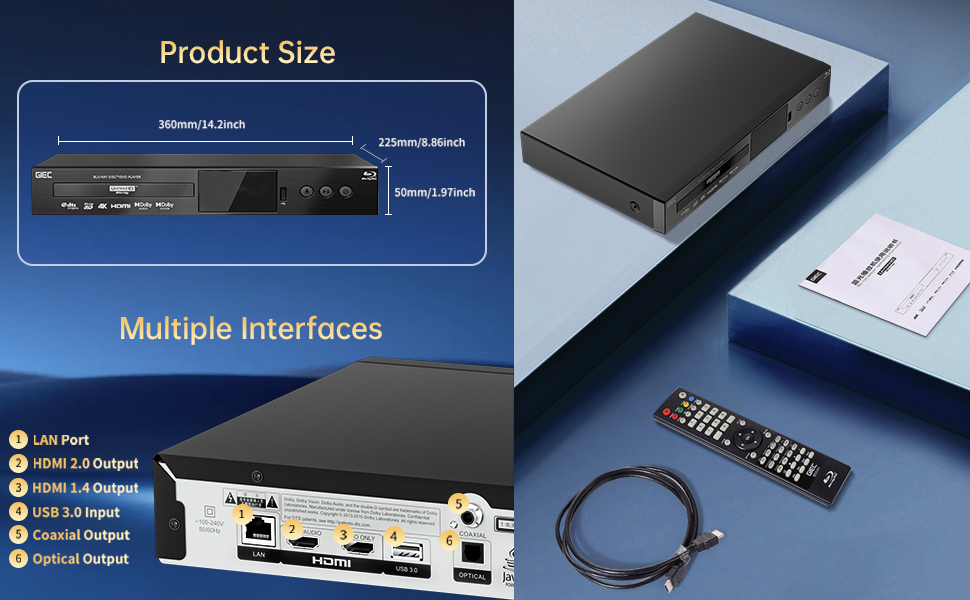
Figure 6.1: Illustration of the multiple disc, video, and audio formats supported by the player.
- Vložte paměťové zařízení USB do Port USB 3.0 na předním nebo zadním panelu.
- Navigate to the "Video," "Music," or "Photo" section on the player's main menu using the remote control.
- Vyberte požadované file from the USB device to begin playback.
Podporované formáty:
- Typy disků: BD, BD-R, BD-RE, DVD-R/RW, DVD+R/RW, DVD-Video, VCD, CD, CD-R/RW.
- Video formáty: MPEG-1, MPEG-2, MPEG-4, VC1, H.264, MOV, MKV, AVI, TS.
- Zvukové formáty: AAC, APE, CUE, FLAC, OGG, MP3, WAV.
7. Vlastnosti
- 4K Ultra HD Playback: Experience movies and shows in stunning 4K resolution with clearer images and richer colors.
- Podpora HDR10: Enjoy a wider range of brightness and contrast, revealing more detail in both dark and bright scenes.
- Dolby Vision: Enhances image quality by dynamically adjusting brightness and expanding dynamic range for more detailed and vivid pictures.
- BT.2020 Color Spaces: Provides a broader color gamut than standard 1080p Blu-ray, resulting in purer, more natural, and realistic colors.
- Dolby Sound & DTS Decoding: Supports Dolby audio decoding and DTS effects for an immersive 5.1 stereo surround sound experience.
- 3D Blu-ray Playback: Compatible with 3D Blu-ray discs for an immersive three-dimensional viewing experience (requires a 3D-compatible TV and glasses).
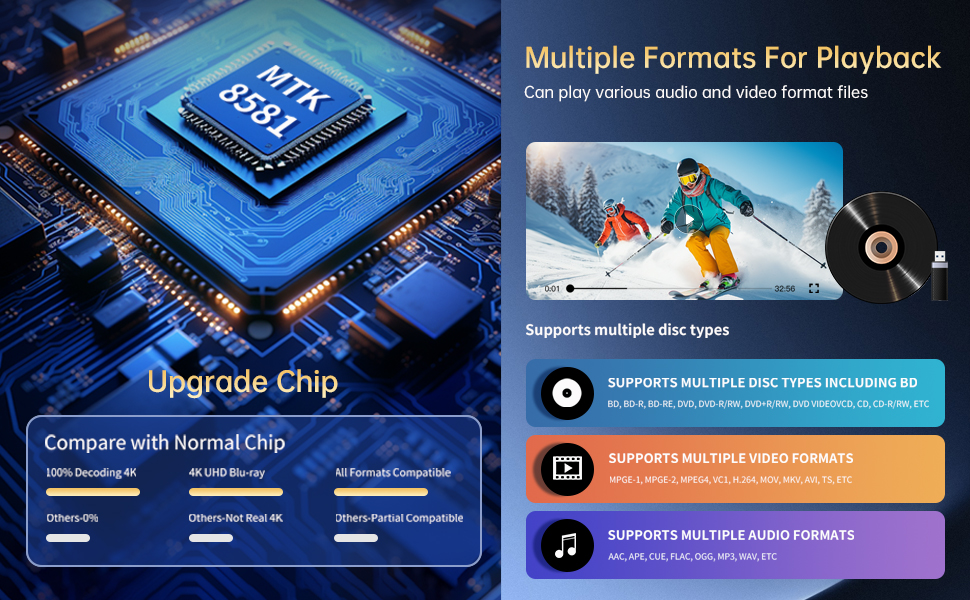
Figure 7.1: Visual comparison illustrating the difference between 8-bit (16.67 million colors) and 10-bit (1.07 billion colors) color depth, highlighting the enhanced detail and delicacy of 10-bit color.

Figure 7.2: The GIEC G5300 Blu Ray Player connected to a TV, showcasing its support for 4K UHD, 3D, HDR, HDR10+, Dolby, and Dolby Vision technologies.
8. Údržba
- Čištění: K čištění vnějšího povrchu přehrávače používejte měkký, suchý hadřík. Nepoužívejte tekuté ani aerosolové čisticí prostředky.
- Péče o disky: Handle discs by their edges. Clean discs with a soft, lint-free cloth, wiping from the center outwards.
- Větrání: Abyste zabránili přehřátí, ujistěte se, že ventilační otvory přehrávače nejsou zablokované.
9. Řešení problémů
If you encounter issues with your Blu-ray player, please refer to the following common solutions:
- Bez napájení: Check if the power cable is securely connected to both the player and the power outlet. Ensure the outlet is functional.
- Žádný obraz/zvuk: Verify that the HDMI cable is correctly connected to both the player and the TV/receiver. Ensure the correct HDMI input is selected on your TV/receiver.
- Disk se nepřehrává: Check if the disc is clean and free of scratches. Ensure the disc is inserted correctly with the label side up. The player supports Region A Blu-ray discs and all region DVD discs.
- Dálkové ovládání nefunguje: Check the batteries in the remote control and replace them if necessary. Ensure there are no obstructions between the remote and the player.
10. Specifikace
| Funkce | Detail |
|---|---|
| Název značky | GIEC |
| Název modelu | G5300 |
| Hmotnost položky | 4.18 liber (1.9 kilogramů) |
| Rozměry produktu | 14.2 x 8.9 x 2 palce |
| Barva | Černý |
| Typ média | Blu-ray disk, DVD |
| Rezoluce | 3840x2160 (4K Ultra HD) |
| Speciální funkce | Anti-Shock, Compact, Dust Proof, Multi-Format Playback, Surround Sound, HDR10, Dolby Vision, BT.2020 Color Spaces |
| Typ konektoru | HDMI (Dual Outputs), USB 3.0, Coaxial, Optical, LAN |
| Technologie připojení | HDMI |
11. Záruka a podpora
For warranty information or technical support, please refer to the documentation included with your purchase or contact GIEC customer service. Keep your proof of purchase for warranty claims.