
1. Úvod
Thank you for choosing the SABLUTE Wireless Keyboard and Mouse Combo. This ergonomic set is designed to provide a comfortable and efficient typing experience for various operating systems. Please read this manual carefully to ensure proper setup and optimal performance of your new device.
Key features include an ergonomic wave key design, a cushioned palm rest for reduced hand pressure, quiet typing and clicking, efficient hotkeys, and broad compatibility with Windows and macOS.
2. Konec produktuview
2.1 Obsah balení
- Bezdrátová klávesnice SABLUTE
- SABLUTE Wireless Mouse
- 2.4G USB Receiver (Dongle)
- Adaptér USB-C
- Uživatelská příručka
2.2 Identifikace součásti

Figure 1: SABLUTE Wireless Keyboard and Mouse Combo (Lavender Purple)
This image displays the complete SABLUTE wireless keyboard and mouse set in lavender purple, highlighting its ergonomic design and included USB dongles.
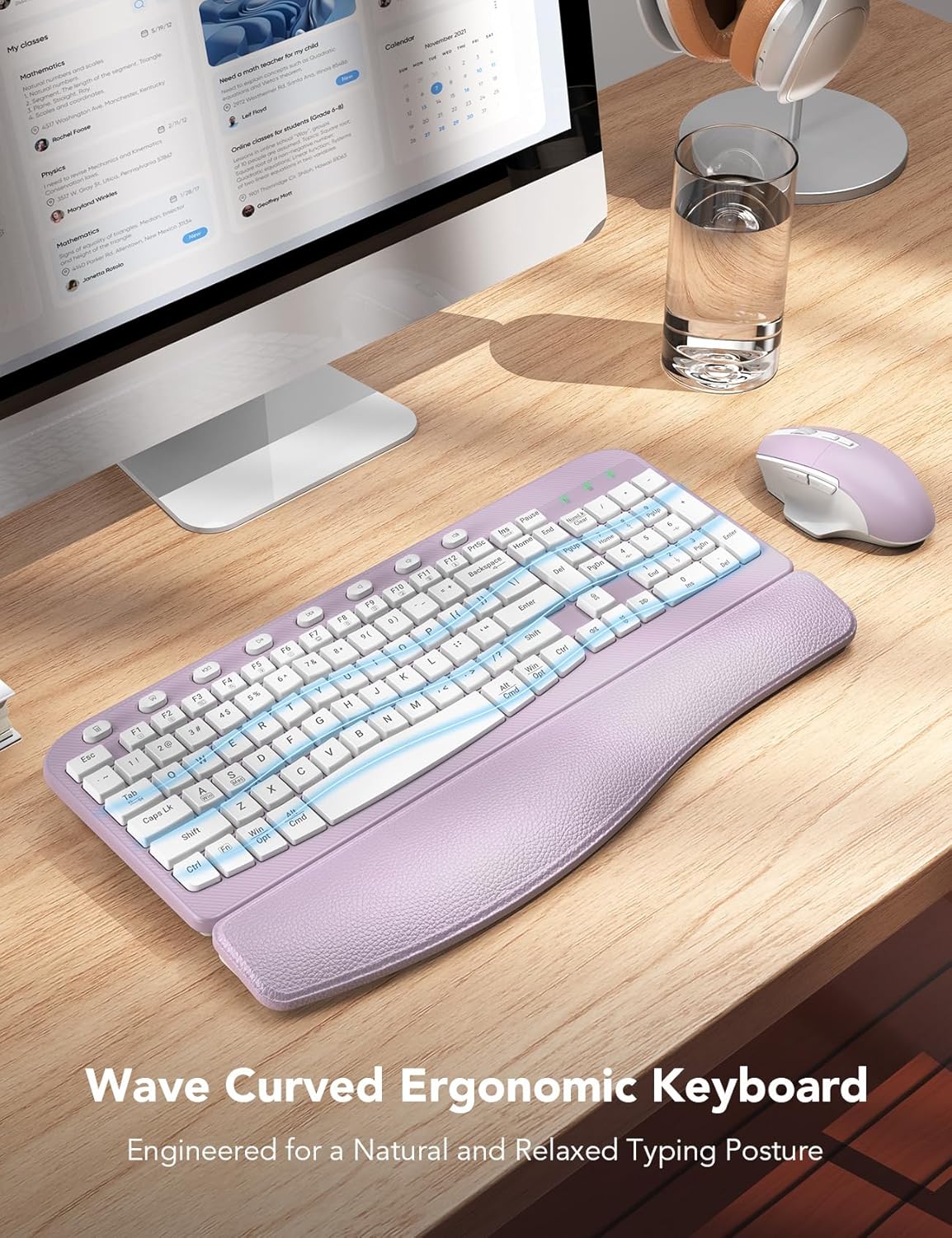
Figure 2: Ergonomic Wave Key Design
Detailní záběr view klávesové showasing its wave-shaped keys, designed for a natural and relaxed typing posture.

Figure 3: Integrated Palm Rest Construction
Explodoval view illustrating the layers of the integrated palm rest: Togo-style leather, high-density foam support, and a sturdy plastic bottom, all contributing to wrist comfort.

Figure 4: Adjustable Keyboard Tilt and USB Connectivity
This image demonstrates the keyboard's adjustable leg stand, allowing for a 7-degree tilt, and highlights the USB-A and USB-C port compatibility for the dongle.

Figure 5: Comfortable Ergo 7-Button Mouse
Detailní view of the ergonomic mouse, pointing out its whisper-quiet clicks, ergonomic arc, ultralight design, and the forward/backward buttons with thumb rest.

Figure 6: Smart Power Management Features
This graphic illustrates the power-saving features, including the ON/OFF switch, 10-minute auto-sleep function, and battery life estimates (365 days standby, 250 hours working time for keyboard, 1 AA battery each).

Figure 7: Dual System Compatibility
An image showing the compatibility with Windows, Chrome OS, and Mac OS, along with the FN+A (Windows) and FN+S (Mac) key combinations for switching modes.

Figure 8: 20 Efficient Shortcut Keys
This image highlights the F1-F12 multimedia keys and 8 one-touch shortcut keys available on the keyboard for enhanced efficiency.

Figure 9: Keyboard and Mouse Dimensions
A diagram providing the physical dimensions of both the keyboard (16.5" x 9.15" x 1.42") and the mouse (5.0" x 3.2" x 1.7").
3. Nastavení
3.1 Instalace baterie
The SABLUTE Wireless Keyboard and Mouse Combo requires 2 AA baterie (not included) for operation. One AA battery is needed for the keyboard and one for the mouse.
- Vyhledejte přihrádku na baterie na spodní straně klávesnice i myši.
- Otevřete kryt bateriového prostoru.
- Insert the AA batteries, ensuring correct polarity (+ and -).
- Bezpečně zavřete kryt bateriového prostoru.
3.2 Připojení zařízení
The keyboard and mouse connect wirelessly to your computer via a single 2.4G USB receiver (dongle). The setup is plug-and-play, requiring no additional drivers.
- Locate the USB receiver. It may be stored in the battery compartment of the mouse for convenience.
- Insert the USB receiver into an available USB-A port on your computer. If your computer only has USB-C ports, use the provided USB-C adapter.
- Turn on the keyboard and mouse using their respective ON/OFF switches (located on the underside of each device).
- The devices should automatically connect to your computer. If not, try moving the mouse or pressing a key on the keyboard to wake them up.
3.3 Přepínání kompatibility systému
Your SABLUTE combo is compatible with both Windows and macOS. You can easily switch between operating system modes:
- Chcete-li přejít na Režim Windows: Stiskněte FN + A.
- Chcete-li přejít na režim macOS: Stiskněte FN + S.
4. Návod k obsluze
4.1 Používání klávesnice
The full-size keyboard features an ergonomic wave design and a comfortable palm rest for extended use. It includes a numeric keypad and a range of shortcut keys.
- psaní: The wave keys are designed for natural finger placement, reducing strain during typing.
- Nastavitelný sklon: Use the foldable legs on the underside of the keyboard to adjust the typing angle for your comfort.
- Klávesové zkratky: The keyboard is equipped with F1-F12 multimedia keys and 8 one-touch hotkeys for quick access to common functions (e.g., calculator, screenshot, media control, volume).
4.2 Použití myši
The ergonomic mouse features a 6-button design with adjustable tracking speed and silent clicks.
- Left/Right Click: Standard mouse buttons with silent micro-switches for reduced noise.
- Rolovací kolečko: For vertical scrolling through documents and web stránky.
- Úprava DPI: Cycle through 3 levels of tracking speed (DPI) to suit your preference and task requirements.
- Tlačítka vpřed/vzad: Located on the side for convenient navigation in web prohlížeče a file průzkumníci.
4.3 Smart Power Management
To conserve battery life, both the keyboard and mouse feature an auto-sleep function:
- If idle for 10 minut, the keyboard and mouse will enter sleep mode.
- To wake them up, simply type any key on the keyboard or click/move the mouse.
5. Údržba
5.1 Čištění
To maintain the longevity and appearance of your keyboard and mouse:
- K otření povrchů použijte měkký, suchý hadřík.
- Pro odolnou špínu lehceampnavlhčete hadřík vodou nebo jemným neabrazivním čisticím prostředkem.
- Nepoužívejte agresivní chemikálie, rozpouštědla nebo abrazivní materiály, protože by mohly poškodit povrchovou úpravu.
- Neponořujte zařízení do vody ani žádné kapaliny.
5.2 Výměna baterie
When the devices stop responding or the performance degrades, it's time to replace the batteries.
- Turn off the device using the ON/OFF switch.
- Otevřete přihrádku na baterie.
- Vyjměte starou baterii typu AA.
- Insert a new AA battery, observing the correct polarity.
- Zavřete kryt přihrádky.
- Staré baterie zlikvidujte zodpovědně v souladu s místními předpisy.
6. Řešení problémů
6.1 Problémy s připojením
- Zařízení nereaguje: Ensure batteries are correctly installed and have sufficient charge. Turn the device ON/OFF switch to reset.
- Žádné připojení: Try plugging the USB receiver into a different USB port on your computer. If using the USB-C adapter, ensure it is fully seated.
- Rušení: Move the keyboard and mouse closer to the USB receiver. Avoid placing the receiver near other wireless devices or large metal objects that might cause interference.
6.2 Problémy specifické pro klávesnici
- Keys not typing: Check if the keyboard is in sleep mode (press any key to wake). Ensure the correct operating system mode is selected (FN+A for Windows, FN+S for macOS).
- Incorrect characters: Verify the correct system mode is active.
6.3 Problémy specifické pro myš
- Cursor not moving: Ensure the mouse is on a clean, non-reflective surface. Check if the mouse is in sleep mode (click or move to wake).
- Nepravidelný pohyb kurzoru: Vyčistěte optický senzor na spodní straně myši.
7. Specifikace
| Funkce | Popis |
|---|---|
| Značka | SABLUTE |
| Číslo modelu | KC15 |
| Technologie připojení | Bezdrátové 2.4G USB |
| Kompatibilní zařízení | Laptop, Personal Computer, Television |
| Rozměry klávesnice | 11.31 x 1.88 x 17.32 palce |
| Hmotnost položky | 2.61 libry |
| Jsou vyžadovány baterie | 2 AA baterie (nejsou součástí balení) |
| Speciální funkce | 8 one-touch shortcut keys, ergonomic wave keys, soft wrist rest |
| Barva | Levandulově fialová |
8. Záruka a podpora
SABLUTE is committed to providing excellent customer service and product quality.
8.1 Informace o záruce
- 90denní výměna: Pro počáteční problémy s produktem.
- 360 Days Manufacturer Warranty: Covers manufacturing defects for nearly a year.
- Brand Care: Dedicated support for your SABLUTE products.
8.2 Zákaznická podpora
Should you encounter any issues or have questions regarding your SABLUTE Wireless Keyboard and Mouse Combo, please contact our support team:
- E-mailová podpora: sabluteservices@outlook.com
- Phone Support (US): +1-213-296-1273
- Provozní doba: Monday - Friday, 9:00 AM - 1:00 PM PST and 2:00 PM - 6:00 PM PST
- Doba odezvy: We aim for a 24-hour reply to all inquiries.