
Zavedení
This manual provides detailed instructions for the installation, operation, and maintenance of your AZDOME GS63Pro Dash Cam. Please read this manual thoroughly before using the product to ensure proper function and safety. Keep this manual for future reference.
Obsah balení
Ověřte, zda jsou v balení obsaženy všechny níže uvedené položky:
- AZDOME GS63Pro 4K Dash Cam (Front Camera)

Image: The main 4K dash camera unit.
- 1080P Rear Camera (with 6m/20ft cable)

Image: The rear camera unit with its connecting cable.
- Dual USB Car Charger
- 360° 3M Sticky Mount
- 360° přísavný držák
- Type-C Charging Cable (3.5m/12ft)
- Kabelové spony (5x)
- Instalační nástroj
- Electrostatic Stickers (2 Large, 2 Small)
- Uživatelská příručka
Konec produktuview
Main Unit (Front Camera)
The front camera features a 2.4-inch LCD screen, lens, and control buttons. It records in 4K UHD resolution.
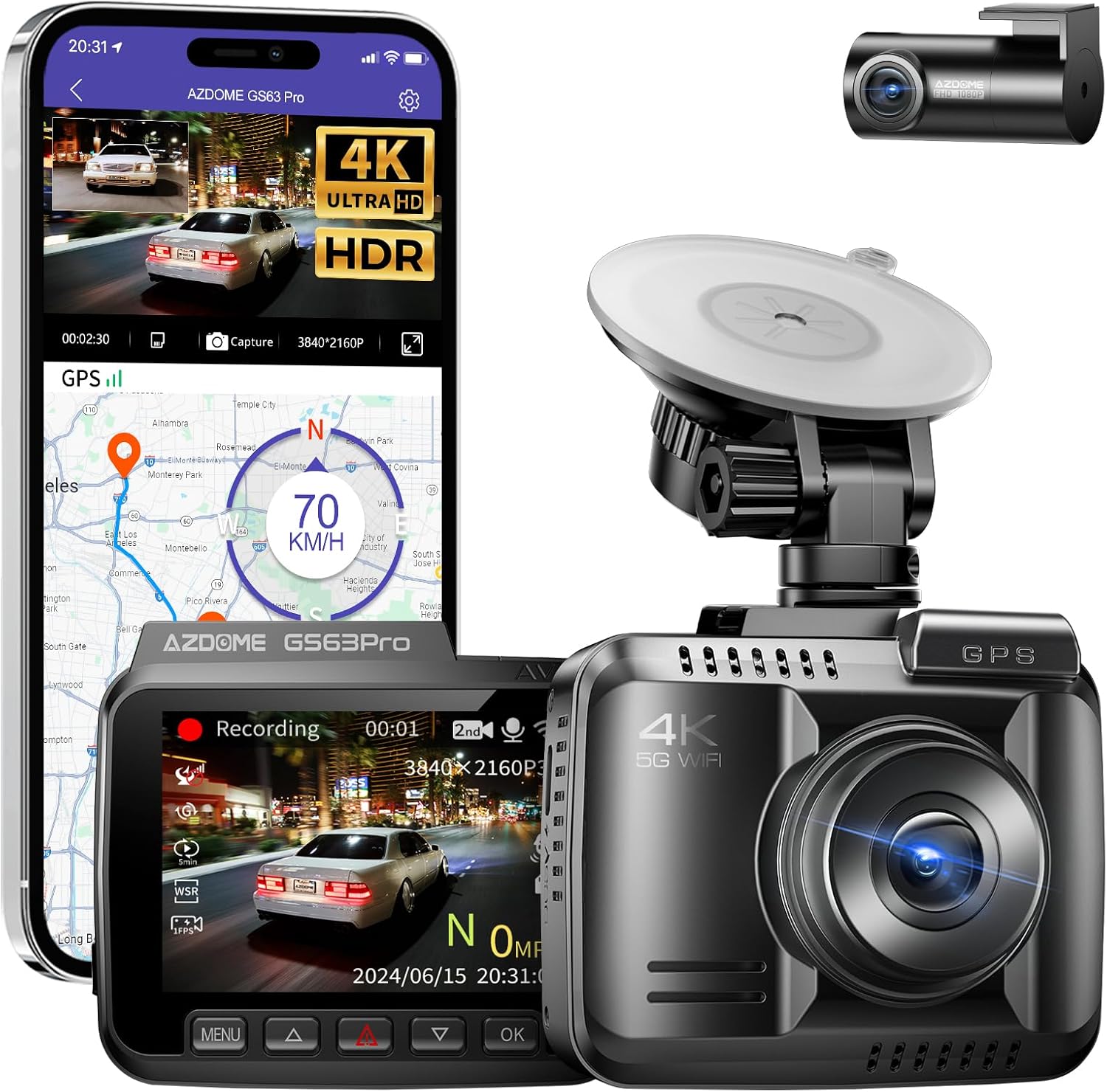
Obrázek: Přední strana view of the AZDOME GS63Pro dash camera, showing the lens and screen.
Zadní kamera
The rear camera provides 1080P FHD recording and connects to the main unit via a cable.
Image: The compact rear camera unit.
Klíčové vlastnosti
- Integrated 128GB eMMC Storage: Eliminates the need for an external SD card, providing stable and reliable recording.
- Dual Recording (4K Front + 1080P Rear): Zachycuje jasné a detailní snímky jídlatage from both front and rear views.

Image: Illustration showing simultaneous 4K front and 1080P rear recording.
- HDR/WDR Technology: Enhances image quality in varying light conditions, especially for night vision, using an advanced 4-megapixel OS04A10 image sensor.

Image: Comparison of normal and HDR/WDR enhanced night vision footage.
- 5.8GHz WiFi připojení: Allows seamless connection to the AZDOME app on your smartphone for viewing, playback, downloading, and sharing videos.

Image: Diagram illustrating 5.8GHz WiFi connection to a smartphone app for control and data transfer.
- Vestavěná GPS: Records accurate route and speed information, viewable via the AZDOME app player.

Image: Screenshot of the AZDOME app showing GPS route tracking on a map.
- 24hodinový monitoring parkování: (Requires optional hardwire kit) Detects impacts via G-sensor and records automatically. Supports time-lapse recording.

Image: Benefits of the AZDOME OBD hardwire kit for parking monitoring, including intelligent recognition and low voltage monitorování.
- Kompaktní design: Minimizes obstruction of driver's view.
Nastavení
1. Počáteční zapnutí a nastavení jazyka
- Connect the dash cam to a power source using the provided car charger.
- Zařízení se automaticky zapne.
- On the screen, select your preferred language (e.g., English).
- Set the correct time zone (e.g., GMT+9 for Japan).
- Upravte nastavení data a času.
Note: Before permanent installation, it is recommended to test the main unit and rear camera by connecting them to power to ensure they function correctly.
2. Montáž Dash Cam
Vyberte si místo pro montáž na čelním skle, které vám nebude překážet viewPřed instalací držáku důkladně očistěte povrch čelního skla.
- Použití přísavného držáku: Attach the suction mount to the windshield and secure the dash cam.
- Using the 3M Sticky Mount: Apply an electrostatic sticker to the windshield first, then attach the 3M sticky mount to the sticker. This allows for easier removal without leaving residue.

Obrázek: Přample of the dash cam mounted on a windshield.
3. Instalace zadní kamery
Mount the rear camera on the rear windshield. Route the rear camera cable neatly along the car's interior trim to the front dash cam unit. Use the provided cable clips and installation tool to hide the cable.

Image: Illustration of routing the rear camera cable.
4. Připojení napájení
Connect the Type-C charging cable to the dash cam and plug the dual USB car charger into your vehicle's cigarette lighter socket. The dash cam will power on and begin recording automatically when the vehicle starts.
Návod k obsluze
Základní nahrávání
- Automatické nahrávání: The dash cam starts recording automatically when powered on.
- Nahrávání ve smyčce: The device records in continuous loops, overwriting the oldest files when the storage is full. Important files can be locked to prevent overwriting.
- G-senzor: In case of a sudden impact or collision, the G-sensor automatically locks the current recording to prevent it from being overwritten.
Navigace v nabídce
Use the buttons on the dash cam to navigate through the menu options. The specific button functions (Menu, Up, Down, OK) are typically labeled on the device or explained in the quick start guide.
- Rozlišení videa: Adjust front and rear camera resolutions.
- Délka nahrávání ve smyčce: Nastavte délku každého segmentu videa (např. 1, 3, 5 minut).
- Citlivost G-senzoru: Upravte citlivost detekce nárazu.
- Kompenzace expozice: Jemné doladění úrovní jasu.
- Datum/čas svamp: Enable or disable the date and time display on recordings.
Using the AZDOME App (5.8GHz WiFi)
- Stáhněte si aplikaci „AZDOME“ z App Storu (iOS) nebo z Obchodu Google Play (Android).

Image: Screenshot showing the AZDOME app interface and download options.
- Zapněte WiFi na svém smartphonu.
- On the dash cam, enable WiFi (refer to the dash cam's menu).
- Connect your smartphone to the dash cam's WiFi network (SSID: AZDOME-GS63Pro-XXXX, Password: 12345678).
- Otevřete aplikaci AZDOME view živé footage, přehrávání nahraných videí, stahování files to your phone, or share them.
The 5.8GHz WiFi offers faster download speeds compared to 2.4GHz.
Funkce GPS
The built-in GPS module automatically records your driving route and speed. This data can be viewed using the AZDOME app player on your smartphone or computer.
Parking Monitoring (Optional)
To enable 24-hour parking monitoring, an optional hardwire kit (AZDOME OBD Hardwire Kit) is required. This kit provides continuous power to the dash cam after the engine is turned off, protecting against various risks.
- G-Sensor Detection: If an impact is detected while parked, the dash cam will automatically power on and record a short video, then lock the file.
- Detekce pohybu: The dash cam can be set to record when motion is detected in front of the vehicle.
- Časosběrné nahrávání: Records continuously at a low frame rate (e.g., 1 frame per second) to save storage space while covering a long period.
Image: Benefits of the AZDOME OBD hardwire kit for parking monitoring, including intelligent recognition and low voltage monitorování.

Image: Diagram showing multiple protection features of the hardwire kit, such as safety protection, input short circuit protection, and output overvoltage ochrana.
ADAS (Advanced Driver-Assistance System)
The GS63Pro may include ADAS features to enhance driving safety. These typically include:
- Upozornění na opuštění jízdního pruhu: Upozorní vás, pokud vaše vozidlo vyjede z jízdního pruhu.
- Varování před čelní srážkou: Warns you of a potential collision with a vehicle ahead.
- Varování před srážkou s chodcem: Alerts you to potential collisions with pedestrians.

Image: Visual representation of ADAS features: lane departure warning, forward collision warning, and pedestrian collision warning.
Údržba
- Čištění: K čištění objektivu a obrazovky fotoaparátu používejte měkký, suchý hadřík. Nepoužívejte abrazivní čisticí prostředky ani rozpouštědla.
- Aktualizace firmwaru: Pravidelně kontrolujte oficiální informace AZDOME. website for firmware updates to ensure optimal performance and new features.
- Záloha dat: Regularly download important video files to your computer or cloud storage to prevent loss.
- Teplota: Avoid exposing the dash cam to extreme temperatures (hot or cold) for extended periods, as this can affect battery life and device performance.
Odstraňování problémů
| Problém | Možná příčina / řešení |
|---|---|
| Palubní kamera se nezapne. |
|
| Nahrávání se neočekávaně zastaví. |
|
| Video footage je rozmazané nebo nejasné. |
|
| Problémy s WiFi připojením v aplikaci. |
|
| Nefunguje monitorování parkování. |
|
Specifikace
| Funkce | Detail |
|---|---|
| Značka | AZDOME |
| Název modelu | GS63Pro |
| Rozlišení videa | Přední: 4K (3840x2160P), Zadní: 1080P |
| Interní úložiště | 128GB eMMC |
| Konektivita | 5.8G Wi-Fi, GPS |
| Speciální funkce | HDR/WDR, App Control, Night Vision, G-Sensor, Parking Monitor (optional hardwire kit required) |
| Pole View | 150 stupňů |
| Velikost obrazovky | 2.4palcový LCD |
| Otvor | F1.8 |
| Rozměry (D x Š x V) | 4 x 8 x 7 cm |
| Hmotnost | 150 gramů |
Záruka a podpora
The AZDOME GS63Pro Dash Cam comes with a 12měsíční záruka výrobce od data nákupu. Tato záruka se vztahuje na vady materiálu a zpracování při běžném používání.
For technical support, troubleshooting assistance, or warranty claims, please contact AZDOME customer service through their official website or the retailer where you purchased the product. Please have your purchase receipt and product model number ready when contacting support.
Pro více informací navštivte Oficiální obchod AZDOME.