
1. Úvod
This manual provides detailed instructions for the proper use, setup, and maintenance of your Caliber Scientific Calculator, Model 297208. Designed for students, engineers, and professionals, this calculator offers 240 functions for a wide range of mathematical and scientific calculations.
Please read this manual thoroughly before using the calculator to ensure optimal performance and longevity.
2. Bezpečnostní informace
- Keep the calculator away from extreme temperatures, direct sunlight, and high humidity.
- Zabraňte pádu kalkulačky na zem nebo jejímu vystavení silným nárazům.
- Do not attempt to disassemble or modify the calculator. This will void the warranty.
- Use only the specified battery type. Incorrect battery usage may cause leakage or explosion.
- Upozornění na baterii: Udržujte baterie mimo dosah dětí a domácích zvířat. Baterie mohou být při spolknutí škodlivé. Pokud dítě nebo zvíře spolkne baterii, okamžitě vyhledejte lékařskou pomoc.
3. Obsah balení
Upon opening your Caliber Scientific Calculator package, please verify that all items are present and in good condition:
- Caliber Scientific Calculator (Model 297208)
- Protective Hard Sliding Cover
- One AG10 Button Cell Battery (pre-installed or included separately)
- Uživatelská příručka (tento dokument)

Image 1: Caliber Scientific Calculator in retail packaging, showing key features.
4. Nastavení
4.1. Zdroj napájení
The Caliber Scientific Calculator operates on dual power sources: solar power and battery power. The solar panel provides power in well-lit environments, while the battery ensures operation in low-light conditions.
4.2. Instalace/výměna baterie
Your calculator includes one AG10 button cell battery. If battery replacement is needed:
- Ujistěte se, že je kalkulačka vypnutá.
- Vyhledejte přihrádku na baterie na zadní straně kalkulačky.
- Pomocí malého šroubováku opatrně otevřete kryt přihrádky na baterie.
- Remove the old battery and insert a new AG10 button cell battery, ensuring the correct polarity (+/-).
- Nasaďte kryt prostoru pro baterie a zajistěte jej šroubem.
Note: Some models may require a AAA battery. Refer to the specific markings on your calculator's battery compartment if different from AG10.
5. Klíčové funkce nadview
The calculator features a 10-digit LCD display and 240 functions. Familiarize yourself with the key layout:
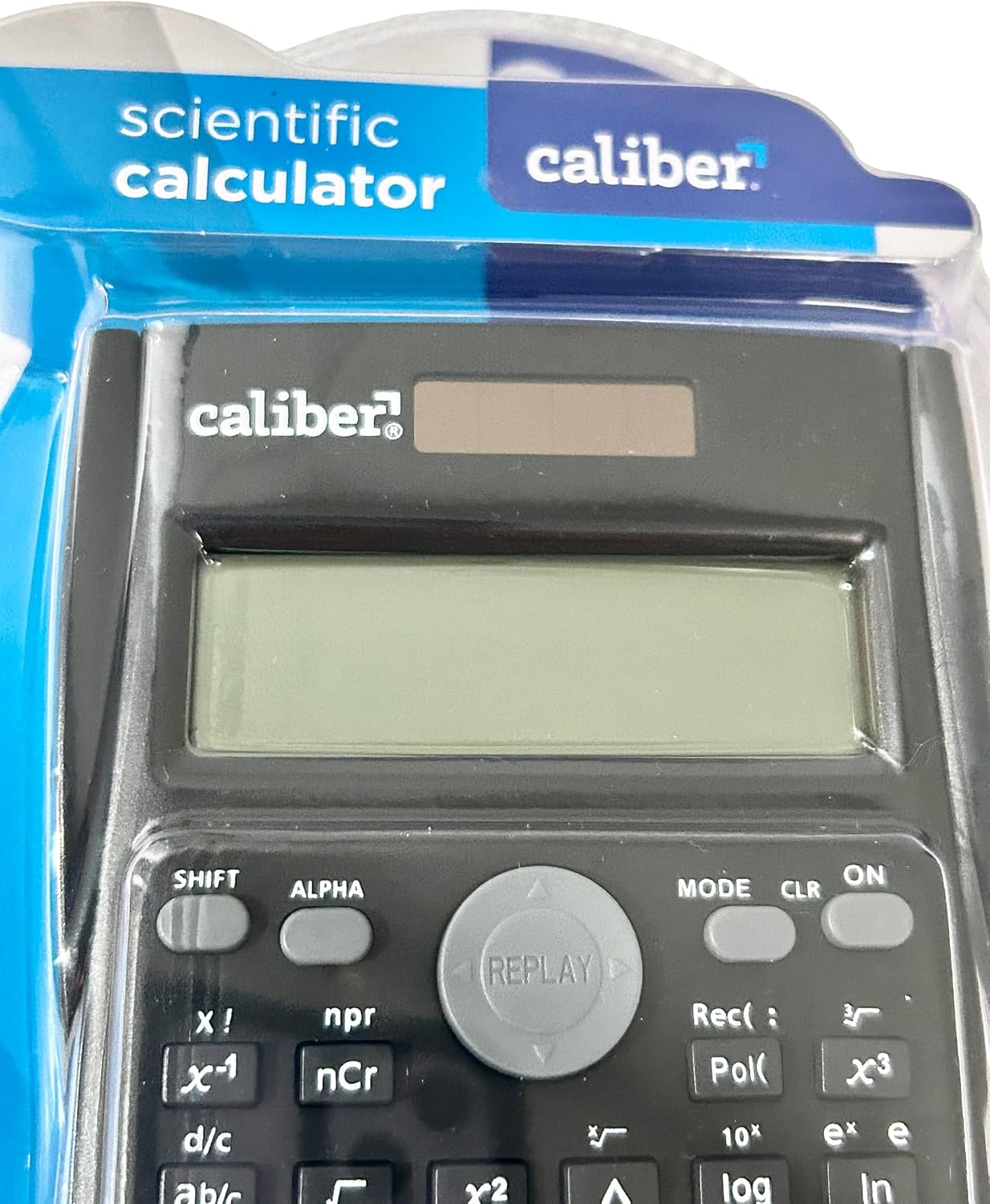
Image 2: Close-up of the calculator's display and key layout.
- Zobrazit: 10-digit LCD for clear viewing of inputs and results.
- ON/OFF: Power on/off the calculator.
- POSUN: Accesses secondary functions printed above the keys (typically in yellow or orange).
- ALFA: Accesses alpha characters and variables (typically in red or green).
- REŽIM: Changes calculation modes (e.g., COMP, STAT, EQN).
- CLR: Clears memory or settings.
- THE: Deletes the last entered digit.
- AC: Clears all entries and resets the calculation.
- Šipky: Navigate through entries and results.
- = (rovná se): Executes the calculation.
6. Návod k obsluze
6.1. Základní výpočty
Chcete-li provést základní aritmetické operace:
- Stiskněte tlačítko ON key to turn on the calculator.
- Zadejte první číslo.
- Stiskněte požadované ovládací tlačítko (+, -, ×, ÷).
- Zadejte druhé číslo.
- Stiskněte tlačítko = klávesu pro zobrazení výsledku.
6.2. Pokročilé funkce
The calculator supports 240 functions, including trigonometric, logarithmic, statistical, and more. To access secondary functions (printed above keys), press the POSUN key before the desired function key.
- Goniometrické funkce: hřích, cos, opálení a jejich inverzní funkce (POSUN + hřích⁻¹, atd.).
- Logaritmické funkce: log (base 10), ln (přirozený logaritmus).
- Mocnina a odmocninové funkce: x², √, xʸ.
- Funkce paměti: Použití STO (Obchod) a RCL (Recall) to save and retrieve values.
- Statistické výpočty: Vstupte MODE and select STAT mode for statistical computations.
For detailed instructions on specific functions, refer to the comprehensive instructions enclosed with your product (if applicable) or consult online resources for scientific calculator usage.
7. Údržba
7.1. Čištění
To clean your calculator:
- Vnější povrch otřete měkkým suchým hadříkem.
- Pro odolnou špínu lehceamphadřík omyjte vodou a jemným mýdlem a poté ihned otřete dosucha.
- Nepoužívejte abrazivní čisticí prostředky, rozpouštědla ani alkohol, protože by mohly poškodit casing nebo displej.
7.2. Skladování
When not in use, store the calculator in a cool, dry place, away from direct sunlight and extreme temperatures. Always use the protective hard sliding cover to prevent damage to the keys and display.

Image 3: Packaging detail showing features including the hard sliding cover and dual power.
8. Řešení problémů
| Problém | Možná příčina | Řešení |
|---|---|---|
| Kalkulačka se nezapne. | Nedostatek světla pro solární napájení nebo vybitá baterie. | Move to a brighter area or replace the AG10 button cell battery. |
| Display shows "ERROR". | Matematická chyba (např. dělení nulou, neplatný vstup). | Stiskněte AC to clear the error and re-enter the calculation correctly. |
| Nesprávné výsledky výpočtu. | Incorrect mode selected, or input error. | Check the current mode (MODE key) and ensure correct data entry. Clear all memory (POSUN + CLR) Pokud je třeba. |
9. Specifikace
| Číslo modelu | 297208 |
| Značka | Ráže |
| Typ zobrazení | 10místný LCD |
| Počet funkcí | 240 |
| Typ kalkulačky | Inženýrské/vědecké |
| Zdroj napájení | Dual Power (Solar & Battery) |
| Typ baterie | 1 x AG10 Button Cell (included) or 1 x AAA (may vary by model) |
| Velikost obrazovky | 3 palců |
| Rozměry (D x Š) | 6" x 3" |
| Materiál pouzdra | Plast |
| UPC | 050428205495 |
10. Záruka a podpora
10.1. Informace o záruce
This product is subject to a return policy. For details regarding returns, exchanges, or warranty claims, please refer to the retailer's return policy where the product was purchased.
10.2. Zákaznická podpora
For further assistance, technical support, or inquiries not covered in this manual, please contact Caliber customer service through their official webwebu nebo prodejce, od kterého jste produkt zakoupili.