
1. Konec produktuview
This manual provides comprehensive instructions for the HP Pavilion 15.6" FHD Laptop. This device is designed for general computing tasks, offering a balance of performance and portability. It features an Intel Core i3-N305 processor, 16GB of DDR4 RAM, and a 1TB storage solution comprising a 512GB PCIe SSD and an additional 500GB HP P500 Portable SSD. The laptop includes a 15.6-inch Full HD anti-glare display, Wi-Fi 6 connectivity, and runs on Windows 11.

Figure 1: HP Pavilion 15.6" FHD Laptop with included HP P500 Portable SSD.
Klíčové vlastnosti:
- Procesor: Intel Core i3-N305 (8 Cores, 8 Threads, up to 3.80 GHz)
- Grafika: Grafika Intel UHD
- Zobrazit: 15.6" Full HD (1920x1080) IPS Anti-glare
- Paměť: 16GB DDR4 RAM
- Skladování: 512GB PCIe SSD + 500GB HP P500 Portable SSD (1TB total)
- Operační systém: Windows 11
- Konektivita: Wi-Fi 6, Bluetooth 5.3
- Porty: USB-C, USB Type-A (x2), HDMI, Headphone/Microphone Combo
- Zabezpečení: Built-in Fingerprint Reader
- Webvačka: HD 720p s Privacy Shutter
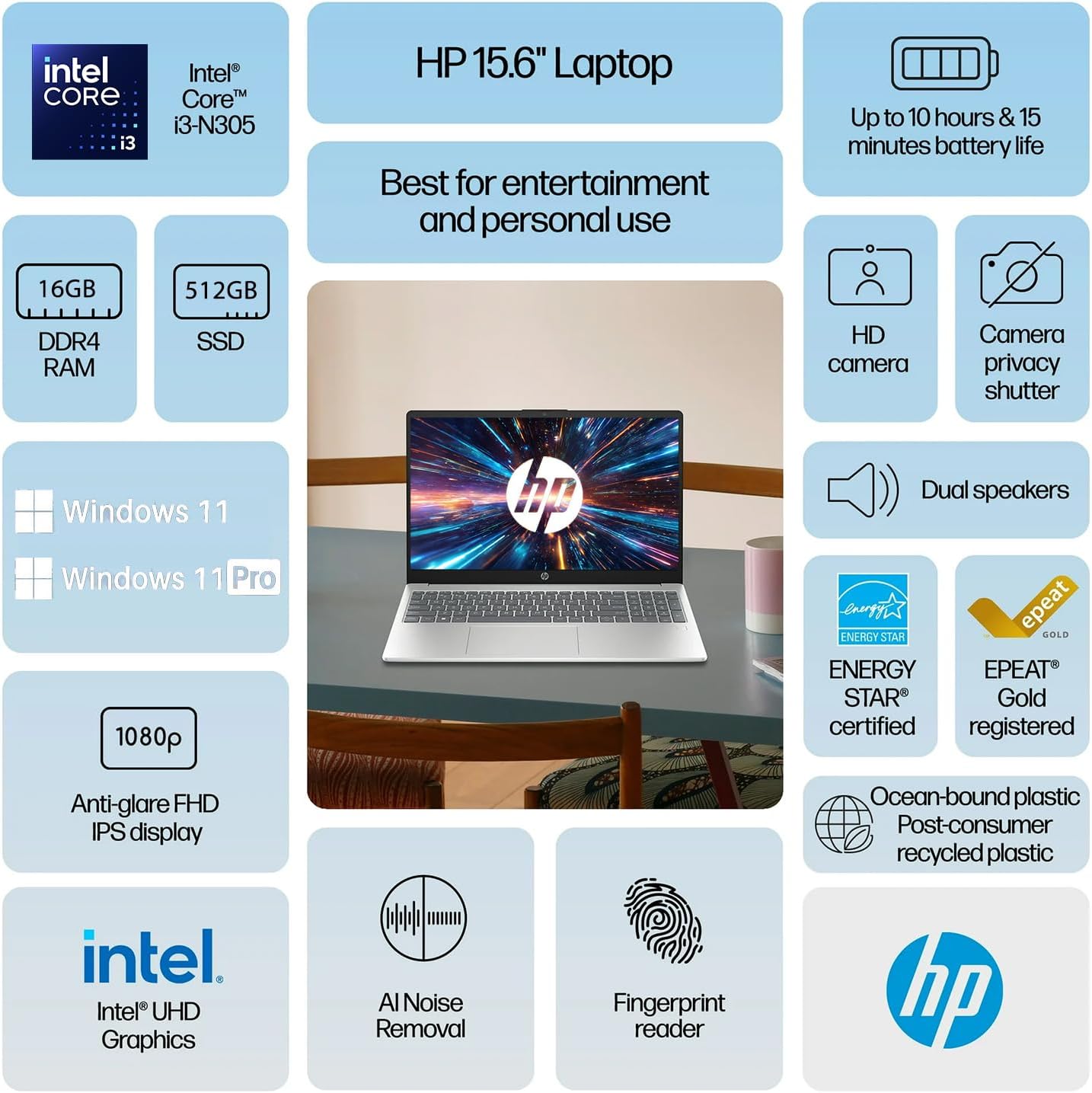
Obrázek 2: Přesview of HP Pavilion 15.6" Laptop features.
2. Počáteční nastavení
2.1 Vybalení a první zapnutí
- Opatrně vyjměte notebook a veškeré příslušenství z obalu.
- Připojte napájecí adaptér k napájecímu konektoru notebooku a poté do elektrické zásuvky.
- Otevřete víko notebooku. Notebook se může zapnout automaticky nebo může být nutné stisknout tlačítko napájení na klávesnici.
- Postupujte podle pokynů na obrazovce a dokončete počáteční nastavení systému Windows 11, včetně výběru jazyka, síťového připojení a vytvoření uživatelského účtu.
2.2 Connecting the HP P500 Portable SSD
The HP P500 Portable SSD is an external storage device included with your laptop. To connect it:
- Locate the USB-C cable provided with the portable SSD.
- Connect one end of the USB-C cable to the HP P500 Portable SSD.
- Connect the other end of the USB-C cable to an available USB-C port on your HP Pavilion laptop.
- The operating system will automatically detect and configure the drive. You can access it through File Badatel.

Figure 3: HP P500 Portable SSD and its connection cable.
3. Ovládání notebooku
3.1 Klávesnice a touchpad
The laptop features a full-size English (US) keyboard and a multi-touch touchpad. Refer to the Podpora HP webmísto for detailed information on keyboard shortcuts and touchpad gestures.
3.2 Čtečka otisků prstů
The built-in fingerprint reader allows for secure and quick login. To set up your fingerprint:
- Přejít na Nastavení > Účty > Možnosti přihlášení.
- Under "Ways to sign in," select Rozpoznávání otisků prstů (Windows Hello) a podle pokynů na obrazovce zaregistrujte své otisky prstů.

Figure 4: Fingerprint reader for secure access.
3.3 Connectivity (Wi-Fi 6 and Bluetooth 5.3)
Your laptop supports Wi-Fi 6 for high-speed wireless internet and Bluetooth 5.3 for connecting wireless peripherals.
- Wi-Fi: Klikněte na ikonu Wi-Fi na hlavním panelu, vyberte požadovanou síť a v případě potřeby zadejte heslo.
- Bluetooth: Přejít na Nastavení > Bluetooth a zařízení to pair new Bluetooth devices.

Figure 5: Laptop demonstrating Wi-Fi 6 and audio capabilities during a video call.
3.4 Externí porty
Notebook je vybaven různými porty pro připojení externích zařízení:
- USB-C (1x): For data transfer and connecting USB-C compatible devices.
- USB typu A (2x): Pro připojení standardních USB zařízení, jako jsou myši, klávesnice nebo externí disky.
- HDMI (1x): Pro připojení k externím displejům nebo projektorům.
- Headphone / microphone combo jack (1x): Pro připojení sluchátek nebo náhlavní soupravy s mikrofonem.
- Power connector (1x): Pro připojení síťového adaptéru.
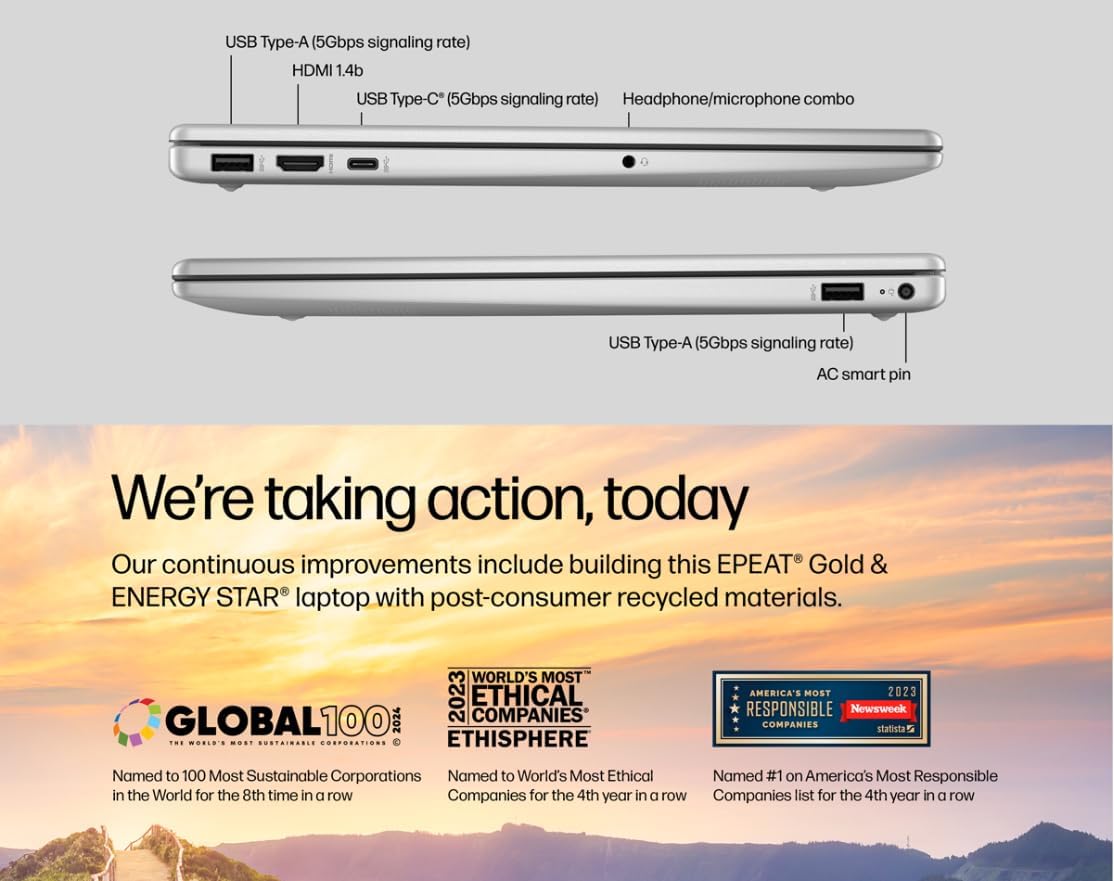
Figure 6: Laptop ports for external connections.
4. Údržba a péče
4.1 Péče o baterii
- Pro maximalizaci životnosti baterie se vyhněte extrémním teplotám.
- For optimal performance, allow the battery to discharge partially before recharging.
- The laptop supports HP Fast Charge, allowing it to charge 0 to 50% in approximately 45 minutes.
4.2 Čištění notebooku
- Použijte měkký hadřík, který nepouští vlákna dampDisplej opláchněte vodou nebo čističem obrazovek.
- Na klávesnici a šasi použijte měkký, suchý hadřík. Nepoužívejte agresivní chemikálie.
- Před čištěním se ujistěte, že je notebook vypnutý a odpojený od sítě.
4.3 Aktualizace softwaru
Regularly update your Windows 11 operating system and drivers to ensure optimal performance and security.
- Aktualizace systému Windows: Přejít na Nastavení > Windows Update a zkontrolujte aktualizace.
- Aktualizace ovladačů: Společnost HP poskytuje aktualizace ovladačů prostřednictvím své podpory website or HP Support Assistant software.
5. Odstraňování běžných problémů
5.1 Problémy s napájením
- Notebook se nezapne: Ujistěte se, že je napájecí adaptér bezpečně připojen k notebooku i k funkční zásuvce. Zkuste jinou zásuvku.
- Baterie se nenabíjí: Verify the power adapter is functioning correctly. Check for any physical damage to the adapter or charging port.
5.2 Problémy se zobrazením
- Žádné zobrazení na obrazovce: Connect an external monitor via HDMI to check if the issue is with the laptop's internal display. If the external monitor works, the internal display may require service.
- Blikající nebo zkreslený obraz: Update your graphics drivers. Adjust display resolution in Windows settings.
5.3 Problémy s připojením
- Nelze se připojit k Wi-Fi: Ensure Wi-Fi is enabled. Restart your router and modem. Forget the network and reconnect.
- Zařízení Bluetooth se nespáruje: Ensure the Bluetooth device is in pairing mode and within range. Restart the laptop and the Bluetooth device.
5.4 Problémy s výkonem
- Pomalý výkon: Close unnecessary applications. Check Task Manager for high CPU/RAM usage. Ensure sufficient free space on the primary SSD.
- Systém zamrzá: Perform a system restart. Check for recent software installations or updates that might be causing conflicts.
6. Technické specifikace
| Funkce | Specifikace |
|---|---|
| Procesor | Intel Core i3-N305 (8 Cores, 8 Threads, up to 3.80 GHz, 6 MB Intel Smart Cache) |
| Grafika | Grafika Intel UHD |
| Operační systém | Windows 11 Home |
| Paměť (RAM) | 16 GB DDR4 |
| Interní úložiště | 512GB PCIe NVMe M.2 SSD |
| Externí úložiště | HP P500 500GB Portable SSD (Red) |
| Zobrazit | 15.6" FHD (1920x1080) IPS antireflexní displej |
| Zvuk | Stereo reproduktory |
| Klávesnice | English (US) with Numeric Keypad |
| Čtečka otisků prstů | Vestavěný |
| Webvačka | HD 720p s Privacy Shutter |
| Životnost baterie | Až 10 hodin |
| Bezdrátové připojení | Wi-Fi 6 (802.11ax), Bluetooth 5.3 |
| Porty | 1x USB-C, 2x USB Type-A, 1x HDMI, 1x Headphone / microphone combo jack, 1x Power connector |
| Barva | Přírodní stříbro |
| Rozměry (D x Š x V) | 14.2 x 9.51 x 0.7 palce |
| Hmotnost | 3.59 liber |

Figure 7: The laptop's 15.6-inch anti-glare display.
7. Záruka a podpora
For warranty information, technical support, and driver downloads, please visit the official HP Support website. It is recommended to register your product to receive updates and support notifications.
- Podpora HP Webmísto: support.hp.com
- Registrace výrobku: Register your HP product online to access personalized support and warranty details.
Please have your product model number (HP Pavilion 15.6" Laptop) and serial number ready when contacting support.